Waiting for Many Tasks: Task.WhenAll and Task.WhenAny
Start several tasks before awaiting any of them, then wait for them all with Task.WhenAll, which takes about as long as the slowest, or for the first to finish with Task.WhenAny, which can also race slow work against a timer.
Journeyman · C# · Updated
After this lesson you can
- Start several tasks before awaiting any, and wait for all of them with Task.WhenAll
- Wait for the first of several tasks with Task.WhenAny, such as to race slow work against a timer
Key takeaways
- Awaiting independent tasks one after another takes the sum of their times. Starting them all first, then awaiting
Task.WhenAll, takes about as long as the slowest one. - Awaiting
Task.WhenAll(...)gives every result as an array, in the order you passed the tasks, whatever order they finish in. It takes a list of tasks too. - Awaiting
Task.WhenAny(...)gives back the first task to finish, not its result. Compare it with your tasks to see which one it is, and await it to get its value. - Racing the work against a timer, as in
Task.WhenAny(work, Task.Delay(500)), lets you stop waiting when the work takes too long. - The tasks that lose a
Task.WhenAnyrace keep running, and their results are ignored unless something awaits them.
A shop's checkout page asks three shipping companies what they'd charge to deliver an order, then shows the customer every quote. Each company takes a fraction of a second to answer. The customer is staring at a spinner the whole time, so every fraction counts.
You'll meet this whenever one page needs several answers that don't depend on each other: a dashboard that loads orders, stock and messages; a travel site that checks several airlines; a weather app that asks more than one station. Tasks, async and await showed that a task starts as soon as it's created. This lesson puts that to work: waiting for many tasks at once, waiting for whichever finishes first, and giving up on work that takes too long.
One after another
Each example in this lesson uses a stand-in for a slow request. GetQuoteAsync pretends to ask a shipping company: it waits ms milliseconds, as a request over the internet would, says the company answered, and gives back its price.
using System.Diagnostics;
Stopwatch timer = Stopwatch.StartNew();
decimal speedy = await GetQuoteAsync("Speedy Parcels", 8.99m, 300);
decimal blueVan = await GetQuoteAsync("Blue Van", 6.49m, 100);
decimal cargoCat = await GetQuoteAsync("Cargo Cat", 7.25m, 500);
Console.WriteLine(Speedy Parcels answered
Blue Van answered
Cargo Cat answered
8.99, 6.49, 7.25
About 900 ms
(timer.ElapsedMilliseconds / 100 * 100 rounds the time down to a whole hundred milliseconds, so the output is the same on every computer.)
It works, but it's slow: 300 + 100 + 500 = 900 milliseconds. Each await waits for its answer before the next line even asks the next company. That's like phoning three shops one at a time when you could text all three and wait for the replies. None of the three quotes needs another's answer, so there's no reason to wait in between.
Start them all, then wait: Task.WhenAll
The fix has two steps. First start every task, keeping each one in a Task<decimal> variable without awaiting it. Then wait for all of them at once with Task.WhenAll:
using System.Diagnostics;
Stopwatch timer = Stopwatch.StartNew();
Task<decimal> speedy = GetQuoteAsync("Speedy Parcels", 8.99m, 300);
Task<decimal> blueVan = GetQuoteAsync("Blue Van", 6.49m, 100);
Task<decimal> cargoCat = GetQuoteAsync("Cargo Cat", 7.25m, 500);
decimal[] quotes = await Task.WhenAll(speedy, blueVan, cargoCat);
Console.WriteLine(string.Join(", ", quotes));
Console.WriteLine(Blue Van answered
Speedy Parcels answered
Cargo Cat answered
8.99, 6.49, 7.25
About 500 ms
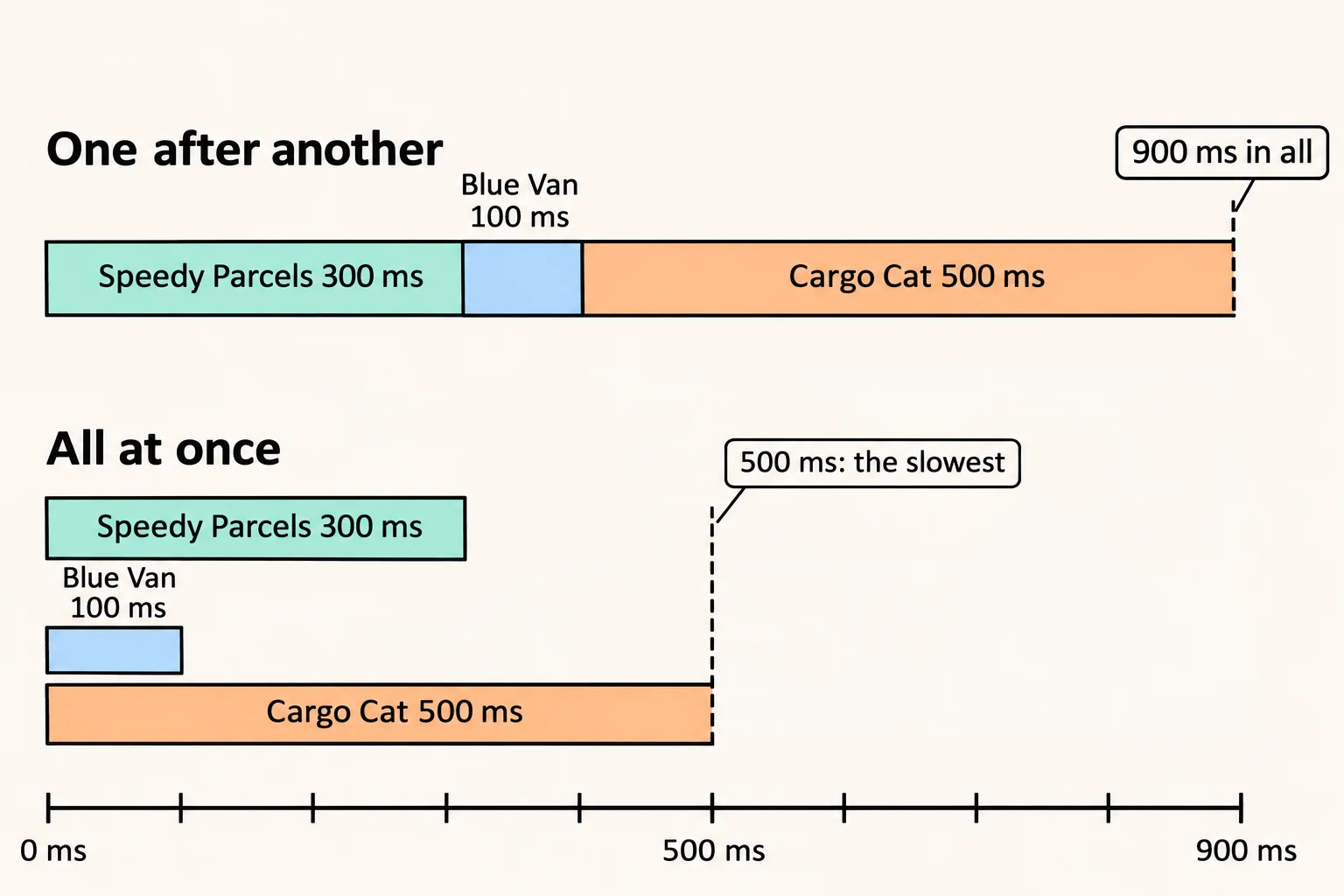
- The three companies were all asked at once, so the wait is about as long as the slowest one, 500 ms, not the sum.
- They answered in a different order (Blue Van first), but
await Task.WhenAll(...)gives the results in the order you passed the tasks: Speedy Parcels, Blue Van, Cargo Cat.quotes[0]is always Speedy Parcels' quote. - The results come back as an array,
decimal[], one for each task.
The ordering matters: Task.WhenAll only waits. If you wrote await GetQuoteAsync(...) on each line, each would finish before the next started, and Task.WhenAll would have nothing left to do at the same time.
A list of tasks
Often you don't know how many tasks there'll be until the program runs: one per station, one per company in a list. Task.WhenAll takes a list of tasks too. Start one task for each item in a loop, add each to a List<Task<int>>, then await them all. Here a weather app asks three stations for the temperature:
List<string> stations = new List<string> { "Airport", "Harbor", "Hilltop" };
List<Task<int>> readings = new List<Task<int>>();
foreach (string station in stations)
{
readings.Add(ReadTemperatureAsync(station));
}
int[] temperatures = await Task.WhenAll(readings);
Console.WriteLine(string.Join(", ", temperatures));
Console.WriteLine(38, 41, 33
Warmest: 41°F
The loop doesn't await anything, so all three requests are on their way before Task.WhenAll starts waiting. The array comes back in the list's order, and LINQ's Max() works on it like on any other collection.
When one of them fails
A task can fail: a company's website is down, a station doesn't answer. Awaiting a failed task throws its exception, so you catch it with try and catch, as in Exceptions in C#. Task.WhenAll waits for every task to finish, and then, if any of them failed, throws that failure:
Task<decimal> speedy = GetQuoteAsync("Speedy Parcels", 8.99m, 300);
Task<decimal> blueVan = NoAnswerAsync("Blue Van", 100);
try
{
decimal[] quotes = await Task.WhenAll(speedy, blueVan);
Console.WriteLine(string.Join(", ", quotes));
}
catch (Exception error)
{
Console.WriteLine(Speedy Parcels answered
No quotes: Blue Van isn't answering
Speedy Parcels did answer, but one failure means Task.WhenAll gives you no array at all. When the other results are still worth having, catch the failure inside each task instead: a small async method that awaits one task in its own try, and returns a stand-in value from its catch. Task.WhenAll then has nothing left that can fail.
The first one back: Task.WhenAny
Sometimes you don't need every answer, only the fastest. A weather app can ask two copies of the same forecast server, one in the east and one in the west, and show whichever answers first. Task.WhenAny waits until any one of its tasks finishes:
Task<string> east = GetForecastAsync("east", 300);
Task<string> west = GetForecastAsync("west", 50);
Task<string> first = await Task.WhenAny(east, west);
string forecast = await first;
Console.WriteLine(forecast);
Console.WriteLine(first == west);
async Task<string> GetForecastAsync(string server, int ms)
{
await Task.Delay(ms);
return Light snow, 28°F (from the west server)
True
Two awaits, and each has its own job:
await Task.WhenAny(east, west)gives back the task that finished first, not its result. That's whyfirstis aTask<string>. Compare it with your own tasks,first == west, to find out which one won.await firstgets that task's result, the forecast. The task is already finished, so this await gives the value straight away.
A race against the clock
Task.Delay(500) is a task that does nothing but finish after 500 milliseconds: a timer. Race your work against one with Task.WhenAny, and you can stop waiting when the work takes too long. This is called a timeout:
Task<string> forecast = GetForecastAsync("east", 1000);
Task timer = Task.Delay(200);
Task finished = await Task.WhenAny(forecast, timer);
if (finished == timer)
{
Console.WriteLine("No forecast yet: showing yesterday's");
}
else
{
Console.WriteLine(await forecast);
}
async Task<string> GetForecastAsync(string server, int ms)
{
await Task.Delay(ms);
return No forecast yet: showing yesterday's
The forecast needs 1,000 ms and the timer 200 ms, so the timer finishes first and the app moves on. The timer is a plain Task, with no result, so finished is a plain Task too: it can be either of them, and comparing it with timer tells you which.
The others keep running
Task.WhenAny stops waiting when the first task finishes. It doesn't stop the other tasks. They carry on, and their results are ignored unless something awaits them:
Task<string> east = GetForecastAsync("east", 300);
Task<string> west = GetForecastAsync("west", 50);
Task<string> first = await Task.WhenAny(east, west);
Console.WriteLine(await first);
Console.WriteLine(Light snow, 28°F (from the west server)
East finished: False
East finished: True
Light snow, 28°F (from the east server)
A task's IsCompleted is true once it has finished. The east server lost the race but still finished its work a moment later. That's harmless for a forecast. When the losing work costs something, a paid request or a heavy database query, remember that it still runs to the end: winning a race doesn't cancel the losers.
Which one to use
| You want | Use | await gives you |
|---|---|---|
| Every result | Task.WhenAll(...) |
the results, as an array, in the order you passed the tasks |
| The first one to finish | Task.WhenAny(...) |
the task that finished first; await it for its result |
| To stop waiting after a while | Task.WhenAny(work, Task.Delay(ms)) |
the timer, if the work took too long |
Do it: find the cheapest shipping quote
The shop's checkout shows only the cheapest shipping quote. Asking the companies one after another keeps the customer waiting, so ask them all at once.
GetQuoteAsync(company) is written for you, in the box. It waits 100 ms, like a request over the internet, then gives back that company's quote:
| Company | Quote |
|---|---|
| Speedy Parcels | 8.99 |
| Blue Van | 6.49 |
| Cargo Cat | 7.25 |
| Night Owl Freight | 12.00 |
It also counts how many companies are being asked at the same moment, in mostAtOnce, so the tests can tell whether yours asked them all at once.
The method gets one value:
companies: the names of the companies to ask, aList<string>, each one from the table. There's always at least one.
For example:
decimal cheapest = await CheapestQuoteAsync(new List<string> { "Speedy Parcels", "Blue Van", "Cargo Cat" });
| Step | Here |
|---|---|
| Ask all three companies at once | 3 asked at the same moment |
| Wait for every quote | 8.99, 6.49 and 7.25 |
| Pick the lowest | 6.49 |
So cheapest is 6.49m.
Your job: write the async method CheapestQuoteAsync(List<string> companies) so it returns a Task<decimal>.
- Ask every company with
GetQuoteAsyncbefore you wait for any answer. - Then wait for every quote with
await. Don't block with.Resultor.Wait(). - Return the lowest quote. With one company, that's its own quote.
Practiced live on the lesson page: write the C# right there and check it.
Check yourself
2 questions to try on the lesson page.
So what
When answers don't depend on each other, start every task first and await them together: the wait shrinks from the sum of their times to the slowest one. Task.WhenAny adds taking the fastest answer and setting a time limit, as long as you remember that the slower tasks keep running.
Key terms
- Task
- Async/Await
- Task.WhenAll
- Task.WhenAny