Is It Really Slow? Measure Your Own Code
Time real code with your language's stopwatch at growing sizes, run it several times and keep the fastest, then read the growth rate from how the times change when the data doubles.
Apprentice · Software Development · Updated
After this lesson you can
- Time a piece of code with your language's stopwatch, running it several times and keeping the fastest
- Name a growth rate from measured times as the data doubles
Key takeaways
- Every language has a stopwatch for code. Start it, run the code, and read how many milliseconds passed.
- One run can lie, because the computer is busy with other things. Run it several times and keep the fastest.
- To find a growth rate, time the code at a size, then at double that size. Twice the time is O(n); about four times is O(n²).
- Your numbers will differ from anyone else's. The ratio between sizes is what tells the growth rate, and it holds on every computer.
So far this module has counted steps on paper, and counting is the right way to predict. But one day a user reports that the duplicates button is slow, and your teammate asks, "is it really slow, or was their phone just busy?" Arguing won't settle it, and neither will one quick try on your laptop. The honest answer is: let's measure, carefully. This lesson times two real pieces of code with your language's stopwatch, and shows that the measurements tell the same story as the step counts: one doubles when the data doubles, the other grows about four times.
A stopwatch for code
Every language has a clock you can read from code. The idea is the same as timing a runner: start the stopwatch, run the code, stop it, and read how much time passed.
| Language | The stopwatch |
|---|---|
| C# | Stopwatch.StartNew(), then Elapsed.TotalMilliseconds |
| Java | System.nanoTime() before and after, then subtract |
| Python | time.perf_counter() before and after, then subtract |
| JavaScript and TypeScript | performance.now() before and after, then subtract |
Timing code like this, to compare how fast it runs, is called a benchmark.
Why one run can lie
Run the same code twice and you'll get two different times. Your computer is always doing other things too (updating apps, playing music, redrawing the screen), and the first run of a piece of code is often slower while the language gets it ready. So a fair measurement runs the code several times and keeps the fastest: the fastest run is the one with the fewest interruptions, the closest to what the code itself costs.
Timing two tasks at growing sizes
The program below times two tasks from this module on playlists of 1,000, 2,000 and 4,000 songs:
- count plays reads every title once, counting how often one song appears: O(n), like the library check;
- count repeats compares every song with every other song, counting the pairs that share a title: O(n²), like the duplicates button.
It runs each task five times at each size and prints the fastest, in milliseconds (thousandths of a second).
using System.Diagnostics;

int CountPlays(List<string> playlist, string title)
{
    int plays = 0;
    foreach (string song in playlist)
    {
        if (song == title)
        {
            plays++;
        }
    }
    return plays;
}

int CountRepeats(List<string> playlist)
{
    int repeats = 0;
    for (int first = 0; first < playlist.Count; first++)
    {
        for (int second = first + 1; second < playlist.Count; second++)
        {
            if (playlist[first] == playlist[second])
            {
                repeats++;
            }
        }
    }
    return repeats;
}

double FastestOfFive(Action task)
{
    double best = double.MaxValue;
    for (int run = 0; run < 5; run++)
    {
        Stopwatch watch = Stopwatch.StartNew();
        task();
        best = Math.Min(best, watch.Elapsed.TotalMilliseconds);
    }
    return best;
}

foreach (int songs in new int[] { 1000, 2000, 4000 })
{
    List<string> playlist = new List<string>();
    for (int number = 0; number < songs; number++)
    {
        playlist.Add("Song " + number);
    }
    double plays = FastestOfFive(() => CountPlays(playlist, "Golden Hour"));
    double repeats = FastestOfFive(() => CountRepeats(playlist));
    Console.WriteLine(songs + " songs: count plays " + plays.ToString("F3") + " ms, count repeats " + repeats.ToString("F3") + " ms");
}
long results = 0;

int countPlays(List<String> playlist, String title) {
    int plays = 0;
    for (String song : playlist) {
        if (song.equals(title)) {
            plays++;
        }
    }
    return plays;
}

int countRepeats(List<String> playlist) {
    int repeats = 0;
    for (int first = 0; first < playlist.size(); first++) {
        for (int second = first + 1; second < playlist.size(); second++) {
            if (playlist.get(first).equals(playlist.get(second))) {
                repeats++;
            }
        }
    }
    return repeats;
}

double fastestOfFive(Runnable task) {
    double best = Double.MAX_VALUE;
    for (int run = 0; run < 5; run++) {
        long start = System.nanoTime();
        task.run();
        best = Math.min(best, (System.nanoTime() - start) / 1_000_000.0);
    }
    return best;
}

void main() {
    for (int songs : new int[] {1000, 2000, 4000}) {
        List<String> playlist = new ArrayList<>();
        for (int number = 0; number < songs; number++) {
            playlist.add("Song " + number);
        }
        double plays = fastestOfFive(() -> results += countPlays(playlist, "Golden Hour"));
        double repeats = fastestOfFive(() -> results += countRepeats(playlist));
        IO.println(songs + " songs: count plays " + String.format("%.3f", plays) + " ms, count repeats " + String.format("%.3f", repeats) + " ms");
    }
}
import time


def count_plays(playlist, title):
    plays = 0
    for song in playlist:
        if song == title:
            plays += 1
    return plays


def count_repeats(playlist):
    repeats = 0
    for first in range(len(playlist)):
        for second in range(first + 1, len(playlist)):
            if playlist[first] == playlist[second]:
                repeats += 1
    return repeats


def fastest_of_five(task):
    best = None
    for run in range(5):
        start = time.perf_counter()
        task()
        elapsed = (time.perf_counter() - start) * 1000
        if best is None or elapsed < best:
            best = elapsed
    return best


for songs in [1000, 2000, 4000]:
    playlist = [f"Song {number}" for number in range(songs)]
    plays = fastest_of_five(lambda: count_plays(playlist, "Golden Hour"))
    repeats = fastest_of_five(lambda: count_repeats(playlist))
    print(f"{songs} songs: count plays {plays:.3f} ms, count repeats {repeats:.3f} ms")
function countPlays(playlist, title) {
  let plays = 0;
  for (const song of playlist) {
    if (song === title) {
      plays++;
    }
  }
  return plays;
}

function countRepeats(playlist) {
  let repeats = 0;
  for (let first = 0; first < playlist.length; first++) {
    for (let second = first + 1; second < playlist.length; second++) {
      if (playlist[first] === playlist[second]) {
        repeats++;
      }
    }
  }
  return repeats;
}

function fastestOfFive(task) {
  let best = Infinity;
  for (let run = 0; run < 5; run++) {
    const start = performance.now();
    task();
    best = Math.min(best, performance.now() - start);
  }
  return best;
}

for (const songs of [1000, 2000, 4000]) {
  const playlist = [];
  for (let number = 0; number < songs; number++) {
    playlist.push(`Song ${number}`);
  }
  const plays = fastestOfFive(() => countPlays(playlist, "Golden Hour"));
  const repeats = fastestOfFive(() => countRepeats(playlist));
  console.log(`${songs} songs: count plays ${plays.toFixed(3)} ms, count repeats ${repeats.toFixed(3)} ms`);
}
function countPlays(playlist: string[], title: string): number {
  let plays = 0;
  for (const song of playlist) {
    if (song === title) {
      plays++;
    }
  }
  return plays;
}

function countRepeats(playlist: string[]): number {
  let repeats = 0;
  for (let first = 0; first < playlist.length; first++) {
    for (let second = first + 1; second < playlist.length; second++) {
      if (playlist[first] === playlist[second]) {
        repeats++;
      }
    }
  }
  return repeats;
}

function fastestOfFive(task: () => void): number {
  let best = Infinity;
  for (let run = 0; run < 5; run++) {
    const start = performance.now();
    task();
    best = Math.min(best, performance.now() - start);
  }
  return best;
}

for (const songs of [1000, 2000, 4000]) {
  const playlist: string[] = [];
  for (let number = 0; number < songs; number++) {
    playlist.push(`Song ${number}`);
  }
  const plays = fastestOfFive(() => countPlays(playlist, "Golden Hour"));
  const repeats = fastestOfFive(() => countRepeats(playlist));
  console.log(`${songs} songs: count plays ${plays.toFixed(3)} ms, count repeats ${repeats.toFixed(3)} ms`);
}
This program has no output under it, because its output is different every time it runs: that's the point of the lesson. Here is one real run of the Python version on a laptop:
| Songs | count plays | count repeats |
|---|---|---|
| 1,000 | 0.010 ms | 10.7 ms |
| 2,000 | 0.019 ms | 41.5 ms |
| 4,000 | 0.040 ms | 170.0 ms |
Your numbers will be different, and faster in C#, Java and JavaScript, which turn code into machine instructions before running it. (The Java version adds every answer to a results field. Without it, Java's JIT compiler notices that nobody uses the answer and skips the work entirely, and the stopwatch times nothing.) That's fine. Look at what happens from row to row.
Reading the growth rate from the times
Divide each time by the one above it:
- count plays: 0.010 → 0.019 → 0.040. Each doubling of the songs about doubles the time. That's the signature of O(n).
- count repeats: 10.7 → 41.5 → 170.0. Each doubling of the songs makes it about four times slower. That's O(n²), exactly as Why the Duplicates Button Crawls: O(n²) predicted.
The ratios won't be perfect (0.019 isn't quite twice 0.010), because a real computer is never perfectly steady. But they're close, and they're close on every computer, in every language. That's why a growth rate is worth knowing: the seconds change from machine to machine, the ratio doesn't.
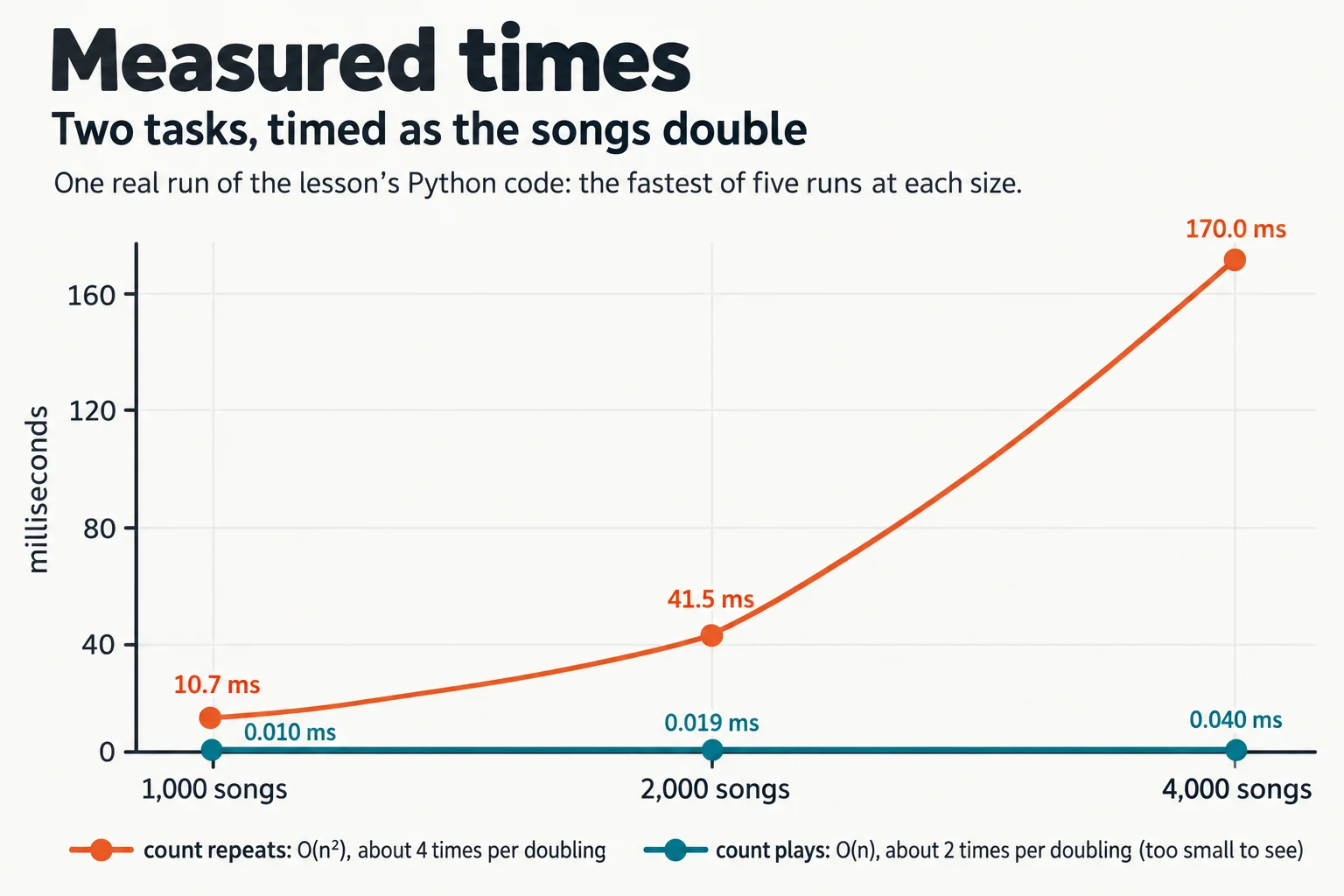
Try it. Add 8,000 songs to the list of sizes. Before you run it, use the ratios to predict both times: count plays should about double again, and count repeats should be about four times its 4,000-song time. How close did you get?
Check yourself
2 questions to try on the lesson page.
So what
Now you can check a Big-O prediction with a stopwatch, and read a growth rate from real measurements: time it, double the data, and divide. When a teammate says "it's slow", you can measure it, find out how it grows, and say whether a faster computer would help or only a better algorithm will.