Why the Duplicates Button Crawls: O(n²)
Find out why a "find duplicates" button that takes a second at 10,000 songs takes about half a minute at 50,000, spot the loop-inside-a-loop that causes it, and name its growth rate: O(n²), quadratic time.
Novice · Software Development · Updated
After this lesson you can
- Recognize O(n²) code: a loop inside a loop over the same items
- Explain why doubling the data makes O(n²) work about four times bigger
Key takeaways
- O(n²), read "big O of n squared", is quadratic time: twice the data means about four times the work.
- A loop inside a loop, both going through the same items, is the usual sign of O(n²) code.
- O(n²) is fine for a few hundred items and painful for a few hundred thousand.
- Comparing both orders, or stopping at the first match, doesn't change the growth: the only real fix is not comparing every pair.
Before this: Why the Library Check Slows Down and Play Doesn't: O(1) and O(n) (a job that reads every song once doubles when the songs double).
Back to the friend from Twice the Stuff, How Much More Work?, and the music app's "find duplicate songs" button. On a laptop, in Python, it takes about a second for 10,000 songs. For 20,000 it takes almost 5 seconds, not 2. For your friend's 50,000 it takes about half a minute, and the friend gives up and closes the app. The code didn't change; only the number of songs did. And this one grows faster than any job so far: twice the songs, about four times the wait.
What would you try?
Compare every song with every other song. That's what the button does now. Song 1 is compared with songs 2 to 50,000, song 2 with songs 3 to 50,000, and so on: about 1.25 billion comparisons for 50,000 songs.
Compare both orders, to be safe. Comparing song 1 with song 2 and song 2 with song 1 finds nothing new. It's twice the comparisons, about 2.5 billion, and it still grows the same way.
Stop at the first duplicate. That's quick when there's a duplicate near the start. But the button has to list every duplicate, so it has to finish the whole job anyway.
| What we tried | Comparisons at 50,000 songs | Where it breaks |
|---|---|---|
| Every song with every later song | about 1,250,000,000 | about four times the work when the songs double |
| Every song with every song, both orders | about 2,500,000,000 | twice as slow, and the same growth |
| Stop at the first duplicate | the same, when the job is to list them all | the button needs every duplicate |
The questions that lead to it
How many comparisons for 4 songs? For 8? For 16? Count the pairs: 4 songs make 6 pairs, 8 songs make 28, and 16 make 120. Each time the songs double, the pairs grow by a little over four times.
Why four, when the songs only doubled? That's the question this lesson answers. The code counts the comparisons for 10, 20, 40 and 80 songs. It has a loop inside a loop, a nested loop: the outer loop picks a song, and the inner loop goes through every song after it, so each pair is compared once:
int Comparisons(int songs)
{
    int count = 0;
    for (int first = 0; first < songs; first++)
    {
        for (int second = first + 1; second < songs; second++)
        {
            count++;
        }
    }
    return count;
}

foreach (int songs in new int[] { 10, 20, 40, 80 })
{
    Console.WriteLine("Songs: " + songs + ", comparisons: " + Comparisons(songs));
}
Songs: 10, comparisons: 45
Songs: 20, comparisons: 190
Songs: 40, comparisons: 780
Songs: 80, comparisons: 3160
int comparisons(int songs) {
    int count = 0;
    for (int first = 0; first < songs; first++) {
        for (int second = first + 1; second < songs; second++) {
            count++;
        }
    }
    return count;
}

void main() {
    for (int songs : new int[] {10, 20, 40, 80}) {
        IO.println("Songs: " + songs + ", comparisons: " + comparisons(songs));
    }
}
Songs: 10, comparisons: 45
Songs: 20, comparisons: 190
Songs: 40, comparisons: 780
Songs: 80, comparisons: 3160
def comparisons(songs):
    count = 0
    for first in range(songs):
        for second in range(first + 1, songs):
            count += 1
    return count


for songs in [10, 20, 40, 80]:
    print(f"Songs: {songs}, comparisons: {comparisons(songs)}")
Songs: 10, comparisons: 45
Songs: 20, comparisons: 190
Songs: 40, comparisons: 780
Songs: 80, comparisons: 3160
function comparisons(songs) {
  let count = 0;
  for (let first = 0; first < songs; first++) {
    for (let second = first + 1; second < songs; second++) {
      count++;
    }
  }
  return count;
}

for (const songs of [10, 20, 40, 80]) {
  console.log(`Songs: ${songs}, comparisons: ${comparisons(songs)}`);
}
Songs: 10, comparisons: 45
Songs: 20, comparisons: 190
Songs: 40, comparisons: 780
Songs: 80, comparisons: 3160
function comparisons(songs: number): number {
  let count = 0;
  for (let first = 0; first < songs; first++) {
    for (let second = first + 1; second < songs; second++) {
      count++;
    }
  }
  return count;
}

for (const songs of [10, 20, 40, 80]) {
  console.log(`Songs: ${songs}, comparisons: ${comparisons(songs)}`);
}
Songs: 10, comparisons: 45
Songs: 20, comparisons: 190
Songs: 40, comparisons: 780
Songs: 80, comparisons: 3160
Each time the songs double, the comparisons grow by a little over four times: 45 to 190, 190 to 780, 780 to 3,160. The bigger the playlist, the closer it gets to exactly four.
Why four times?
Picture the songs as a grid: one row and one column for every song, and a square wherever a row meets a column. Each square is "this song compared with that song". Ten songs make a 10 by 10 grid of 100 squares. Leave out the squares where a song meets itself, and count each pair once instead of twice, and you have the 45 comparisons: a bit less than half the grid.
Now double the songs. The grid gets twice as wide and twice as tall, so it has four times as many squares. Half of four times as many squares is still four times as many comparisons.
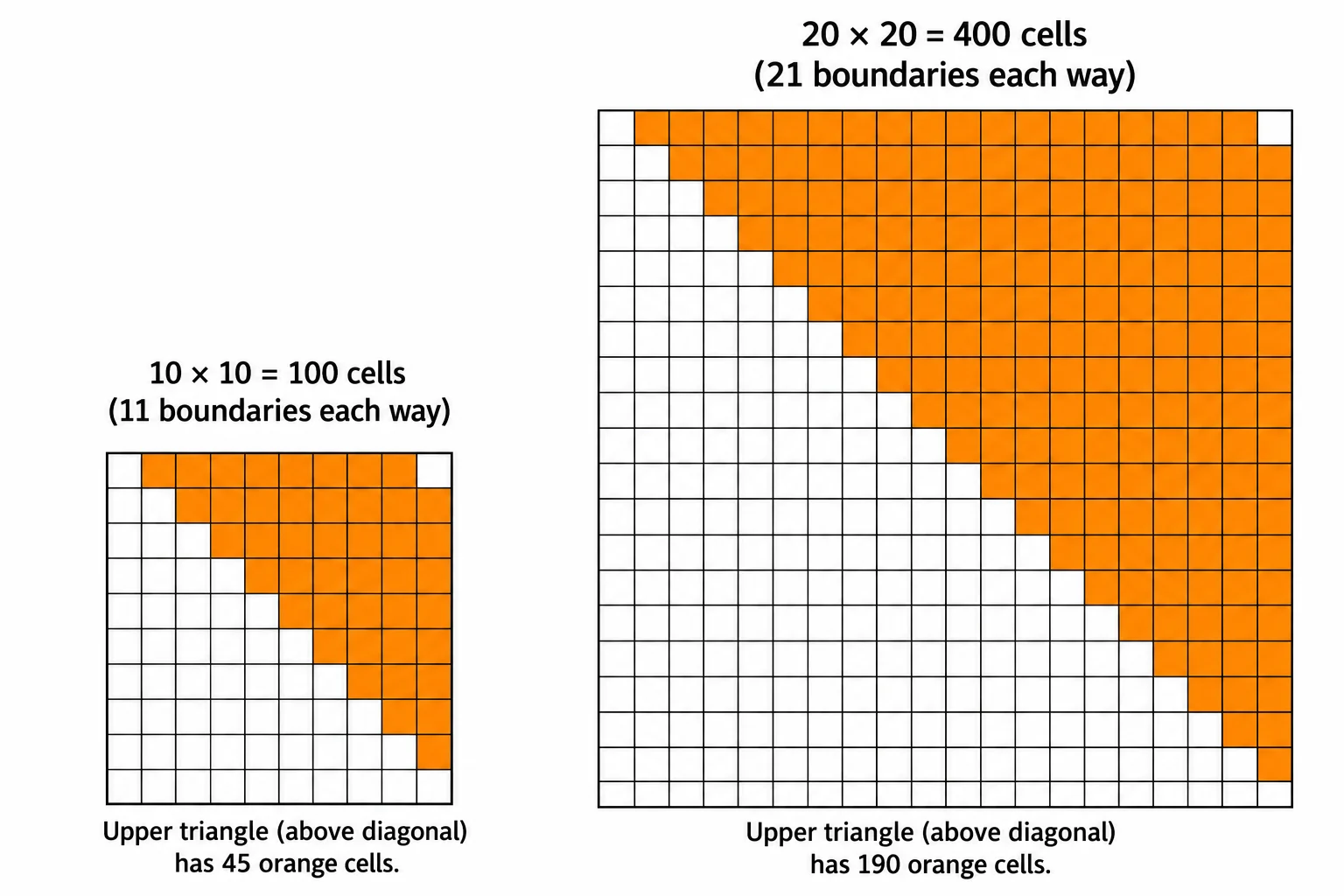
A grid of n by n squares holds n × n squares, which mathematicians write n² and read "n squared" (the small 2 means "times itself").
How it got its name
Work that grows with the square of the data turns up so often that it got a name: quadratic time. It's written O(n²) and read "big O of n squared": double the stuff, four times the work. (Quadratic comes from the Latin for "square".)
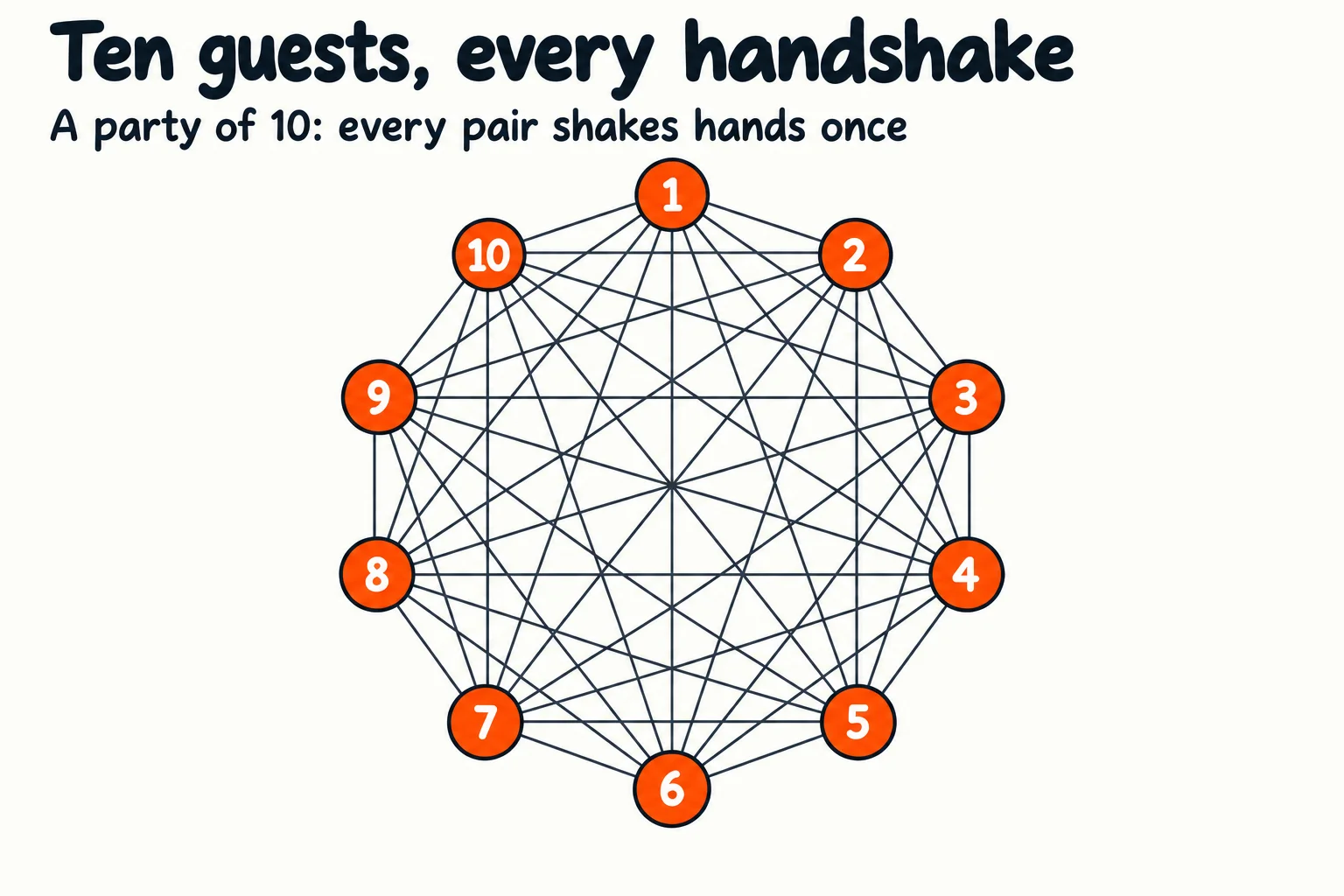
You already know it from parties. When everyone shakes hands with everyone else, once, 10 guests make 45 handshakes, a couple of minutes of polite greetings. Eighty guests make 3,160, and the party is over before the greetings are. Guests and handshakes are songs and comparisons, so the numbers are the same.
You might wonder why it isn't O(n² ÷ 2), since the comparisons are about half the grid. Big-O cares only about how the work grows, and halving a number doesn't change how it grows: it still goes up four times when the songs double. That's also why comparing both orders, in the tries above, is still O(n²). The lesson Are Two Loops Twice as Slow? Why O(2n) Is Still O(n) explains this rule.
Try it. Add 160 and 320 to the list of playlist sizes and run it again. Then work out how many comparisons 1,000 songs would need, and run that too to check yourself.
How to spot it
Look for a loop inside a loop where both loops go through the same items: every song against every song, every customer's email against every other. That's the shape of O(n²). For a playlist of 200 songs it's about 20,000 comparisons, which is nothing for a computer. For 200,000 songs it's about 20 billion, which is many minutes of waiting.
So is there a way to find the duplicates without comparing every pair? There is, and the chapter's exercise, Find the Duplicate Songs, asks you to find one.
Check yourself
2 questions to try on the lesson page.
So what
A loop inside a loop is often the first thing a reviewer points at when an app slows down as it grows. Spotting O(n²) in your own code, before your users do, is one of the most useful habits this course teaches.