Answering a Question by Hand, and Where It Breaks
A list of order dictionaries, a loop and a dictionary of running totals answer a coffee chain's question about sales by store in plain Python, and three more questions and one blank price show where hand-written code starts to strain, which is the problem a table library such as pandas solves.
Apprentice · Python · Updated
After this lesson you can
- Total a value for each group of rows in plain Python, with a loop and a dictionary of running totals
- Explain where hand-written loops start to break on real data, from one loop per question to a blank value that stops a total
Key takeaways
- A list of dictionaries holds a table's rows, and a loop that adds to a dictionary of running totals answers a question such as sales by store.
- get(store, 0) starts a group's total at 0 the first time its key comes up, then hands back the total so far every time after.
- Every new question costs another loop with one word changed, and a question about two columns at once needs a dictionary inside a dictionary.
- A CSV file's values arrive as text, so one blank price makes float('') stop the whole total with a ValueError, and every loop needs the same check for blanks.
- round(total, 2) keeps money to cents, because a computer stores most decimal prices a hair off.
On Monday morning, Rosa, who owns Bean Street Coffee, asks the kind of question every data job and class project starts with: which of the three stores, Downtown, Campus or Harbor, sold the most last week? This lesson answers it by hand with lists, dictionaries and loops, then answers three more, and watches where the code starts to strain. That strain is the problem a table library solves.
Which store sold the most?
The week's orders arrive as a CSV file, one order per row: order_id, date, time, store, drink, size, quantity and unit_price. Read with csv.DictReader and its numbers converted, the week becomes a list of dictionaries, one dictionary per row. Here are ten of its orders, typed into a notebook cell with only the columns these questions need (our own made-up data):
orders = [
    {"date": "2026-11-02", "store": "Downtown", "drink": "latte", "quantity": 2, "unit_price": 4.45},
    {"date": "2026-11-02", "store": "Campus", "drink": "drip coffee", "quantity": 1, "unit_price": 2.95},
    {"date": "2026-11-02", "store": "Harbor", "drink": "cold brew", "quantity": 1, "unit_price": 4.15},
    {"date": "2026-11-02", "store": "Downtown", "drink": "mocha", "quantity": 1, "unit_price": 4.75},
    {"date": "2026-11-02", "store": "Campus", "drink": "chai", "quantity": 3, "unit_price": 4.35},
    {"date": "2026-11-03", "store": "Harbor", "drink": "latte", "quantity": 1, "unit_price": 4.95},
    {"date": "2026-11-03", "store": "Downtown", "drink": "drip coffee", "quantity": 2, "unit_price": 2.45},
    {"date": "2026-11-03", "store": "Campus", "drink": "latte", "quantity": 1, "unit_price": 3.95},
    {"date": "2026-11-03", "store": "Harbor", "drink": "tea", "quantity": 2, "unit_price": 2.65},
    {"date": "2026-11-03", "store": "Downtown", "drink": "cold brew", "quantity": 1, "unit_price": 4.65},
]
print(len(orders), "orders")
10 orders
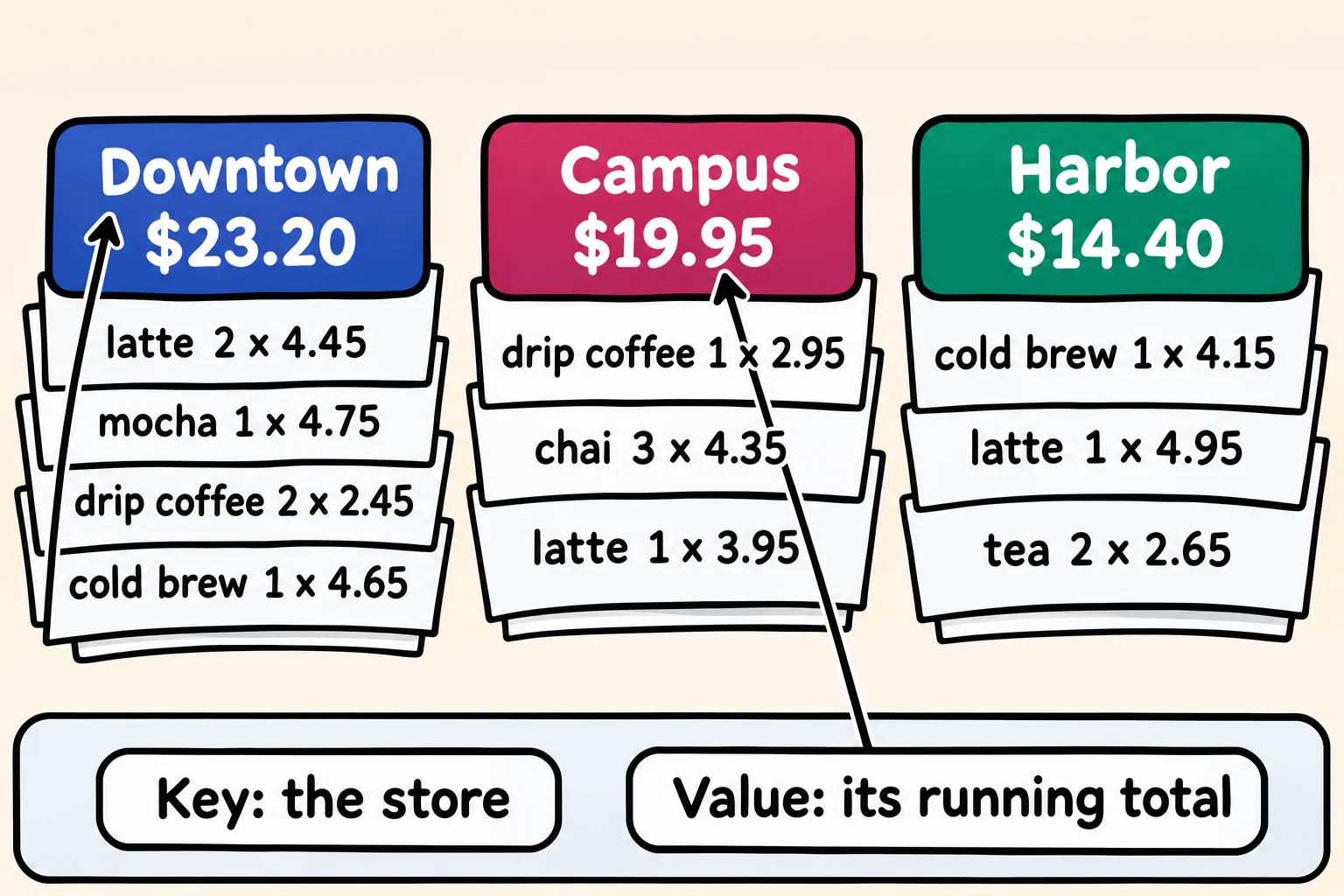
On paper, you'd sort the order slips into one pile per store and keep a tally on top of each pile. A dictionary does the same: the store's name is the key, and its value is a running total, a number you keep adding to as you go.
sales_by_store = {}
for order in orders:
    sale = order["quantity"] * order["unit_price"]
    store = order["store"]
    sales_by_store[store] = sales_by_store.get(store, 0) + sale

for store, total in sales_by_store.items():
    print(store, round(total, 2))
Downtown 23.2
Campus 19.95
Harbor 14.4
The first time a store comes up, get(store, 0) gives 0; after that, it gives the store's total so far, and the loop adds this order's sale. round(total, 2) keeps cents: without it, Downtown prints as 23.200000000000003, because a computer stores most decimal prices a hair off. Downtown sold the most: $23.20.
Three more questions, three more loops
Then Rosa asks three more: which drink sold the most cups, which day was busier, and what is an average order worth? The first counts cups, and needs a second loop to find the biggest count:
cups_by_drink = {}
for order in orders:
    drink = order["drink"]
    cups_by_drink[drink] = cups_by_drink.get(drink, 0) + order["quantity"]

best_drink = ""
best_cups = 0
for drink, cups in cups_by_drink.items():
    if cups > best_cups:
        best_drink = drink
        best_cups = cups
print("Best seller:", best_drink, best_cups, "cups")
Best seller: latte 4 cups
Sales by day is the store loop again, with order["date"] where order["store"] was:
sales_by_day = {}
for order in orders:
    sale = order["quantity"] * order["unit_price"]
    day = order["date"]
    sales_by_day[day] = sales_by_day.get(day, 0) + sale

for day, total in sales_by_day.items():
    print(day, round(total, 2))
2026-11-02 33.8
2026-11-03 23.75
The average order is one more loop, divided by the number of orders:
total = 0
for order in orders:
    total += order["quantity"] * order["unit_price"]
print("Average order:", round(total / len(orders), 2))
Average order: 5.75
Each loop is a copy of the last, with a word or two changed:
| Question | What changed in the loop |
|---|---|
| Sales by store | the key, order["store"] |
| Best-selling drink | the key, order["drink"], adding order["quantity"], and a loop for the biggest |
| Sales by day | the key, order["date"] |
| Average order | no key: one total over len(orders) |
Every copy is a chance for a typo. Sales by store for each day would need a dictionary inside a dictionary, and a month of questions becomes a page of loops that look alike.
One blank price
The real file is messier. csv.DictReader hands every value over as text, and on a busy morning one price was left blank. Here are two rows the way DictReader gives them:
rows = [
    {"store": "Harbor", "drink": "latte", "quantity": "2", "unit_price": "4.45"},
    {"store": "Campus", "drink": "mocha", "quantity": "1", "unit_price": ""},
]
total = 0
for row in rows:
    total += int(row["quantity"]) * float(row["unit_price"])
print(round(total, 2))
ValueError: could not convert string to float: ''
That's the error's last line. ValueError is Python's error for a value of the right type that can't be used: float("") can't turn an empty string into a number, so the whole total stops at the first blank. An if gets past it:
total = 0
skipped = 0
for row in rows:
    if row["unit_price"] == "":
        skipped += 1
    else:
        total += int(row["quantity"]) * float(row["unit_price"])
print("Total:", round(total, 2))
print("Orders with no price:", skipped)
Total: 8.9
Orders with no price: 1
It works, but a decision now hides in the code: is a blank price a free drink, a typo, or a sale to leave out? And the same check must go into every loop above. Forget it in one, and that question crashes while the others answer.
What a table tool does instead
Every loop made the same few moves: go through the rows, sort them into groups by one column, add up another, and decide what to do about blanks. A table library writes each move once, for any column you name: you say "group the orders by store and add up the sales", and it does the looping. A blank is marked as missing, so it's left out of a total on purpose instead of stopping it, and you can count the blanks.
Python's table library is pandas, and Meet pandas: A Table You Can Program answers this lesson's first question in one line. The loops aren't wasted: knowing what pandas does for you is what lets you trust its answers. The week's whole file holds about 600 orders, and Exercise: Coffee Orders by Hand answers four questions about it with this lesson's loops.
Do it: total the orders by store
A few of the week's orders, read from the CSV file, need totaling, and one price was left blank.
rows: a list of orders the waycsv.DictReadergives them, each a dictionary of text:"store"(such as"Harbor"),"quantity"(such as"2") and"unit_price"(such as"4.45", or""when it was left blank).
Your job: write the function sales_by_store(rows) so it returns a dictionary with each store's name as a key and its total sales as the value.
- An order's sale is its quantity times its unit price. Convert the quantity with
int()and the price withfloat(). - Leave out every order whose
"unit_price"is"": it adds nothing to its store's total. - Round each store's total to cents with
round(total, 2). - With no rows, return an empty dictionary,
{}.
Worked through: with these rows,
rows = [
    {"store": "Harbor", "quantity": "1", "unit_price": "4.15"},
    {"store": "Campus", "quantity": "3", "unit_price": "4.35"},
    {"store": "Harbor", "quantity": "2", "unit_price": "2.65"},
]
Harbor sold 1 × 4.15 = 4.15 and 2 × 2.65 = 5.30, which make 9.45, and Campus sold 3 × 4.35 = 13.05. So sales_by_store(rows) returns {"Harbor": 9.45, "Campus": 13.05}.
Practiced live on the lesson page: write the Python right there and check it.
Check yourself
2 questions to try on the lesson page.
So what
Every table question is the same few moves, a loop, a key and a running total, and writing them by hand shows you exactly what a table library such as pandas does for you, and why one blank value matters.