Many-to-Many
Why two tables can't link many-to-many directly, and how an associative (junction) table between them turns it into two one-to-many relationships.
Journeyman · SQL · Database · Updated
A many-to-many relationship cannot exist as a direct link between two tables. This is the concept that many rows in one table can be related to many rows in another. Adding this type of a PK to FK relationship is not possible.
For instance, one order could contain many products. But a product could be ordered by many customers, or even by the same customer on multiple occasions. In other words, one product can be contained in many orders. This is a many-to-many relationship.
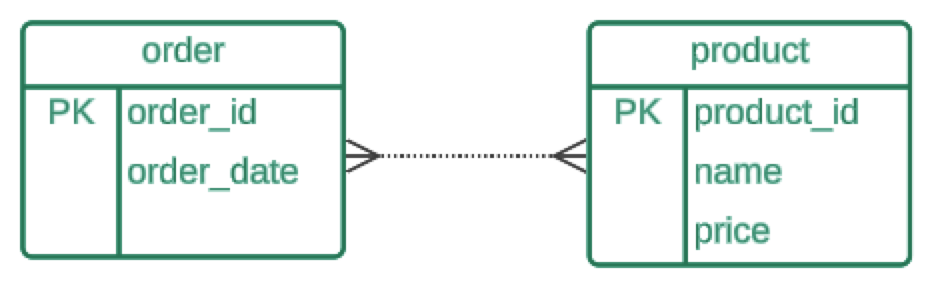
This direct relationship presents a challenge though, that needs to be addressed. Which table should contain the details of the relationship?
If an order can have many products, then should the product table contain the order_id foreign key along with all related data, such as quantity? But then each product would be limited to existing for just one order.
If a product can be ordered many times, then should the order table contain the product_id foreign key as well as all associated data, such as quantity? With this design, each order could then only contain a single product. A customer would need to create a new order for each product they want to purchase.
Two One-to-Many Relationships
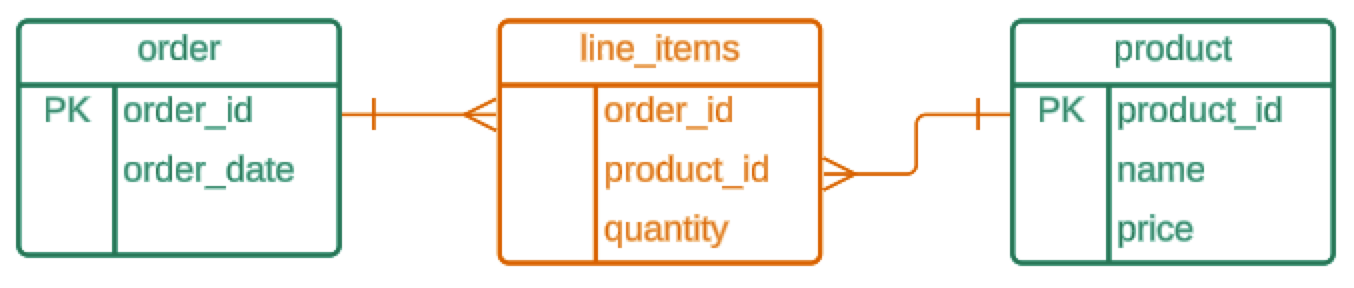
The solution is a third table between them, called an associative table (or junction table). It holds one row for each order and product pair, with that pair's details, such as the quantity. The many-to-many relationship becomes two one-to-many relationships: an order has many line items, and a product appears in many line items.
Do it: add a new order's line items
An order can hold many products, and a product can be in many orders. The LineItems table sits between Orders and Products and holds one row for each order-and-product pair, with how many of that product the order wants.
The three tables (the Tables tab shows the SQL that makes them):
Orders:
| OrderId | CompanyName |
|---|---|
| 1 | Alfreds Futterkiste |
| 2 | Bon app' |
| 3 | Around the Horn |
Products:
| ProductId | ProductName |
|---|---|
| 1 | Chai |
| 2 | Chang |
| 3 | Tofu |
LineItems, the associative table. Its OrderId points at Orders, and its ProductId at Products:
| OrderId | ProductId | Quantity |
|---|---|---|
| 1 | 1 | 10 |
| 1 | 3 | 2 |
| 2 | 1 | 5 |
So order 1 is two rows (10 Chai and 2 Tofu), and Chai is in two orders (1 and 2).
Order 3 has just come in from Around the Horn, and it has no line items yet. It's for 4 Chang and 6 Tofu. Working it through, each product in the order becomes one row:
| In the order | OrderId | ProductId (from Products) |
Quantity |
|---|---|---|---|
| 4 Chang | 3 | 2 | 4 |
| 6 Tofu | 3 | 3 | 6 |
After your SQL runs, LineItems should hold exactly these rows (shown by OrderId, then ProductId):
| OrderId | ProductId | Quantity |
|---|---|---|
| 1 | 1 | 10 |
| 1 | 3 | 2 |
| 2 | 1 | 5 |
| 3 | 2 | 4 |
| 3 | 3 | 6 |
Your job: add order 3's line items to LineItems.
- Add one row for each product in order 3, with its
OrderId,ProductIdandQuantity. - Leave the rows of orders 1 and 2 as they are.
Practiced live on the lesson page: write the SQL right there and check it.