Draw Your Own: Paper, Mermaid and draw.io
A design drawn on a whiteboard is lost by Friday, so pick the tool by the job: paper for thinking, Mermaid's text diagrams for the ones that live beside the code (GitHub and VS Code draw them for you), and draw.io for a tidy picture.
Apprentice · Software Development · OOP · Updated
After this lesson you can
- Write a class diagram in Mermaid's text form, with its classes, arrows and numbers
- Choose paper, Mermaid or draw.io for a diagram, by who reads it and how often it changes
Key takeaways
- Sketch on paper first: names, arrows and numbers are enough; it's for thinking, and it's quick to throw away.
- Mermaid writes a class diagram as text in a Markdown file, so it lives beside the code, changes in the same commit, and GitHub and VS Code draw it.
- In Mermaid,
<|--is inherits,<|..implements,-->has,..>uses,o--and*--are the two diamonds, and numbers go in quotes at each end. - draw.io (app.diagrams.net) is free and drag-and-drop, for a polished picture in a slide or a document.
Before this: How Many, and Who Owns It: Multiplicity and the Two Diamonds.
Pedal & Go's team planned group rentals at a whiteboard: boxes, arrows, a 1..* circled twice. Somebody took a photo. Two weeks later the code had changed, the photo hadn't, and nobody could find it anyway. A month after that, a new teammate asked how the desk fits together, and the answer was "read the code".
The diagrams in this course are drawn for you. Your own designs need drawing too, and where you draw one decides whether it's still true next month. This lesson gives you three ways, and when to use each: paper for thinking, Mermaid for diagrams that live beside the code, and draw.io for a polished picture.
Paper: for thinking
Start every design with a pencil, a sheet of paper or a whiteboard. It's the fastest tool there is, and the point of a first sketch is to be wrong cheaply: draw it, find the problem, draw it again.
On paper, draw less than a full diagram. Names in boxes, the arrows, and the numbers that matter are usually enough. Leave out the types and most of the methods until the shape is right.
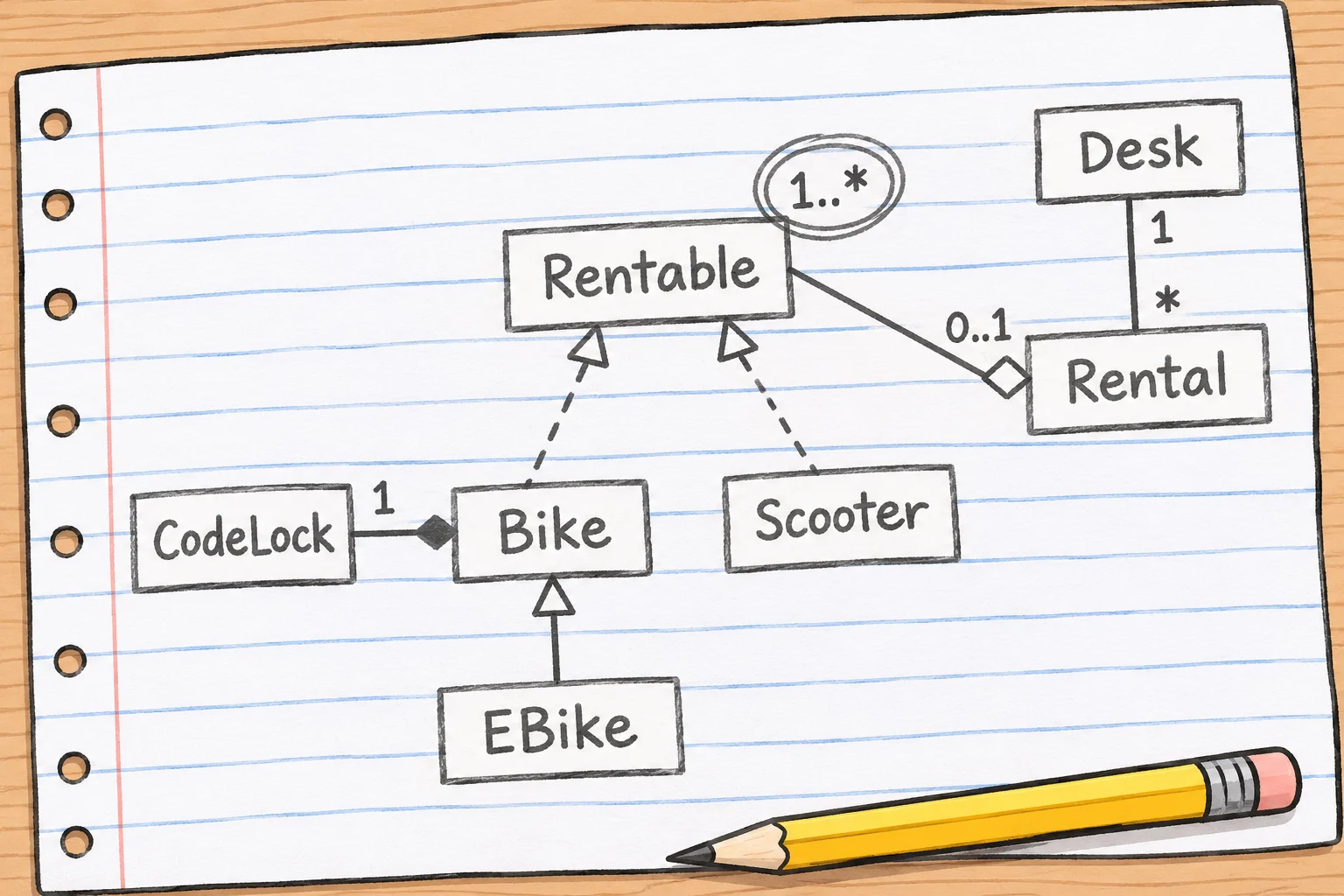
A paper sketch is a conversation, and it's done when the conversation is. If the design is worth keeping, write it down somewhere it will stay true.
Mermaid: a diagram written as text
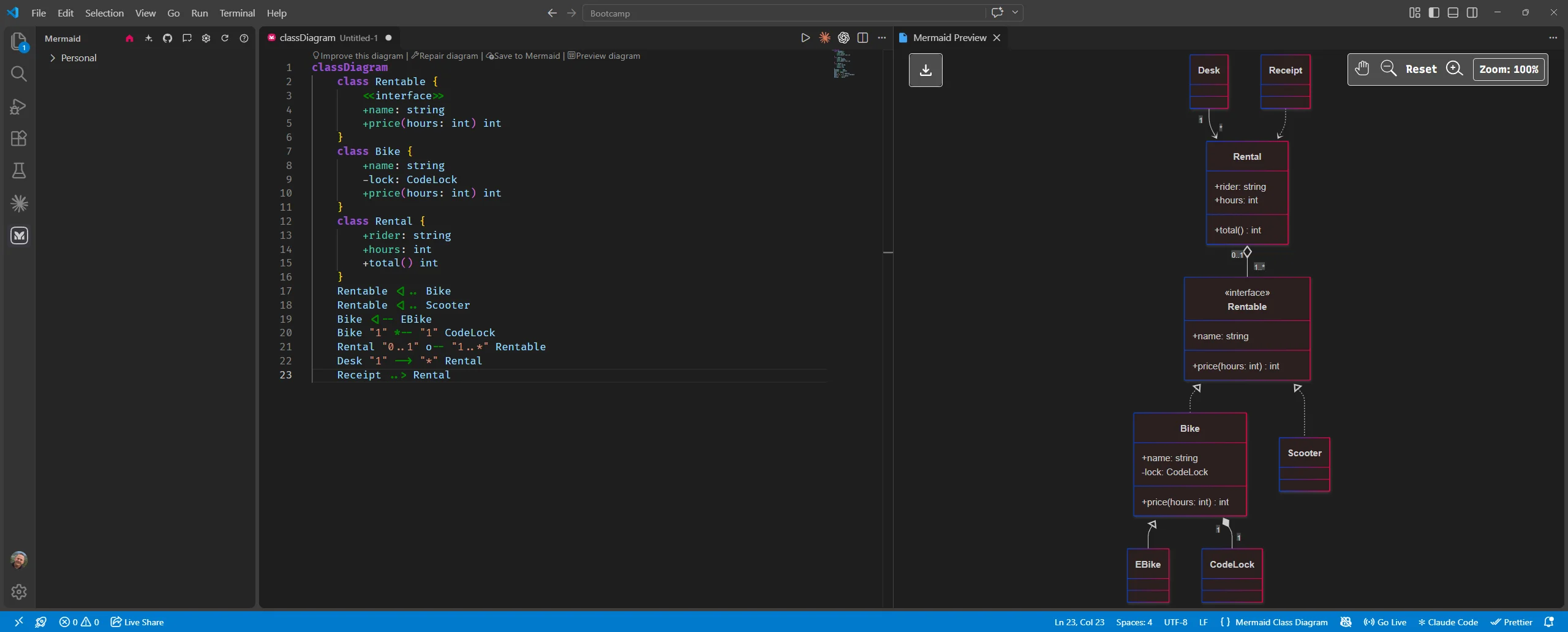
Mermaid is a small language for writing diagrams as text. You write the classes and arrows in a few short lines, and a tool draws the picture. Because the diagram is text, it goes in a Markdown file (a project's README.md, say) right beside the code: it's saved with the code, changed in the same commit, and reviewed with the code. And you don't need a special program to see it: GitHub draws a Mermaid diagram when you open the file, and VS Code's Markdown preview draws it too, once you add the free Markdown Preview Mermaid Support extension.
Here's the desk, written in Mermaid. In a Markdown file, it goes inside a fenced block marked mermaid:
classDiagram
    class Rentable {
        <<interface>>
        +name: string
        +price(hours: int) int
    }
    class Bike {
        +name: string
        -lock: CodeLock
        +price(hours: int) int
    }
    class Rental {
        +rider: string
        +hours: int
        +total() int
    }
    Rentable <|.. Bike
    Rentable <|.. Scooter
    Bike <|-- EBike
    Bike "1" *-- "1" CodeLock
    Rental "0..1" o-- "1..*" Rentable
    Desk "1" --> "*" Rental
    Receipt ..> Rental
Read it from the top. classDiagram says what kind of diagram this is. Each class block is one box: its fields, then its methods (anything with parentheses), with + and - as in the last lessons; <<interface>> puts «interface» above the name. A method's return type goes after the parentheses: +total() int. Then one line per arrow, and a class named only in an arrow, like Scooter, still gets its own box.
The arrows are drawn with keyboard symbols that look a little like the real ones:
| In Mermaid | Draws | Means |
|---|---|---|
Bike <\|-- EBike |
solid line, hollow triangle at Bike |
an e-bike is a bike (inherits) |
Rentable <\|.. Bike |
dashed line, hollow triangle at Rentable |
a bike keeps the Rentable promise (implements) |
Desk --> Rental |
solid line, open arrowhead at Rental |
a desk has rentals |
Receipt ..> Rental |
dashed line, open arrowhead at Rental |
a receipt uses a rental |
Rental o-- Rentable |
hollow diamond at Rental |
aggregation |
Bike *-- CodeLock |
filled diamond at Bike |
composition |
Rental "0..1" o-- "1..*" Rentable |
a number at each end | multiplicity |
<| is a triangle on its side, -- a solid line and .. a dashed one; o is a hollow diamond and * a filled one. Each symbol sits at the end it's drawn on. To try it without installing anything, paste the block into the Mermaid Live Editor at mermaid.live.
draw.io: for a polished picture
Sometimes the reader isn't a developer: a slide for the owner, a page in a guide, a diagram in a report for a class. For those, draw.io is free, runs in the browser at app.diagrams.net without an account, and works by drag and drop. Its UML shapes are in the panel on the left: a class box with its three parts, an interface, and every arrow in this chapter, each with the right line and head. Save the diagram as a .drawio file to change it later, and export it as a PNG picture to put in a document.
A draw.io picture looks the best of the three, and it's the hardest to keep true: when the code changes, somebody has to remember to open the file and move the boxes.
Which one, when
| Tool | Best for | Where it lives | When the code changes |
|---|---|---|---|
| Paper or a whiteboard | thinking, and talking a design through | nowhere: it's thrown away | it doesn't matter; it's already done its job |
| Mermaid | diagrams developers keep: a README, a design note | in the repository, as text | edit a line, in the same commit as the code |
| draw.io | a polished picture for people who don't read code | a .drawio file, and the exported picture |
open the file and redraw |
Two questions pick the tool: who reads it, and how long must it stay true. A sketch for your own thinking is paper. A diagram the team will read next year is Mermaid, because it changes with the code. A picture for a slide is draw.io.
Try it. Open a new file, design.md, in VS Code. Add a mermaid block that draws Bike, EBike and CodeLock: an e-bike is a bike, and a bike has exactly one lock. Open the preview with Ctrl+Shift+V (Cmd+Shift+V on a Mac). (One answer: classDiagram, then Bike <|-- EBike, then Bike "1" *-- "1" CodeLock.)
Check yourself
2 questions to try on the lesson page.
So what
Draw on paper to think, in Mermaid to keep, and in draw.io to present. A diagram that changes in the same commit as the code is a diagram people can trust.