MVVM and Components
When a screen's code has to update every label by hand after each change, one change sooner or later forgets one and the screen shows something untrue; MVVM puts the screen's state and rules in a view model that tells the view when it changes, so the view, bound to it, redraws itself, and a component in Angular or React bundles a view with its view model.
Journeyman · OOP · Software Development · Updated
After this lesson you can
- Move a screen's state and rules into a view model that tells the view when it changes, so the screen updates itself
- Spot the smells that point to MVVM: screen code that updates each label by hand after every change, and forgets one
- Tell MVC, MVVM and a component apart by what each part does
Key takeaways
- The smell: screen code that updates each label by hand after every change, and one change that forgets one.
- The cause: the screen's values are copied onto the screen in many places, so nothing keeps them in step.
- The fix: a view model holds the screen's state and works out what it shows; the view is bound to it, so a change redraws whatever reads it.
- Data binding is Pass 1's Observer at work: the view model keeps a list of whoever is listening and tells them all.
- A component (Angular, React) is a view and its view model in one small piece of the screen.
Before this: MVC: Model, View, Controller, and Observer: Tell Whoever's Listening (a list of listeners) from Pass 1.
MVC fits a web page: a request comes in, a page goes out, and it's done. The library's self-checkout kiosk is different. Its screen stays up while Maya uses it: she borrows a book and the numbers change, she brings one back and they change again, all without a new page. Screens like that kept running into the same trouble, and the fix this lesson builds has a name that sounds like MVC's cousin: MVVM.
The symptom: the button that stayed off
The kiosk's screen shows three things for the member at it: how many books they have out, how many more they may borrow, and whether the Borrow button is on (a member may have 5 books out). The kiosk's code updates each one after every change. Maya starts with 3 books out, borrows two, then brings one back:
Screen screen = new Screen();
int booksOut = 3;
Borrow();
Borrow();
ReturnBook();
void Borrow()
{
booksOut++;
screen.BooksOut = Maya: 4 books out, 1 more allowed, Borrow is on
Maya: 5 books out, 0 more allowed, Borrow is off
Maya: 4 books out, 1 more allowed, Borrow is off
class Screen {
String booksOut = "", moreAllowed = "", button = "";
void print() { IO.println("Maya: " + booksOut + ", " + moreAllowed + ", " + button); }
}
Screen screen = new Screen();
int booksOut = 3;
void borrow() {
booksOut++;
screen.booksOut = booksOut + " books out";
screen.moreAllowed = (5 - booksOut) + " more allowed";
screen.button = booksOut < 5 ? "Borrow is on" : "Borrow is off";
screen.print();
}
void returnBook() {
booksOut--;
screen.booksOut = booksOut + " books out";
screen.moreAllowed = (5 - booksOut) + " more allowed";
screen.print();
}
void main() {
borrow();
borrow();
returnBook();
}
Maya: 4 books out, 1 more allowed, Borrow is on
Maya: 5 books out, 0 more allowed, Borrow is off
Maya: 4 books out, 1 more allowed, Borrow is off
class Screen:
def __init__(self):
self.books_out = self.more_allowed = self.button = ""
def print(self):
print(f"Maya: {self.books_out}, {self.more_allowed}, {self.button}")
screen = Screen()
books_out = 3
def borrow():
global books_out
books_out += 1
screen.books_out = f"{books_out} books out"
screen.more_allowed = f"{5 - books_out} more allowed"
screen.button = "Borrow is on" if books_out < 5 else "Borrow is off"
screen.print()
def return_book():
global books_out
books_out -= 1
screen.books_out = f"{books_out} books out"
screen.more_allowed = f"{5 - books_out} more allowed"
screen.print()
borrow()
borrow()
return_book()
Maya: 4 books out, 1 more allowed, Borrow is on
Maya: 5 books out, 0 more allowed, Borrow is off
Maya: 4 books out, 1 more allowed, Borrow is off
const screen = {
booksOut: "", moreAllowed: "", button: "",
print() { console.log(`Maya: ${this.booksOut}, ${this.moreAllowed}, ${this.button}`); },
};
let booksOut = 3;
function borrow() {
booksOut++;
screen.booksOut = `${booksOut} books out`;
screen.moreAllowed = `${5 - booksOut} more allowed`;
screen.button = booksOut < 5 ? "Borrow is on" : "Borrow is off";
screen.print();
}
function returnBook() {
booksOut--;
screen.booksOut = `${booksOut} books out`;
screen.moreAllowed = `${5 - booksOut} more allowed`;
screen.print();
}
borrow();
borrow();
returnBook();
Maya: 4 books out, 1 more allowed, Borrow is on
Maya: 5 books out, 0 more allowed, Borrow is off
Maya: 4 books out, 1 more allowed, Borrow is off
const kioskScreen = {
booksOut: "", moreAllowed: "", button: "",
print(): void { console.log(`Maya: ${this.booksOut}, ${this.moreAllowed}, ${this.button}`); },
};
let booksOut = 3;
function borrow(): void {
booksOut++;
kioskScreen.booksOut = `${booksOut} books out`;
kioskScreen.moreAllowed = `${5 - booksOut} more allowed`;
kioskScreen.button = booksOut < 5 ? "Borrow is on" : "Borrow is off";
kioskScreen.print();
}
function returnBook(): void {
booksOut--;
kioskScreen.booksOut = `${booksOut} books out`;
kioskScreen.moreAllowed = `${5 - booksOut} more allowed`;
kioskScreen.print();
}
borrow();
borrow();
returnBook();
Maya: 4 books out, 1 more allowed, Borrow is on
Maya: 5 books out, 0 more allowed, Borrow is off
Maya: 4 books out, 1 more allowed, Borrow is off
Maya has 4 books out and may borrow one more, but the button stays off: returnBook updated two of the three things on the screen and forgot the button. Every new thing on the screen (a fee owed, a hold waiting) would need updating in every function that changes anything.
- The symptom: screen code that updates each label by hand after every change, and one change that forgets one.
- The cause: the screen's values are worked out and copied onto the screen in many places, and nothing keeps them in step with the one fact they all come from: how many books Maya has out.
What would you try?
One RefreshEverything() function, called at the end of every change. Closer: the screen is drawn in one place. But every change still has to remember to call it, and the screen code still works out "1 more allowed" itself, mixing the rules into the drawing.
Check the screen again every second. The screen would be right eventually, and wrong for up to a second, and it would redraw a thousand times when nothing changed.
What a good fix needs: the facts and the rules in one place, and the screen told whenever they change, so no change can forget it.
The fix: a view model the screen is bound to
A car's fuel gauge works this way. Nobody updates the needle: it's connected to the tank, and when the fuel goes down, the needle moves by itself.
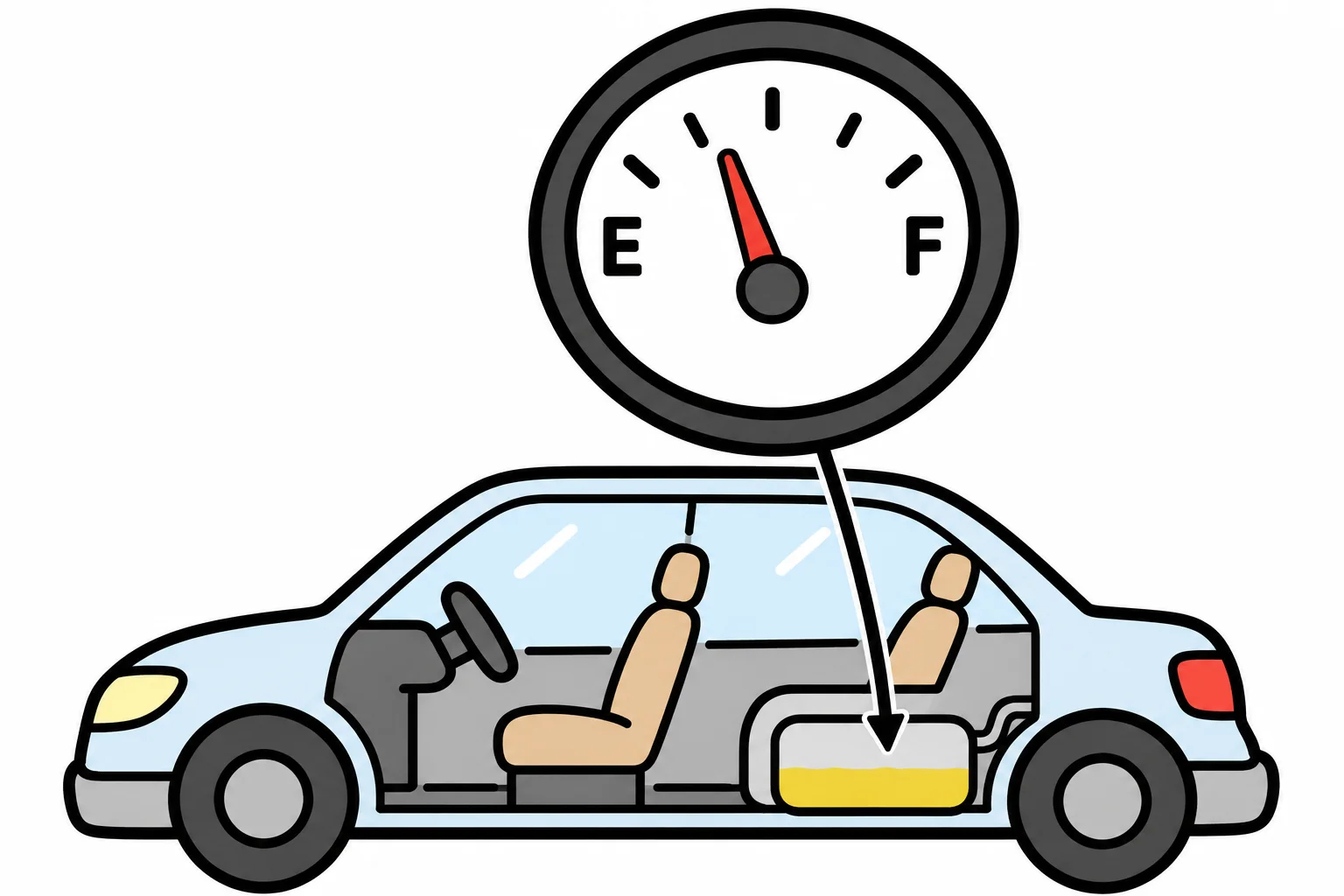
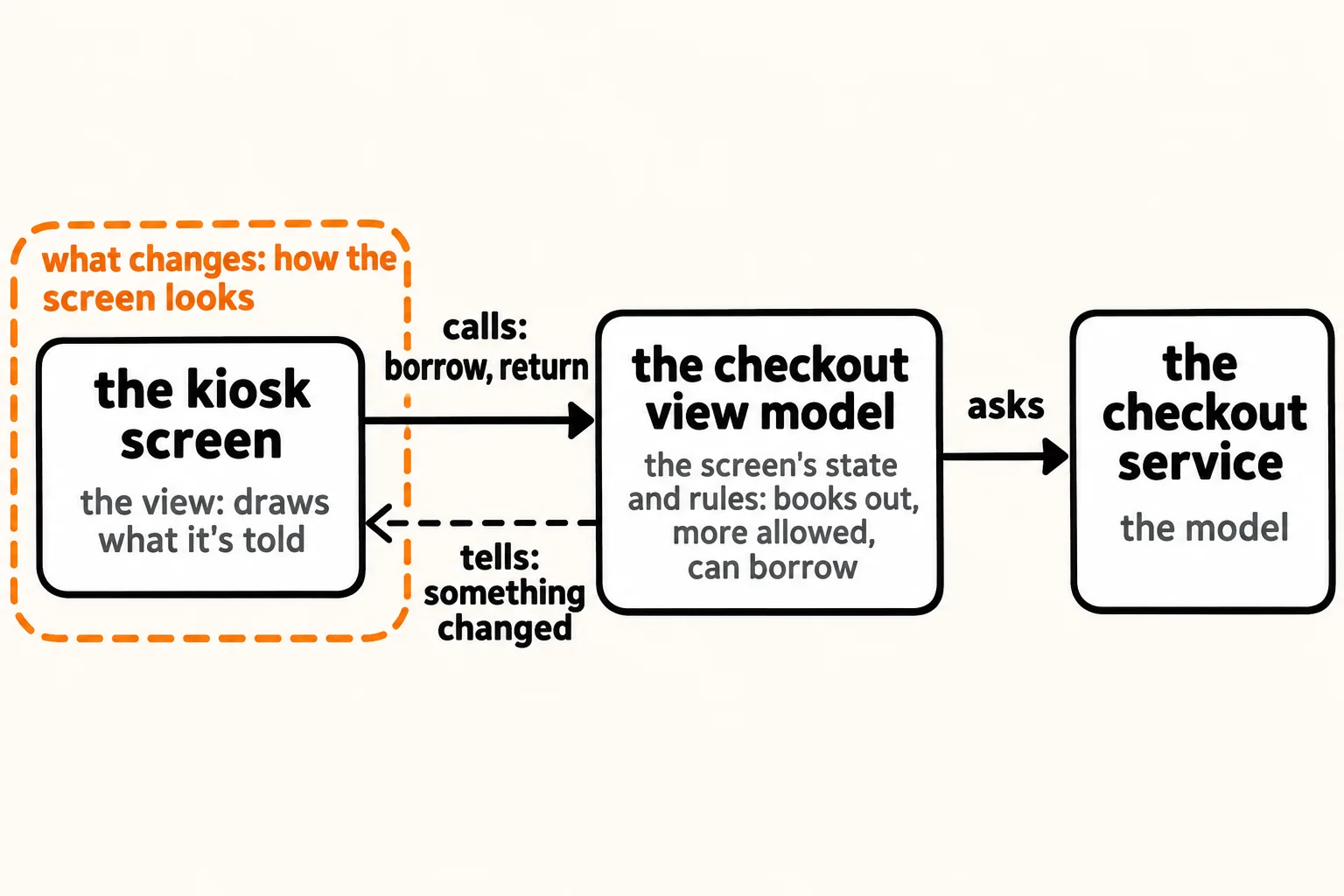
In code, the tank is a view model: an object that holds the screen's state (how many books are out) and works out everything the screen shows from it (how many more are allowed, whether Borrow is on). It keeps a list of whoever is listening and tells them when it changes, the Observer from Pass 1. The view, the screen, only draws what the view model says, and it's bound to it: it signed up as a listener, so every change redraws it. Behind the view model sits the model, the library's real data and rules (the checkout service from the last chapter):
CheckoutViewModel viewModel = new CheckoutViewModel("Maya", 3);
KioskScreen screen = new KioskScreen(viewModel);
viewModel.Borrow();
viewModel.Borrow();
viewModel.ReturnBook();
// The view model: the screen's state, the rules for what it shows, and who to tell when it changes.
class CheckoutViewModel
{
private readonly List<Action> listeners = new();
public CheckoutViewModel(string member, int booksOut)
{
Member = member;
BooksOut = booksOut;
}
public string Member { get; }
public int BooksOut { get; private set; }
public int MoreAllowed => 5 - BooksOut;
public bool CanBorrow => BooksOut < 5;
public void OnChange(Action listener) => listeners.Add(listener);
// In the real kiosk these would ask the checkout service (the model) first.
public void Borrow()
{
if (CanBorrow) { BooksOut++; Changed(); }
}
public void ReturnBook()
{
BooksOut--;
Changed();
}
private void Changed()
{
foreach (Action listener in listeners) { listener(); }
}
}
// The view: it draws what the view model says, and is bound to it, so every change redraws it.
class KioskScreen
{
private readonly CheckoutViewModel viewModel;
public KioskScreen(CheckoutViewModel viewModel)
{
this.viewModel = viewModel;
viewModel.OnChange(Draw);
}
private void Draw() => Console.WriteLine(
Maya: 4 books out, 1 more allowed, Borrow is on
Maya: 5 books out, 0 more allowed, Borrow is off
Maya: 4 books out, 1 more allowed, Borrow is on
// The view model: the screen's state, the rules for what it shows, and who to tell when it changes.
class CheckoutViewModel {
    private final List<Runnable> listeners = new ArrayList<>();
    final String member;
    private int booksOut;

    CheckoutViewModel(String member, int booksOut) {
        this.member = member;
        this.booksOut = booksOut;
    }

    int booksOut() { return booksOut; }
    int moreAllowed() { return 5 - booksOut; }
    boolean canBorrow() { return booksOut < 5; }

    void onChange(Runnable listener) { listeners.add(listener); }

    // In the real kiosk these would ask the checkout service (the model) first.
    void borrow() {
        if (canBorrow()) { booksOut++; changed(); }
    }

    void returnBook() {
        booksOut--;
        changed();
    }

    private void changed() {
        for (Runnable listener : listeners) { listener.run(); }
    }
}

// The view: it draws what the view model says, and is bound to it, so every change redraws it.
class KioskScreen {
    private final CheckoutViewModel viewModel;

    KioskScreen(CheckoutViewModel viewModel) {
        this.viewModel = viewModel;
        viewModel.onChange(this::draw);
    }

    private void draw() {
        IO.println(viewModel.member + ": " + viewModel.booksOut() + " books out, " + viewModel.moreAllowed()
            + " more allowed, Borrow is " + (viewModel.canBorrow() ? "on" : "off"));
    }
}

void main() {
    CheckoutViewModel viewModel = new CheckoutViewModel("Maya", 3);
    KioskScreen screen = new KioskScreen(viewModel);

    viewModel.borrow();
    viewModel.borrow();
    viewModel.returnBook();
}
Maya: 4 books out, 1 more allowed, Borrow is on
Maya: 5 books out, 0 more allowed, Borrow is off
Maya: 4 books out, 1 more allowed, Borrow is on
class CheckoutViewModel:
    """The view model: the screen's state, the rules for what it shows, and who to tell when it changes."""

    def __init__(self, member, books_out):
        self.member = member
        self.books_out = books_out
        self._listeners = []

    @property
    def more_allowed(self):
        return 5 - self.books_out

    @property
    def can_borrow(self):
        return self.books_out < 5

    def on_change(self, listener):
        self._listeners.append(listener)

    # In the real kiosk these would ask the checkout service (the model) first.
    def borrow(self):
        if self.can_borrow:
            self.books_out += 1
            self._changed()

    def return_book(self):
        self.books_out -= 1
        self._changed()

    def _changed(self):
        for listener in self._listeners:
            listener()


class KioskScreen:
    """The view: it draws what the view model says, and is bound to it, so every change redraws it."""

    def __init__(self, view_model):
        self.view_model = view_model
        view_model.on_change(self.draw)

    def draw(self):
        vm = self.view_model
        button = "on" if vm.can_borrow else "off"
        print(f"{vm.member}: {vm.books_out} books out, {vm.more_allowed} more allowed, Borrow is {button}")


view_model = CheckoutViewModel("Maya", 3)
screen = KioskScreen(view_model)

view_model.borrow()
view_model.borrow()
view_model.return_book()
Maya: 4 books out, 1 more allowed, Borrow is on
Maya: 5 books out, 0 more allowed, Borrow is off
Maya: 4 books out, 1 more allowed, Borrow is on
// The view model: the screen's state, the rules for what it shows, and who to tell when it changes.
class CheckoutViewModel {
  #listeners = [];
  constructor(member, booksOut) {
    this.member = member;
    this.booksOut = booksOut;
  }
  get moreAllowed() { return 5 - this.booksOut; }
  get canBorrow() { return this.booksOut < 5; }
  onChange(listener) { this.#listeners.push(listener); }

  // In the real kiosk these would ask the checkout service (the model) first.
  borrow() {
    if (this.canBorrow) { this.booksOut++; this.#changed(); }
  }
  returnBook() {
    this.booksOut--;
    this.#changed();
  }
  #changed() {
    for (const listener of this.#listeners) { listener(); }
  }
}

// The view: it draws what the view model says, and is bound to it, so every change redraws it.
class KioskScreen {
  #viewModel;
  constructor(viewModel) {
    this.#viewModel = viewModel;
    viewModel.onChange(() => this.draw());
  }
  draw() {
    const vm = this.#viewModel;
    console.log(`${vm.member}: ${vm.booksOut} books out, ${vm.moreAllowed} more allowed, Borrow is ${vm.canBorrow ? "on" : "off"}`);
  }
}

const viewModel = new CheckoutViewModel("Maya", 3);
const screen = new KioskScreen(viewModel);

viewModel.borrow();
viewModel.borrow();
viewModel.returnBook();
Maya: 4 books out, 1 more allowed, Borrow is on
Maya: 5 books out, 0 more allowed, Borrow is off
Maya: 4 books out, 1 more allowed, Borrow is on
// The view model: the screen's state, the rules for what it shows, and who to tell when it changes.
class CheckoutViewModel {
  private readonly listeners: (() => void)[] = [];
  readonly member: string;
  booksOut: number;

  constructor(member: string, booksOut: number) {
    this.member = member;
    this.booksOut = booksOut;
  }

  get moreAllowed(): number { return 5 - this.booksOut; }
  get canBorrow(): boolean { return this.booksOut < 5; }
  onChange(listener: () => void): void { this.listeners.push(listener); }

  // In the real kiosk these would ask the checkout service (the model) first.
  borrow(): void {
    if (this.canBorrow) { this.booksOut++; this.changed(); }
  }
  returnBook(): void {
    this.booksOut--;
    this.changed();
  }
  private changed(): void {
    for (const listener of this.listeners) { listener(); }
  }
}

// The view: it draws what the view model says, and is bound to it, so every change redraws it.
class KioskScreen {
  private readonly viewModel: CheckoutViewModel;
  constructor(viewModel: CheckoutViewModel) {
    this.viewModel = viewModel;
    viewModel.onChange(() => this.draw());
  }
  draw(): void {
    const vm = this.viewModel;
    console.log(`${vm.member}: ${vm.booksOut} books out, ${vm.moreAllowed} more allowed, Borrow is ${vm.canBorrow ? "on" : "off"}`);
  }
}

const viewModel = new CheckoutViewModel("Maya", 3);
const kiosk = new KioskScreen(viewModel);

viewModel.borrow();
viewModel.borrow();
viewModel.returnBook();
Maya: 4 books out, 1 more allowed, Borrow is on
Maya: 5 books out, 0 more allowed, Borrow is off
Maya: 4 books out, 1 more allowed, Borrow is on
The button is right now, and nobody fixed ReturnBook's copy of the screen code: there is no copy. Each change tells the listeners, and the screen draws itself from the view model, so nothing on it can be forgotten. A new line on the screen (a fee owed) is one new value in the view model and one more piece of the drawing.
Where the languages differ. The view model's "what it shows" values (MoreAllowed, CanBorrow) are worked out each time they're read: C# and TypeScript use properties and getters, Python uses @property, JavaScript get, and Java plain methods. C# apps usually tell listeners with an event instead of a list, the modern Observer from Pass 3.
How it got its name
The three parts are the model (the library's data and rules), the view (the screen) and the view model (a model of the view: everything the screen shows, worked out and ready to draw). Hence Model-View-ViewModel, or MVVM, written up in 2005 for desktop apps whose screens could be bound to an object: told to show one of its values and redraw when it changes. That binding is called data binding. It isn't magic; it's an Observer list like the one above, built into the framework.
Components: a view and its view model in one piece
Modern screens are built from components: small pieces such as a book card, a search box or the checkout panel, each with its own view (a template) and its own view model (the component's class or function, holding its state). Angular and React split the screen this way. These aren't run here: each needs its framework. Versions checked on 2026-11-01.
What this looks like in Angular 22. The template is the view; the class is the view model. Its values are signals, values a template can be bound to: change one, and the screen redraws whatever reads it.
import { Component, computed, signal } from "@angular/core";

@Component({
  selector: "kiosk-checkout",
  template: `
    <p>{{ member }}: {{ booksOut() }} books out, {{ moreAllowed() }} more allowed</p>
    <button [disabled]="!canBorrow()" (click)="borrow()">Borrow</button>
    <button (click)="returnBook()">Return</button>
  `,
})
export class KioskCheckout {
  readonly member = "Maya";
  readonly booksOut = signal(3);
  readonly moreAllowed = computed(() => 5 - this.booksOut());
  readonly canBorrow = computed(() => this.booksOut() < 5);

  borrow(): void {
    if (this.canBorrow()) { this.booksOut.update((count) => count + 1); }
  }

  returnBook(): void {
    this.booksOut.update((count) => count - 1);
  }
}
What this looks like in React 19. A component is a function that returns its view; useState holds its state. Change the state, and React draws the component again.
import { useState } from "react";

export function KioskCheckout() {
  const [booksOut, setBooksOut] = useState(3);
  const moreAllowed = 5 - booksOut;
  const canBorrow = booksOut < 5;

  return (
    <div>
      <p>Maya: {booksOut} books out, {moreAllowed} more allowed</p>
      <button disabled={!canBorrow} onClick={() => setBooksOut(booksOut + 1)}>Borrow</button>
      <button onClick={() => setBooksOut(booksOut - 1)}>Return</button>
    </div>
  );
}
In C#, desktop and phone apps (WPF, .NET MAUI) write view models as classes that announce changes through INotifyPropertyChanged, and their screens, written in XAML, bind to them. Java's JavaFX does the same with its own properties.
MVC, MVVM or a component?
They share a model and a view; what sits between them, and how the view finds out about changes, is the difference:
| MVC | MVVM | A component | |
|---|---|---|---|
| Fits | a web page: a request in, a page out | a screen that stays up and changes | a piece of a screen |
| Between model and view | a controller, which handles each request | a view model, which holds the screen's state | the component's class or function |
| How the view gets new values | it's drawn again for the next request | it's bound to the view model and redraws itself | the framework redraws it when its state changes |
| In this pass | ASP.NET Core, Spring, FastAPI, Express and Nest controllers | WPF and .NET MAUI view models | Angular and React components |
When not to use it
- For a page that's drawn once and never changes, such as the library's opening hours. A template and its data are enough.
- When the view model starts doing the model's job. Late-fee rules belong with the checkout service; the view model only works out what the screen shows.
- When everything is bound to everything. A view model with fifty values, each redrawing the whole screen, is slow and hard to follow. Keep each view model to one piece of the screen: that's what components are for.
How often you'll meet it: every day in front-end and app code, as components (our estimate).
Check yourself
2 questions to try on the lesson page.
So what
A screen that's updated by hand will one day show something untrue. Put its state and rules in a view model, bind the screen to it, and the screen redraws itself whenever anything changes. It's Observer, applied to a whole screen, and it's how every component framework works.