Sequence Diagrams: Loops, Choices and Waiting
Real calls repeat, branch and sometimes don't wait for an answer; a sequence diagram shows each with a loop frame, an alt frame, an object created partway down, and an open arrowhead, and Mermaid writes the whole diagram as a few lines of text.
Journeyman · OOP · Software Development · Updated
After this lesson you can
- Read loop and alt frames, object creation and messages that don't wait for an answer on a sequence diagram
- Write a short sequence diagram in Mermaid's text form
Key takeaways
- A loop frame is a box around the arrows that repeat, labeled with what they repeat for.
- An alt frame is a box split by a dashed line: one part for each choice, each labeled with its condition in square brackets.
- An object created partway through the story starts its lifeline lower down, where the call that makes it is.
- A filled arrowhead is a call that waits for its answer; an open arrowhead is a message sent without waiting.
- Mermaid turns a few lines of text into a sequence diagram, and GitHub and VS Code draw it for you.
Before this: Sequence Diagrams: Who Calls Whom, in Order, which reads lifelines, messages and replies.
One package is a tidy story. The depot's real day isn't: at closing time the worker empties a whole bag onto the scanner, some labels belong to another depot, and every package that ships sends its customer a text. The diagram from the last lesson can draw one scan. To draw the real day, it needs three more marks: one for "this repeats", one for "this depends", and one for "this doesn't wait".
The bag at closing time
Here is the evening scan. The scanner reads a bag of three packages; the tracker knows two of them, ships each one it finds, and asks the texting service to tell its customer:
Tracker tracker = new Tracker(new Texts());
tracker.Add(new Package(42, "Maya"));
tracker.Add(new Package(43, "Sam"));
Scanner scanner = new Scanner(tracker);
scanner.ReadBag(new List<int> { 42, 43, 99 });
class Scanner
{
private readonly Tracker tracker;
public Scanner(Tracker tracker) { this.tracker = tracker; }
public void ReadBag(List<int> ids)
{
foreach (int id in ids)
{
Console.WriteLine(tracker.Scanned(id));
}
}
}
class Tracker
{
private readonly Dictionary<int, Package> packages = new Dictionary<int, Package>();
private readonly Texts texts;
public Tracker(Texts texts) { this.texts = texts; }
public void Add(Package parcel) { packages[parcel.Id] = parcel; }
public string Scanned(int id)
{
if (packages.TryGetValue(id, out Package? parcel))
{
parcel.Ship();
texts.Send(parcel.Recipient);
return Text to Maya: your package is on its way
Package 42: shipped
Text to Sam: your package is on its way
Package 43: shipped
Package 99: not found
class Package {
int id;
String recipient;
String status = "ordered";
Package(int id, String recipient) { this.id = id; this.recipient = recipient; }
void ship() { status = "shipped"; }
}
class Texts {
void send(String name) { IO.println("Text to " + name + ": your package is on its way"); }
}
class Tracker {
Map<Integer, Package> packages = new HashMap<>();
Texts texts;
Tracker(Texts texts) { this.texts = texts; }
void add(Package parcel) { packages.put(parcel.id, parcel); }
String scanned(int id) {
Package parcel = packages.get(id);
if (parcel != null) {
parcel.ship();
texts.send(parcel.recipient);
return "Package " + id + ": " + parcel.status;
}
return "Package " + id + ": not found";
}
}
class Scanner {
Tracker tracker;
Scanner(Tracker tracker) { this.tracker = tracker; }
void readBag(List<Integer> ids) {
for (int id : ids) {
IO.println(tracker.scanned(id));
}
}
}
void main() {
Tracker tracker = new Tracker(new Texts());
tracker.add(new Package(42, "Maya"));
tracker.add(new Package(43, "Sam"));
Scanner scanner = new Scanner(tracker);
scanner.readBag(List.of(42, 43, 99));
}
Text to Maya: your package is on its way
Package 42: shipped
Text to Sam: your package is on its way
Package 43: shipped
Package 99: not found
class Package:
def __init__(self, id, recipient):
self.id = id
self.recipient = recipient
self.status = "ordered"
def ship(self):
self.status = "shipped"
class Texts:
def send(self, name):
print(f"Text to {name}: your package is on its way")
class Tracker:
def __init__(self, texts):
self.packages = {}
self.texts = texts
def add(self, parcel):
self.packages[parcel.id] = parcel
def scanned(self, id):
parcel = self.packages.get(id)
if parcel is not None:
parcel.ship()
self.texts.send(parcel.recipient)
return f"Package {id}: {parcel.status}"
return f"Package {id}: not found"
class Scanner:
def __init__(self, tracker):
self.tracker = tracker
def read_bag(self, ids):
for id in ids:
print(self.tracker.scanned(id))
tracker = Tracker(Texts())
tracker.add(Package(42, "Maya"))
tracker.add(Package(43, "Sam"))
scanner = Scanner(tracker)
scanner.read_bag([42, 43, 99])
Text to Maya: your package is on its way
Package 42: shipped
Text to Sam: your package is on its way
Package 43: shipped
Package 99: not found
class Package {
status = "ordered";
constructor(id, recipient) {
this.id = id;
this.recipient = recipient;
}
ship() {
this.status = "shipped";
}
}
class Texts {
send(name) {
console.log(`Text to ${name}: your package is on its way`);
}
}
class Tracker {
packages = new Map();
constructor(texts) {
this.texts = texts;
}
add(parcel) {
this.packages.set(parcel.id, parcel);
}
scanned(id) {
const parcel = this.packages.get(id);
if (parcel !== undefined) {
parcel.ship();
this.texts.send(parcel.recipient);
return `Package ${id}: ${parcel.status}`;
}
return `Package ${id}: not found`;
}
}
class Scanner {
constructor(tracker) {
this.tracker = tracker;
}
readBag(ids) {
for (const id of ids) {
console.log(this.tracker.scanned(id));
}
}
}
const tracker = new Tracker(new Texts());
tracker.add(new Package(42, "Maya"));
tracker.add(new Package(43, "Sam"));
const scanner = new Scanner(tracker);
scanner.readBag([42, 43, 99]);
Text to Maya: your package is on its way
Package 42: shipped
Text to Sam: your package is on its way
Package 43: shipped
Package 99: not found
class Package {
id: number;
recipient: string;
status = "ordered";
constructor(id: number, recipient: string) {
this.id = id;
this.recipient = recipient;
}
ship(): void {
this.status = "shipped";
}
}
class Texts {
send(name: string): void {
console.log(`Text to ${name}: your package is on its way`);
}
}
class Tracker {
packages = new Map<number, Package>();
texts: Texts;
constructor(texts: Texts) {
this.texts = texts;
}
add(parcel: Package): void {
this.packages.set(parcel.id, parcel);
}
scanned(id: number): string {
const parcel = this.packages.get(id);
if (parcel !== undefined) {
parcel.ship();
this.texts.send(parcel.recipient);
return `Package ${id}: ${parcel.status}`;
}
return `Package ${id}: not found`;
}
}
class Scanner {
tracker: Tracker;
constructor(tracker: Tracker) {
this.tracker = tracker;
}
readBag(ids: number[]): void {
for (const id of ids) {
console.log(this.tracker.scanned(id));
}
}
}
const tracker = new Tracker(new Texts());
tracker.add(new Package(42, "Maya"));
tracker.add(new Package(43, "Sam"));
const scanner = new Scanner(tracker);
scanner.readBag([42, 43, 99]);
Text to Maya: your package is on its way
Package 42: shipped
Text to Sam: your package is on its way
Package 43: shipped
Package 99: not found
Notice the order: each text prints before its "shipped" line, because the tracker sends the text before it answers the scanner. Order questions like that are what this diagram answers.
Three new marks
Here is the whole evening on one page:
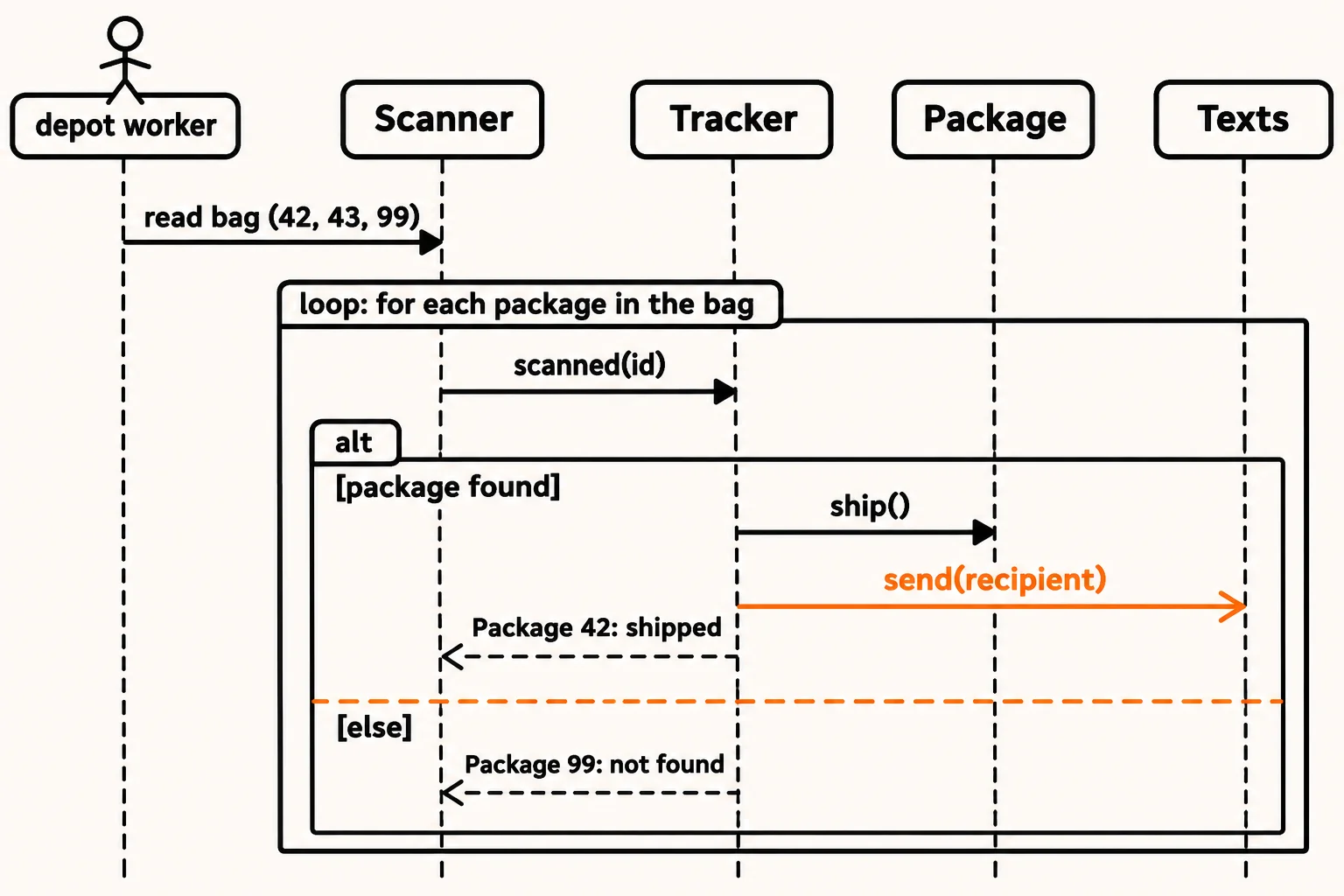
- A loop frame. A box drawn around the arrows that repeat, with
loopin its corner and what it repeats for: for each package in the bag. The code'sforloop is the box. - An alt frame. A box split into parts by a dashed line, one part for each choice, like an
ifand itselse. Each part has its condition in square brackets,[package found]and[else]. Only one part happens each time around. (When there's only anif, with nothing in theelse, the box is labeledopt, for "optional".) - Waiting, or not. A call with a filled arrowhead waits: the scanner can't print until the tracker answers. The text to the customer has an open arrowhead: the tracker hands the message to the texting service and carries on without waiting for an answer. In this small program the text prints at once; in the real app the texting service sends it in its own time, and the open arrowhead says the tracker doesn't care when.
Your textbook calls these boxes combined fragments, and an open-arrowhead message an asynchronous message (one that doesn't wait); a waiting call is synchronous. There are a few more kinds of frame (par for things happening at the same time, break for leaving a loop early), but loop, alt and opt cover most diagrams you'll meet.
A call that makes an object
Sometimes a call doesn't ask an existing object for something; it creates one. When the website takes a new order from Sam, the tracker makes package 43. That package didn't exist at the top of the diagram, so its lifeline starts lower down, at the height of the call that creates it, and the arrow points at its box, often labeled new or «create». An object that's done can end its lifeline with an X, though most diagrams leave it out.
Write it as text: Mermaid
Drawing boxes by hand gets old. Mermaid is a small text language for diagrams: you write the lifelines and arrows as lines of text, and GitHub, VS Code (with the Mermaid preview) and many documentation tools draw the picture for you. Here is the evening scan:
sequenceDiagram
    actor Worker as depot worker
    participant Scanner
    participant Tracker
    participant Package
    participant Texts
    Worker->>Scanner: read bag (42, 43, 99)
    loop for each package in the bag
        Scanner->>Tracker: scanned(id)
        alt package found
            Tracker->>Package: ship()
            Tracker-)Texts: send(recipient)
            Tracker-->>Scanner: Package 42: shipped
        else
            Tracker-->>Scanner: Package 99: not found
        end
    end
Read the arrows aloud: ->> is a call (filled arrowhead, waits), -->> is a dashed reply, and -) is a message that doesn't wait (open arrowhead). loop … end and alt … else … end are the frames.
And the new order, with package 43 created partway down:
sequenceDiagram
    participant Website
    participant Tracker
    Website->>Tracker: order("Sam")
    create participant P43 as Package 43
    Tracker->>P43: new
    Tracker-->>Website: package 43
Because it's text, a Mermaid diagram lives next to the code in your repository, changes show up in a code review, and nobody has to redraw a picture when an arrow moves.
Try it. Add a line to the first Mermaid diagram so that, after the loop, the scanner tells the worker "bag done". (It's Scanner-->>Worker: bag done, after the last end.)
Check yourself
2 questions to try on the lesson page.
So what
Loops, choices and calls that don't wait are where real bugs hide: the text that went out twice, the package that was never found. With frames and Mermaid you can draw them in a few minutes, and the next lesson uses both to plan the tracker.