Sequence Diagrams: Who Calls Whom, in Order
From this pass on, the design problems are about calls: who asks whom, in what order, and what comes back; a sequence diagram draws exactly that, as lifelines read from top to bottom, starting with a package scanned at the depot.
Apprentice · OOP · Software Development · Updated
After this lesson you can
- Read a sequence diagram top to bottom: who calls whom, in what order, and what comes back
- Draw a sequence diagram from a few lines of code that call each other
Key takeaways
- A class diagram shows what exists; a sequence diagram shows what happens, one call at a time, in order.
- Each object that takes part gets a lifeline: a box at the top and a dashed line down the page.
- A solid arrow is a call, labeled with what's asked; a dashed arrow back is the answer. Read them from top to bottom.
- Drawing the calls shows who depends on whom, so you can see where a change will ripple before you make it.
Before this: Drawing Structure: Class and Object Diagrams, where you met class diagrams.
This pass builds a bigger app: a package tracker for Lakeside Parcel, a small delivery company. In Pass 1, the bakery's problems were about where code lived: which function picks the product, where the deal goes. The tracker's problems are about calls: a scanner asks the tracker, the tracker tells the package, a text goes to the customer. When a bug report says "the customer got the text before the package was even scanned", a class diagram can't help. It shows what exists, not what happens, or in what order. So before the tracker's first line of code, this lesson hands you a second kind of diagram, the sequence diagram.
The scan at the depot
Every morning, the depot worker scans each package as it goes onto a truck. Scanning package 42 should mark it as shipped. Here are the three objects that make that happen, with a line printed at every step so you can follow the calls:
Tracker tracker = new Tracker();
tracker.Add(new Package(42, "Maya"));
Scanner scanner = new Scanner(tracker);
scanner.Read(42);
class Scanner
{
private readonly Tracker tracker;
public Scanner(Tracker tracker) { this.tracker = tracker; }
public void Read(int id)
{
Console.WriteLine(Scanner: read package 42
Tracker: find package 42
Package 42: was ordered, now shipped
Scanner shows: Package 42: shipped
class Package {
int id;
String recipient;
String status = "ordered";
Package(int id, String recipient) { this.id = id; this.recipient = recipient; }
void ship() {
IO.println("Package " + id + ": was " + status + ", now shipped");
status = "shipped";
}
}
class Tracker {
Map<Integer, Package> packages = new HashMap<>();
void add(Package parcel) { packages.put(parcel.id, parcel); }
String scanned(int id) {
IO.println("Tracker: find package " + id);
Package parcel = packages.get(id);
parcel.ship();
return "Package " + id + ": " + parcel.status;
}
}
class Scanner {
Tracker tracker;
Scanner(Tracker tracker) { this.tracker = tracker; }
void read(int id) {
IO.println("Scanner: read package " + id);
String answer = tracker.scanned(id);
IO.println("Scanner shows: " + answer);
}
}
void main() {
Tracker tracker = new Tracker();
tracker.add(new Package(42, "Maya"));
Scanner scanner = new Scanner(tracker);
scanner.read(42);
}
Scanner: read package 42
Tracker: find package 42
Package 42: was ordered, now shipped
Scanner shows: Package 42: shipped
class Package:
def __init__(self, id, recipient):
self.id = id
self.recipient = recipient
self.status = "ordered"
def ship(self):
print(f"Package {self.id}: was {self.status}, now shipped")
self.status = "shipped"
class Tracker:
def __init__(self):
self.packages = {}
def add(self, parcel):
self.packages[parcel.id] = parcel
def scanned(self, id):
print(f"Tracker: find package {id}")
parcel = self.packages[id]
parcel.ship()
return f"Package {id}: {parcel.status}"
class Scanner:
def __init__(self, tracker):
self.tracker = tracker
def read(self, id):
print(f"Scanner: read package {id}")
answer = self.tracker.scanned(id)
print(f"Scanner shows: {answer}")
tracker = Tracker()
tracker.add(Package(42, "Maya"))
scanner = Scanner(tracker)
scanner.read(42)
Scanner: read package 42
Tracker: find package 42
Package 42: was ordered, now shipped
Scanner shows: Package 42: shipped
class Package {
status = "ordered";
constructor(id, recipient) {
this.id = id;
this.recipient = recipient;
}
ship() {
console.log(`Package ${this.id}: was ${this.status}, now shipped`);
this.status = "shipped";
}
}
class Tracker {
packages = new Map();
add(parcel) {
this.packages.set(parcel.id, parcel);
}
scanned(id) {
console.log(`Tracker: find package ${id}`);
const parcel = this.packages.get(id);
parcel.ship();
return `Package ${id}: ${parcel.status}`;
}
}
class Scanner {
constructor(tracker) {
this.tracker = tracker;
}
read(id) {
console.log(`Scanner: read package ${id}`);
const answer = this.tracker.scanned(id);
console.log(`Scanner shows: ${answer}`);
}
}
const tracker = new Tracker();
tracker.add(new Package(42, "Maya"));
const scanner = new Scanner(tracker);
scanner.read(42);
Scanner: read package 42
Tracker: find package 42
Package 42: was ordered, now shipped
Scanner shows: Package 42: shipped
class Package {
id: number;
recipient: string;
status = "ordered";
constructor(id: number, recipient: string) {
this.id = id;
this.recipient = recipient;
}
ship(): void {
console.log(`Package ${this.id}: was ${this.status}, now shipped`);
this.status = "shipped";
}
}
class Tracker {
packages = new Map<number, Package>();
add(parcel: Package): void {
this.packages.set(parcel.id, parcel);
}
scanned(id: number): string {
console.log(`Tracker: find package ${id}`);
const parcel = this.packages.get(id)!;
parcel.ship();
return `Package ${id}: ${parcel.status}`;
}
}
class Scanner {
tracker: Tracker;
constructor(tracker: Tracker) {
this.tracker = tracker;
}
read(id: number): void {
console.log(`Scanner: read package ${id}`);
const answer = this.tracker.scanned(id);
console.log(`Scanner shows: ${answer}`);
}
}
const tracker = new Tracker();
tracker.add(new Package(42, "Maya"));
const scanner = new Scanner(tracker);
scanner.read(42);
Scanner: read package 42
Tracker: find package 42
Package 42: was ordered, now shipped
Scanner shows: Package 42: shipped
Where the languages differ. The variable is called parcel, not package, because package is a reserved word in Java, and in JavaScript and TypeScript classes. TypeScript's ! after get(id) says "I know this package is there"; the next lesson handles the case where it isn't.
Four lines, in an order that matters. Reading the code to find that order means jumping between three classes. A picture would show it at a glance.
The everyday version: a relay race
A relay race works the same way. Each runner waits at their spot until the baton arrives, runs their part, and hands it on. To understand the race, you don't need to know each runner's shoe size; you need to know who hands the baton to whom, and in what order.
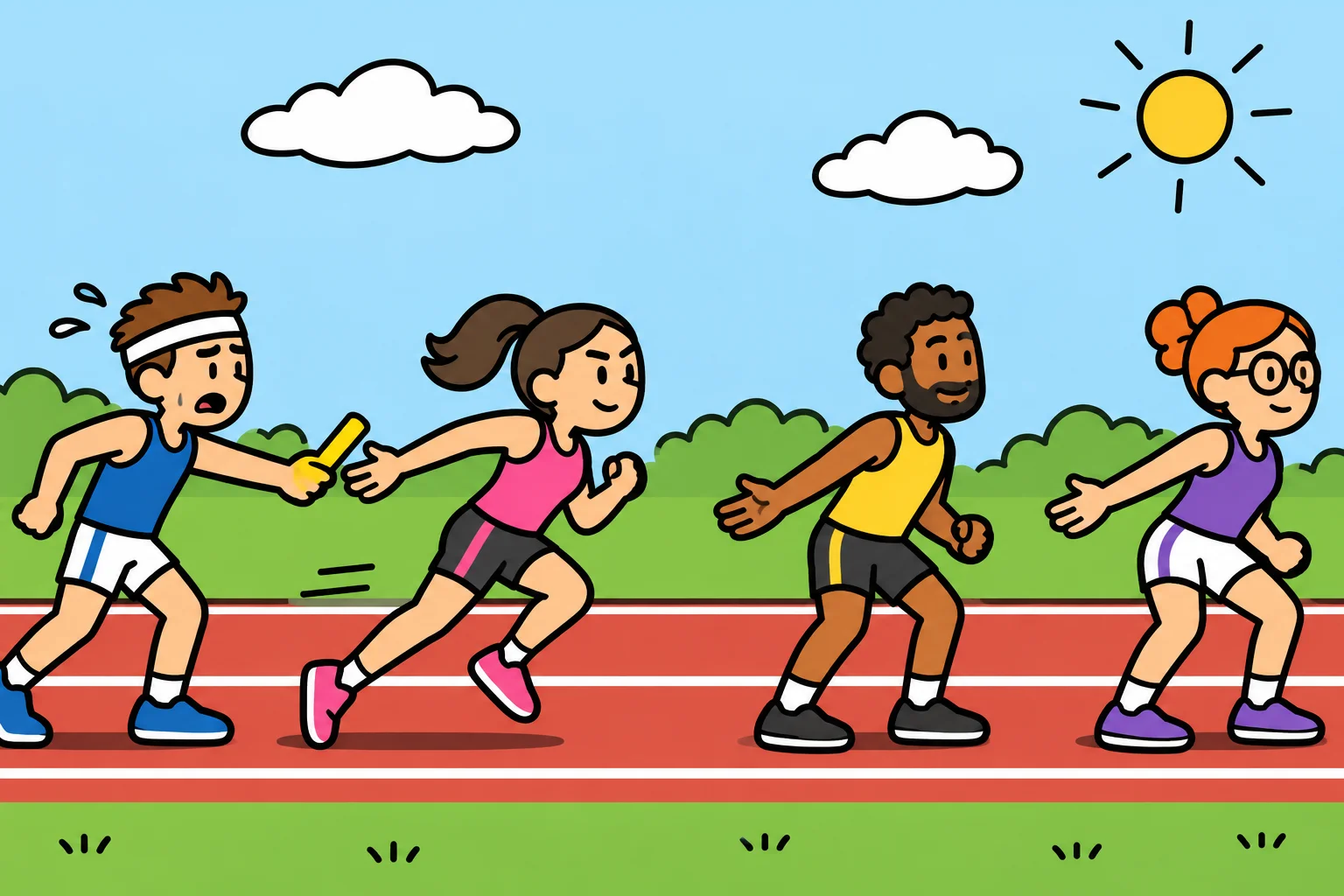
Reading a sequence diagram
A sequence diagram draws the race. It's one of the diagrams in UML, the Unified Modeling Language, the same family as the class diagrams you already know. Here is the scan at the depot:
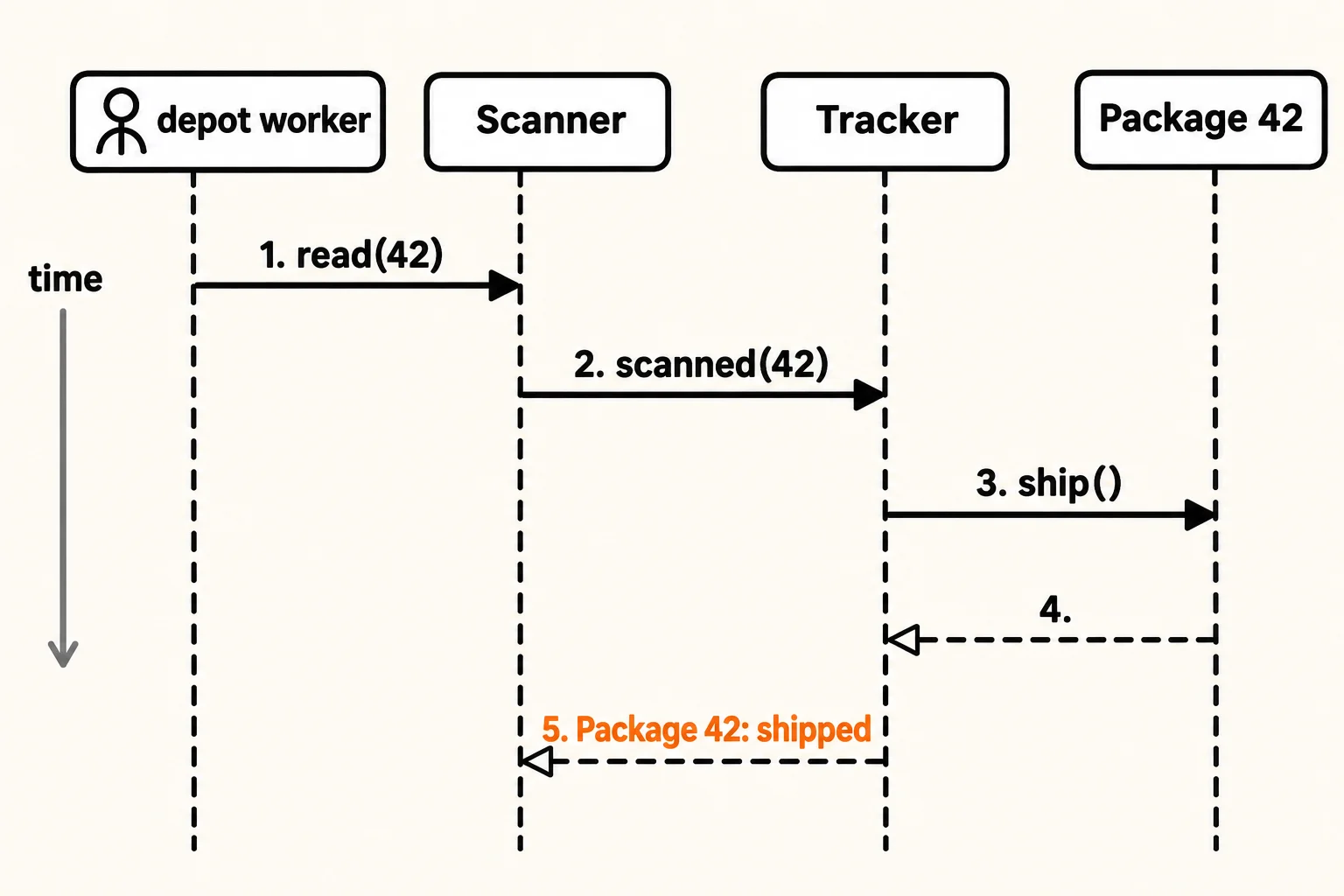
Four parts make it up:
- Lifelines. Each object that takes part gets a box across the top and a dashed line straight down the page. The line is that object's life during the story. A person who starts the story, such as the depot worker, is drawn as a stick figure. (A textbook writes an object's box as
name : Class, such asp42 : Package; this course writes the plain name.) - Messages. A solid arrow from one lifeline to another is a call: one object asks another to do something. It's labeled with what's asked, usually the method's name:
scanned(42). - Replies. A dashed arrow back is the answer:
"Package 42: shipped". When a call returns nothing worth saying, the dashed arrow can be left unlabeled, or left out. - Time runs down the page. The higher arrow happens first. That's the whole trick: read from top to bottom, and you're reading the story in order.
Textbooks add one more mark: a thin rectangle on a lifeline, called an activation bar, for the time that object is busy. Here, Tracker's bar would start at arrow 2 and end at arrow 5, because Tracker is busy for the whole time it waits for the package.
Read the diagram out loud and it's the code's printed lines: the worker asks the scanner to read 42, the scanner asks the tracker, the tracker tells package 42 to ship, the package is done, and the tracker answers "Package 42: shipped".
Drawing one from code
You can draw a sequence diagram from any few lines of code that call each other, in four steps:
- Find the first call. Who starts the story? Here, the worker calls
scanner.Read(42). - Add a lifeline for each object, left to right, in the order they join the story.
- Follow the code. Each time one object calls another's method, draw a solid arrow from the caller to the one called, below the last arrow. When the method returns something, draw a dashed arrow back.
- Read it back from top to bottom and check it against the code, line by line.
Try it. Add a fourth object, Texts, with a method Send(name) that prints Text to Maya: your package is on its way, and have the tracker call it right after parcel.Ship(). Where does the new arrow go on the diagram? (From Tracker to Texts, below arrow 3 and above the reply to the scanner.)
What the diagram is good for
A sequence diagram earns its keep in three places:
- Before you code: sketching the calls shows who needs to know whom. If an arrow crosses the whole page, two objects that shouldn't know each other are talking.
- When you're tracking down a bug: "the text went out before the scan" is a question about order, and the diagram answers it.
- For the rest of this course: many patterns are about calls (who asks, who decides, who's told), and from here on each of those patterns comes with its sequence diagram.
You don't need to draw one for every method. Draw one when the order of the calls is the thing you need to understand or explain.
Check yourself
2 questions to try on the lesson page.
So what
A class diagram tells you who's in the story; a sequence diagram tells you the story. With both, you can plan the tracker, and every pattern in this pass comes with a picture of how its calls flow.