A Contact List That's Fast to Search and Easy to Change: Binary Search Trees
Keep 100,000 contacts so a name is found on every keystroke, new contacts go in all day, and the screen shows everyone A to Z, or from Kai to Maya, without sorting: why an unsorted list, a sorted array and a dictionary each fall short, and the structure that fixes them, the binary search tree.
Journeyman · Data Structures · Updated
After this lesson you can
- Trace a search or an add through a binary search tree, going left for smaller and right for bigger
- Describe how a binary search tree removes a leaf, a node with one child and a node with two children
- Choose between an unsorted list, a sorted array, a hash table and a binary search tree for a job, and say why
Key takeaways
- An unsorted list finds a name in O(n); a sorted array finds it in O(log n) but slides about half the names to add one; a dictionary finds and adds in O(1) but keeps no order.
- In a binary search tree, every node's left subtree holds smaller values and its right subtree bigger ones.
- Search and add follow one path down: left for smaller, right for bigger, so each step skips a whole subtree, and a new name is hung where the search fell off, with nothing sliding.
- Removing a leaf deletes it, a node with one child is replaced by that child, and a node with two children by the next value in order.
- When the tree is balanced, search, add and remove are O(log n); an in-order walk lists everything in sorted order.
Before this: Finding Maya's Coat Without a Ticket: Hash Tables finds a name in one step, but it keeps no order. It can't list names A to Z, or find everyone from Kai to Maya, without sorting them all first.
A sales team shares one contact list of 100,000 people, and the app has three jobs:
- Find as you type. Every keystroke in the search box looks up a name.
- Add all day. New contacts arrive from forms, imports and business cards.
- Show them in order. The contacts screen lists everyone A to Z, and the letter bar down its side jumps to a stretch such as everyone from Kai to Maya.
Fast finding, fast adding, and order kept the whole time. You've met structures that do one or two of those.
What would you try?
An unsorted list. Adding is instant: put the new contact at the end. But finding Kai means reading names from the top, up to 100,000 checks on every keystroke, O(n). And the A to Z screen has to sort all 100,000 each time it opens.
A sorted array. Binary search, from Module 4, finds a name in about 17 checks, O(log n). A to Z is already there, and "Kai to Maya" is: find Kai, then read along until Maya. But a new contact has to go in its place, so every name after it slides over one spot to make room: about 50,000 slides on average, O(n) per add. A morning's import of 10,000 business cards is about 500 million slides.
A dictionary. The hash table from Module 5 finds a name and adds one in O(1) on average. But it keeps names where their hashes put them, not in alphabetical order. Every A to Z screen sorts all 100,000 first, O(n log n), and "Kai to Maya" checks every name.
| What we tried | Find a name | Add a name | A to Z, or Kai to Maya | Where it breaks |
|---|---|---|---|---|
| Unsorted list | O(n): up to 100,000 checks | O(1) | sort every time | every keystroke |
| Sorted array | O(log n): about 17 checks | O(n): about 50,000 slides | already in order | every new contact |
| Dictionary | O(1) on average | O(1) on average | sort every time | every time order is needed |
The questions that lead to it
What does the app do most? All three jobs, all day. None of them can be the slow one.
What did the sorted array get right? Binary search: ask about the middle name first, and throw away the half the name can't be in. What went wrong? The names sat side by side, so a new one pushed everyone after it along.
So binary search always asks about the middle first. What if the middle name sat at the top, with the earlier half hanging off its left and the later half off its right, and each half's own middle at the top of that half? A search would start at the top and go left or right, halving as it goes. And a new name wouldn't need a gap in a row: it could hang off the bottom, wherever the search for it ran out of names.
How it got its name
This idea was so useful that it got a name: a binary search tree. It's a binary tree, because every node has at most two children, a left child and a right child, and it's a search tree because its shape holds the answers to binary search's questions. It keeps one rule at every node:
- everything in the node's left subtree is smaller than the node;
- everything in its right subtree is bigger.
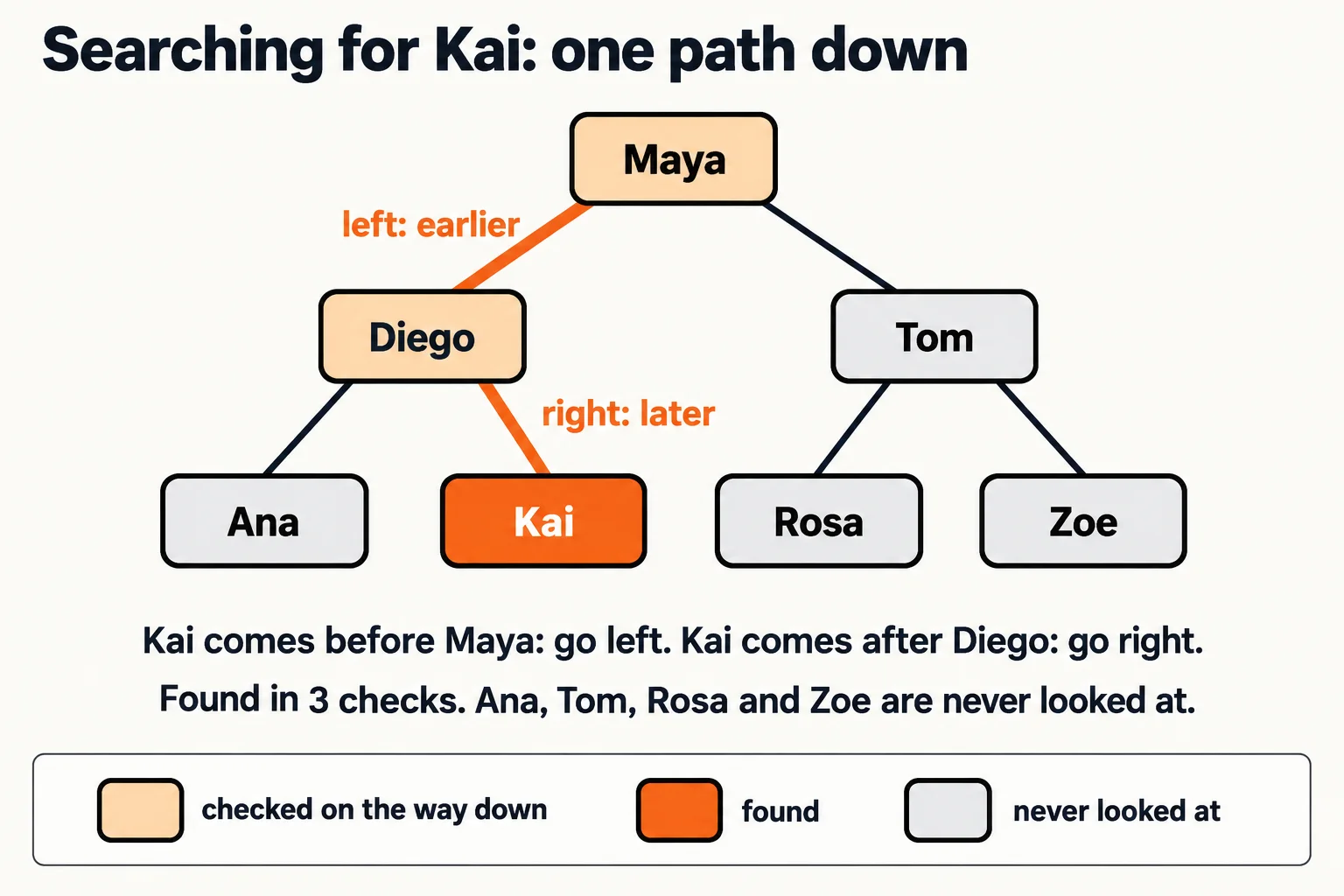
For contacts, smaller means earlier in the alphabet. Here are seven contacts added in the order Maya, Diego, Tom, Ana, Kai, Rosa, Zoe. Maya came first, so she's the root. Diego is smaller than Maya, so he went left; Tom is bigger, so he went right. Every name after that followed the same rule down.
Searching: one path down
To find Kai, start at the root and compare:
- Kai comes before Maya, so go left, to Diego. Tom's whole side is skipped.
- Kai comes after Diego, so go right, to Kai. Found, in 3 checks.
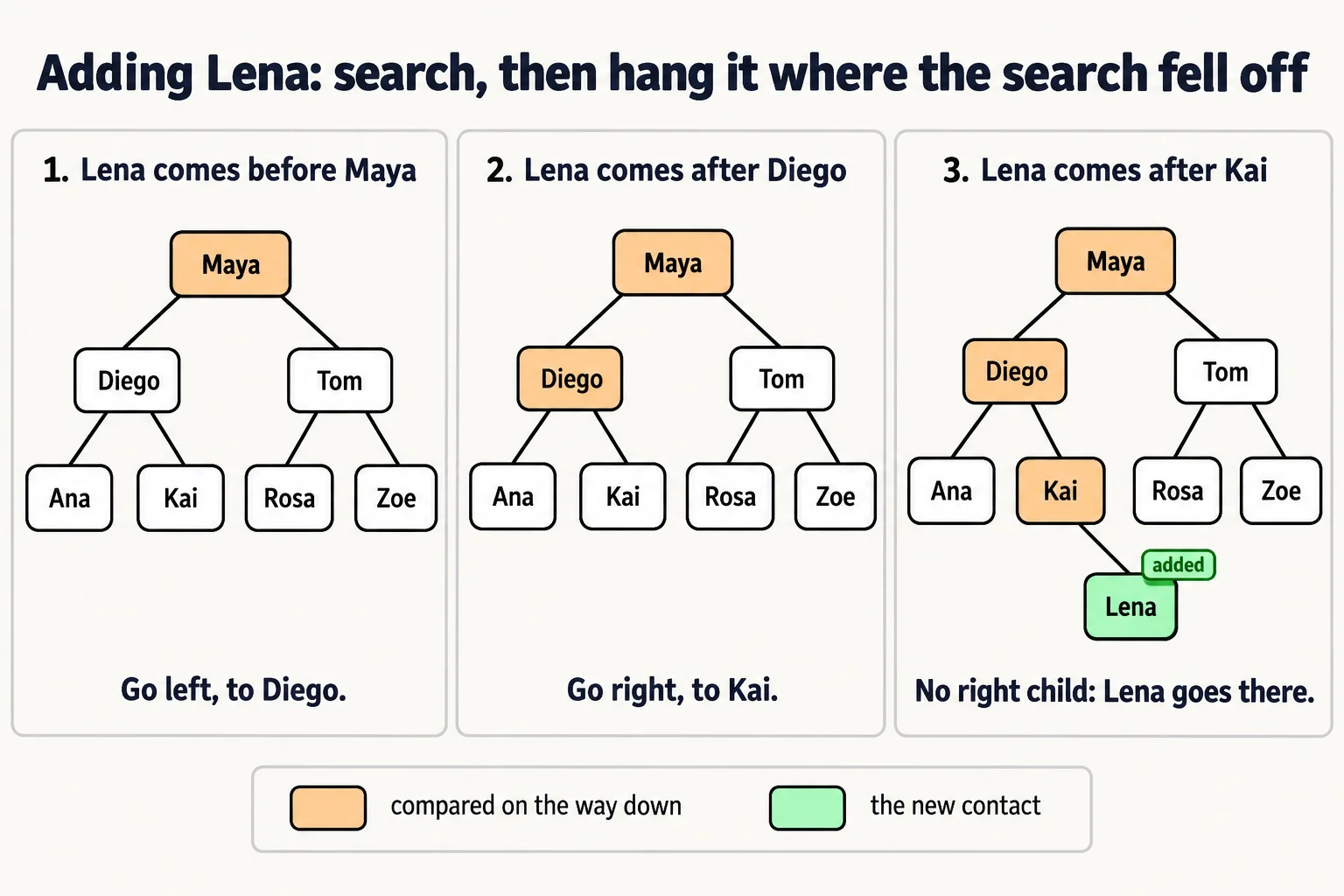
If the name isn't there, the path runs out: Lena comes before Maya (left), after Diego (right), after Kai (right), and Kai has no right child. Lena isn't in the tree, and you know it after 3 checks, not 7.
Adding: search, then hang it where the search fell off
Adding uses the same path. Search for the new name, and where the search falls off the tree, the new node goes. Adding Lena follows Maya, Diego, Kai, and becomes Kai's right child. Nothing else moves: no sliding, no copying, which is exactly what the sorted array couldn't do.
A binary search tree in code
Each Contact node holds a name and its two children, Left and Right; an empty spot is null (None in Python). The tree adds names, shows the path a search takes, and lists every name with an in-order walk from Print the Chart, Count the Teams: Walking a Tree in the Right Order: everything on the left, then the node, then everything on the right, which comes out A to Z.
ContactTree contacts = new ContactTree();
foreach (string name in new string[] { "Maya", "Diego", "Tom", "Ana", "Kai", "Rosa", "Zoe" })
{
    contacts.Add(name);
}
Console.WriteLine("Search for Kai: " + contacts.SearchPath("Kai"));
Console.WriteLine("Search for Lena: " + contacts.SearchPath("Lena"));
Console.WriteLine("A to Z: " + string.Join(", ", contacts.InOrder()));

class Contact
{
    public string Name { get; }
    public Contact? Left { get; set; }
    public Contact? Right { get; set; }

    public Contact(string name)
    {
        Name = name;
    }
}

class ContactTree
{
    private Contact? root;

    public void Add(string name)
    {
        if (root == null)
        {
            root = new Contact(name);
            return;
        }
        Contact current = root;
        while (true)
        {
            int comparison = string.CompareOrdinal(name, current.Name);
            if (comparison == 0)
            {
                return;
            }
            if (comparison < 0)
            {
                if (current.Left == null)
                {
                    current.Left = new Contact(name);
                    return;
                }
                current = current.Left;
            }
            else
            {
                if (current.Right == null)
                {
                    current.Right = new Contact(name);
                    return;
                }
                current = current.Right;
            }
        }
    }

    public string SearchPath(string name)
    {
        List<string> path = new List<string>();
        Contact? current = root;
        while (current != null)
        {
            path.Add(current.Name);
            int comparison = string.CompareOrdinal(name, current.Name);
            if (comparison == 0)
            {
                return string.Join(" -> ", path) + ": found";
            }
            current = comparison < 0 ? current.Left : current.Right;
        }
        return string.Join(" -> ", path) + ": not found";
    }

    public List<string> InOrder()
    {
        List<string> names = new List<string>();
        Walk(root, names);
        return names;
    }

    private void Walk(Contact? node, List<string> names)
    {
        if (node == null)
        {
            return;
        }
        Walk(node.Left, names);
        names.Add(node.Name);
        Walk(node.Right, names);
    }
}
Search for Kai: Maya -> Diego -> Kai: found
Search for Lena: Maya -> Diego -> Kai: not found
A to Z: Ana, Diego, Kai, Maya, Rosa, Tom, Zoe
class Contact {
    String name;
    Contact left;
    Contact right;

    Contact(String name) {
        this.name = name;
    }
}

class ContactTree {
    private Contact root;

    void add(String name) {
        if (root == null) {
            root = new Contact(name);
            return;
        }
        Contact current = root;
        while (true) {
            int comparison = name.compareTo(current.name);
            if (comparison == 0) {
                return;
            }
            if (comparison < 0) {
                if (current.left == null) {
                    current.left = new Contact(name);
                    return;
                }
                current = current.left;
            } else {
                if (current.right == null) {
                    current.right = new Contact(name);
                    return;
                }
                current = current.right;
            }
        }
    }

    String searchPath(String name) {
        List<String> path = new ArrayList<>();
        Contact current = root;
        while (current != null) {
            path.add(current.name);
            int comparison = name.compareTo(current.name);
            if (comparison == 0) {
                return String.join(" -> ", path) + ": found";
            }
            current = comparison < 0 ? current.left : current.right;
        }
        return String.join(" -> ", path) + ": not found";
    }

    List<String> inOrder() {
        List<String> names = new ArrayList<>();
        walk(root, names);
        return names;
    }

    private void walk(Contact node, List<String> names) {
        if (node == null) {
            return;
        }
        walk(node.left, names);
        names.add(node.name);
        walk(node.right, names);
    }
}

void main() {
    ContactTree contacts = new ContactTree();
    for (String name : new String[] {"Maya", "Diego", "Tom", "Ana", "Kai", "Rosa", "Zoe"}) {
        contacts.add(name);
    }
    IO.println("Search for Kai: " + contacts.searchPath("Kai"));
    IO.println("Search for Lena: " + contacts.searchPath("Lena"));
    IO.println("A to Z: " + String.join(", ", contacts.inOrder()));
}
Search for Kai: Maya -> Diego -> Kai: found
Search for Lena: Maya -> Diego -> Kai: not found
A to Z: Ana, Diego, Kai, Maya, Rosa, Tom, Zoe
class Contact:
    def __init__(self, name):
        self.name = name
        self.left = None
        self.right = None


class ContactTree:
    def __init__(self):
        self.root = None

    def add(self, name):
        if self.root is None:
            self.root = Contact(name)
            return
        current = self.root
        while True:
            if name == current.name:
                return
            if name < current.name:
                if current.left is None:
                    current.left = Contact(name)
                    return
                current = current.left
            else:
                if current.right is None:
                    current.right = Contact(name)
                    return
                current = current.right

    def search_path(self, name):
        path = []
        current = self.root
        while current is not None:
            path.append(current.name)
            if name == current.name:
                return " -> ".join(path) + ": found"
            current = current.left if name < current.name else current.right
        return " -> ".join(path) + ": not found"

    def in_order(self):
        names = []
        self._walk(self.root, names)
        return names

    def _walk(self, node, names):
        if node is None:
            return
        self._walk(node.left, names)
        names.append(node.name)
        self._walk(node.right, names)


contacts = ContactTree()
for name in ["Maya", "Diego", "Tom", "Ana", "Kai", "Rosa", "Zoe"]:
    contacts.add(name)
print("Search for Kai: " + contacts.search_path("Kai"))
print("Search for Lena: " + contacts.search_path("Lena"))
print("A to Z: " + ", ".join(contacts.in_order()))
Search for Kai: Maya -> Diego -> Kai: found
Search for Lena: Maya -> Diego -> Kai: not found
A to Z: Ana, Diego, Kai, Maya, Rosa, Tom, Zoe
class Contact {
  constructor(name) {
    this.name = name;
    this.left = null;
    this.right = null;
  }
}

class ContactTree {
  constructor() {
    this.root = null;
  }

  add(name) {
    if (this.root === null) {
      this.root = new Contact(name);
      return;
    }
    let current = this.root;
    while (true) {
      if (name === current.name) {
        return;
      }
      if (name < current.name) {
        if (current.left === null) {
          current.left = new Contact(name);
          return;
        }
        current = current.left;
      } else {
        if (current.right === null) {
          current.right = new Contact(name);
          return;
        }
        current = current.right;
      }
    }
  }

  searchPath(name) {
    const path = [];
    let current = this.root;
    while (current !== null) {
      path.push(current.name);
      if (name === current.name) {
        return `${path.join(" -> ")}: found`;
      }
      current = name < current.name ? current.left : current.right;
    }
    return `${path.join(" -> ")}: not found`;
  }

  inOrder() {
    const names = [];
    this.#walk(this.root, names);
    return names;
  }

  #walk(node, names) {
    if (node === null) {
      return;
    }
    this.#walk(node.left, names);
    names.push(node.name);
    this.#walk(node.right, names);
  }
}

const contacts = new ContactTree();
for (const name of ["Maya", "Diego", "Tom", "Ana", "Kai", "Rosa", "Zoe"]) {
  contacts.add(name);
}
console.log(`Search for Kai: ${contacts.searchPath("Kai")}`);
console.log(`Search for Lena: ${contacts.searchPath("Lena")}`);
console.log(`A to Z: ${contacts.inOrder().join(", ")}`);
Search for Kai: Maya -> Diego -> Kai: found
Search for Lena: Maya -> Diego -> Kai: not found
A to Z: Ana, Diego, Kai, Maya, Rosa, Tom, Zoe
class Contact {
  name: string;
  left: Contact | null = null;
  right: Contact | null = null;

  constructor(name: string) {
    this.name = name;
  }
}

class ContactTree {
  private root: Contact | null = null;

  add(name: string): void {
    if (this.root === null) {
      this.root = new Contact(name);
      return;
    }
    let current = this.root;
    while (true) {
      if (name === current.name) {
        return;
      }
      if (name < current.name) {
        if (current.left === null) {
          current.left = new Contact(name);
          return;
        }
        current = current.left;
      } else {
        if (current.right === null) {
          current.right = new Contact(name);
          return;
        }
        current = current.right;
      }
    }
  }

  searchPath(name: string): string {
    const path: string[] = [];
    let current = this.root;
    while (current !== null) {
      path.push(current.name);
      if (name === current.name) {
        return `${path.join(" -> ")}: found`;
      }
      current = name < current.name ? current.left : current.right;
    }
    return `${path.join(" -> ")}: not found`;
  }

  inOrder(): string[] {
    const names: string[] = [];
    this.walk(this.root, names);
    return names;
  }

  private walk(node: Contact | null, names: string[]): void {
    if (node === null) {
      return;
    }
    this.walk(node.left, names);
    names.push(node.name);
    this.walk(node.right, names);
  }
}

const contacts = new ContactTree();
for (const name of ["Maya", "Diego", "Tom", "Ana", "Kai", "Rosa", "Zoe"]) {
  contacts.add(name);
}
console.log(`Search for Kai: ${contacts.searchPath("Kai")}`);
console.log(`Search for Lena: ${contacts.searchPath("Lena")}`);
console.log(`A to Z: ${contacts.inOrder().join(", ")}`);
Search for Kai: Maya -> Diego -> Kai: found
Search for Lena: Maya -> Diego -> Kai: not found
A to Z: Ana, Diego, Kai, Maya, Rosa, Tom, Zoe
The arrow -> in the output is read "then": Maya, then Diego, then Kai. A name that's already in the tree isn't added twice, since two contacts can't share a spot. The names are compared character by character, the way a dictionary orders words, so capital letters count: C# uses string.CompareOrdinal and Java compareTo for that, while Python, JavaScript and TypeScript compare strings with < directly.
Try it. Add "Lena" to the list of names and run it again. The search for Lena now ends with found, and the A to Z list puts her between Kai and Maya, without any code that sorts.
Removing: three cases
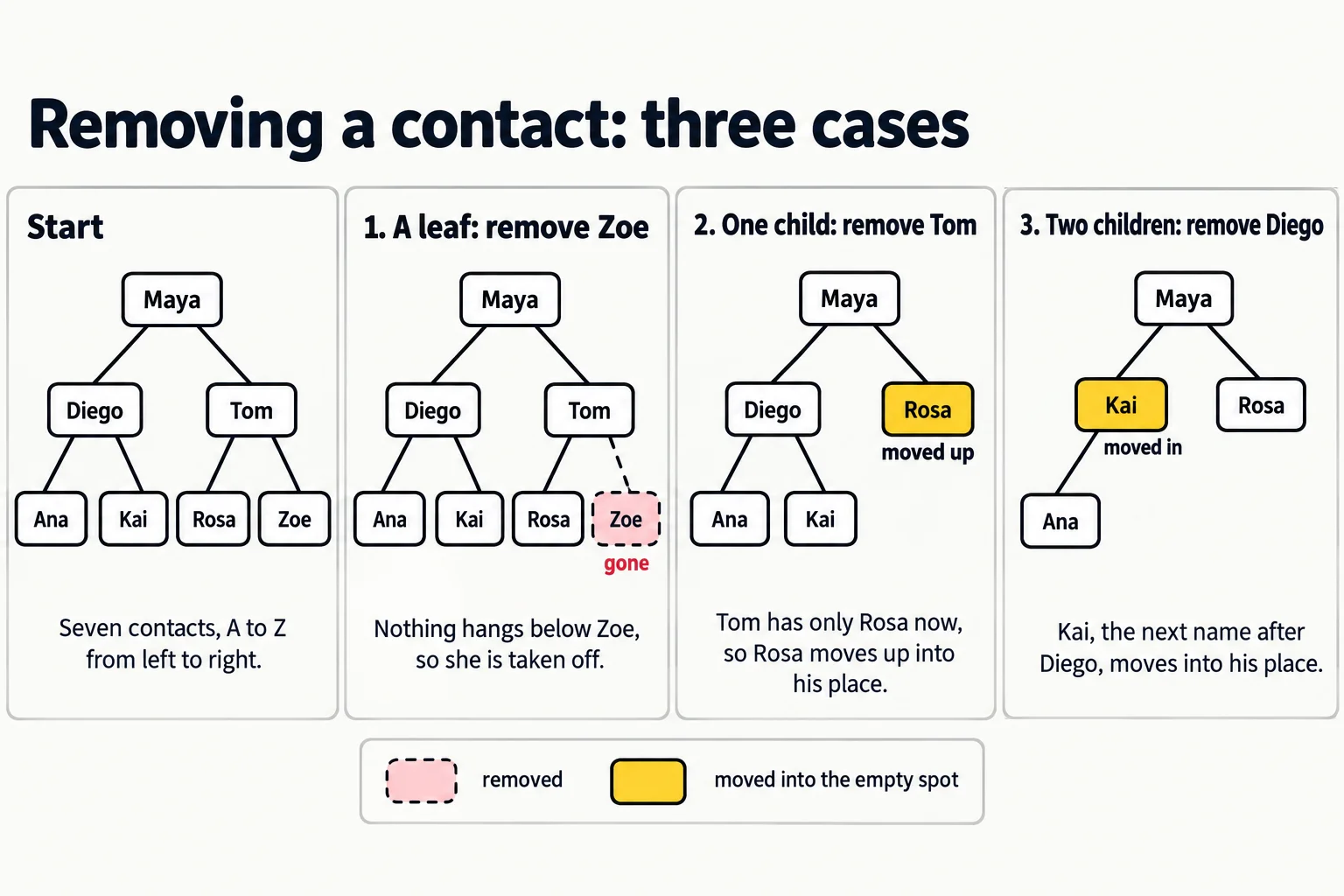
Removing a contact has to keep the rule true at every node. There are three cases, from easy to clever:
- A leaf: nothing hangs below it, so take it off. Removing Zoe leaves Tom with only Rosa.
- A node with one child: the child moves up into its place, bringing everything below it along. Removing Tom now moves Rosa up to be Maya's right child.
- A node with two children: it can't hand its spot to both children. Instead, find the next name in order, the smallest name in its right subtree: go right once, then left as far as you can. That name moves into the node's spot, and is removed from where it was (which is always case 1 or 2). Removing Diego moves Kai up: Kai is the next name after Diego, so Ana is still on his left, and everything is still in order.
You'll write all three cases yourself in Exercise: The Contact List Tree.
The binary search tree's cost card
Every operation walks one path from the root, so its cost is the tree's height. When the tree is balanced, its height is about log n, the same "halve it each time" count as binary search:
| Operation | Big-O (balanced) | Why, in everyday terms |
|---|---|---|
| Search for a name | O(log n) | Each check skips a whole side of the tree |
| Add a name | O(log n) | Search for it, then hang it where the search fell off; nothing slides |
| Remove a name | O(log n) | Find it, then at most one more walk down to the next name in order |
| List everything A to Z | O(n) | An in-order walk visits everyone once |
| Everyone from Kai to Maya | O(log n + k), k the names found | Walk down to Kai, then in order until Maya |
For the sales team's 100,000 contacts, that's about 17 checks per keystroke and about 17 steps per new contact, instead of 50,000 slides. The catch is the word balanced. A tree whose names arrive in the wrong order can grow tall and thin, and then every operation is O(n). That's the next lesson, The Sorted Import That Made Search Crawl: Why Balance Matters.
When another choice wins
A binary search tree is the all-rounder, and an all-rounder loses to a specialist at its own job:
- Names that never change: a sorted array finds them as fast, uses less memory, and has no links to follow. Its weakness was adding, and a fixed list never adds.
- Order that's never needed: a dictionary finds and adds in O(1), faster than O(log n). Its weakness was order, and a login page never lists its users A to Z.
What tips the choice to the tree is needing all three jobs at once: finding, changing and order.
Check yourself
2 questions to try on the lesson page.
So what
A binary search tree is binary search turned into a structure: one comparison per level, left for smaller and right for bigger. It finds, adds and removes in a few steps, never slides anything along, and hands you everything in sorted order for free.