Most Played, Then A to Z: Stable and Built-In Sorts
List songs by artist, then by title, with your language's built-in sort, and keep songs that tie in the order the user chose: why sorting twice scrambles them in C#, and the promise a sort has to make to keep that order, stability.
Journeyman · Data Structures · Updated
After this lesson you can
- Sort by more than one key with your language's built-in sort
- Explain what a stable sort is and when it matters
Key takeaways
- Every language's built-in sort is O(n log n). In real code, use it rather than writing your own.
- You tell the built-in sort what to sort by: a key (the plays, the artist) or a comparison of two items.
- Sort by more than one key by comparing the first key, and only when it ties, the next.
- A stable sort keeps items that tie in the order they were in. Java's object sort, Python's sort, JavaScript's sort and C#'s OrderBy are stable; C#'s List.Sort is not.
- Sorting twice, by title and then by artist, keeps each artist's songs in title order only with a stable sort; otherwise sort by both keys at once.
Before this: Can Any Sort Go Faster? The n log n Speed Limit (you've written four sorts by hand, and the fast ones are as fast as comparing gets).
In real code you'll write none of those four sorts: every language has a built-in sort that's faster than anything you'd write in an afternoon and has been tested by millions of programs. But here's a bug report from a music app that uses it.
The library screen has a column header for each field. A user clicks Title, then Artist, expecting every artist's songs in title order. In the C# version of the app, each artist's songs come back scrambled, and after a refresh they're scrambled differently. In the Java and Python versions, the same two clicks work.
What would you try?
Write your own sort. Your merge sort from A Million Songs to Sort Before Bedtime: Merge Sort gets it right, as you'll see. But now the app carries its own sort, tested only by you, in place of one used by millions.
Sort twice, again. Click Title, then Artist, and sort by title and then by artist in code: that's what the app already does. The second sort is the one that scrambles the songs.
One combined key, artist then title. It fixes these two columns. But the screen sorts by whichever columns the user clicked, in whatever order, and the app would have to remember every click and build the key from them.
Add each song's place in the list as the last tie-breaker. Sort by artist, and when two artists tie, by where the songs were before this sort. That works, every time, but it's work you'd do by hand on every sort.
The questions that lead to it
What did the first sort know that the second threw away? The title order. After clicking Title, each artist's songs were already in title order; the second sort only had to leave them that way.
What would a sort have to promise to keep it? That two items it can't tell apart, two songs by the same artist, come out in the order they went in. Java's and Python's built-in sorts make that promise. C#'s List<T>.Sort doesn't.
How it got its name
That promise was so useful that it got a name: a sort that keeps tied items in their original order is a stable sort. A sort that may shuffle them is unstable. With a stable sort, two clicks give two keys, one sort at a time, and the ties keep whatever order the last click gave them.
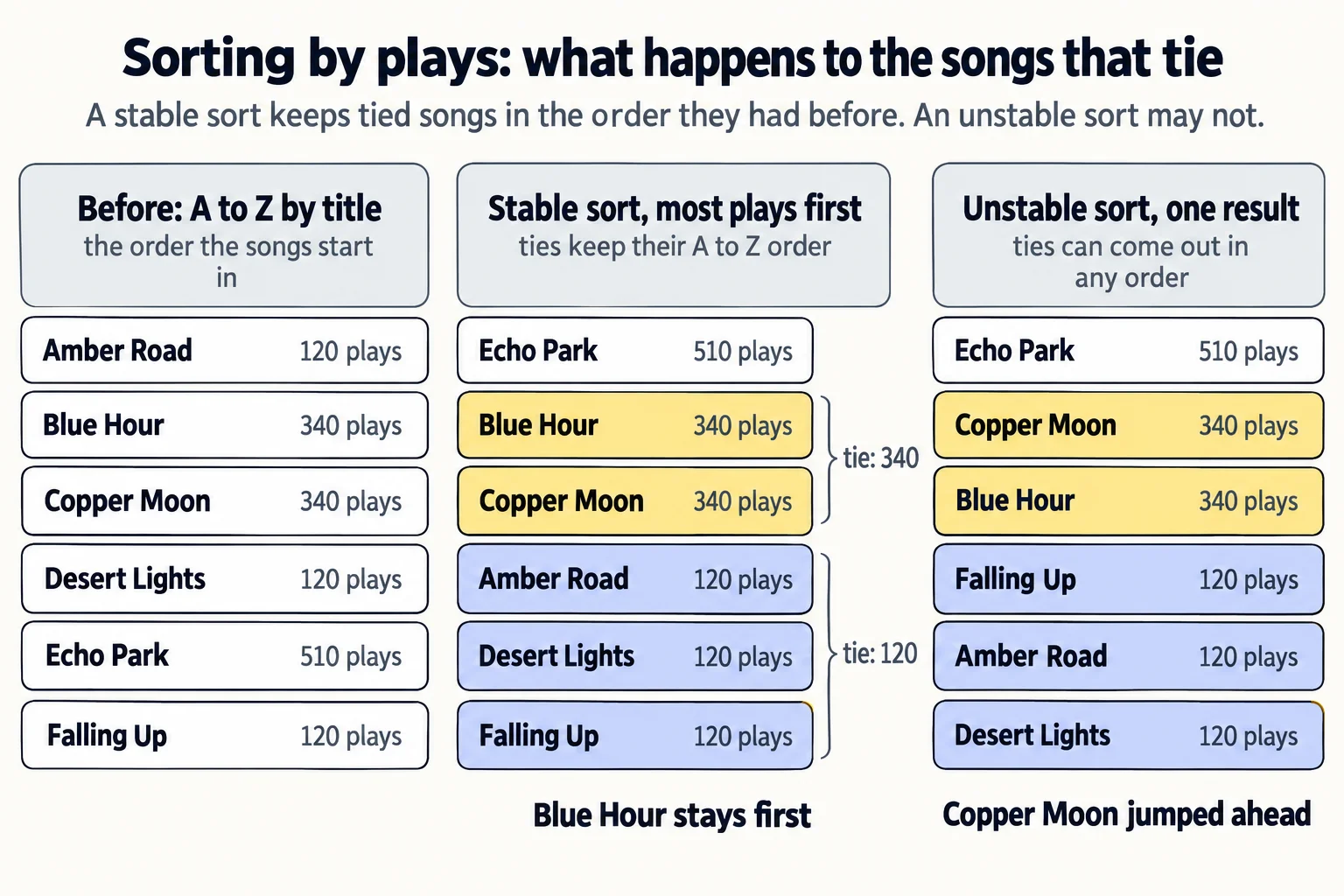
C#'s List<T>.Sort and Array.Sort are unstable: on a list of up to 16 items they happen to keep ties in order, and on a longer one they can scramble them, which is why the bug hides in small tests. C#'s LINQ OrderBy and ThenBy are stable. Here's which is which in every language, and what's inside.
What's inside your language's sort
All of them are O(n log n), and all of them mix the sorts from this module:
| Language | The built-in sort | What's inside | Stable? |
|---|---|---|---|
| C# | List<T>.Sort, Array.Sort |
introsort: quicksort, switching to heapsort if it goes too deep, and insertion sort for short stretches | no |
| C# | LINQ OrderBy, ThenBy |
a stable sort | yes |
| Java | List.sort, Collections.sort, Arrays.sort on objects |
Timsort: merge sort plus insertion sort | yes |
| Java | Arrays.sort on int[] and other plain numbers |
dual-pivot quicksort | no (two equal numbers can't be told apart anyway) |
| Python | sorted, list.sort |
Timsort (since Python 3.11 it picks which stretches to merge with a newer rule, Powersort) | yes |
| JavaScript, TypeScript | Array.prototype.sort, toSorted |
Timsort in Node.js and Chrome | yes |
Timsort looks for stretches of the list that are already in order and merges them, so it's especially fast on data that's almost sorted, the same talent you saw in insertion sort.
Sort by a key, then by two
A sort key is the thing you sort by: a song's plays, its artist, its title. Here are six songs from a music library, listed A to Z by title, sorted two ways: by plays, most first, and then by artist, with songs by the same artist in title order:
List<Song> songs = new List<Song>
{
    new Song("Amber Road", "Marigold Avenue", 120),
    new Song("Blue Hour", "Night Bus Trio", 340),
    new Song("Copper Moon", "Marigold Avenue", 340),
    new Song("Desert Lights", "Night Bus Trio", 120),
    new Song("Echo Park", "Copper Kettle Band", 510),
    new Song("Falling Up", "Copper Kettle Band", 120)
};

Console.WriteLine("By plays, most first:");
foreach (Song song in songs.OrderByDescending(song => song.Plays))
{
    Console.WriteLine(song.Plays + " plays: " + song.Title);
}

Console.WriteLine("By artist, then title:");
foreach (Song song in songs.OrderBy(song => song.Artist, StringComparer.Ordinal).ThenBy(song => song.Title, StringComparer.Ordinal))
{
    Console.WriteLine(song.Artist + ": " + song.Title);
}

record Song(string Title, string Artist, int Plays);
By plays, most first:
510 plays: Echo Park
340 plays: Blue Hour
340 plays: Copper Moon
120 plays: Amber Road
120 plays: Desert Lights
120 plays: Falling Up
By artist, then title:
Copper Kettle Band: Echo Park
Copper Kettle Band: Falling Up
Marigold Avenue: Amber Road
Marigold Avenue: Copper Moon
Night Bus Trio: Blue Hour
Night Bus Trio: Desert Lights
record Song(String title, String artist, int plays) {
}

void main() {
    List<Song> songs = List.of(
        new Song("Amber Road", "Marigold Avenue", 120),
        new Song("Blue Hour", "Night Bus Trio", 340),
        new Song("Copper Moon", "Marigold Avenue", 340),
        new Song("Desert Lights", "Night Bus Trio", 120),
        new Song("Echo Park", "Copper Kettle Band", 510),
        new Song("Falling Up", "Copper Kettle Band", 120));

    List<Song> byPlays = new ArrayList<>(songs);
    byPlays.sort(Comparator.comparingInt(Song::plays).reversed());
    IO.println("By plays, most first:");
    for (Song song : byPlays) {
        IO.println(song.plays() + " plays: " + song.title());
    }

    List<Song> byArtist = new ArrayList<>(songs);
    byArtist.sort(Comparator.comparing(Song::artist).thenComparing(Song::title));
    IO.println("By artist, then title:");
    for (Song song : byArtist) {
        IO.println(song.artist() + ": " + song.title());
    }
}
By plays, most first:
510 plays: Echo Park
340 plays: Blue Hour
340 plays: Copper Moon
120 plays: Amber Road
120 plays: Desert Lights
120 plays: Falling Up
By artist, then title:
Copper Kettle Band: Echo Park
Copper Kettle Band: Falling Up
Marigold Avenue: Amber Road
Marigold Avenue: Copper Moon
Night Bus Trio: Blue Hour
Night Bus Trio: Desert Lights
from dataclasses import dataclass


@dataclass
class Song:
    title: str
    artist: str
    plays: int


songs = [
    Song("Amber Road", "Marigold Avenue", 120),
    Song("Blue Hour", "Night Bus Trio", 340),
    Song("Copper Moon", "Marigold Avenue", 340),
    Song("Desert Lights", "Night Bus Trio", 120),
    Song("Echo Park", "Copper Kettle Band", 510),
    Song("Falling Up", "Copper Kettle Band", 120),
]

print("By plays, most first:")
for song in sorted(songs, key=lambda song: song.plays, reverse=True):
    print(f"{song.plays} plays: {song.title}")

print("By artist, then title:")
for song in sorted(songs, key=lambda song: (song.artist, song.title)):
    print(f"{song.artist}: {song.title}")
By plays, most first:
510 plays: Echo Park
340 plays: Blue Hour
340 plays: Copper Moon
120 plays: Amber Road
120 plays: Desert Lights
120 plays: Falling Up
By artist, then title:
Copper Kettle Band: Echo Park
Copper Kettle Band: Falling Up
Marigold Avenue: Amber Road
Marigold Avenue: Copper Moon
Night Bus Trio: Blue Hour
Night Bus Trio: Desert Lights
const songs = [
  { title: "Amber Road", artist: "Marigold Avenue", plays: 120 },
  { title: "Blue Hour", artist: "Night Bus Trio", plays: 340 },
  { title: "Copper Moon", artist: "Marigold Avenue", plays: 340 },
  { title: "Desert Lights", artist: "Night Bus Trio", plays: 120 },
  { title: "Echo Park", artist: "Copper Kettle Band", plays: 510 },
  { title: "Falling Up", artist: "Copper Kettle Band", plays: 120 },
];

console.log("By plays, most first:");
for (const song of [...songs].sort((a, b) => b.plays - a.plays)) {
  console.log(`${song.plays} plays: ${song.title}`);
}

console.log("By artist, then title:");
for (const song of [...songs].sort((a, b) => a.artist.localeCompare(b.artist) || a.title.localeCompare(b.title))) {
  console.log(`${song.artist}: ${song.title}`);
}
By plays, most first:
510 plays: Echo Park
340 plays: Blue Hour
340 plays: Copper Moon
120 plays: Amber Road
120 plays: Desert Lights
120 plays: Falling Up
By artist, then title:
Copper Kettle Band: Echo Park
Copper Kettle Band: Falling Up
Marigold Avenue: Amber Road
Marigold Avenue: Copper Moon
Night Bus Trio: Blue Hour
Night Bus Trio: Desert Lights
type Song = { title: string; artist: string; plays: number };

const songs: Song[] = [
  { title: "Amber Road", artist: "Marigold Avenue", plays: 120 },
  { title: "Blue Hour", artist: "Night Bus Trio", plays: 340 },
  { title: "Copper Moon", artist: "Marigold Avenue", plays: 340 },
  { title: "Desert Lights", artist: "Night Bus Trio", plays: 120 },
  { title: "Echo Park", artist: "Copper Kettle Band", plays: 510 },
  { title: "Falling Up", artist: "Copper Kettle Band", plays: 120 },
];

console.log("By plays, most first:");
for (const song of [...songs].sort((a, b) => b.plays - a.plays)) {
  console.log(`${song.plays} plays: ${song.title}`);
}

console.log("By artist, then title:");
for (const song of [...songs].sort((a, b) => a.artist.localeCompare(b.artist) || a.title.localeCompare(b.title))) {
  console.log(`${song.artist}: ${song.title}`);
}
By plays, most first:
510 plays: Echo Park
340 plays: Blue Hour
340 plays: Copper Moon
120 plays: Amber Road
120 plays: Desert Lights
120 plays: Falling Up
By artist, then title:
Copper Kettle Band: Echo Park
Copper Kettle Band: Falling Up
Marigold Avenue: Amber Road
Marigold Avenue: Copper Moon
Night Bus Trio: Blue Hour
Night Bus Trio: Desert Lights
There are two ways to say what to sort by, and the languages lean on different ones:
- A key: a small function that picks the sort key out of each item. C#'s
OrderBy(song => song.Plays), Java'sComparator.comparingInt(Song::plays)and Python'skey=lambda song: song.playsall do this. For more than one key, C# addsThenBy, JavathenComparing, and Python gives back a tuple,(song.artist, song.title), which Python compares item by item. - A comparison: a function that's handed two items,
aandb, and answers with a number: below zero whenacomes first, zero when they tie, above zero whenbcomes first. JavaScript and TypeScript work this way.b.plays - a.playsputs the most plays first, and||moves on to the title only when the artists tie (whenlocaleComparegives 0).
A note on the languages: sort sorts an array in place, so the code sorts a copy, [...songs], and leaves songs alone (newer JavaScript also has toSorted, which makes the copy for you). C# and Java copy before sorting for the same reason, and Python's sorted makes a new list too. One JavaScript trap: called with no comparison, sort compares items as text, so [10, 9, 100].sort() gives [10, 100, 9]. Always pass a comparison for numbers.
The ties in the output
Look at the songs with 340 plays: Blue Hour, then Copper Moon. And the three with 120: Amber Road, Desert Lights, Falling Up. Within each tie, the songs kept the order they had before the sort, A to Z by title. That's not luck: every sort in that example is stable, C#'s OrderBy included.
Stability matters whenever the order you started with means something:
- Sorting in steps. Sort a playlist by title, then by artist with a stable sort, and each artist's songs stay in title order: two keys, one sort at a time. That's the two clicks from the bug report.
- Ties that should stay put. A leaderboard sorted by points should keep players with equal points in the order they got there, like
addToBoardin Exercise: Sort the Leaderboard.
Back to the bug report. The C# app sorted with List<T>.Sort, which is unstable: songs by the same artist could come out in either order, and the order could change between refreshes as the list changed. The fix is one of two lines: sort with OrderBy (and ThenBy), which is stable, or sort by a second key that breaks every tie. Of the sorts you wrote: insertion sort and merge sort are stable (merge sort because it takes from the left pile on a tie, <=), while selection sort's long-distance swaps and the in-place quicksort can jump an item past its twin.
Try it. Sort the songs by plays, most first, and by title within each tie on purpose: in C#, add .ThenBy(song => song.Title, StringComparer.Ordinal); in Python, use key=lambda song: (-song.plays, song.title). The output doesn't change, because the stable sort already kept that order, but now it doesn't depend on the starting order.
The cost card
| Operation | Big-O | The everyday reason |
|---|---|---|
| Built-in sort, any list | O(n log n) | a tuned mix of merge sort or quicksort with insertion sort |
| Built-in sort, almost sorted (Timsort) | close to O(n) | it finds the stretches already in order and merges them |
| Compare two items by several keys | O(1) for a fixed number of keys | look at the next key only on a tie |
| Extra memory | O(n) for Timsort and OrderBy; O(log n) for introsort |
merging needs room; quicksort sorts in place |
Check yourself
2 questions to try on the lesson page.
So what
In real code, sorting is one line: the built-in sort plus your key or comparison. Your job is to name the keys in the right order and to know whether ties keep their order, because "sorted by plays, then by title" and "sorted by plays, ties in any order" look the same until two songs tie, usually in production, on a list longer than the one you tested.