Is That Song in My Library? Linear Search
Answer "is this song in my library, and where?" for a list kept in the order the songs were added: the search every list supports, what it costs, and the size at which it stops being fast enough.
Apprentice · Data Structures · Updated
After this lesson you can
- Write a linear search that gives back an item's position, or -1 when it isn't there
- Explain why linear search works on unsorted data and takes O(n) steps
Key takeaways
- Linear search checks each item in turn, from the first, and stops at the first match. It gives back the item's position, or -1 when the item isn't there.
- It works on any list, in any order, because it never skips an item.
- It is O(n), linear time: twice the songs, twice the looks in the worst case, when the song is last or missing.
- It breaks on a big list that's searched often: a missing song in a million takes a million looks, and a service answering 1,000 searches a second reads up to a billion titles a second.
- For a short list, or one searched only once, it's still the right search: sorting first would cost more than the search it speeds up.
Before this: Why the Library Check Slows Down and Play Doesn't: O(1) and O(n) (reading a list from the top takes one step per item) and Why Does This Loop Take Seconds? Your Language's List (songs kept in the order they were added).
Your music app keeps your songs in the order you added them: Midnight Bus first, then Lemon Skies, Slow Rain, Paper Boats and four more. A friend asks, "Do you have Slow Rain?", and the search box has to answer: is it there, and where?
It's the question every list gets asked most. A sign-up page asks it of every new email ("is this address taken?"), a spreadsheet asks it when you look for order 1042, and Ctrl+F asks it of every word in a document. By the end of this lesson you'll have the search every list supports, you'll know what it costs, and you'll know the size at which it stops being good enough.
What would you try?
Here the first idea is the right one to start with: look at the first song, then the next, and keep going until Slow Rain turns up or the songs run out. There's nothing simpler to try first. The songs are in the order you added them, which says nothing about titles, so Slow Rain could be anywhere, and every song is a place it might be.
So this lesson doesn't line up three tries and knock them down. It takes the one plain try, gives it its name, and pushes it until it breaks. The next lesson starts where it breaks.
How it got its name
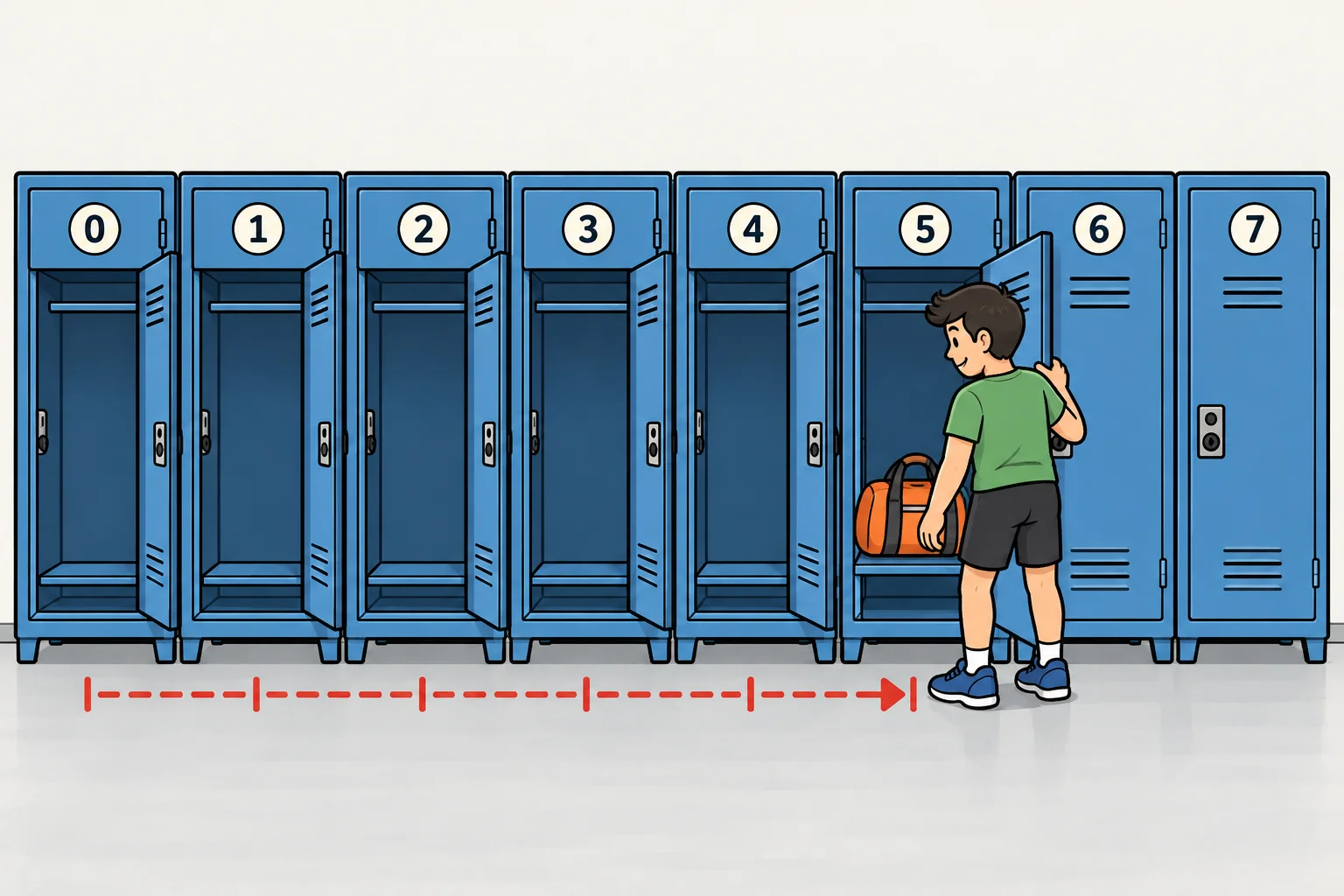
Checking the items one after another, in a line, was so common that it got a name: linear search (in your textbook, also sequential search). "Linear" means in a line. You've done it at the gym: the lockers have no names on them, so to find your bag you open the first locker, then the next, until the bag turns up.
- Start at the first item.
- If it's the one you want, stop: you've found it.
- If not, move on to the next item.
- If you run out of items, it isn't there.
Linear search in code
Here is that library of eight songs, and a search that gives back a song's position in the list: its index, counted from 0, as every list in the five languages counts. When the song isn't there, the search gives back -1, a number that can never be a real position. That "this means not found" value is the custom in every language you'll use.
List<string> library = new List<string> { "Midnight Bus", "Lemon Skies", "Slow Rain", "Paper Boats", "Neon Garden", "Quiet Harbor", "Sunday Static", "Golden Hour" };

int LinearSearch(List<string> songs, string title)
{
    for (int position = 0; position < songs.Count; position++)
    {
        if (songs[position] == title)
        {
            return position;
        }
    }
    return -1;
}

foreach (string title in new string[] { "Slow Rain", "Golden Hour", "Blue Hour" })
{
    Console.WriteLine(title + ": position " + LinearSearch(library, title));
}
Slow Rain: position 2
Golden Hour: position 7
Blue Hour: position -1
List<String> library = List.of("Midnight Bus", "Lemon Skies", "Slow Rain", "Paper Boats", "Neon Garden", "Quiet Harbor", "Sunday Static", "Golden Hour");

int linearSearch(List<String> songs, String title) {
    for (int position = 0; position < songs.size(); position++) {
        if (songs.get(position).equals(title)) {
            return position;
        }
    }
    return -1;
}

void main() {
    for (String title : new String[] {"Slow Rain", "Golden Hour", "Blue Hour"}) {
        IO.println(title + ": position " + linearSearch(library, title));
    }
}
Slow Rain: position 2
Golden Hour: position 7
Blue Hour: position -1
library = ["Midnight Bus", "Lemon Skies", "Slow Rain", "Paper Boats", "Neon Garden", "Quiet Harbor", "Sunday Static", "Golden Hour"]


def linear_search(songs, title):
    for position in range(len(songs)):
        if songs[position] == title:
            return position
    return -1


for title in ["Slow Rain", "Golden Hour", "Blue Hour"]:
    print(f"{title}: position {linear_search(library, title)}")
Slow Rain: position 2
Golden Hour: position 7
Blue Hour: position -1
const library = ["Midnight Bus", "Lemon Skies", "Slow Rain", "Paper Boats", "Neon Garden", "Quiet Harbor", "Sunday Static", "Golden Hour"];

function linearSearch(songs, title) {
  for (let position = 0; position < songs.length; position++) {
    if (songs[position] === title) {
      return position;
    }
  }
  return -1;
}

for (const title of ["Slow Rain", "Golden Hour", "Blue Hour"]) {
  console.log(`${title}: position ${linearSearch(library, title)}`);
}
Slow Rain: position 2
Golden Hour: position 7
Blue Hour: position -1
const library: string[] = ["Midnight Bus", "Lemon Skies", "Slow Rain", "Paper Boats", "Neon Garden", "Quiet Harbor", "Sunday Static", "Golden Hour"];

function linearSearch(songs: string[], title: string): number {
  for (let position = 0; position < songs.length; position++) {
    if (songs[position] === title) {
      return position;
    }
  }
  return -1;
}

for (const title of ["Slow Rain", "Golden Hour", "Blue Hour"]) {
  console.log(`${title}: position ${linearSearch(library, title)}`);
}
Slow Rain: position 2
Golden Hour: position 7
Blue Hour: position -1
Two details make it work. The return inside the loop stops the search at the first match, so nothing after it is read. The return -1 after the loop only runs when the loop has looked at every song without a match. Java compares text with .equals, because == on two Strings asks whether they are the same object, not the same words.
Try it. Search for "slow rain", all in small letters. The search gives back -1: to a computer, a capital S and a small s are different letters.
Your language already has one
Every language comes with a linear search built in, so in everyday code you call it instead of writing the loop. It's worth knowing that it is the same loop inside, with the same cost.
List<string> library = new List<string> { "Midnight Bus", "Lemon Skies", "Slow Rain", "Paper Boats", "Neon Garden", "Quiet Harbor", "Sunday Static", "Golden Hour" };

Console.WriteLine("Position of Slow Rain: " + library.IndexOf("Slow Rain"));
Console.WriteLine("Blue Hour in the library: " + (library.Contains("Blue Hour") ? "yes" : "no"));
Position of Slow Rain: 2
Blue Hour in the library: no
List<String> library = List.of("Midnight Bus", "Lemon Skies", "Slow Rain", "Paper Boats", "Neon Garden", "Quiet Harbor", "Sunday Static", "Golden Hour");

void main() {
    IO.println("Position of Slow Rain: " + library.indexOf("Slow Rain"));
    IO.println("Blue Hour in the library: " + (library.contains("Blue Hour") ? "yes" : "no"));
}
Position of Slow Rain: 2
Blue Hour in the library: no
library = ["Midnight Bus", "Lemon Skies", "Slow Rain", "Paper Boats", "Neon Garden", "Quiet Harbor", "Sunday Static", "Golden Hour"]

print(f"Position of Slow Rain: {library.index('Slow Rain')}")
print("Blue Hour in the library: " + ("yes" if "Blue Hour" in library else "no"))
Position of Slow Rain: 2
Blue Hour in the library: no
const library = ["Midnight Bus", "Lemon Skies", "Slow Rain", "Paper Boats", "Neon Garden", "Quiet Harbor", "Sunday Static", "Golden Hour"];

console.log(`Position of Slow Rain: ${library.indexOf("Slow Rain")}`);
console.log(`Blue Hour in the library: ${library.includes("Blue Hour") ? "yes" : "no"}`);
Position of Slow Rain: 2
Blue Hour in the library: no
const library: string[] = ["Midnight Bus", "Lemon Skies", "Slow Rain", "Paper Boats", "Neon Garden", "Quiet Harbor", "Sunday Static", "Golden Hour"];

console.log(`Position of Slow Rain: ${library.indexOf("Slow Rain")}`);
console.log(`Blue Hour in the library: ${library.includes("Blue Hour") ? "yes" : "no"}`);
Position of Slow Rain: 2
Blue Hour in the library: no
A note on the languages: C#, Java, JavaScript and TypeScript give back -1 from IndexOf or indexOf when the item is missing. Python's index doesn't: it stops the program with a ValueError. So in Python, ask in first ("is it there?"), then call index only when the answer is yes.
What it costs
How much work is a linear search? It depends on where the song is, which is the best, worst and average case from Fast in the Demo, Slow for Users: Best, Worst and Average:
- Best case: the song is first. One look, however big the library: O(1).
- Worst case: the song is last, or not there at all. Every song is looked at: n looks for n songs, O(n).
- Average case: somewhere in the middle, about n ÷ 2 looks, which is still O(n).
So linear search is O(n), read "big O of n": linear time. Twice the songs, twice the looks on a bad day.
Its strength is that it asks nothing of the data. The songs can be in any order, because the search never skips one.
Where it breaks
Eight songs take at most eight looks. Now give the library a million songs, the size of a streaming service's catalog or a big shop's customer list.
- One search for a missing song reads all 1,000,000 titles before it can say "not there". On a computer that's still well under a second, so a search you run once a day is fine.
- A search box asks on every keystroke. Type "Slow Rain" and that's nine searches, up to 9 million titles read, for one song.
- A service answers everyone at once. At 1,000 searches a second, it reads up to a billion titles a second, most of them to say "not found".
A faster computer doesn't fix it. O(n) means the work grows with the library: next year's two million songs take twice the looks again. The trouble is that skipping is impossible. Since the list's order says nothing about titles, any song you didn't look at might be the one.
The question that leads on
So ask: is there any way to know where a song is without looking at it? What would have to be true about the list, so that one look tells you something about the songs you didn't look at?
Think about how you'd find "quiet" in a paper dictionary, then read the next lesson, One Song in a Million, in 20 Looks: Binary Search. It answers the question, and it needs one thing from the list first.
When linear search is the right one
Don't throw it away. For a short list, or a list you search only once, linear search is the right tool, not a stopgap: no setup, short code, and any order works. The faster search needs the list sorted first, and sorting a million songs costs about 20 million steps (the rest of this module is about sorting). That's more than the million looks of one linear search, so sorting only pays off when the same big list is searched again and again.
The cost card
| Operation | Big-O | The everyday reason |
|---|---|---|
| Find an item, best case | O(1) | your bag is in the first locker |
| Find an item, worst case | O(n) | your bag is in the last locker, or in none, so you open them all |
| Find an item, average case | O(n) | about half the lockers, and half of n still grows with n |
| Extra memory | O(1) | you only remember which locker you're at |
Check yourself
2 questions to try on the lesson page.
So what
Linear search is the honest default: it works on any list and its code is short, so use it (or your language's indexOf) for small lists and one-off searches. When the same big list is searched again and again, a million looks a search is the sign to sort the list and search it a smarter way.