The Folder Tool That Never Stopped: Base Cases
Find out why the folder tool crashed on one customer's drive, and make every recursive function you write stop: why a bigger stack, catching the error and a depth limit all fall short, and the two rules of a base case that fix it.
Apprentice · Data Structures · Updated
After this lesson you can
- Write a base case that stops a recursive function, with every call moving toward it
- Explain what a stack overflow is and why a missing base case causes one
Key takeaways
- The base case is where a recursive function stops calling itself and answers straight away.
- Every call must move toward the base case. A call that hands back the same problem, or a step that skips past the base case, is as bad as no base case at all.
- Without a base case the calls never end, and the program crashes with a stack overflow, which each language reports in its own words.
- A bigger stack only moves the crash, and catching the error loses the answer: the fix is a base case every call can reach.
Before this: How Big Is This Folder? Recursion added up a folder by handing each folder inside it back to FolderSize, and stopped at folders with nothing inside.
The folder tool goes out to its first customers, and it works on every drive, except one. A customer writes in: she pointed it at her Projects folder, and it crashed. The Python version printed RecursionError: maximum recursion depth exceeded; the C# version printed Stack overflow. and closed.
Her Projects folder holds 40 MB of files and a Website folder with 15 MB. It also holds a shortcut called Back to Projects. Double-click it, and you're in Projects again. Shortcuts like this are common (Windows calls them links, macOS calls them aliases), and they're handy for people. For FolderSize they're a trap: it opened Projects, then the shortcut, which was Projects, then the shortcut inside that, and so on, forever.
Sooner or later every developer writes a recursive function that never stops, so in this lesson you'll make it happen on purpose, read the error in your language, and learn the two rules that prevent it.
The smallest version of the crash
A crash is easier to study when it's small. Here's the smallest recursive function that never stops: a countdown with nothing to tell it when to stop. It prints the number, then counts down from one less:
void Countdown(int number)
{
    Console.WriteLine(number);
    Countdown(number - 1);
}

Countdown(3);
Stack overflow.
void countdown(int number) {
    IO.println(number);
    countdown(number - 1);
}

void main() {
    countdown(3);
}
Exception in thread "main" java.lang.StackOverflowError
def countdown(number):
    print(number)
    countdown(number - 1)


countdown(3)
RecursionError: maximum recursion depth exceeded
function countdown(number) {
  console.log(number);
  countdown(number - 1);
}

countdown(3);
RangeError: Maximum call stack size exceeded
function countdown(number: number): void {
  console.log(number);
  countdown(number - 1);
}

countdown(3);
RangeError: Maximum call stack size exceeded
It's safe to run. It prints 3, 2, 1, 0, −1, −2 and keeps going, about a thousand numbers below zero in Python and thousands more in the other languages, and then the program crashes. Each language's output above is the line that says why. This is the one place in the course where the five tabs print different things: the crash is the same, but each language names it in its own words.
What the crash means
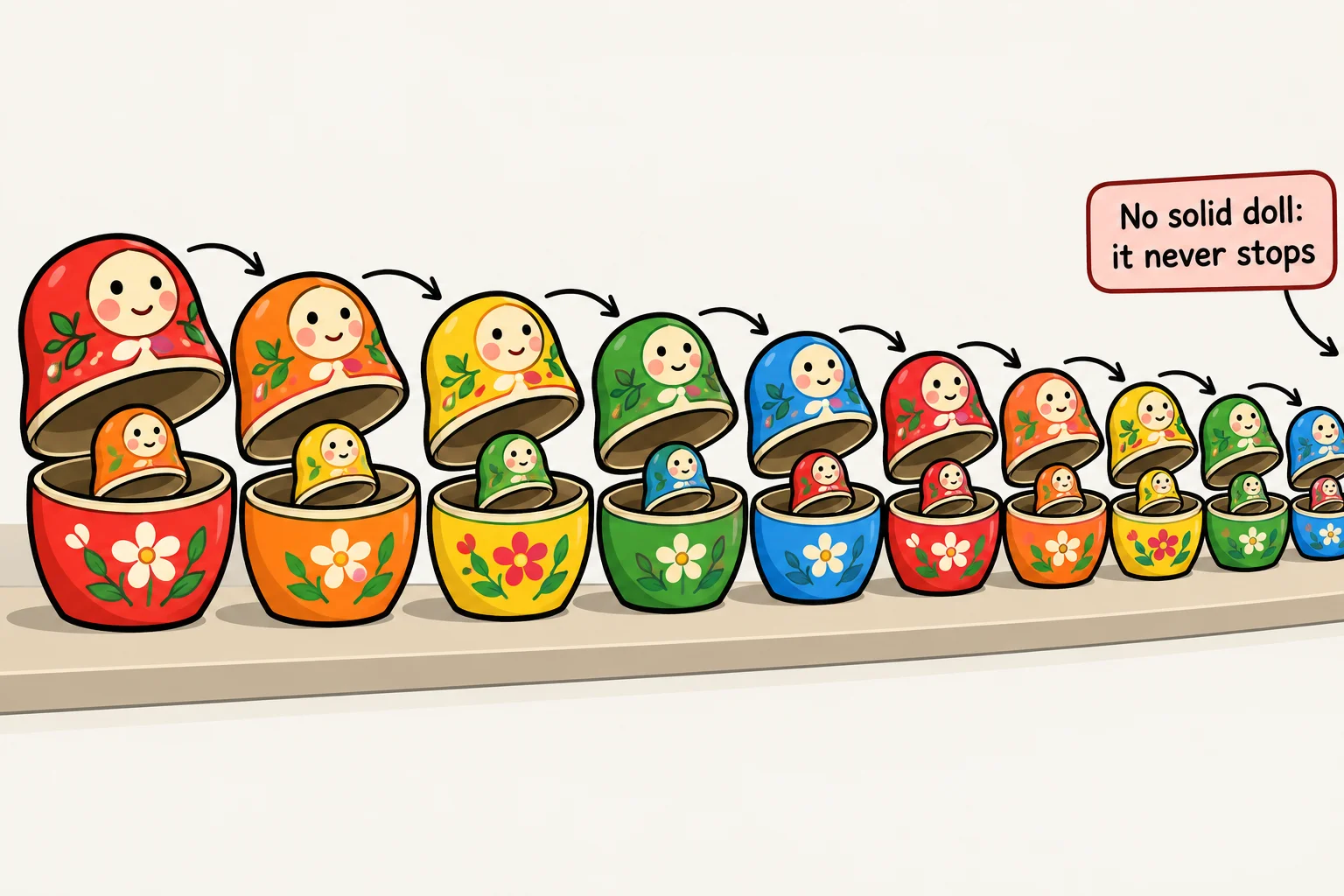
A call that hasn't finished yet is waiting, and every waiting call takes a little memory. The calls wait in an area of memory called the call stack (Where Do the Waiting Calls Wait? The Call Stack draws it), and the call stack has a fixed size: a few megabytes at most, tiny next to the rest of your computer's memory. A countdown that never stops never finishes a single call, so the waiting calls pile up until there's no room left: a stack overflow. A function that keeps calling itself and never reaches a stop is called infinite recursion.
- C# stops the whole program with
Stack overflow.It can't be caught withtryandcatch. - Java throws a
StackOverflowError. - Python stops on purpose at about 1,000 calls deep, long before the memory runs out, and raises a
RecursionError. - JavaScript and TypeScript throw a
RangeErrorwhose message is Maximum call stack size exceeded.
What would you try?
Give it a bigger stack. Python lets you raise its limit: sys.setrecursionlimit(10_000). The countdown now makes 9,999 calls before it crashes, instead of about 1,000. But the customer's folders loop forever, so any limit runs out. A bigger stack only moves the crash later, after using more memory.
Catch the error. In Java, Python and JavaScript, a try around the call keeps the program alive. In C# it can't: the program stops anyway. And even where it works, what size does the tool show for Projects? The work was thrown away with the error.
Stop after 100 levels. Pass a depth along, and stop when it reaches 100. Now the tool finishes, and says Projects is 2,750 MB: every trip through the shortcut goes two levels deeper, so it counted the same 55 MB fifty times. It stopped, but the answer is wrong.
| What we tried | What happens | Where it breaks |
|---|---|---|
| A bigger stack | 9,999 calls instead of about 1,000, then the same crash | the loop has no end, so no limit is enough |
| Catch the error | the program keeps running (not in C#) | there's no size left to show |
| Stop after 100 levels | it finishes | Projects counted 50 times: 2,750 MB, not 55 |
The questions that lead to it
What's the smallest folder you could answer without opening anything? One with nothing inside but files: it's just the size of its own files.
Does every call get closer to it? Opening a real folder does: the folder inside is smaller, one level further down, and a real drive has a bottom. Opening the shortcut doesn't: it hands back Projects, the very folder we started with. That call got no closer at all.
So what should a shortcut be? Not a folder to open. Its folder is already counted where it really lives, so a shortcut can be answered straight away, as 0 MB, without opening it. That's a second smallest case, and it's the one every real disk tool uses: they don't follow shortcuts.
The two rules of a base case
You met the base case in the last lesson: the smallest version of a problem, answered without calling the function again. This crash shows what it has to promise:
- There is one, and it's checked before the function calls itself. The broken countdown had none.
- Every call moves toward it, and can't skip past it. The shortcut broke this rule by handing back the same folder.
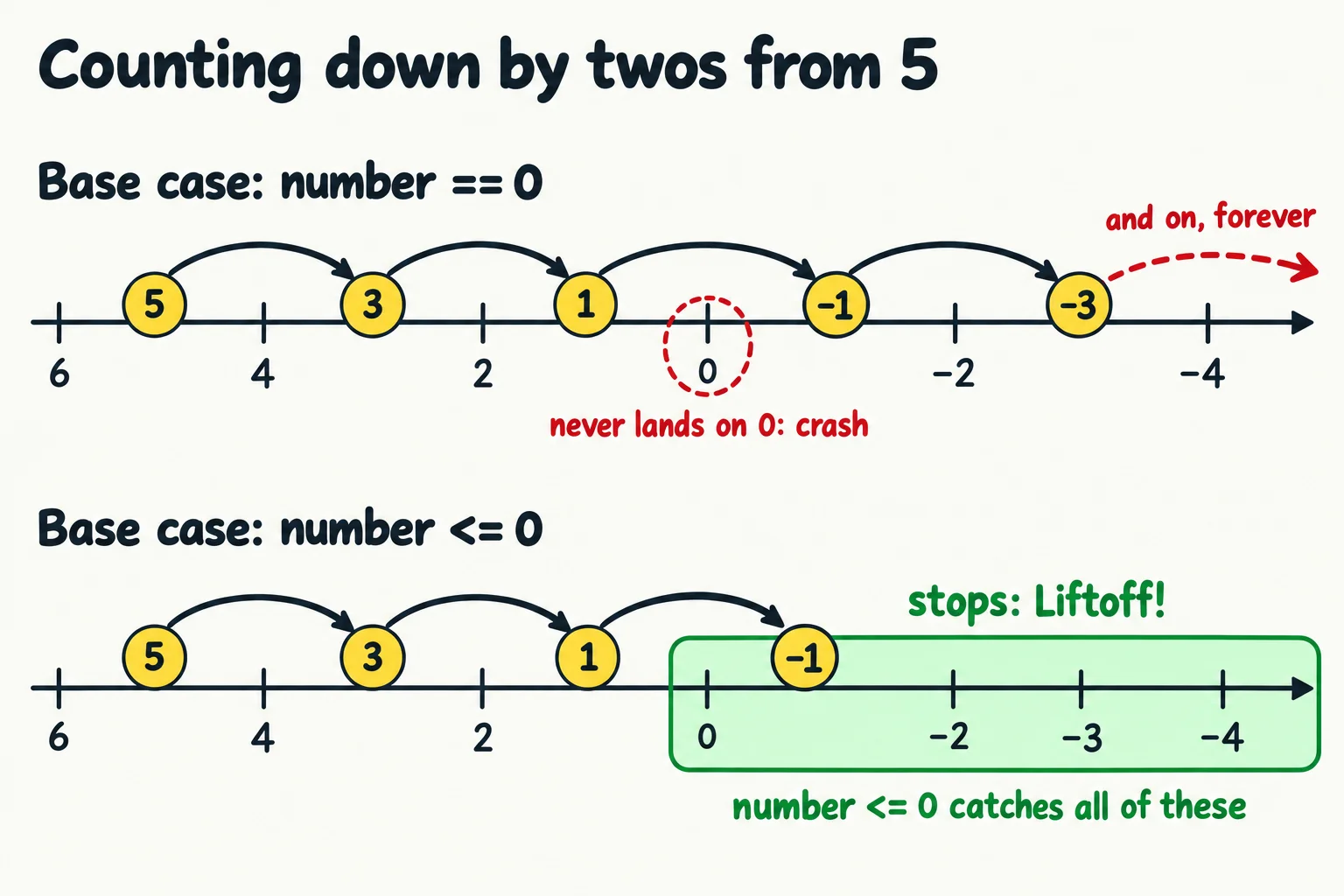
Rule 2 has a sneaky form. Here's a countdown by twos from 5 whose base case is number == 0. It counts 5, 3, 1, −1, −3… The calls jump right over 0, so the base case never runs, and it crashes like the countdown with no base case at all. When the calls take steps bigger than one, catch everything past the end: number <= 0 (read "number is less than or equal to zero"), not number == 0.
void CountdownByTwos(int number)
{
    if (number <= 0)
    {
        Console.WriteLine("Liftoff!");
        return;
    }
    Console.WriteLine(number);
    CountdownByTwos(number - 2);
}

CountdownByTwos(5);
5
3
1
Liftoff!
void countdownByTwos(int number) {
    if (number <= 0) {
        IO.println("Liftoff!");
        return;
    }
    IO.println(number);
    countdownByTwos(number - 2);
}

void main() {
    countdownByTwos(5);
}
5
3
1
Liftoff!
def countdown_by_twos(number):
    if number <= 0:
        print("Liftoff!")
        return
    print(number)
    countdown_by_twos(number - 2)


countdown_by_twos(5)
5
3
1
Liftoff!
function countdownByTwos(number) {
  if (number <= 0) {
    console.log("Liftoff!");
    return;
  }
  console.log(number);
  countdownByTwos(number - 2);
}

countdownByTwos(5);
5
3
1
Liftoff!
function countdownByTwos(number: number): void {
  if (number <= 0) {
    console.log("Liftoff!");
    return;
  }
  console.log(number);
  countdownByTwos(number - 2);
}

countdownByTwos(5);
5
3
1
Liftoff!
The base case comes first in the function, before the recursive call. The function asks "am I done?" before it asks itself anything.
Fixing the folder tool
Now the customer's drive. A folder gets one more field, whether it's a shortcut, and FolderSize gets a second base case, checked first: a shortcut is answered as 0 MB and never opened. Back to Projects is built the way her drive has it: opening it shows Projects again.
Folder projects = new Folder("Projects", 40, []);
projects.Folders.Add(new Folder("Website", 15, []));
projects.Folders.Add(new Folder("Back to Projects", 0, [projects], IsShortcut: true));

int FolderSize(Folder folder)
{
    if (folder.IsShortcut)
    {
        Console.WriteLine(folder.Name + ": a shortcut, not opened");
        return 0;
    }
    int total = folder.FilesMB;
    foreach (Folder inner in folder.Folders)
    {
        total += FolderSize(inner);
    }
    Console.WriteLine(folder.Name + ": " + total + " MB");
    return total;
}

FolderSize(projects);

record Folder(string Name, int FilesMB, List<Folder> Folders, bool IsShortcut = false);
Website: 15 MB
Back to Projects: a shortcut, not opened
Projects: 55 MB
record Folder(String name, int filesMB, List<Folder> folders, boolean isShortcut) {}

int folderSize(Folder folder) {
    if (folder.isShortcut()) {
        IO.println(folder.name() + ": a shortcut, not opened");
        return 0;
    }
    int total = folder.filesMB();
    for (Folder inner : folder.folders()) {
        total += folderSize(inner);
    }
    IO.println(folder.name() + ": " + total + " MB");
    return total;
}

void main() {
    Folder projects = new Folder("Projects", 40, new ArrayList<>(), false);
    projects.folders().add(new Folder("Website", 15, new ArrayList<>(), false));
    projects.folders().add(new Folder("Back to Projects", 0, List.of(projects), true));
    folderSize(projects);
}
Website: 15 MB
Back to Projects: a shortcut, not opened
Projects: 55 MB
from dataclasses import dataclass


@dataclass
class Folder:
    name: str
    files_mb: int
    folders: list
    is_shortcut: bool = False


def folder_size(folder):
    if folder.is_shortcut:
        print(f"{folder.name}: a shortcut, not opened")
        return 0
    total = folder.files_mb
    for inner in folder.folders:
        total += folder_size(inner)
    print(f"{folder.name}: {total} MB")
    return total


projects = Folder("Projects", 40, [])
projects.folders.append(Folder("Website", 15, []))
projects.folders.append(Folder("Back to Projects", 0, [projects], is_shortcut=True))
folder_size(projects)
Website: 15 MB
Back to Projects: a shortcut, not opened
Projects: 55 MB
const projects = { name: "Projects", filesMB: 40, folders: [], isShortcut: false };
projects.folders.push({ name: "Website", filesMB: 15, folders: [], isShortcut: false });
projects.folders.push({ name: "Back to Projects", filesMB: 0, folders: [projects], isShortcut: true });

function folderSize(folder) {
  if (folder.isShortcut) {
    console.log(`${folder.name}: a shortcut, not opened`);
    return 0;
  }
  let total = folder.filesMB;
  for (const inner of folder.folders) {
    total += folderSize(inner);
  }
  console.log(`${folder.name}: ${total} MB`);
  return total;
}

folderSize(projects);
Website: 15 MB
Back to Projects: a shortcut, not opened
Projects: 55 MB
type Folder = { name: string; filesMB: number; folders: Folder[]; isShortcut: boolean };

const projects: Folder = { name: "Projects", filesMB: 40, folders: [], isShortcut: false };
projects.folders.push({ name: "Website", filesMB: 15, folders: [], isShortcut: false });
projects.folders.push({ name: "Back to Projects", filesMB: 0, folders: [projects], isShortcut: true });

function folderSize(folder: Folder): number {
  if (folder.isShortcut) {
    console.log(`${folder.name}: a shortcut, not opened`);
    return 0;
  }
  let total = folder.filesMB;
  for (const inner of folder.folders) {
    total += folderSize(inner);
  }
  console.log(`${folder.name}: ${total} MB`);
  return total;
}

folderSize(projects);
Website: 15 MB
Back to Projects: a shortcut, not opened
Projects: 55 MB
55 MB: 40 of its own and 15 in Website, each counted once. Both rules hold now. There are two base cases, a shortcut and a folder with nothing inside, and every call that isn't a shortcut opens a real folder one level down, so every path of calls reaches one.
Try it. In the countdown by twos, change number <= 0 back to number == 0 and run it. Then start it at 6 instead of 5. Which start crashes, and why does the other one stop?
Check yourself
2 questions to try on the lesson page.
So what
When you write a recursive function, write the base case first and ask two questions: will every call get closer to it, and can a call jump past it, or loop back to where it started? When a program crashes with a stack overflow, those are the first things to check, and a bigger stack is never the fix.