The Sorted Import That Made Search Crawl: Why Balance Matters
Keep a contact list fast however its names arrive: see why a sorted import turns a plain binary search tree into a line as slow as a list, why shuffling and rebuilding don't fix it, and which always-balanced sorted map your language gives you.
Journeyman · Data Structures · Updated
After this lesson you can
- Explain why adding sorted data turns a plain binary search tree into a slow line
- Pick your language's sorted map, or what to use where there is none
Key takeaways
- A binary search tree is only as fast as it is short: every operation walks one path, so its cost is the tree's height.
- Adding values in sorted order makes each one the right child of the last, so the tree becomes a line and search becomes O(n).
- Shuffling fails for keys that always grow, such as sign-up numbers, and rebuilding after every add costs O(n) each time.
- Self-balancing trees, such as AVL and red-black trees, rotate nodes after each change to keep the height near log n.
- C#'s SortedDictionary and Java's TreeMap are self-balancing trees; Python and JavaScript have no built-in sorted map.
Before this: A Contact List That's Fast to Search and Easy to Change: Binary Search Trees finds a name in about log n checks, but only while the tree stays short and bushy.
Here is a bug that passes every test and then shows up in real use. You build the sales team's contact list on a binary search tree. It's fast in testing, where you typed contacts in any old order. Then a user imports 5,000 contacts from a file that's already sorted A to Z, and every search crawls. Nothing in the code changed; only the order the data arrived in. This lesson finds out why, tries the obvious fixes, and ends with the ready-made, always-balanced tree your language already has.
The same names, a different shape
A binary search tree's shape depends on the order the values arrive. Add the contacts Maya, Diego, Tom, Ana, Kai, Rosa, Zoe, and you get the bushy tree from the last lesson: height 2. Add the same seven names in A to Z order, Ana, Diego, Kai, Maya, Rosa, Tom, Zoe, and something sad happens:
- Ana is the root.
- Diego is bigger than Ana, so he goes right.
- Kai is bigger than Ana, and bigger than Diego, so he goes right of Diego.
- Every name after that is bigger than all the ones before it, so it goes right, right, right, to the end.
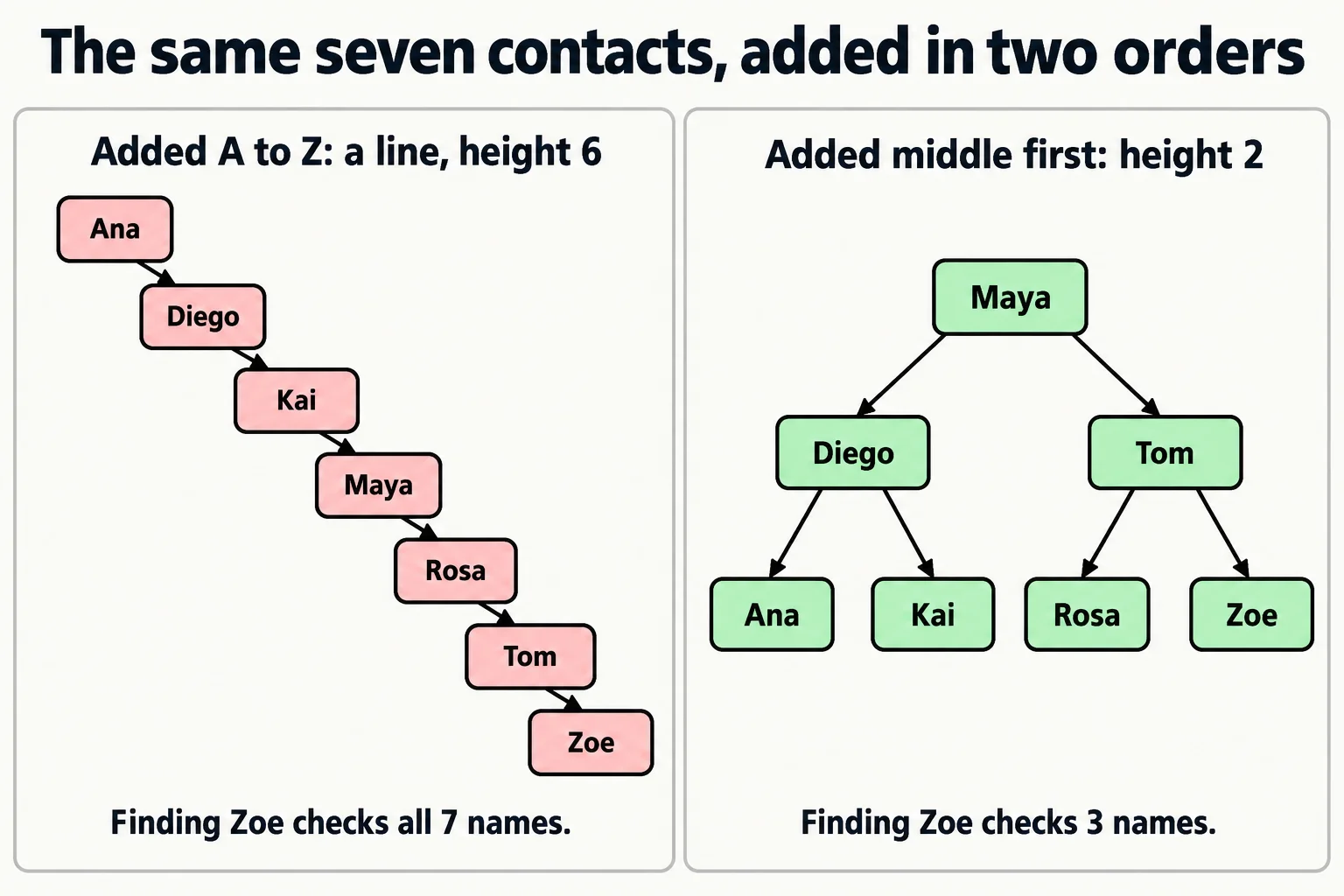
It's still a binary search tree: the rule holds at every node. But it's also a linked list wearing a tree costume. Finding Zoe means checking all seven names, one by one. Search is O(n) again.
Measuring it
The program below adds the same 255 contacts two ways and measures each tree. To keep the numbers easy to check, the contacts are numbered 1 to 255 in A to Z order. The first tree gets them in order. The second gets them middle first: 128, then the middle of each half (64 and 192), then the middle of each quarter, and so on, the order binary search would ask about them in. For each tree it prints the height and how many checks it takes to find contact 255, the last one.
Tree inOrder = new Tree();
for (int number = 1; number <= 255; number++)
{
    inOrder.Add(number);
}
Tree middleFirst = new Tree();
AddMiddleFirst(middleFirst, 1, 255);

Console.WriteLine("Added in order: height " + inOrder.Height() + ", " + inOrder.ChecksToFind(255) + " checks to find 255");
Console.WriteLine("Added middle first: height " + middleFirst.Height() + ", " + middleFirst.ChecksToFind(255) + " checks to find 255");

void AddMiddleFirst(Tree tree, int low, int high)
{
    if (low > high)
    {
        return;
    }
    int middle = (low + high) / 2;
    tree.Add(middle);
    AddMiddleFirst(tree, low, middle - 1);
    AddMiddleFirst(tree, middle + 1, high);
}

class Node
{
    public int Value { get; }
    public Node? Left { get; set; }
    public Node? Right { get; set; }

    public Node(int value)
    {
        Value = value;
    }
}

class Tree
{
    private Node? root;

    public void Add(int value)
    {
        if (root == null)
        {
            root = new Node(value);
            return;
        }
        Node current = root;
        while (true)
        {
            if (value < current.Value)
            {
                if (current.Left == null)
                {
                    current.Left = new Node(value);
                    return;
                }
                current = current.Left;
            }
            else
            {
                if (current.Right == null)
                {
                    current.Right = new Node(value);
                    return;
                }
                current = current.Right;
            }
        }
    }

    public int ChecksToFind(int value)
    {
        int checks = 0;
        Node? current = root;
        while (current != null)
        {
            checks++;
            if (value == current.Value)
            {
                break;
            }
            current = value < current.Value ? current.Left : current.Right;
        }
        return checks;
    }

    public int Height()
    {
        return HeightOf(root);
    }

    private int HeightOf(Node? node)
    {
        if (node == null)
        {
            return -1;
        }
        return 1 + Math.Max(HeightOf(node.Left), HeightOf(node.Right));
    }
}
Added in order: height 254, 255 checks to find 255
Added middle first: height 7, 8 checks to find 255
class Node {
    int value;
    Node left;
    Node right;

    Node(int value) {
        this.value = value;
    }
}

class Tree {
    private Node root;

    void add(int value) {
        if (root == null) {
            root = new Node(value);
            return;
        }
        Node current = root;
        while (true) {
            if (value < current.value) {
                if (current.left == null) {
                    current.left = new Node(value);
                    return;
                }
                current = current.left;
            } else {
                if (current.right == null) {
                    current.right = new Node(value);
                    return;
                }
                current = current.right;
            }
        }
    }

    int checksToFind(int value) {
        int checks = 0;
        Node current = root;
        while (current != null) {
            checks++;
            if (value == current.value) {
                break;
            }
            current = value < current.value ? current.left : current.right;
        }
        return checks;
    }

    int height() {
        return heightOf(root);
    }

    private int heightOf(Node node) {
        if (node == null) {
            return -1;
        }
        return 1 + Math.max(heightOf(node.left), heightOf(node.right));
    }
}

void addMiddleFirst(Tree tree, int low, int high) {
    if (low > high) {
        return;
    }
    int middle = (low + high) / 2;
    tree.add(middle);
    addMiddleFirst(tree, low, middle - 1);
    addMiddleFirst(tree, middle + 1, high);
}

void main() {
    Tree inOrder = new Tree();
    for (int number = 1; number <= 255; number++) {
        inOrder.add(number);
    }
    Tree middleFirst = new Tree();
    addMiddleFirst(middleFirst, 1, 255);

    IO.println("Added in order: height " + inOrder.height() + ", " + inOrder.checksToFind(255) + " checks to find 255");
    IO.println("Added middle first: height " + middleFirst.height() + ", " + middleFirst.checksToFind(255) + " checks to find 255");
}
Added in order: height 254, 255 checks to find 255
Added middle first: height 7, 8 checks to find 255
class Node:
    def __init__(self, value):
        self.value = value
        self.left = None
        self.right = None


class Tree:
    def __init__(self):
        self.root = None

    def add(self, value):
        if self.root is None:
            self.root = Node(value)
            return
        current = self.root
        while True:
            if value < current.value:
                if current.left is None:
                    current.left = Node(value)
                    return
                current = current.left
            else:
                if current.right is None:
                    current.right = Node(value)
                    return
                current = current.right

    def checks_to_find(self, value):
        checks = 0
        current = self.root
        while current is not None:
            checks += 1
            if value == current.value:
                break
            current = current.left if value < current.value else current.right
        return checks

    def height(self):
        return self._height_of(self.root)

    def _height_of(self, node):
        if node is None:
            return -1
        return 1 + max(self._height_of(node.left), self._height_of(node.right))


def add_middle_first(tree, low, high):
    if low > high:
        return
    middle = (low + high) // 2
    tree.add(middle)
    add_middle_first(tree, low, middle - 1)
    add_middle_first(tree, middle + 1, high)


in_order = Tree()
for number in range(1, 256):
    in_order.add(number)
middle_first = Tree()
add_middle_first(middle_first, 1, 255)

print(f"Added in order: height {in_order.height()}, {in_order.checks_to_find(255)} checks to find 255")
print(f"Added middle first: height {middle_first.height()}, {middle_first.checks_to_find(255)} checks to find 255")
Added in order: height 254, 255 checks to find 255
Added middle first: height 7, 8 checks to find 255
class Node {
  constructor(value) {
    this.value = value;
    this.left = null;
    this.right = null;
  }
}

class Tree {
  constructor() {
    this.root = null;
  }

  add(value) {
    if (this.root === null) {
      this.root = new Node(value);
      return;
    }
    let current = this.root;
    while (true) {
      if (value < current.value) {
        if (current.left === null) {
          current.left = new Node(value);
          return;
        }
        current = current.left;
      } else {
        if (current.right === null) {
          current.right = new Node(value);
          return;
        }
        current = current.right;
      }
    }
  }

  checksToFind(value) {
    let checks = 0;
    let current = this.root;
    while (current !== null) {
      checks++;
      if (value === current.value) {
        break;
      }
      current = value < current.value ? current.left : current.right;
    }
    return checks;
  }

  height() {
    return this.#heightOf(this.root);
  }

  #heightOf(node) {
    if (node === null) {
      return -1;
    }
    return 1 + Math.max(this.#heightOf(node.left), this.#heightOf(node.right));
  }
}

function addMiddleFirst(tree, low, high) {
  if (low > high) {
    return;
  }
  const middle = Math.floor((low + high) / 2);
  tree.add(middle);
  addMiddleFirst(tree, low, middle - 1);
  addMiddleFirst(tree, middle + 1, high);
}

const inOrder = new Tree();
for (let number = 1; number <= 255; number++) {
  inOrder.add(number);
}
const middleFirst = new Tree();
addMiddleFirst(middleFirst, 1, 255);

console.log(`Added in order: height ${inOrder.height()}, ${inOrder.checksToFind(255)} checks to find 255`);
console.log(`Added middle first: height ${middleFirst.height()}, ${middleFirst.checksToFind(255)} checks to find 255`);
Added in order: height 254, 255 checks to find 255
Added middle first: height 7, 8 checks to find 255
class TreeNode {
  value: number;
  left: TreeNode | null = null;
  right: TreeNode | null = null;

  constructor(value: number) {
    this.value = value;
  }
}

class Tree {
  private root: TreeNode | null = null;

  add(value: number): void {
    if (this.root === null) {
      this.root = new TreeNode(value);
      return;
    }
    let current = this.root;
    while (true) {
      if (value < current.value) {
        if (current.left === null) {
          current.left = new TreeNode(value);
          return;
        }
        current = current.left;
      } else {
        if (current.right === null) {
          current.right = new TreeNode(value);
          return;
        }
        current = current.right;
      }
    }
  }

  checksToFind(value: number): number {
    let checks = 0;
    let current = this.root;
    while (current !== null) {
      checks++;
      if (value === current.value) {
        break;
      }
      current = value < current.value ? current.left : current.right;
    }
    return checks;
  }

  height(): number {
    return this.heightOf(this.root);
  }

  private heightOf(node: TreeNode | null): number {
    if (node === null) {
      return -1;
    }
    return 1 + Math.max(this.heightOf(node.left), this.heightOf(node.right));
  }
}

function addMiddleFirst(tree: Tree, low: number, high: number): void {
  if (low > high) {
    return;
  }
  const middle = Math.floor((low + high) / 2);
  tree.add(middle);
  addMiddleFirst(tree, low, middle - 1);
  addMiddleFirst(tree, middle + 1, high);
}

const inOrder = new Tree();
for (let number = 1; number <= 255; number++) {
  inOrder.add(number);
}
const middleFirst = new Tree();
addMiddleFirst(middleFirst, 1, 255);

console.log(`Added in order: height ${inOrder.height()}, ${inOrder.checksToFind(255)} checks to find 255`);
console.log(`Added middle first: height ${middleFirst.height()}, ${middleFirst.checksToFind(255)} checks to find 255`);
Added in order: height 254, 255 checks to find 255
Added middle first: height 7, 8 checks to find 255
The same 255 contacts, the same code: 255 checks one way, 8 the other. An empty spot has height -1 here, so that a single node comes out at 0, matching Who Works Under Whom? Trees. The TypeScript version calls its node class TreeNode, because TypeScript already has a built-in type named Node for web pages.
Try it. Change every 255 in the program to 511 (in Python, range(1, 256) becomes range(1, 512)) and run it again. The line now needs 511 checks to find the last contact; the balanced tree needs only 9. Twice the contacts: twice the checks for the line, one more for the balanced tree.
What would you try?
You can't make users add their contacts middle first. So how do you keep the tree short?
Shuffle the names before adding them. For a one-off import, add the 5,000 contacts in random order and the tree comes out bushy enough: in 20 shuffled runs it was 24 to 31 levels tall, against 12 for a perfect tree and 4,999 for the line. But it fails when the keys arrive one at a time, already in order: customer numbers handed out 1, 2, 3 as people sign up, or orders stamped with the time. You can't shuffle what hasn't arrived yet, and each new key is the biggest so far, so it goes right, right, right.
Rebuild the tree after every add. Walk it in order, which gives the names sorted, and build it again middle first, as the program above does. Every rebuild gives a perfect tree, but every rebuild also touches every contact: O(n) for one add, the sorted array's problem all over again. Adding 5,000 contacts one at a time, with a walk and a rebuild after each, is about 25 million steps, where the adds alone take about 60,000.
Rebuild now and then. Rebuild after every 500 adds, say. That's cheaper, but between rebuilds the tree leans again, and with always-growing keys, the newest 500 hang off the bottom in a line every time.
| What we tried | Cost per add | Where it breaks |
|---|---|---|
| Shuffle first | O(log n) on average | keys that always grow arrive in order |
| Rebuild after every add | O(n): about 25 million steps for 5,000 adds | every add pays for the whole tree |
| Rebuild now and then | cheap on average | the tree leans between rebuilds |
The question that leads to it
Rebuilding fixed the whole tree when only one small part of it leaned: the bottom of the right side. Can we fix only the piece that starts to lean, right when it leans? If each add checked the few nodes on its own path and straightened the first one that leaned too far, the fix would cost about as much as the add: O(log n).
Self-balancing trees
That idea was so useful that it got a name: a self-balancing tree, a binary search tree that checks its own shape after every add and remove, along the path it changed, and fixes it when one side gets too tall.
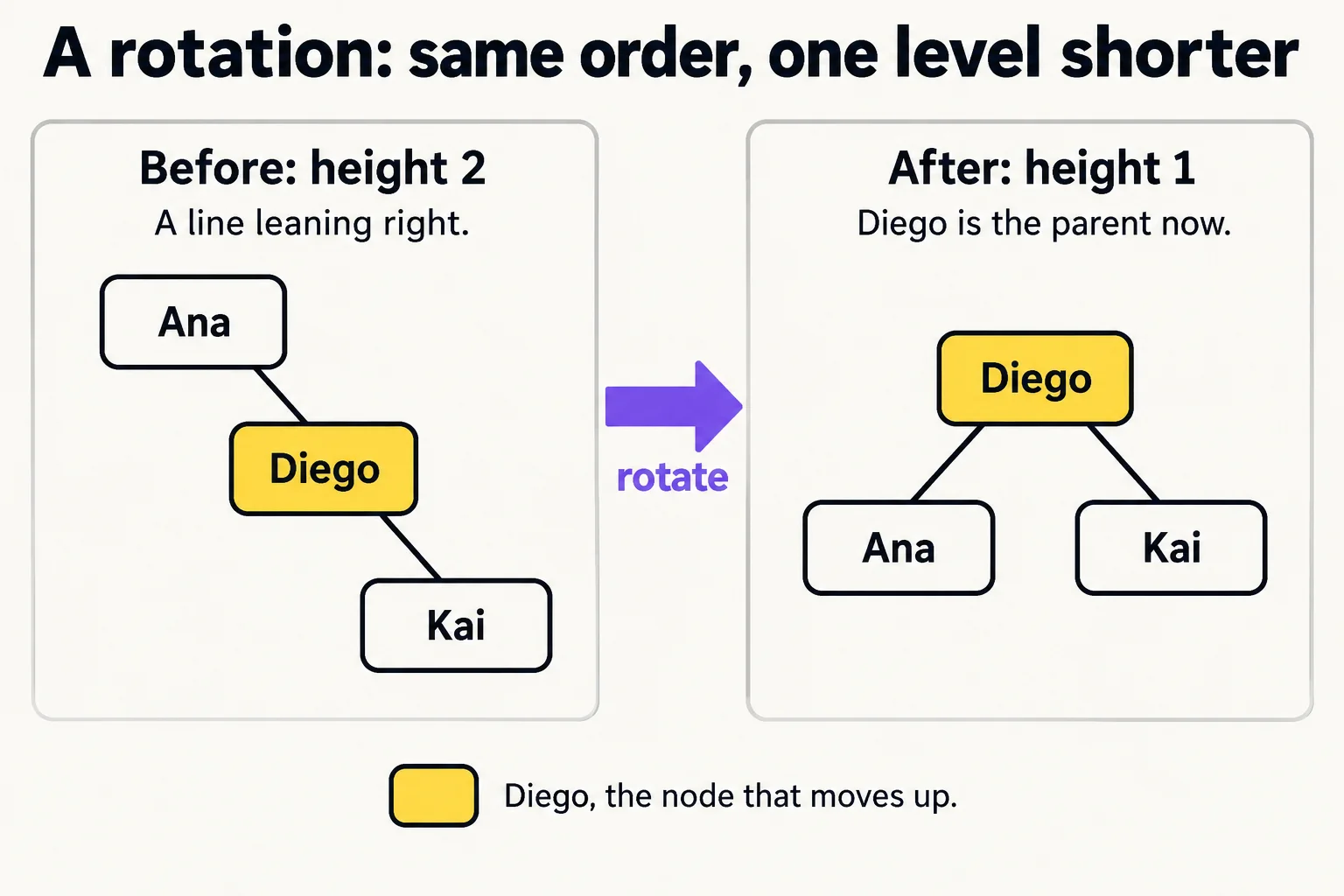
The fix is a rotation: a small swap of a parent and a child that makes one side shorter and the other taller, without breaking the left-smaller, right-bigger rule. Picture three contacts in a line, Ana, then Diego on her right, then Kai on his. Rotate, and Diego becomes the parent, with Ana on his left and Kai on his right. Same three names, still in order, and one level shorter.
The two you'll hear about most:
- AVL trees keep the two sides of every node within one level of each other. Very short, so searching is as fast as it gets.
- Red-black trees allow a little more lean, so they rotate less often when data changes a lot. They're the ones inside most languages' libraries.
Both keep the height near log n, however the data arrives, shuffled, sorted or one sign-up at a time, so search, add and remove stay O(log n) in the worst case, not only on lucky days. You don't need to write one: the rotation rules are fiddly, and every serious library already has one.
The sorted map in your language
A sorted map is a dictionary that keeps its keys in order: look up by key like any dictionary, and also walk the keys A to Z. It's the self-balancing tree you'll use in real code.
SortedDictionary<string, string> phones = new SortedDictionary<string, string>(StringComparer.Ordinal);
phones["Zoe"] = "555-0198";
phones["Ana"] = "555-0142";
phones["Maya"] = "555-0110";
phones["Kai"] = "555-0177";

foreach (KeyValuePair<string, string> contact in phones)
{
    Console.WriteLine(contact.Key + ": " + contact.Value);
}
Ana: 555-0142
Kai: 555-0177
Maya: 555-0110
Zoe: 555-0198
void main() {
    TreeMap<String, String> phones = new TreeMap<>();
    phones.put("Zoe", "555-0198");
    phones.put("Ana", "555-0142");
    phones.put("Maya", "555-0110");
    phones.put("Kai", "555-0177");

    for (Map.Entry<String, String> contact : phones.entrySet()) {
        IO.println(contact.getKey() + ": " + contact.getValue());
    }
}
Ana: 555-0142
Kai: 555-0177
Maya: 555-0110
Zoe: 555-0198
phones = {}
phones["Zoe"] = "555-0198"
phones["Ana"] = "555-0142"
phones["Maya"] = "555-0110"
phones["Kai"] = "555-0177"

for name in sorted(phones):
    print(f"{name}: {phones[name]}")
Ana: 555-0142
Kai: 555-0177
Maya: 555-0110
Zoe: 555-0198
const phones = new Map();
phones.set("Zoe", "555-0198");
phones.set("Ana", "555-0142");
phones.set("Maya", "555-0110");
phones.set("Kai", "555-0177");

for (const name of [...phones.keys()].sort()) {
  console.log(`${name}: ${phones.get(name)}`);
}
Ana: 555-0142
Kai: 555-0177
Maya: 555-0110
Zoe: 555-0198
const phones = new Map<string, string>();
phones.set("Zoe", "555-0198");
phones.set("Ana", "555-0142");
phones.set("Maya", "555-0110");
phones.set("Kai", "555-0177");

for (const name of [...phones.keys()].sort()) {
  console.log(`${name}: ${phones.get(name)}`);
}
Ana: 555-0142
Kai: 555-0177
Maya: 555-0110
Zoe: 555-0198
Only two of the five languages have a sorted map built in. C#'s SortedDictionary<TKey, TValue> and Java's TreeMap<K, V> are red-black trees: they keep the keys in order all the time. Python's dict and JavaScript's Map are hash tables (Module 5), so they keep keys in the order they were added, not sorted; the Python, JavaScript and TypeScript versions sort the keys each time they need them in order, which is O(n log n) per listing. When a Python program needs order all the time, the usual choice is the sortedcontainers package from PyPI, installed with pip; in JavaScript and TypeScript it's a package from npm, or the binary search tree you built in the last lesson.
The cost card: plain and self-balancing
| Operation | Plain binary search tree, worst case | Self-balancing tree or sorted map | Why, in everyday terms |
|---|---|---|---|
| Search, add, remove | O(n) | O(log n) | A line makes you check every name; a balanced tree halves what's left each step |
| List everything in order | O(n) | O(n) | Everyone is visited once either way |
| Smallest or largest key | O(n) | O(log n) | Walk all the way left, or all the way right |
A sorted map costs more per operation than a hash table's O(1) dictionary. Pick it when you need the keys in order, such as listing contacts A to Z or finding everyone between two dates; otherwise the plain dictionary is faster.
Check yourself
2 questions to try on the lesson page.
So what
A binary search tree is only as fast as it is short, and sorted data makes it as tall as possible. When you need data kept in order, reach for your language's sorted map, which balances itself, and when you build your own tree, remember that the order data arrives in decides its shape.