Tests on Every Push with GitHub Actions
A GitHub Actions workflow in .github/workflows/ci.yml installs an API's requirements and runs Ruff, mypy and pytest on a fresh computer at every push and pull request, so a change that breaks a check gets a red cross on its commit, with a log that says which step failed and why.
Journeyman · GitHub Actions · Python · Software Development · Updated
After this lesson you can
- Write a GitHub Actions workflow that sets up Python, installs the requirements and runs Ruff, mypy and pytest on every push and pull request
- Read a failed workflow run to find the step and the problem, run the same command on your computer, and push a fix
Key takeaways
- Continuous integration runs a project's checks on every change, on a fresh computer, so a problem is caught when it's pushed, not days later.
- A workflow is a YAML file in .github/workflows. Its on line says when it runs, runs-on picks the computer, and its steps run one after another.
- For a Python API the steps are actions/checkout, actions/setup-python with the Python version and the pip cache, pip install -r requirements.txt, then Ruff, mypy and pytest.
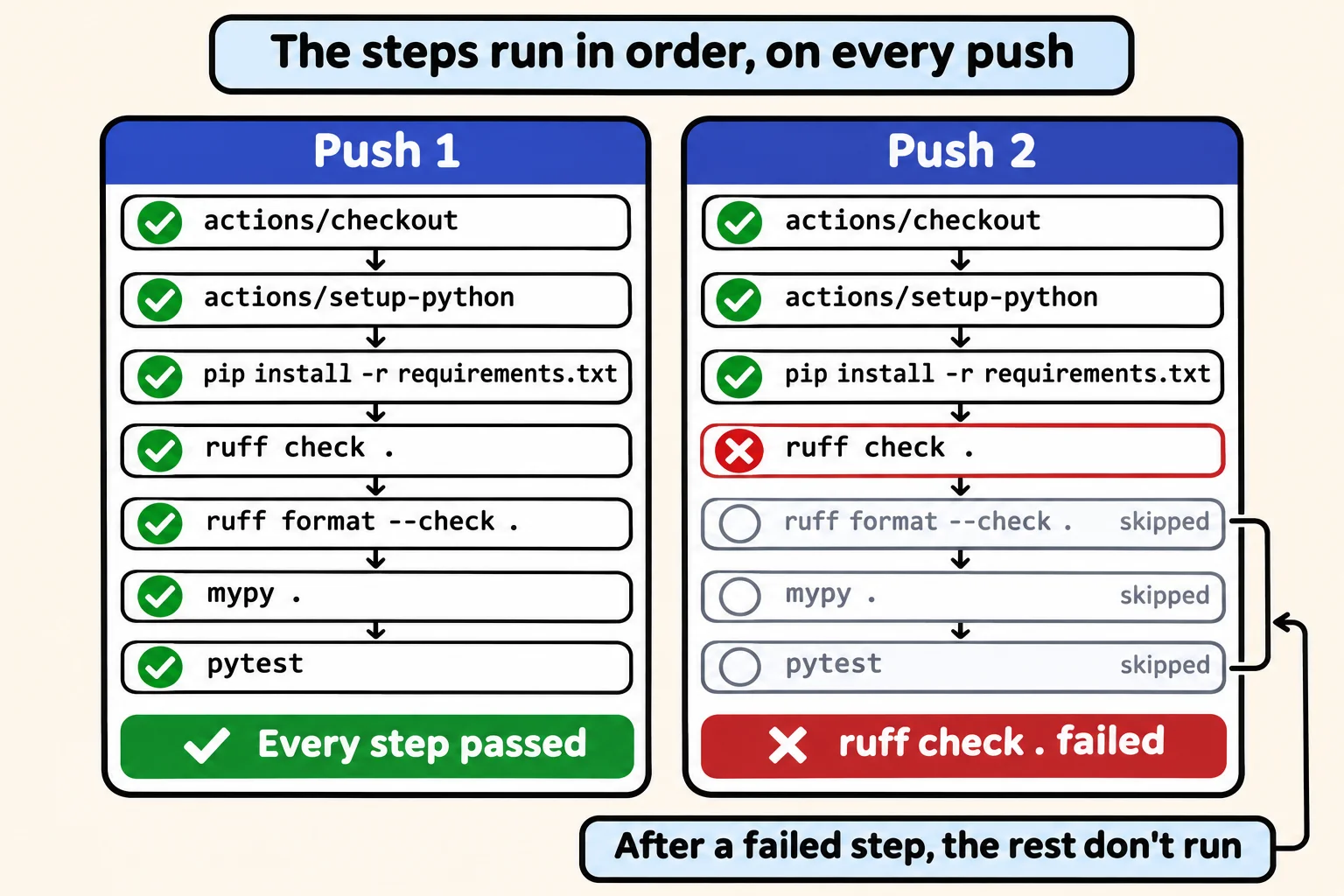
- A step fails when its command ends with an exit code other than 0, and the steps after it don't run. Its log shows what the command printed, as on your computer.
- A status badge in the README shows everyone whether the latest run passed.
Job listings ask for "CI/CD", and teams expect the CI part from your first week: no change is merged until GitHub has run the project's checks on it and put a green check beside the commit. On your own projects, the same setup catches the day you forget to run the checks yourself.
The Lost and Found Desk's three students agreed to run Ruff, mypy and pytest before every push. Then Jun fixed the found_on error that mypy reported in Ruff and mypy on an API Project, ran pytest, saw it pass, and pushed. He didn't run Ruff.
An inspection at every delivery
Picture a restaurant kitchen where a health inspector checks every delivery at the back door: the same checklist each time, before anything reaches the shelves. Nobody has to remember to call them.
Continuous integration, or CI, is that inspector for code. Every push is a delivery, and the same checks run on it every time, on a fresh computer that has only what's in the repository. GitHub Actions is the CI service built into GitHub, free for public repositories. You describe the checks in a workflow file, and GitHub runs it on a runner, a computer it starts for each run and throws away afterward.
The workflow file
A workflow lives in the folder .github/workflows/ at the top of the repository (.github is read "dot github"), in a file such as ci.yml. It's written in YAML (read "YAM-ul"), a format for settings: each line is name: value, indenting with spaces (never tabs) shows what belongs inside what, and a line starting with - (read "dash") is one item of a list.
name: CI

on: [push, pull_request]

jobs:
  checks:
    runs-on: ubuntu-latest
    steps:
      - uses: actions/checkout@v7
      - uses: actions/setup-python@v7
        with:
          python-version: "3.15"
          cache: pip
      - run: pip install -r requirements.txt
      - run: ruff check .
      - run: ruff format --check .
      - run: mypy .
      - run: pytest
Top to bottom:
name: CIis what the Actions tab calls the workflow.on: [push, pull_request]says when it runs: on every push, and on every pull request (a request to merge a branch's changes, which the team reviews).jobsholds the work: here one job,checks.runs-on: ubuntu-latestasks for a fresh Linux runner; your Python code behaves the same there as on Windows or a Mac.stepsrun in order, each one a step. A step eitherusesan action someone else wrote or **run**s a command.actions/checkout@v7copies the repository onto the runner, and@v7(read "at v seven") pins its version, the wayrequirements.txtpins a package's.actions/setup-python@v7installs Python, andwithgives it two settings: the course's Python,"3.15", in quotes, because YAML reads an unquoted3.10as the number 3.1; andcache: pip, which keeps pip's downloads between runs, keyed byrequirements.txt, so later runs install faster.pip install -r requirements.txtinstalls the exact versions the file pins, Ruff and mypy included. Then come the checks, quickest first.ruff format --check .only asks; a check should never change your files.
Before you push, run the same steps
Every push to try a fix costs a minute or two of waiting, so run the same commands in VS Code's terminal before you push, with the virtual environment on:
ruff check .
ruff format --check .
mypy .
All checks passed!
6 files already formatted
Success: no issues found in 6 source files
Then pytest ends with 3 passed. All five steps would pass on GitHub too. Commit .github/workflows/ci.yml with the rest of your work and push.
Reading a run: green, then red
After a push, open the repository on GitHub and choose the Actions tab. Each run is listed under CI with its commit's message, and a yellow dot means it's still running. Choose a run, then the job checks, and you see every step with a check mark, plus a few that GitHub adds itself, such as Set up job and Complete job.
Jun's push went differently. A step fails when its command ends with an exit code other than 0 (the number a program hands back when it finishes: 0 when it worked), and Ruff exits with 1 when it finds a problem. So his run stopped at ruff check . with a red cross, the steps after it didn't run, a red cross appeared beside his commit, and GitHub emailed him. Choosing the failed step opens its log, which holds what ruff check . printed on the runner, the same as on his own computer:
E501 Line too long (104 > 100)
  --> routers/items.py:31:101
   |
29 |     new_item: ItemIn, conn: sqlite3.Connection = Depends(get_db, scope="function")
30 | ) -> dict:
31 |     item_id = items_data.add_item(conn, new_item.name, new_item.found_at, new_item.found_on.isoformat())
   |                                                                                                     ^^^^
32 |     return {"id": item_id, **new_item.model_dump()}
   |

Found 1 error.
GitHub's own last line says the process completed with exit code 1. To fix a failed run, read the log, run the same command on your computer until it passes (here, ruff format . wraps the line), then commit and push. The new push starts a new run, and the check turns green. A run that fails only on GitHub usually means something is on your computer and not in the repository, such as a file you never committed or a package missing from requirements.txt.
A status badge
A badge in the README shows the latest run's result to everyone who opens the repository. Add this line at the top of README.md, with your GitHub name and repository in the address:

It shows the workflow's name, CI, with passing in green or failing in red, and it changes by itself after every run.
Sources
- GitHub, Workflow syntax for GitHub Actions:
name,on,jobs,runs-on,steps,uses,runandwith. - GitHub, actions/setup-python:
actions/setup-python@v7withactions/checkout@v7, andcache: pip, keyed by the hash ofrequirements.txt. - GitHub, actions/python-versions: the Python builds setup-python installs, Python 3.15 among them.
- GitHub, Adding a workflow status badge: the badge's address.
Check yourself
2 questions to try on the lesson page.
So what
A workflow turns "remember to run the checks" into something GitHub does for every push, so a broken change shows up as a red cross within minutes instead of as a surprise for the next person who pulls the code.