Startup, Shutdown and a Health Check
FastAPI's lifespan function runs code once as the app starts, such as the migrations, and once as it stops, a TestClient used in a with block runs it in tests, and a /health route that asks the database a real question answers 200 when the API can do its job and 503 in the one error shape when it can't, which is what a host checks before it sends anyone to the app.
Freelancer · FastAPI · REST API · Updated
After this lesson you can
- Run code as an API starts and stops with FastAPI's lifespan, such as migrations, and run it in tests with a TestClient in a with block
- Write a /health route that checks the database and answers 200 when it works or 503 in the one error shape when it doesn't
Key takeaways
- Work such as migrations belongs at startup, once, before the first request, not at the top of main.py, where anything that imports the file runs it.
- A lifespan function runs its code before yield as the app starts and its code after yield as the app stops, and FastAPI(lifespan=lifespan) registers it.
- A TestClient runs the lifespan only inside a with block, so a test that needs the migrations uses with TestClient(app) as client.
- A health route asks the database a real question, such as counting a table's rows, and answers 200 when it works or 503 when it doesn't.
- A host calls the health route to decide whether the app is ready for traffic, so it stays fast, open to everyone, and free of secrets.
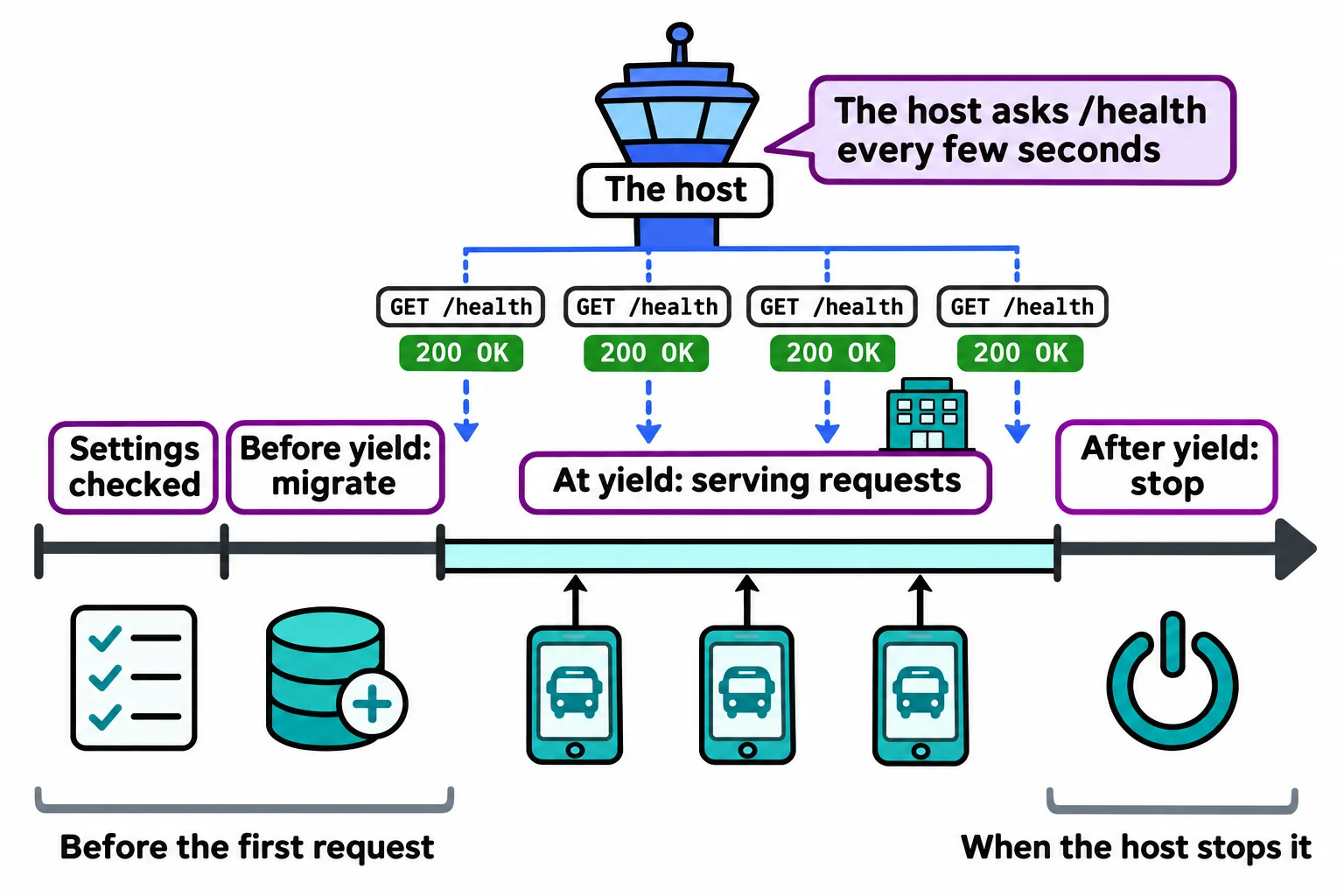
When your API goes online, the host starts it, waits until it says it's ready, and only then sends it real people. Later it keeps asking "are you still working?" every few seconds. Both conversations are code you write, and you'll find them in nearly every production API: a startup step and a health check.
The Campus Shuttle API keeps its routes in SQLite, with numbered migration scripts and the migrate(conn) function from Creating and Changing Tables: Migrations. That lesson handed you a lifespan that runs them and asked you to copy it as it was. This lesson explains how it works, what else belongs in it, and the health check that goes with it.
Why the migrations aren't at the top of main.py
The migrations must run once, before the first request. Two places look right and aren't:
- At the top of
main.py. Then they run whenever anything importsmain: every test file, every tool, even a teammate checking the code. And they run against whateversettings.database_pathsays at that moment, which may be your real database. - Inside
get_db. Then they run before every request. CheckingPRAGMA user_versionthousands of times a minute is wasted work, and two requests could start the same script at once.
What's needed is a place that runs when the app starts serving, and a matching place for when it stops.
lifespan: before and after the app runs
FastAPI's lifespan is that place. It's a function with one yield in it: the code above yield runs as the app starts, the app serves requests while it waits at yield, and the code below runs as the app stops.
import logging
from contextlib import asynccontextmanager

from fastapi import FastAPI

from database import migrate, open_db
from settings import settings

logging.basicConfig(level=settings.log_level, format="%(levelname)s %(name)s: %(message)s")
logger = logging.getLogger(__name__)


@asynccontextmanager
async def lifespan(app: FastAPI):
    conn = open_db(settings.database_path)
    ran = migrate(conn)
    conn.close()
    logger.info("Started: database %s, migrations run %s", settings.database_path, ran)
    yield
    logger.info("Stopped")


app = FastAPI(title="Campus Shuttle", lifespan=lifespan)
@asynccontextmanager (from Python's contextlib) turns the function into a context manager, the same kind of thing a with block uses: something with a start and an end. FastAPI enters it as the app starts and leaves it as the app stops. It's written async def because FastAPI runs it on the same loop that juggles every request; async and await in Plain Words, the next chapter, explains that loop. Anything opened before yield that should stay open, such as a connection to another service, is closed after it. (Older code uses @app.on_event("startup"), which FastAPI has replaced with lifespan.)
Start the API on a new database file and stop it with Ctrl+C. Here are the terminal's lines around yours, which appear exactly where they belong:
INFO:     Waiting for application startup.
INFO main: Started: database shuttle.db, migrations run [1, 2]
INFO:     Application startup complete.
INFO:     Shutting down
INFO:     Waiting for application shutdown.
INFO main: Stopped
INFO:     Application shutdown complete.
Start it again and the line says migrations run []: the database is up to date. And if a script fails, Uvicorn prints the error and ERROR: Application startup failed. Exiting., so the app never serves a request with half a database. That's failing fast again, one step after the settings.
Startup in tests
A TestClient runs the lifespan only when it's used in a with block:
with TestClient(app) as client:
    response = client.get("/routes")
The startup code runs as the block begins and the shutdown code as it ends. A plain client = TestClient(app) skips both, which is right for tests that bring their own database through dependency_overrides, as Testing with a Real, Throwaway Database does, and wrong for a test that relies on the migrations.
A health route that asks the database
A host needs one address it can call to ask "can you do your job?". The answer that's only {"status": "ok"} proves the process is running, and nothing more. The shuttle API's job is reading its database, so the check asks the database a real question:
import sqlite3

from fastapi import Depends

from database import get_db


@app.get("/health")
def health(conn: sqlite3.Connection = Depends(get_db, scope="function")):
    try:
        conn.execute("SELECT COUNT(*) FROM routes").fetchone()
    except sqlite3.Error as error:
        logger.error("Health check failed: %s", error)
        return problem(503, "The database isn't answering.")
    return {"status": "ok"}
get_db is the dependency from A Database Connection for Every Request, with scope="function" as there. Why count a table's rows instead of SELECT 1? SQLite makes a new, empty file when the path it's given doesn't exist, and SELECT 1 works fine on an empty file. Counting routes proves the right file is there and the migrations ran. When everything works, GET /health answers 200 OK:
{"status":"ok"}
Pointed at an empty database file, it answers 503 Service Unavailable: "I'm running, but I can't do my job right now". The body is the course's one error shape, from problem():
{"status":503,"title":"Service Unavailable","detail":"The database isn't answering."}
The real reason goes to the log, not to the caller: ERROR main: Health check failed: no such table: routes.
What a host does with it
A host such as Render takes a health check path, /health, and calls it every few seconds. A new deploy gets riders only once /health answers 200; if it stops answering, the host can restart the app or keep the old one running. Put Your API Online with Render sets that path. Because the host calls it so often, a health route stays fast (one small query), open to everyone (no sign-in), and quiet about details: no secrets, no file paths, no error messages in its body.
Check yourself
2 questions to try on the lesson page.
So what
A lifespan that migrates before the first request and a health route that asks the database a real question let a host start your API safely and notice the moment it stops working, before a rider does.