Settings Checked at Startup
An API reads every setting it needs from environment variables, or from a .env file on your own computer, through one pydantic-settings BaseSettings class that gives each setting a type and a default, so a missing or mistyped setting stops the app as it starts, with a message naming every problem, instead of crashing a later request.
Journeyman · FastAPI · REST API · Updated
After this lesson you can
- Describe an API's settings with a pydantic-settings BaseSettings class, with types and defaults, read from environment variables and a .env file
- Make an API stop at startup with a message naming every missing or invalid setting, instead of failing on a later request
Key takeaways
- Settings read with os.environ all over the code fail late, on the first request that needs them, far from the mistake that caused it.
- A BaseSettings class lists every setting once, with its type and its default, and reads each one from the environment variable of the same name.
- Text from the environment becomes the field's type, so TOKEN_MINUTES=45 arrives as the number 45, and a value that can't be turned into it is an error.
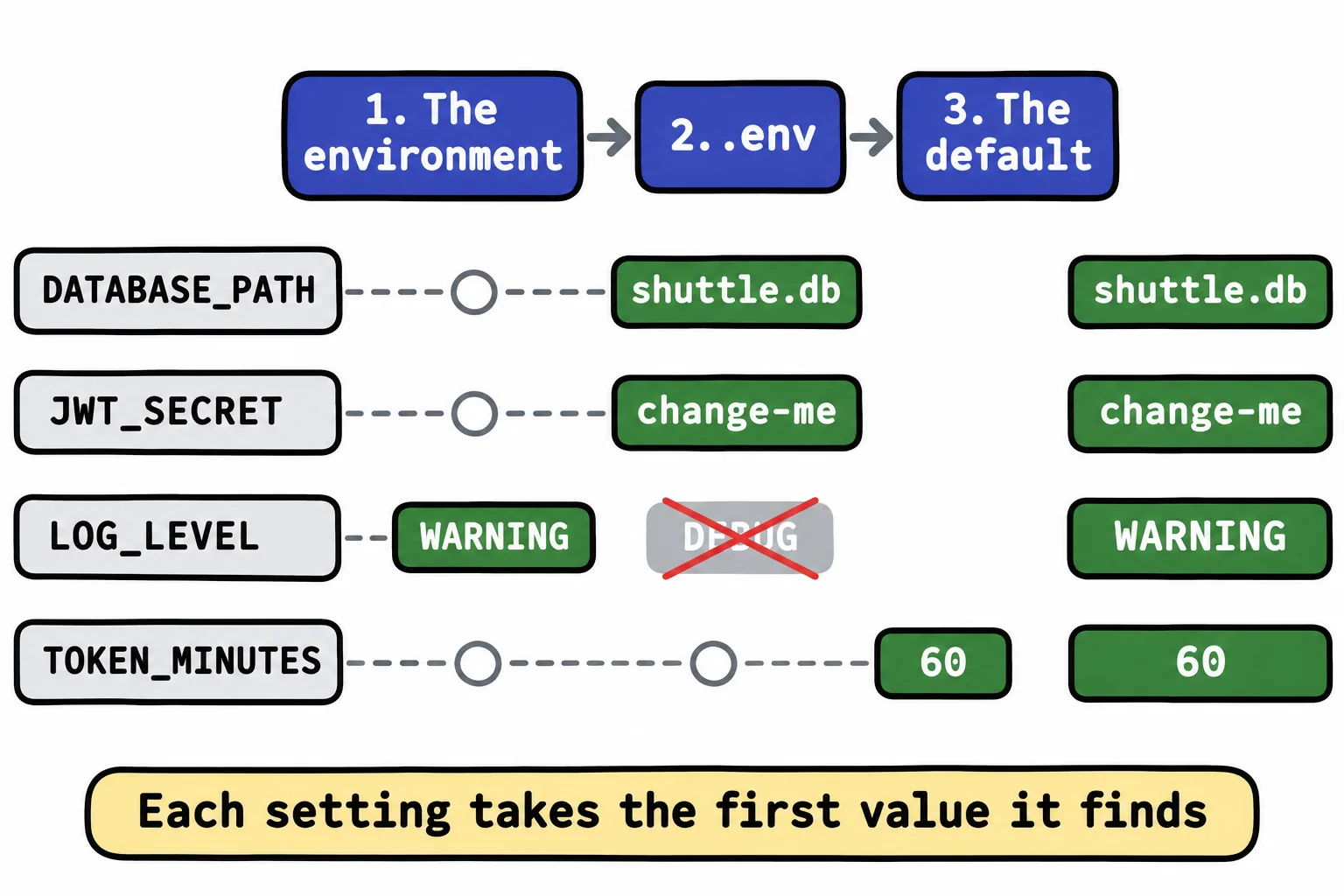
- A .env file holds the values for your own computer and stays out of Git. A real environment variable wins over the same name in .env.
- Making the one settings object as the app starts means a missing setting stops it at once, with every problem named, which is called failing fast.
The same API runs on your laptop, inside your tests, and on a host where real people use it. Each place needs its own database file, its own secret and its own amount of logging. Every back-end job you take will have a settings file like the one in this lesson, and "it worked on my machine" is very often a setting nobody checked.
The Campus Shuttle API tells riders when the next bus comes, and drivers sign in to report delays. Its code reads environment variables (named values the terminal or the host hands a program, as Keeping Secrets Out of Your Code showed) wherever it happens to need one.
Settings read everywhere fail late
A teammate sets up the shuttle API on a new laptop. They forget JWT_SECRET, type TOKEN_MINUTES as a word, and misspell DATABASE_PATH. To see all of it on one screen, this script sets their variables itself, then reads them the way the API's files do:
import os

os.environ["TOKEN_MINUTES"] = "sixty"
os.environ["DATABSE_PATH"] = "/srv/shuttle/shuttle.db"

DATABASE_PATH = os.environ.get("DATABASE_PATH", "shuttle.db")
print("Database:", DATABASE_PATH)
print("Token minutes:", int(os.environ.get("TOKEN_MINUTES", "60")))
Database: shuttle.db
ValueError: invalid literal for int() with base 10: 'sixty'
Three mistakes, three different ways to fail:
- The misspelled name fails silently: the API quietly opens a new, empty
shuttle.db, and every route answers with no buses. TOKEN_MINUTEScrashes only when a driver signs in, as a 500, and the error says nothing about a setting.- The missing
JWT_SECRETis the same: the app starts,/docsopens, and the first sign-in crashes withKeyError: 'JWT_SECRET'.
One settings class
A pilot runs a checklist before takeoff, not halfway down the runway. An API can do the same: read every setting in one place, as it starts, and refuse to start when one is wrong. Stopping at once with a clear reason, instead of limping on, is called failing fast.
pydantic-settings comes with fastapi[standard]. Its BaseSettings is a Pydantic model whose fields are filled from environment variables:
from pydantic_settings import BaseSettings


class Settings(BaseSettings):
    database_path: str
    jwt_secret: str
    log_level: str = "INFO"
    token_minutes: int = 60
Each field reads the variable with its name in capitals: database_path reads DATABASE_PATH. A field with no default, such as jwt_secret, is required. And each value is turned into the field's type, the way a request model turns a body's JSON into Python values. Set the variables in VS Code's terminal, on Windows (PowerShell; $env: is read "dollar env colon"):
$env:DATABASE_PATH = "shuttle.db"
$env:JWT_SECRET = "change-me"
$env:TOKEN_MINUTES = "45"
Or on a Mac (zsh):
export DATABASE_PATH=shuttle.db
export JWT_SECRET=change-me
export TOKEN_MINUTES=45
Then settings = Settings() reads them all. print(settings.database_path) and print(settings.token_minutes + 15) print:
shuttle.db
60
TOKEN_MINUTES came in as the text "45" and left as the number 45.
A .env file for your own computer
Keeping Secrets Out of Your Code kept the values in a file named .env (read "dot env") and loaded it with load_dotenv(). A settings class reads that file itself, with one more line:
from pydantic_settings import BaseSettings, SettingsConfigDict


class Settings(BaseSettings):
    model_config = SettingsConfigDict(env_file=".env")

    database_path: str
    jwt_secret: str
    log_level: str = "INFO"
    token_minutes: int = 60
.env sits in the project folder, one NAME=value per line. This one gives log_level the value DEBUG:
DATABASE_PATH=shuttle.db
JWT_SECRET=change-me
LOG_LEVEL=DEBUG
.env is listed in .gitignore, so it never reaches GitHub, and .env.example, with the names and made-up values, is committed for teammates to copy. When a name is both a real environment variable and a line in .env, the real variable wins: with LOG_LEVEL=WARNING set in the terminal, settings.log_level is WARNING. That's how a host's settings beat any file left on its disk.
Stop at startup, naming every problem
Settings() checks every field at once. When something is wrong, it raises a ValidationError naming each problem, with a long traceback and links around it. A small function turns that into a message anyone can act on, and stops the app:
import sys

from pydantic import ValidationError


def load_settings():
    try:
        return Settings()
    except ValidationError as error:
        lines = ["The shuttle API can't start. Fix these settings in the environment or in .env:"]
        for problem in error.errors():
            lines.append(f"  {str(problem['loc'][0]).upper()}: {problem['msg']}")
        sys.exit("\n".join(lines))


settings = load_settings()
sys.exit with a message prints it and stops the program. The last line makes the one settings object, when settings.py is first imported; every other file writes from settings import settings and uses the same object, so get_db from A Database Connection for Every Request opens settings.database_path. Since main.py imports it, fastapi dev main.py stops before it serves anything. With no .env and TOKEN_MINUTES=sixty in the terminal:
The shuttle API can't start. Fix these settings in the environment or in .env:
  DATABASE_PATH: Field required
  JWT_SECRET: Field required
  TOKEN_MINUTES: Input should be a valid integer, unable to parse string as an integer
All three problems, before a single rider is affected.
Do it: check the shuttle API's settings by hand
Do by hand what BaseSettings does for the shuttle API: read its settings from the environment, fill in the defaults, and name every missing one.
env: the environment variables, a dictionary of names to text, such as{"DATABASE_PATH": "shuttle.db", "JWT_SECRET": "change-me"}.
Your job: write load_settings(env), which returns a dictionary with four keys:
"database_path": the value ofDATABASE_PATH. Required."jwt_secret": the value ofJWT_SECRET. Required."log_level": the value ofLOG_LEVEL, or"INFO"whenenvdoesn't have it."token_minutes": the value ofTOKEN_MINUTESturned into anint, or60whenenvdoesn't have it.- When a required name is missing, return nothing: raise
ValueErrorwith the messageMissing settings:followed by every missing name,DATABASE_PATHbeforeJWT_SECRET, separated by a comma and a space.
Worked through: load_settings({"DATABASE_PATH": "shuttle.db", "JWT_SECRET": "change-me"}) returns {"database_path": "shuttle.db", "jwt_secret": "change-me", "log_level": "INFO", "token_minutes": 60}. And load_settings({"LOG_LEVEL": "DEBUG"}) raises ValueError with the message Missing settings: DATABASE_PATH, JWT_SECRET.
Practiced live on the lesson page: write the Python right there and check it.
Check yourself
2 questions to try on the lesson page.
So what
A settings class checked as the app starts turns a typo on a host into one clear message at deploy time, instead of a 500 a rider finds at midnight.