Create, Update and Delete: POST, PUT, PATCH and DELETE
A FastAPI resource is finished with four routes that change it, POST that answers 201 with the new item, PUT that replaces a whole item, PATCH that changes only the fields sent with model_dump(exclude_unset=True), and DELETE that answers 204 with no body, each answering 404 when the item isn't there.
Journeyman · FastAPI · REST API · Updated
After this lesson you can
- Write POST, PUT and DELETE routes that answer 201 with the new item, 200 with the replaced item and 204 with no body, or 404 when it isn't there
- Write a PATCH route that changes only the fields a request sent with model_dump(exclude_unset=True), and choose between PUT and PATCH
Key takeaways
- POST adds an item and answers 201 Created with it, because the server chose its id and its starting values.
- PUT replaces the whole item, so its body needs every field. A PUT that sends only the field that changed gets a 422.
- PATCH changes only the fields a request sent. model_dump(exclude_unset=True) gives exactly those, with no None for the fields left out.
- DELETE answers 204 No Content, with no body. Deleting the same item a second time answers 404.
- Every route with an id in its path answers 404 when there's no such item.
Almost every app lets people change things after they've made them: fix a typo in a post, move an order to shipped, cancel a booking. Each change is a request to an API, and its method and status code tell every caller what happened. REST: Resources, Endpoints and Methods laid out the methods for one resource; this lesson writes the routes behind them in FastAPI.
The example is Spoke & Chain Bike Repair, a neighborhood bike shop. Each work ticket says who brought the bike in, which bike, what's wrong, and where it is: waiting, in repair, ready or picked up.
POST: a new ticket, and 201
The front desk sends what it knows: the customer, the bike and the problem. The server fills in the rest, the next id and a status of waiting. Here's the shop's whole main.py so far:
from fastapi import FastAPI, HTTPException
from pydantic import BaseModel

app = FastAPI(title="Spoke & Chain")

TICKETS = [
    {"id": 1, "customer": "Dana", "bike": "blue cruiser", "problem": "flat rear tire", "status": "waiting"},
    {"id": 2, "customer": "Marco", "bike": "red road bike", "problem": "brakes squeal", "status": "in repair"},
    {"id": 3, "customer": "Ana", "bike": "green hybrid", "problem": "chain keeps slipping", "status": "ready"},
]


class TicketIn(BaseModel):
    customer: str
    bike: str
    problem: str


def find_ticket(ticket_id):
    for ticket in TICKETS:
        if ticket["id"] == ticket_id:
            return ticket
    raise HTTPException(status_code=404, detail=f"There's no ticket {ticket_id}.")


def next_id():
    return max((ticket["id"] for ticket in TICKETS), default=0) + 1


@app.post("/tickets", status_code=201)
def add_ticket(new_ticket: TicketIn):
    ticket = {"id": next_id(), **new_ticket.model_dump(), "status": "waiting"}
    TICKETS.append(ticket)
    return ticket
next_id() takes the biggest of the tickets' ids and adds one; default=0 covers an empty list. The len(TICKETS) + 1 from Taking JSON In: Your First Request Body stops working once tickets can be deleted: delete ticket 2, and three tickets become two, so the next new ticket would get id 3, which ticket 3 still has.
POST /tickets with Jun's kids' bike answers 201 Created, with the id the server chose:
{"id":4,"customer":"Jun","bike":"kids' bike","problem":"training wheels loose","status":"waiting"}
PUT replaces the whole ticket
PUT means "here's the whole ticket; replace what you have with it". The body is a whole TicketIn, and ticket.update(...) copies every key of the new values into the stored ticket:
@app.put("/tickets/{ticket_id}")
def replace_ticket(ticket_id: int, new_ticket: TicketIn):
    ticket = find_ticket(ticket_id)
    ticket.update(new_ticket.model_dump())
    return ticket
PUT /tickets/3 with Ana's customer, bike and a new problem answers 200 OK with the replaced ticket; the id and status are the server's, so they stay. PUT /tickets/9 answers 404, from find_ticket.
Now the mechanic wants to change only Marco's problem, and sends PUT /tickets/2 with {"problem": "brakes squeal when wet"}. The answer is 422 Unprocessable Content: TicketIn says all three fields are required, and two are missing. FastAPI's error list says so, shortened here:
{"detail":[{"type":"missing","loc":["body","customer"],"msg":"Field required"},{"type":"missing","loc":["body","bike"],"msg":"Field required"}]}
PUT is doing its job. A change to one field needs a different method.
PATCH changes only what's sent
PATCH means "change these fields, and leave the rest alone". Its model makes every field optional, with a default of None:
class TicketChanges(BaseModel):
    customer: str | None = None
    bike: str | None = None
    problem: str | None = None


@app.patch("/tickets/{ticket_id}")
def change_ticket(ticket_id: int, changes: TicketChanges):
    ticket = find_ticket(ticket_id)
    ticket.update(changes.model_dump())
    return ticket
PATCH /tickets/2 with only the new problem answers 200, but look at Marco's ticket:
{"id":2,"customer":null,"bike":null,"problem":"brakes squeal when wet","status":"in repair"}
model_dump() gives every field, and the two that weren't sent have their default, None, which update copied over Marco's name and bike. The fix is one argument. model_dump(exclude_unset=True) (read "exclude unset equals true") leaves out every field the request didn't set:
ticket.update(changes.model_dump(exclude_unset=True))
For this request, that's {'problem': 'brakes squeal when wet'}, so only the problem changes, and Marco keeps his name and his red road bike. An empty body, {}, changes nothing. Any other field in the body, such as status, isn't in TicketChanges, so Pydantic leaves it out.
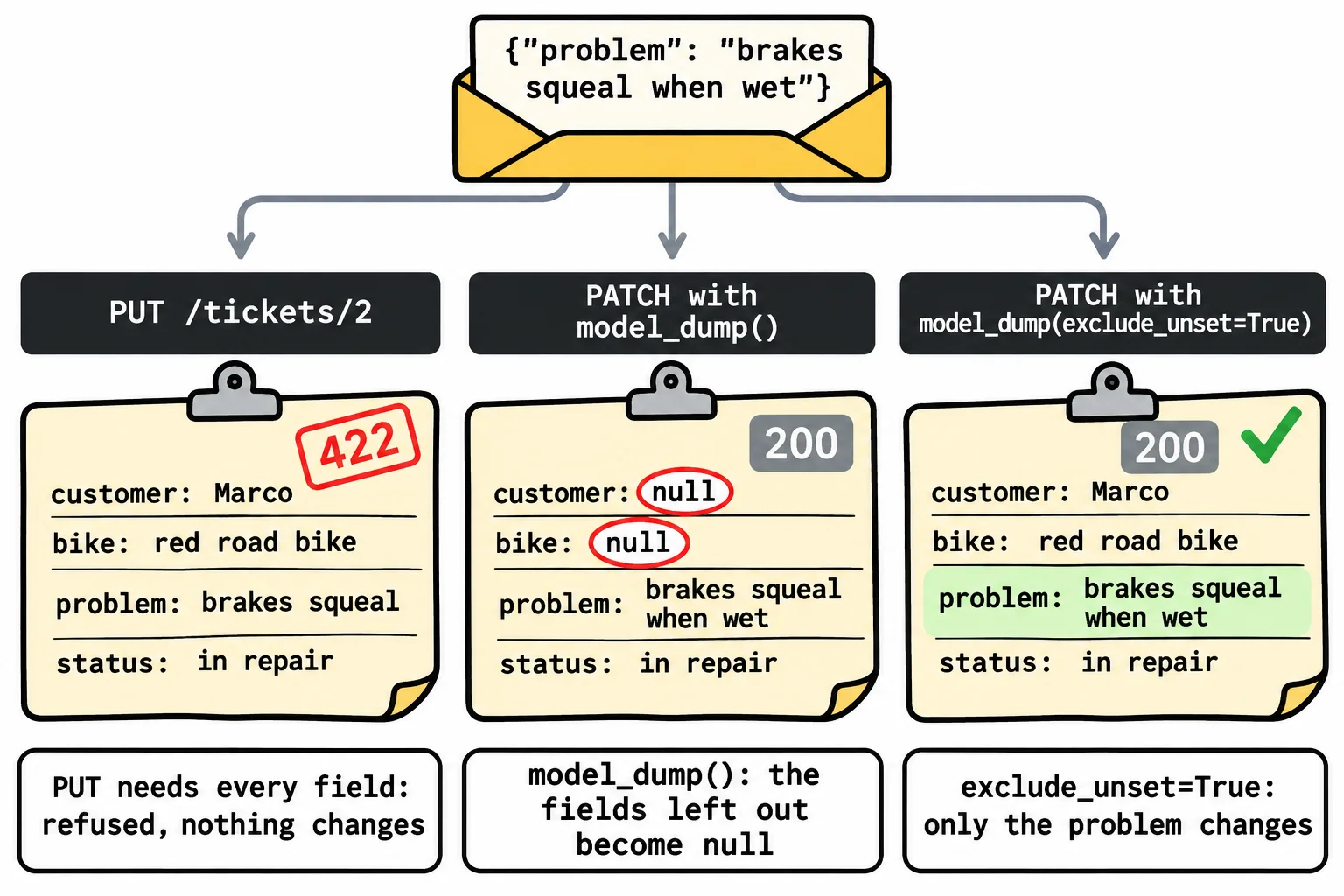
Which to choose? PUT when the caller sends the whole item, such as a form with every field filled in; PATCH when it sends only what changed, such as one tap that edits one value.
DELETE answers 204, with nothing
@app.delete("/tickets/{ticket_id}", status_code=204)
def delete_ticket(ticket_id: int):
    ticket = find_ticket(ticket_id)
    TICKETS.remove(ticket)
DELETE /tickets/4 answers 204 No Content, which means "it worked, and there's nothing to send back"; the function returns nothing. Sent again, it answers 404 with {"detail":"There's no ticket 4."}: the ticket is gone. The whole resource now looks like this:
| Endpoint | What it does | When it works | No such ticket |
|---|---|---|---|
POST /tickets |
Adds a ticket | 201 and the new ticket | (no id) |
PUT /tickets/3 |
Replaces ticket 3 | 200 and the ticket | 404 |
PATCH /tickets/3 |
Changes some of ticket 3 | 200 and the ticket | 404 |
DELETE /tickets/3 |
Removes ticket 3 | 204, no body | 404 |
Do it: change only what the front desk sent
Ana calls the shop: her chain is still slipping, and now it squeaks too. The front desk sends only the new problem. Write the plain-Python heart of a PATCH: a function that applies the changes to a ticket.
ticket: a ticket dictionary, with the keysid,customer,bike,problemandstatus.changes: a dictionary of the fields the request sent, such as{"problem": "chain slips and squeaks"}.
Your job: write apply_patch(ticket, changes), which returns a new dictionary: a copy of ticket with each field in changes set to its new value.
- Leave
ticketitself unchanged: change and return a copy (dict(ticket)makes one). - Never change the
id: skip anidinchanges. - Skip any field in
changesthat the ticket doesn't have, such ascolor. - An empty
changes,{}, returns a copy with nothing changed.
Worked through: with Ana's ticket below and {"problem": "chain slips and squeaks"}, the problem is a field the ticket has and it isn't id, so the copy gets the new problem. apply_patch returns {"id": 3, "customer": "Ana", "bike": "green hybrid", "problem": "chain slips and squeaks", "status": "ready"}.
Practiced live on the lesson page: write the Python right there and check it.
Check yourself
2 questions to try on the lesson page.
So what
POST, PUT, PATCH and DELETE, each with its own status code, finish the resource, and a PATCH that changes only what was sent means nobody's name gets wiped out by a one-field edit.