Joining Tables
A JOIN puts two related tables back together in one query, matching each product to its vendor with ON and naming columns from both tables through short aliases, and a LEFT JOIN keeps the vendors that have no products yet, with None where a product would be.
Journeyman · SQLite · SQL · Database · Updated
After this lesson you can
- Join two tables with JOIN ... ON, choosing columns from both and naming them with table and column aliases
- Choose LEFT JOIN over JOIN to keep rows that have no match, such as a vendor with no products yet, and read the None it gives in their place
Key takeaways
- JOIN ... ON matches the rows of two tables, such as each product with the vendor whose id equals its vendor_id, and gives back one row per match.
- One join query replaces a query for every row in a loop, which is slow once there are hundreds of rows.
- When both tables have a column with the same name, say which table it comes from, and short aliases such as p and v keep that readable.
- A plain JOIN (an INNER JOIN) drops rows with no match. A LEFT JOIN keeps every row of the first table and puts NULL, None in Python, where the match would be.
A screen almost never shows one table on its own. An order shows the customer's name, a comment shows its author, a product page shows who sells it. Every time an API answers with data from two related tables, a join is how it gets them in one go. This lesson puts the Saturday Farmers Market's two tables back together.
The market's database is the one Related Tables and Foreign Keys built, with two more vendors: Green Basket, which sells kale, and Pepper Patch, which joined this week and has no products yet.
| id | name | stall |
|---|---|---|
| 1 | Sunny Acres | 4 |
| 2 | Hilltop Honey | 7 |
| 3 | Green Basket | 2 |
| 4 | Pepper Patch | 12 |
| id | vendor_id | name | price |
|---|---|---|---|
| 1 | 1 | Strawberries | 5.00 |
| 2 | 1 | Snap peas | 3.50 |
| 3 | 2 | Wildflower honey | 9.00 |
| 4 | 2 | Honeycomb | 12.00 |
| 5 | 3 | Kale | 3.00 |
One question, two tables
The market's map app wants every product with the stall to walk to. The products table only knows each vendor's id, so a first try asks again for every product, in a loop (conn is the market's connection):
products = conn.execute("SELECT name, price, vendor_id FROM products ORDER BY id").fetchall()
for name, price, vendor_id in products:
    stall = conn.execute("SELECT stall FROM vendors WHERE id = ?", (vendor_id,)).fetchone()[0]
    print(name, price, stall)
Strawberries 5.0 4
Snap peas 3.5 4
Wildflower honey 9.0 7
Honeycomb 12.0 7
Kale 3.0 2
It works, but it asked six times: once for the list and once for each of its five products. The summer market has four hundred products, so that's four hundred and one questions for one screen. This pattern is common enough to have a name, the N+1 problem: one query for a list, then one more for each of its N rows.
JOIN ... ON
Picture laying the price tags beside the market's map and matching each tag's stall to the line on the map with that stall. A join does that matching in the database. You name the two tables and the rule for a match:
rows = conn.execute("""
    SELECT products.name, products.price, vendors.stall
    FROM products
    JOIN vendors ON products.vendor_id = vendors.id
    ORDER BY products.id
""").fetchall()
for row in rows:
    print(row)
('Strawberries', 5.0, 4)
('Snap peas', 3.5, 4)
('Wildflower honey', 9.0, 7)
('Honeycomb', 12.0, 7)
('Kale', 3.0, 2)
Read the FROM lines aloud as "from products, join vendors on products dot vendor id equals vendors dot id". For each product, SQLite finds the vendor whose id equals the product's vendor_id, the join condition after ON, and glues the two rows into one. products.name names a column with its table, so SELECT can take columns from both. One question, one answer.
A joined row reads as a sentence: "Strawberries cost $5.00 at stall 4." When a sentence sounds wrong, such as honey at the kale farm's stall, the ON line is matching the wrong columns.
Short names: aliases
Both tables have a name column and an id column. Ask for name without its table, and SQLite can't tell which one you mean:
conn.execute("""
    SELECT name, stall
    FROM products
    JOIN vendors ON products.vendor_id = vendors.id
""")
sqlite3.OperationalError: ambiguous column name: name
Writing each table's full name works, but it gets long. A table alias is a short name for a table, given after AS in the FROM line, and a column alias renames a column in the answer. With sqlite3.Row, the column aliases become the keys you read the row by:
conn.row_factory = sqlite3.Row
rows = conn.execute("""
    SELECT p.name AS product, v.name AS vendor, v.stall
    FROM products AS p
    JOIN vendors AS v ON p.vendor_id = v.id
    ORDER BY v.stall, p.name
""").fetchall()
for row in rows[:2]:
    print(dict(row))
{'product': 'Kale', 'vendor': 'Green Basket', 'stall': 2}
{'product': 'Snap peas', 'vendor': 'Sunny Acres', 'stall': 4}
p stands for products and v for vendors, so p.name AS product reads "p dot name, as product". Those dictionaries are ready to go out of an API as JSON.
Keeping the rows with no match: LEFT JOIN
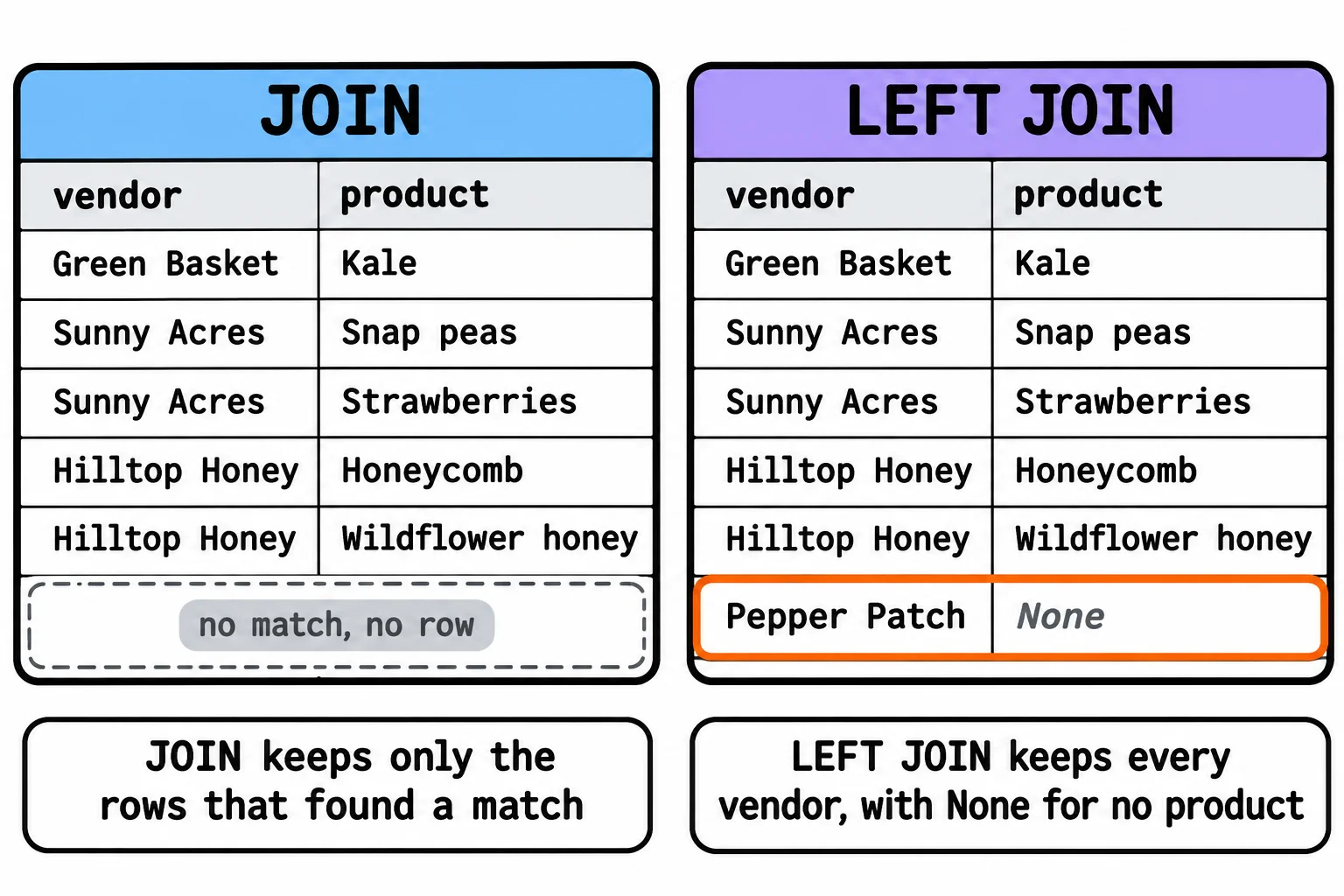
The market's directory lists every vendor with its products. Joining from vendors gives five rows, one for each product, and Pepper Patch isn't among them: a plain JOIN keeps only the rows that found a match. It's also called an INNER JOIN, and INNER JOIN is the same query written out in full.
A LEFT JOIN keeps every row of the left table, the one after FROM, and puts NULL (Python's None) where the match would be:
for row in conn.execute("""
    SELECT v.name, p.name
    FROM vendors AS v
    LEFT JOIN products AS p ON p.vendor_id = v.id
    ORDER BY v.stall, p.name
"""):
    print(tuple(row))
('Green Basket', 'Kale')
('Sunny Acres', 'Snap peas')
('Sunny Acres', 'Strawberries')
('Hilltop Honey', 'Honeycomb')
('Hilltop Honey', 'Wildflower honey')
('Pepper Patch', None)
With JOIN instead of LEFT JOIN, the same query gives the first five rows. Choose by the question you're answering: "products and where to buy them" wants a JOIN, since a product always has a vendor; "every vendor, with whatever it sells" wants a LEFT JOIN, so the new vendor isn't left off the directory. Its full name is LEFT OUTER JOIN.
Do it: find each product's stall
The map app needs a list it can draw: every product, with the stall where it's sold.
conn: a connection to the market's database, with two tables.vendorshas the columnsid,nameandstall;productshasid,vendor_id(a vendor'sid),nameandprice.
Your job: write products_with_vendor(conn). It returns a list of tuples, one for each product: the product's name and its vendor's stall.
- Sort the list by stall, and products at the same stall by name.
- A vendor with no products adds nothing to the list.
- With no products at all, return an empty list,
[].
Worked through: with the tables from the top of this lesson (Pepper Patch included), the answer is:
[('Kale', 2), ('Snap peas', 4), ('Strawberries', 4), ('Honeycomb', 7), ('Wildflower honey', 7)]
Kale is at Green Basket's stall 2, Sunny Acres' two products come next, sorted by name, then Hilltop Honey's two. Pepper Patch sells nothing yet, so it adds no row.
Practiced live on the lesson page: write the Python right there and check it.
Check yourself
2 questions to try on the lesson page.
So what
Related data lives in separate tables, and a join is how an API gets it back together in one question, with a LEFT JOIN whenever a row with nothing to match still belongs in the answer.