What a Database Is, and Why SQLite
A JSON file loses changes when two people save at once and has to be read whole to find one item, so an API keeps its data in a database of tables, rows and columns, and Python's built-in sqlite3 module opens a whole SQLite database stored in one file.
Apprentice · SQLite · SQL · Database · Updated
After this lesson you can
- Explain what a database's tables, rows, columns and primary key are, and why an API keeps its data in a database instead of a JSON file
- Open a SQLite database with sqlite3.connect, run SQL with execute, save changes with commit and close the connection
Key takeaways
- A database keeps data in tables, like labeled spreadsheets, with a column for each fact and a row for each item.
- A primary key is a column whose value is different in every row, such as an id, so one value always means one row.
- A JSON file loses a change when two people save at once and must be read whole to find one item, which a database is built to handle.
- SQLite is a whole database in one file, and Python's sqlite3 module opens it with no server and nothing to install.
- sqlite3.connect opens a database, execute runs one SQL statement, commit saves the changes and close lets the file go.
Every app that remembers something keeps it somewhere: the orders a shop took today, the accounts people signed up for, the items in a to-do list. Up to now, this course's APIs kept their data in a Python list, which is gone the moment the server stops. In this module your API's data moves into a database, so it's still there tomorrow.
The example for this chapter is Fern & Fig, a small plant shop. Its catalog (each plant's name, the light it needs, how often to water it, its price, whether it's safe for pets, and a care tip) lives in a file, plants.json, and the shop's API reads that file and writes it back.
The catalog in a JSON file
A JSON file works for one person. Trouble starts when two people use it at once. Ana and Ben both open the catalog at the shop's counter: Ana lowers the Snake Plant's price and saves, and a moment later Ben adds a Boston Fern and saves. Each of them saves the whole list as they last read it:
import json

saved = '[{"name": "Snake Plant", "price": 24.0}]'

ana = json.loads(saved)
ben = json.loads(saved)

ana[0]["price"] = 22.0
saved = json.dumps(ana)

ben.append({"name": "Boston Fern", "price": 18.0})
saved = json.dumps(ben)

print(saved)
[{"name": "Snake Plant", "price": 24.0}, {"name": "Boston Fern", "price": 18.0}]
Ben's save wrote his old copy over Ana's, so the Snake Plant is back to $24.00 and nobody was told. And as the catalog grows, finding one plant means reading every plant in the file, while nothing stops someone saving a plant with no name.
A database is a program built for these jobs: it takes many changes at once without losing any, finds one item among thousands quickly, and refuses data that breaks its rules.
Tables, rows and columns
Picture a spreadsheet with a labeled column for each fact and a line for each plant. A database keeps its data the same way, in tables: each column holds one fact (the name, the price), and each row is one item (one plant). A database usually holds several tables, one for each kind of thing: plants, customers, orders.
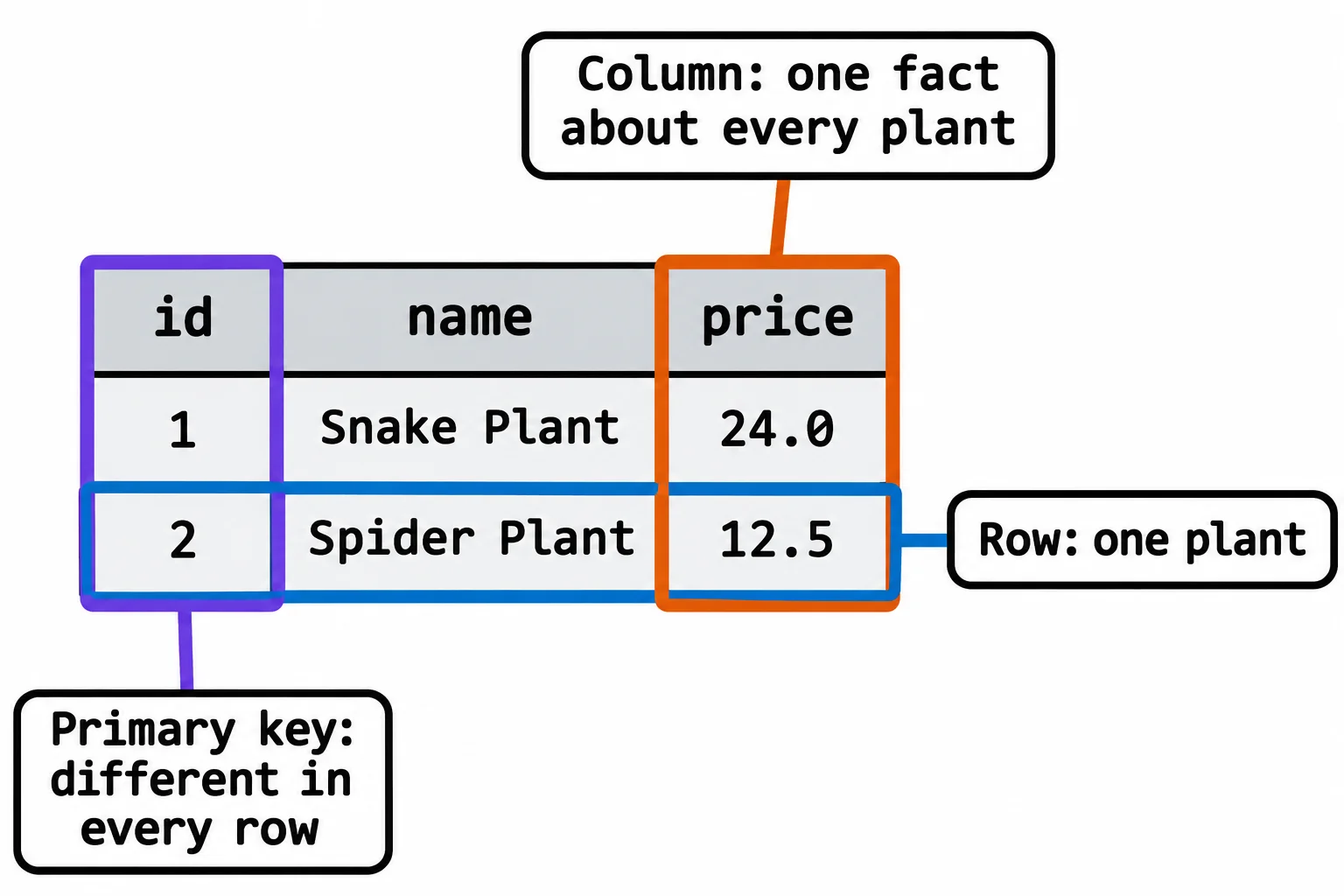
The id column is the table's primary key: a value that's different in every row, like a receipt number. Two plants might share a name, but plant 2 is always exactly one row.
You talk to a database in SQL (read "S-Q-L", or "sequel"), a language made for asking about tables: "give me the plants under $20", "add this plant", "change that price". Most databases run as a server, a separate program your app connects to: PostgreSQL and SQL Server are two that bigger apps use. SQLite is different: the whole database is one file on disk, and Python comes with the sqlite3 module that opens it, so there's nothing to install. It's a good fit for learning and for small apps, and the SQL you learn here carries over to the servers.
Connect, execute, commit, close
Four steps talk to a SQLite database from Python:
import sqlite3

conn = sqlite3.connect("shop.db")
conn.execute("CREATE TABLE IF NOT EXISTS plants (id INTEGER PRIMARY KEY, name TEXT, price REAL)")
conn.execute("INSERT INTO plants (name, price) VALUES (?, ?)", ("Snake Plant", 24.0))
conn.execute("INSERT INTO plants (name, price) VALUES (?, ?)", ("Spider Plant", 12.5))
conn.commit()

row = conn.execute("SELECT COUNT(*) FROM plants").fetchone()
print(row)
print(row[0], "plants")
conn.close()
(2,)
2 plants
sqlite3.connect("shop.db")opens the file, making it when it isn't there yet, and gives back a connection,conn: your line to the database.sqlite3.connect(":memory:")makes a database in memory instead, gone when the program ends, which is handy for practice and tests.conn.execute(...)runs one SQL statement. Here they make theplantstable, add two rows, and count them. The?marks (read "question mark") hold places for the values that follow in brackets. Tables and Rows: CREATE TABLE and INSERT takes these statements apart.conn.commit()saves the changes into the file. Until then, they're only a draft that this connection can see.executehands back a cursor, the object that steps through a statement's answer, andfetchone()takes the answer's next row as a tuple:(2,).row[0]is the count.conn.close()lets go of the file.
Run the program a second time and it prints 4 plants: the first run's two plants were still in shop.db. That's the whole point of a database.
Looking inside with python -m sqlite3
Python 3.12 and later can open a database file in the terminal, so you can look at what your code saved. In VS Code's terminal, in the folder that holds shop.db (on a Mac, type python3):
python -m sqlite3 shop.db
It prints a few lines about itself, including the version of SQLite inside your Python, and then waits at a sqlite> prompt for SQL. After one run of the program above:
sqlite> SELECT * FROM plants;
(1, 'Snake Plant', 24.0)
(2, 'Spider Plant', 12.5)
sqlite> .quit
SELECT * FROM plants; (read "select star from plants": * means every column) shows each row as a tuple, and .quit leaves the shell. What you type there runs on the real file, so use it to look, and make changes through your code.
Do it: start the plant catalog in memory
Before moving the real catalog, Fern & Fig wants to try a database in memory.
plants: a list of plants to add, each a tuple of a name and a price, such as("Boston Fern", 18.0).
Your job: write the function start_catalog(plants).
- Open a new database in memory with
sqlite3.connect(":memory:"). - Make the table
plantswith three columns:id INTEGER PRIMARY KEY,name TEXTandprice REAL. - Add each plant in the list, in order, with an
INSERTthat uses?placeholders. Leaveidout: SQLite numbers the rows 1, 2, 3 for you. - Return the connection.
The tests read your table back through the connection you return. An empty list still makes the table, with no rows in it.
Worked through: start_catalog([("Boston Fern", 18.0), ("Parlor Palm", 29.0)]) makes the table and adds two rows, so on the connection it returns, SELECT COUNT(*) FROM plants gives (2,), and SELECT id, name, price FROM plants gives these rows:
[(1, 'Boston Fern', 18.0), (2, 'Parlor Palm', 29.0)]
Practiced live on the lesson page: write the Python right there and check it.
Check yourself
2 questions to try on the lesson page.
So what
Every API that remembers anything keeps its data in a database, and with tables, rows, a primary key and four steps in Python, you've opened your first one.