Article, Section and Aside
Inside the main content, mark up each piece that stands on its own as an article, each themed group with its own heading as a section, and related extras as an aside, using one short test for each.
Apprentice · HTML · Updated
After this lesson you can
- Use the stand-alone test to decide when content belongs in an article
- Choose section for a themed group with a heading, and aside for content related to the main content but not part of it
Key takeaways
- An article is one complete piece that would make sense on its own, copied into a newsletter or shared by a link, such as a news story, a blog post or a review.
- A section is a group of content on one theme, with a heading of its own.
- An aside is an extra beside the main content, such as a sidebar or a "Did you know?" box. It is related, but the main content makes sense without it.
- Article, section, aside and nav are called sectioning content. Each starts a part of the page that can have its own header and footer.
A blog, an online store, a news site, a page of recipes: most of what people build has many pieces inside its main content. A product page has reviews. A blog post has comments. A news page has stories, a "Most read" box and a part with the opening hours. When you build pages like these, at work or for an assignment, three elements say what each piece is, and each one comes with a test you can run in your head.
The newsletter test: article
Imagine clipping a story out of a newspaper and sticking it on the fridge. It still makes sense: it has its own headline and says everything it needs to. That's the test for an article: is this one complete piece that would make sense on its own, copied into a newsletter or shared by a link?
If the answer is yes, it goes in an <article>:
<article>
  <h2>New 3D printer in the makerspace</h2>
  <p>Our makerspace now has a 3D printer. Book a free half-hour session at the front desk.</p>
</article>
Things that pass the test: a news story, a blog post, a forum post, a reader's comment, a product card with its photo, name and price, a recipe, a review of a movie. Things that fail it: a "Read more" link, the menu, the copyright line. Clip any of those out, and they make no sense alone.
A chapter with a heading: section
A textbook is split into chapters, and each chapter has a title. A newspaper has its Sports pages, all about sports, under a big "Sports" heading. That's a section: a group of content on one theme, with a heading of its own.
<section>
  <h2>Opening Hours</h2>
  <p>Monday to Thursday: 9 a.m. to 8 p.m.</p>
  <p>Sunday: closed</p>
</section>
The heading is the clue. If you can't think of a heading for the group, it probably isn't a section. And sections and articles work together: a group of stories isn't one complete piece, so the library's "Library News" is a section, and each story inside it is an article.
<section>
  <h2>Library News</h2>
  <article>
    <h3>Summer Reading Challenge starts June 1</h3>
    <p>Read five books by August 15 and earn a free tote bag.</p>
  </article>
  <article>
    <h3>New 3D printer in the makerspace</h3>
    <p>Book a free half-hour session at the front desk.</p>
  </article>
</section>
The "Did you know?" box: aside
Magazines put little boxes beside their stories: Did you know?, Related reading, a short bio of the writer. They're related to the story, but if you cut them out, the story still works. That's an aside: content that's related to what's around it, but not part of it.
<aside>
  <h2>Upcoming Events</h2>
  <p>June 3: Lego Builders Club, ages 6 to 12, 4 p.m.</p>
  <p>June 5: Teen Game Night, 6 p.m.</p>
</aside>
On the library's news page, the upcoming events sit beside the news: a sidebar. Other good asides: a "You might also like" box on a product page, a glossary box beside a lesson, an author bio beside a blog post.
An <aside> at the page level is a landmark, like the four in Header, Nav, Main and Footer. A screen reader announces it as "complementary", which means "extra, beside the main content".
Which one? Four questions
When you're not sure which element a piece of content needs, ask these questions in order, and stop at the first yes:
| Ask | If yes |
|---|---|
| 1. Is it one complete piece, such as a story, a post or a comment, that would make sense on its own, copied into a newsletter or shared by a link? | <article> |
| 2. Is it an extra beside the main content, such as a sidebar, a "Did you know?" box or related links, that the main content makes sense without? | <aside> |
| 3. Is it a group on one theme, with a heading of its own? | <section> |
| 4. None of these, and you need a box only to group or style things? | <div>, covered in Div and Span: Boxes with No Meaning |
For the library: each news story is an article (question 1), the events box beside the news is an aside (question 2), and the group of stories under "Library News" is a section (question 3).
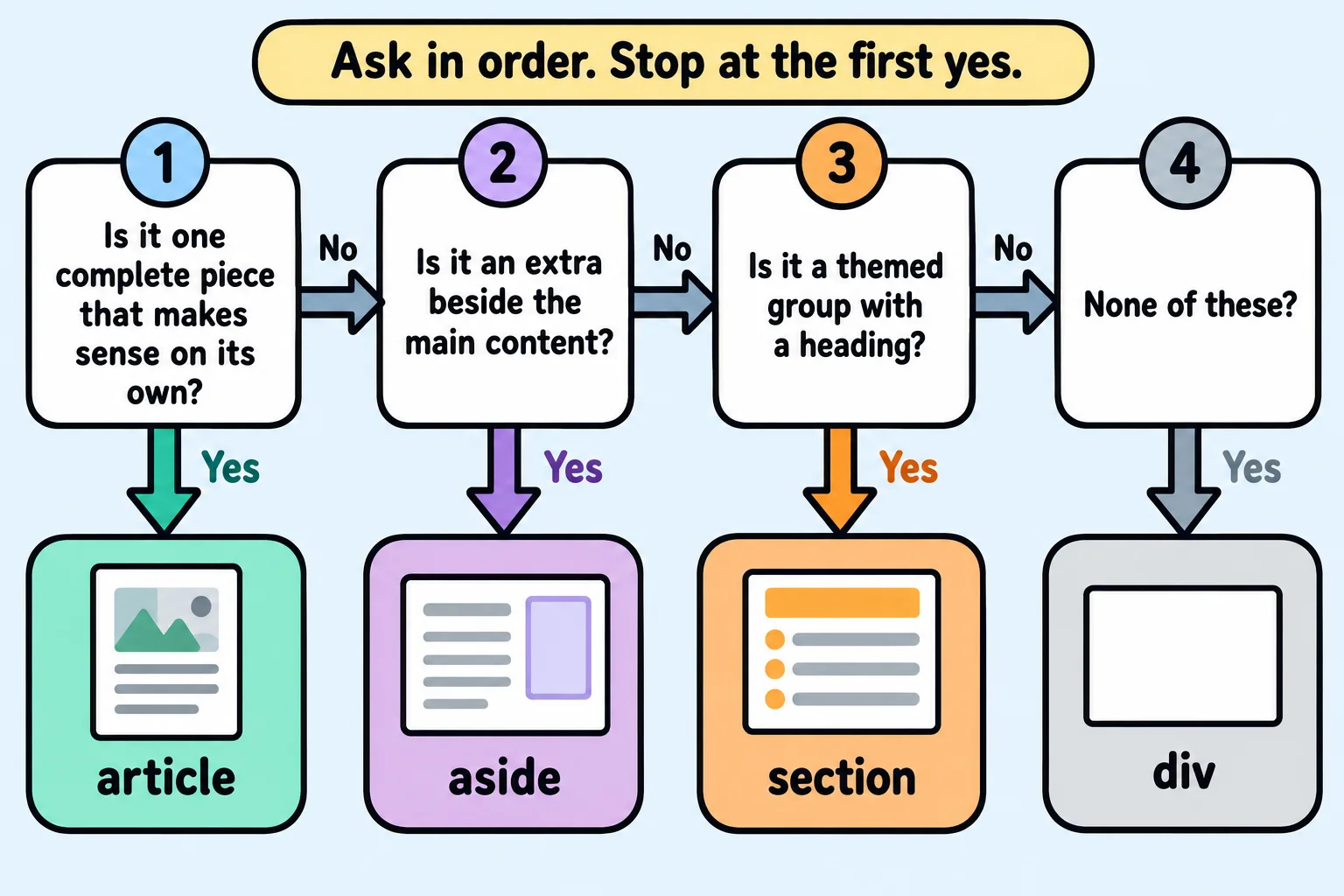
Try it. Open a news site or a store you use, and pick three pieces of one page: a story or product, a box beside it, and a group with a heading. Run the four questions on each. Then right-click each piece, choose Inspect, and see what the site's developers chose.
Sectioning content: parts with their own top and bottom
<article>, <section>, <aside> and <nav> have something in common: each starts a part of the page with its own heading. In the HTML standard, and in many textbooks, this group is called sectioning content. That's why an article can have a <header> and <footer> of its own, and why they belong to the article, not to the page:
<article>
  <header>
    <h3>Quiet study rooms can now be booked online</h3>
    <p>Posted May 28</p>
  </header>
  <p>The four study rooms on the second floor can be booked up to a week ahead.</p>
  <footer>
    <p>Filed under: Library News</p>
  </footer>
</article>
Try it. In VS Code, make a page for a pet adoption site or a bike shop. In its <main>, add a <section> with a heading, holding two <article>s (two pets, or two bikes), and an <aside> with a tip. Give one article its own <header> with a heading and a date.
Do it: sort out the staff picks page
The library's newsletter wants to copy each staff pick on its own, and the library's stylesheet gives pieces, groups and extras each their own look. Right now every part of the Staff Picks page is a plain <div>, so nothing can tell them apart. Run the four questions on each box:
- Each book pick, with its title and who picked it, is one complete piece the newsletter could copy.
- Staff Picks, the two picks together under their heading, is a group on one theme.
- Did you know? is an extra beside the picks; the page makes sense without it.
Keep every word. Edit the page in the box, and the checks tick as each box gets its element.
Practiced live on the lesson page: write the HTML right there and check it.
Check yourself
2 questions to try on the lesson page.
So what
Article, section and aside turn "a page full of stuff" into stories, groups and extras that a screen reader, a search engine and the next developer can each pick out, and four questions help you choose between them.