Inserting Data
Add rows to a table with INSERT, for every column or only some, one row or several at once, without breaking a foreign key.
Apprentice · SQL · MySQL · Updated
Below is the ANSI standard syntax to insert a new row into a table.
INSERT INTO <table_name> (<column_1>, <column_2>, ...)
VALUES (<value_1>, <value_2>, ...)
Insert with All Columns
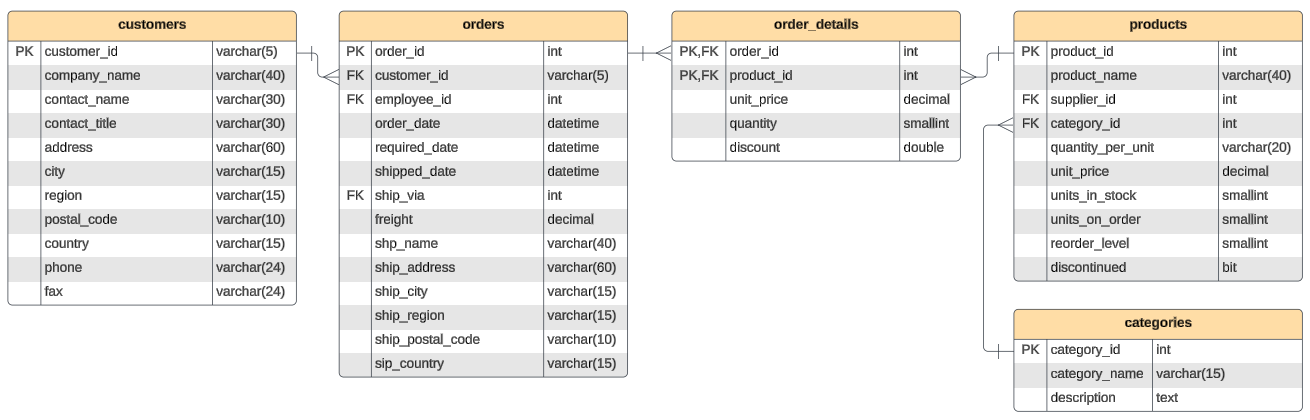
These examples use the products table in the Northwind database:
INSERT INTO products
(
    product_id
    , product_name
    , supplier_id
    , category_id
    , quantity_per_unit
    , unit_price
    , units_in_stock
    , units_on_order
    , reorder_level
    , discontinued
)
VALUES
(
    1001
    , 'Hot Chocolate'
    , 1
    , 1
    , '12 pack'
    , 5.99
    , 50
    , 0
    , 10
    , false
);
This query inserts a new product with the specified details into the products table.
Inserting Data into Specific Columns
When you insert a row, you don't need to supply every column, only the required ones. The database can generate the id of a new row for you, so leave it out. A table can have only one auto-number (AUTO_INCREMENT) column, and it is usually the primary key.
INSERT INTO products
(
    product_name
    , category_id
    , unit_price
    , units_in_stock
)
VALUES
(
    'Hot Chocolate'
    , 1
    , 5.99
    , 50
);
This query inserts a new product into the products table, specifying only the product_name, category_id, unit_price, and units_in_stock. Other columns will take their default values or remain NULL. The product_id field is the primary key, and is autogenerated.
Inserting Multiple Rows at Once
INSERT INTO customers(customer_id, company_name, contact_name, country)
VALUES ('TACOT','Taco Town', 'Rosa Martinez', 'USA')
    , ('ALPSH','Alpen Schokies', 'Werner Mueller', 'Germany')
    , ('RACGR','Raclette und Gruyere', 'Hans Messerli', 'Switzerland');
This query inserts multiple customers into the customers table in a single INSERT statement.
Example of Inserting Data with a Foreign Key Violation
Suppose you have two tables: orders and customers. The orders table has a foreign key (customer_id) that references the customers table.
If you attempt to insert an order with a customer_id that does not exist in the customers table, a foreign key violation will occur.
INSERT INTO orders
(
    customer_id
    , order_date
)
VALUES
(
    'JOECS'
    , '2024-03-15'
);
In this example, the customer_id value of 'JOECS' does not exist in the customers table. As a result, the database will raise a foreign key constraint violation error.
Example of Proper Insertion with a Foreign Key
To avoid the foreign key violation, you must insert a valid customer_id that exists in the customers table.
Insert a Valid Customer
First, you must ensure the customer with the proper ID exists in the customer table.
INSERT INTO customers(customer_id, company_name, contact_name, country)
VALUES ('JOECS','Joe''s Crab Shack', 'Joe Wilson', 'USA');
Insert an Order with the Valid Customer ID
Then, you can insert an order for that customer_id.
INSERT INTO orders
(
    customer_id
    , order_date
)
VALUES
(
    'JOECS'
    , '2024-03-15'
);
This query successfully inserts the order because the customer_id value of 'JOECS' now exists in the customers table.
Do it: add two new shippers
Northwind has signed two new shipping companies, and they need to be in the shippers table before anyone can send an order with them.
The shippers table (the Tables tab shows the SQL that makes it) has three columns:
shipper_id: the shipper's number. It numbers itself, as anAUTO_INCREMENTcolumn does in MySQL. (SQLite, which runs this box, writes that asINTEGER PRIMARY KEY.)company_name: the company's name. It's required.phone: the company's phone number, as text.
Today it has these rows:
| shipper_id | company_name | phone |
|---|---|---|
| 1 | Speedy Express | (503) 555-9831 |
| 2 | United Package | (503) 555-3199 |
| 3 | Federal Shipping | (503) 555-9931 |
The two new shippers:
| company_name | phone |
|---|---|
| Harbor Express | (503) 555-0140 |
| Ana's Bike Couriers | (503) 555-0150 |
After your SQL runs, the check reads the whole table, sorted by shipper_id, and it should give exactly these rows:
| shipper_id | company_name | phone |
|---|---|---|
| 1 | Speedy Express | (503) 555-9831 |
| 2 | United Package | (503) 555-3199 |
| 3 | Federal Shipping | (503) 555-9931 |
| 4 | Harbor Express | (503) 555-0140 |
| 5 | Ana's Bike Couriers | (503) 555-0150 |
Your job: write an INSERT that adds the two new shippers.
- Name the two columns you fill:
company_nameandphone. - Leave
shipper_idout: the database gives each new row the next number. - Add Harbor Express first, then Ana's Bike Couriers, so they get numbers 4 and 5.
- Write each name and phone number exactly as the table above shows it, including the quote in Ana's.
Practiced live on the lesson page: write the SQL right there and check it.