Shaping the Report: $project, $set, $sort and $limit
Four stages turn a pipeline's correct answer into a report someone can read, $sort and $limit for the top few, $project to choose and rename fields, and $set to compute new ones with expressions such as $multiply and $round, and the order of the stages changes what comes out.
Journeyman · MongoDB · Updated
After this lesson you can
- Choose, rename and compute fields with $project and $set, using expressions such as $multiply and $round
- Sort and trim a pipeline's result with $sort and $limit, and predict how the order of the stages changes the result
- Choose the stages a sales report needs from $match, $group, $sort, $limit, $project, $set and $count
Key takeaways
- $sort puts documents in order (1 up, -1 down), and $limit keeps only the first few, so a sort then a limit gives a top 3 or a top 5.
- $project chooses the fields to keep, and can rename one with a field path, such as category set to "$_id", while _id set to 0 leaves _id out.
- $set adds a computed field to each document, or replaces one, with expressions such as $multiply to multiply and $round to round.
- Stages run in the order you write them, so a $limit before a $sort keeps the wrong documents, and a field $project left out is gone for every later stage.
A dashboard tile that says "Top 3 categories", a sales report a manager downloads, the numbers behind a chart: each wants a few rows, in order, with clear names and amounts in dollars and cents. $group gets the numbers right; the stages in this lesson make them presentable. You'll use them at the end of almost every pipeline you write.
The examples use Riverbend Bike Shop's 2,000 orders from The Aggregation Pipeline: Data on a Conveyor Belt. In mongosh, after use riverbend, load them again first:
load("riverbend-orders.js")
true
From an answer to a report
Riverbend wants two things for its dashboard: the top three categories by revenue, biggest first, and the average order for each payment method. $group: Totals, Counts and Averages already computed both, but the answers came out in no order, with every name under _id and averages such as 178.9732441471572. Four more stages fix that: $sort, $limit, $project and $set.
$sort and $limit: the top three
$sort (read "sort") puts the documents in order, as sort does after a find in Sorting and Paging: sort, limit and skip: 1 is up, smallest first, and -1 is down, biggest first. $limit (read "limit") keeps only the first few documents and drops the rest. A sort, then a limit, is a top three:
db.orders.aggregate([
  { $group: { _id: "$category", revenue: { $sum: "$total" } } },
  { $sort: { revenue: -1 } },
  { $limit: 3 }
])
[
  { _id: 'bikes', revenue: 181065 },
  { _id: 'helmets', revenue: 84364 },
  { _id: 'lights', revenue: 37935 }
]
$project: choose and rename fields
$project (read "project", as in Choosing Fields with Projections) decides which fields each document keeps. 1 keeps a field, _id: 0 leaves _id out, and a new name with a field path renames a field: category: "$_id" means "a field called category, holding the value of _id":
db.orders.aggregate([
  { $group: { _id: "$category", revenue: { $sum: "$total" } } },
  { $sort: { revenue: -1 } },
  { $limit: 3 },
  { $project: { _id: 0, category: "$_id", revenue: 1 } }
])
[
  { revenue: 181065, category: 'bikes' },
  { revenue: 84364, category: 'helmets' },
  { revenue: 37935, category: 'lights' }
]
The same three numbers, now with a name that says what they are.
$set: compute a new field
The accountant wants the 8% sales tax on each order. No order stores it, but a stage can work it out. $set (read "set"; $addFields is its other name, and does the same) adds a field to each document. Its value can be an expression, a small formula worked out for each document. $multiply (read "multiply") multiplies the numbers in its square brackets. Customer 7's orders, with their tax:
db.orders.aggregate([
  { $match: { customerId: 7 } },
  { $set: { tax: { $multiply: ["$total", 0.08] } } },
  { $project: { total: 1, tax: 1 } }
])
[
  { _id: 10063, total: 70, tax: 5.6000000000000005 },
  { _id: 10392, total: 266, tax: 21.28 },
  { _id: 10639, total: 52, tax: 4.16 },
  { _id: 10744, total: 120, tax: 9.6 },
  { _id: 11163, total: 180, tax: 14.4 },
  { _id: 11844, total: 95, tax: 7.6000000000000005 },
  { _id: 11910, total: 64, tax: 5.12 }
]
The math is right, but computers store numbers such as 0.08 a tiny bit off, and the leftovers show up as 5.6000000000000005. $round (read "round") takes a value and how many decimal places to keep, [value, 2] for cents. Expressions fit inside each other, so the multiply goes inside the round:
db.orders.aggregate([
  { $match: { customerId: 7 } },
  { $set: { tax: { $round: [{ $multiply: ["$total", 0.08] }, 2] } } },
  { $project: { total: 1, tax: 1 } }
])
[
  { _id: 10063, total: 70, tax: 5.6 },
  { _id: 10392, total: 266, tax: 21.28 },
  { _id: 10639, total: 52, tax: 4.16 },
  { _id: 10744, total: 120, tax: 9.6 },
  { _id: 11163, total: 180, tax: 14.4 },
  { _id: 11844, total: 95, tax: 7.6 },
  { _id: 11910, total: 64, tax: 5.12 }
]
Give $set a field that's already there, and it replaces it. That rounds the payment averages in place:
db.orders.aggregate([
  { $group: { _id: "$payment", orders: { $sum: 1 }, average: { $avg: "$total" } } },
  { $set: { average: { $round: ["$average", 2] } } },
  { $sort: { orders: -1 } }
])
[
  { _id: 'card', orders: 1196, average: 178.97 },
  { _id: 'paypal', orders: 599, average: 190.84 },
  { _id: 'gift card', orders: 205, average: 173.92 }
]
Stage order changes the answer
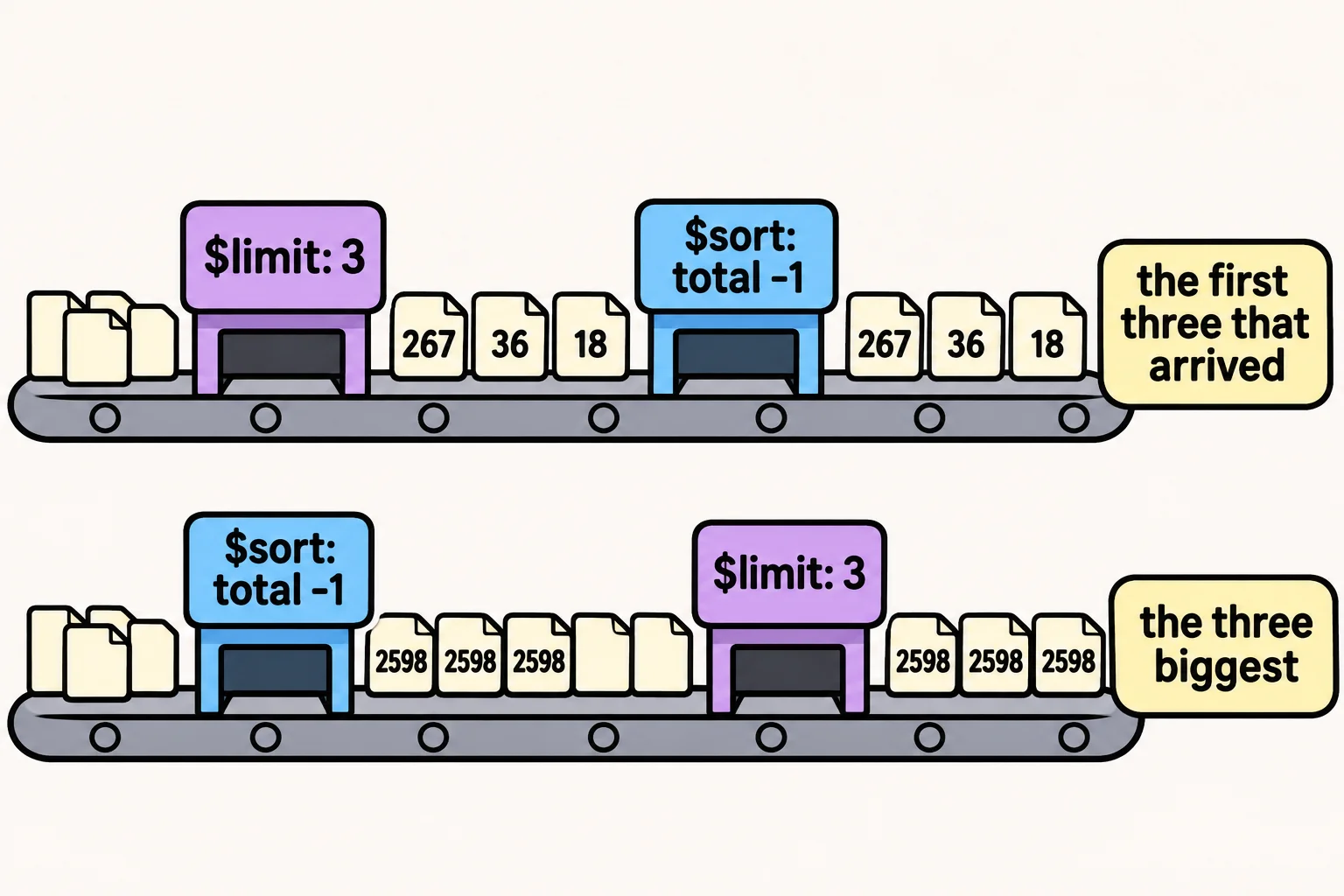
The belt runs the stages in the order you write them. Put $limit before $sort, and it keeps the first three orders that arrive, then sorts only those:
db.orders.aggregate([
  { $limit: 3 },
  { $sort: { total: -1 } },
  { $project: { total: 1 } }
])
[
  { _id: 10001, total: 267 },
  { _id: 10002, total: 36 },
  { _id: 10003, total: 18 }
]
The first three orders of the year, sorted among themselves, not the three biggest. Sort first, then limit:
db.orders.aggregate([
  { $sort: { total: -1, _id: 1 } },
  { $limit: 3 },
  { $project: { total: 1 } }
])
[
  { _id: 10690, total: 2598 },
  { _id: 10755, total: 2598 },
  { _id: 11337, total: 2598 }
]
Five orders tie at $2,598, so the second sort field, _id: 1, decides which three come first, and the answer is the same every time. The same rule works the other way for $project: a field it leaves out is gone for every stage after it, so a later $sort on that field has nothing to sort by. A common order is $match, $group, $set, $sort, $limit, then $project.
Check yourself
2 questions to try on the lesson page.
So what
The right numbers are only half a report. With $sort, $limit, $project and $set in the right order, a pipeline now hands back exactly the rows a dashboard or a manager needs, named and rounded.