Reports by Day and Month: Dates in a Pipeline
Dates stored as real dates can be matched by range and grouped by month or day with $year, $month and $dateToString, and the timezone option counts each order in the month it was where the shop is.
Journeyman · MongoDB · Updated
After this lesson you can
- Match documents in a date range with ISODate, $gte and $lt
- Group documents by month or day with $year, $month or $dateToString, and set the timezone option to the shop's time zone
- Choose $unwind, $lookup, a group by date or a plain $match and $group for a sales report question
Key takeaways
- Store dates as dates with ISODate, not as text, because a text value never matches a date in a filter.
- A year is everything from ISODate("2026-01-01") up to, but not including, ISODate("2027-01-01"), written with $gte and $lt.
- $year and $month take a date apart, and $dateToString writes it as text in the format you give, such as "%Y-%m" for 2026-03.
- MongoDB keeps every date in UTC, and the timezone option, such as "America/Los_Angeles", counts each date in the shop's own time.
Almost every dashboard has a chart with time along the bottom: sales by month, sign-ups by day, orders by hour. Whenever someone asks "how did we do last month?", the pipeline behind the answer matches a date range and groups by a piece of the date. Get the dates right and the chart is right; get the time zone wrong and a busy evening lands in the wrong month.
The examples use Riverbend's sales from $unwind: One Document per Array Item. If you changed them, load("riverbend-sales.js") puts them back as they started.
A date written as text isn't a date
Riverbend's owner wants the orders since March 1. A first try writes the date the way you'd type it:
db.orders.countDocuments({ orderedAt: { $gte: "2026-03-01" } })
0
Zero, though five orders came after March 1. Each orderedAt holds a real date, made with ISODate (read "ISO date"), and MongoDB never compares a date with text: they're different types, as BSON Types and the _id Field showed. Compare a date with a date:
db.orders.countDocuments({ orderedAt: { $gte: ISODate("2026-03-01") } })
5
ISODate("2026-03-01") is the first moment of March 1, written year, month, day: the international standard, ISO 8601, that gives it its name. The same trap works the other way: a date saved as text in the documents matches no date in a filter and can't be grouped by month. Store dates as dates.
A date range: $gte and $lt
A year is a range of moments, so it takes two comparisons. Riverbend's 2026 is every order from the first moment of 2026 up to, but not including, the first moment of 2027:
db.orders.aggregate([
  { $match: { orderedAt: { $gte: ISODate("2026-01-01"), $lt: ISODate("2027-01-01") } } },
  { $count: "orders" }
])
[ { orders: 9 } ]
Nine of the 10 orders: order 5000, from December 2025, is left out. Why $lt the next year rather than $lte December 31? ISODate("2026-12-31") is midnight at the start of December 31, so $lte would leave out every order placed later that day. "From the first of this month up to the first of the next" never misses an hour.
Grouping by month: $year, $month and $dateToString
To group by month, the pipeline takes each date apart. $year and $month give its year and its month as numbers, and a $group whose _id holds both gives one row per month:
db.orders.aggregate([
  { $match: { status: "shipped", orderedAt: { $gte: ISODate("2026-01-01"), $lt: ISODate("2027-01-01") } } },
  { $group: { _id: { year: { $year: "$orderedAt" }, month: { $month: "$orderedAt" } }, sales: { $sum: "$total" }, orders: { $sum: 1 } } },
  { $sort: { _id: 1 } }
])
[
  { _id: { year: 2026, month: 1 }, sales: 2031, orders: 2 },
  { _id: { year: 2026, month: 2 }, sales: 110, orders: 2 },
  { _id: { year: 2026, month: 3 }, sales: 719, orders: 1 },
  { _id: { year: 2026, month: 4 }, sales: 1342, orders: 2 },
  { _id: { year: 2026, month: 5 }, sales: 35, orders: 1 }
]
A chart wants labels like 2026-03. $dateToString writes a date as text in the format you give it: %Y is the four-digit year, %m the two-digit month and %d the day, so "%Y-%m" groups by month and "%Y-%m-%d" by day. Because "2026-03" sorts the way the months run, the rows come out in order:
db.orders.aggregate([
  { $match: { status: "shipped", orderedAt: { $gte: ISODate("2026-01-01"), $lt: ISODate("2027-01-01") } } },
  { $group: { _id: { $dateToString: { format: "%Y-%m", date: "$orderedAt" } }, sales: { $sum: "$total" }, orders: { $sum: 1 } } },
  { $sort: { _id: 1 } }
])
[
  { _id: '2026-01', sales: 2031, orders: 2 },
  { _id: '2026-02', sales: 110, orders: 2 },
  { _id: '2026-03', sales: 719, orders: 1 },
  { _id: '2026-04', sales: 1342, orders: 2 },
  { _id: '2026-05', sales: 35, orders: 1 }
]
Time zones: whose midnight?
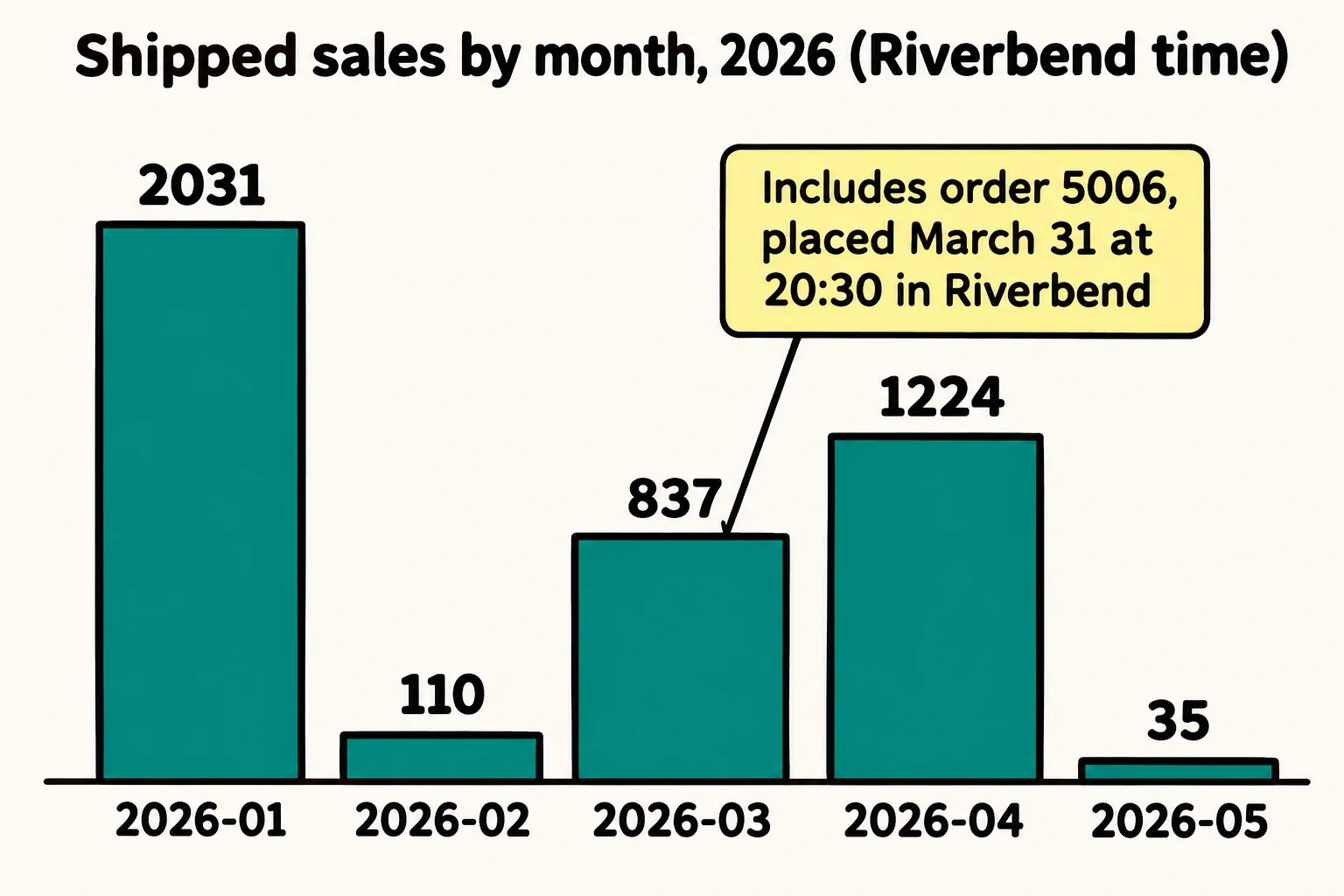
Order 5006 shows in April, but Jordan placed it on the evening of March 31. MongoDB keeps every date in UTC, Coordinated Universal Time, the clock the world agrees on, and Riverbend's clocks run 7 hours behind it in spring. The timezone option shows the same moment on Riverbend's clock, named the way the world's time-zone list names it, "America/Los_Angeles":
db.orders.aggregate([
  { $match: { _id: 5006 } },
  { $project: {
      utc: { $dateToString: { format: "%Y-%m-%d %H:%M", date: "$orderedAt" } },
      riverbend: { $dateToString: { format: "%Y-%m-%d %H:%M", date: "$orderedAt", timezone: "America/Los_Angeles" } }
  } }
])
[
  { _id: 5006, utc: '2026-04-01 03:30', riverbend: '2026-03-31 20:30' }
]
Give the monthly report the same option, and the order counts in March, the month it was in the shop:
db.orders.aggregate([
  { $match: { status: "shipped", orderedAt: { $gte: ISODate("2026-01-01"), $lt: ISODate("2027-01-01") } } },
  { $group: { _id: { $dateToString: { format: "%Y-%m", date: "$orderedAt", timezone: "America/Los_Angeles" } }, sales: { $sum: "$total" }, orders: { $sum: 1 } } },
  { $sort: { _id: 1 } }
])
[
  { _id: '2026-01', sales: 2031, orders: 2 },
  { _id: '2026-02', sales: 110, orders: 2 },
  { _id: '2026-03', sales: 837, orders: 2 },
  { _id: '2026-04', sales: 1224, orders: 1 },
  { _id: '2026-05', sales: 35, orders: 1 }
]
March grows to 837 and April shrinks to 1224. $year and $month take the same option, written { $month: { date: "$orderedAt", timezone: "America/Los_Angeles" } }. A name like "America/Los_Angeles" also knows when the clocks change for summer, which a fixed "-08:00" doesn't.
Which stage for which question
The whole chapter, side by side:
| The question | What the pipeline needs |
|---|---|
| Total sales per payment method or status | $match, then $group by that field |
| Units sold of each product | $unwind the items, then $group by product |
| Each customer's spending, with their name | $group by customerId, then $lookup the customer and $unwind it |
| Sales per month | $match a date range, then $group by $dateToString with the shop's timezone |
Check yourself
2 questions to try on the lesson page.
So what
Dates stored as dates can be matched by range and grouped by any piece of the calendar. Name the shop's time zone, and every order lands in the month it really happened.