Arrays and Documents Inside Documents
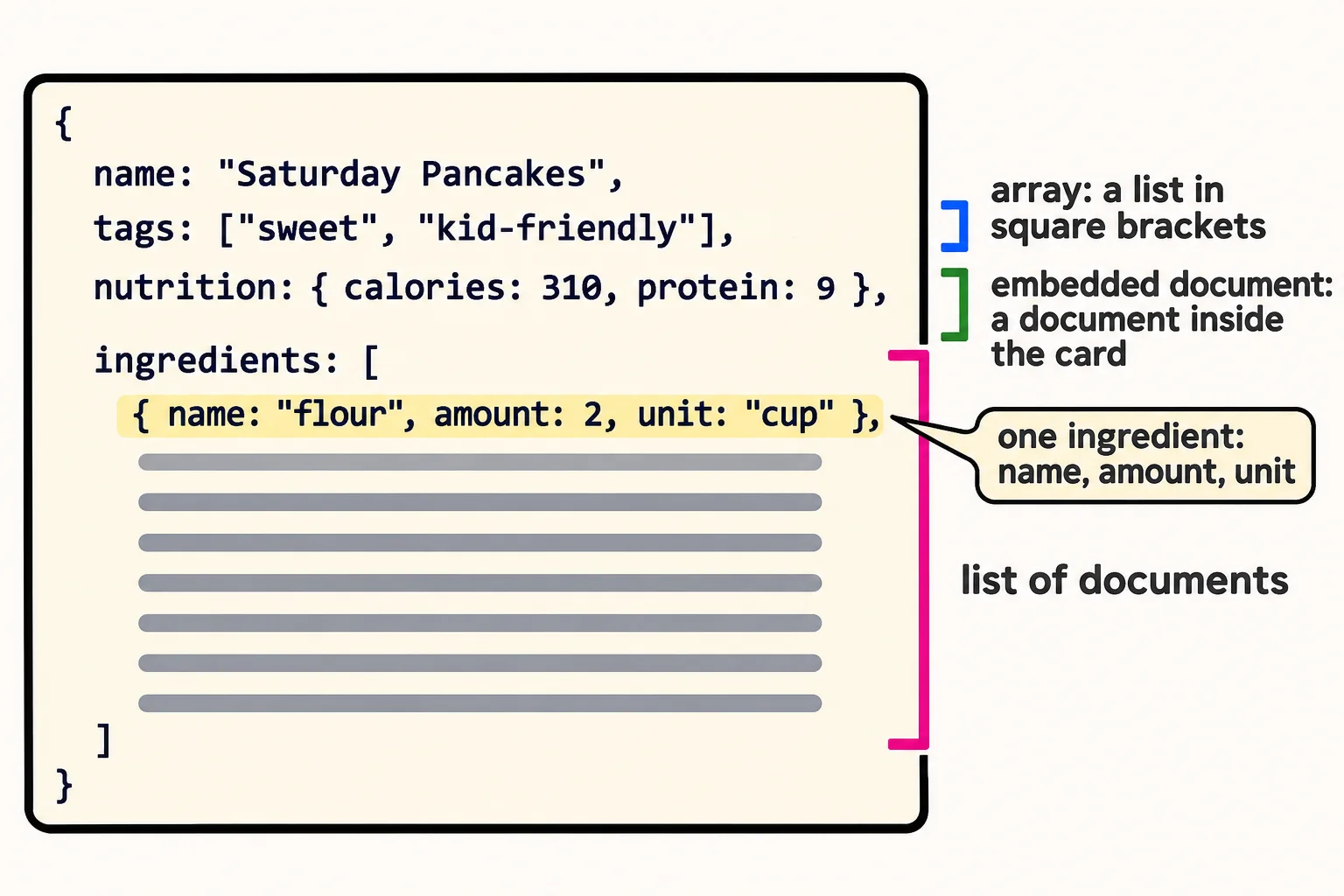
Square brackets hold a list, called an array, such as a recipe's tags; braces inside a document hold a document inside a document, such as its nutrition box; and a list of documents holds the ingredients, each with a name, an amount and a unit.
Novice · MongoDB · Updated
After this lesson you can
- Write an array in square brackets and a document inside a document, such as a recipe's tags and its nutrition box
- Write a list of documents, such as ingredients that each have a name, an amount and a unit, indented so it stays readable
Key takeaways
- Square brackets hold a list of values, called an array, with commas between the items, such as a recipe's tags.
- A document can hold another document as a field's value, such as a nutrition box with calories and protein.
- An array can hold documents, such as a list of ingredients that each have a name, an amount and a unit.
- An amount stored as a number can be doubled or added up later; "2 cups flour" stored as text can't.
- Indent each level by two spaces, and put a closing bracket or brace under the line that opened it, so a big document stays readable.
Real records hold lists: an order's items, a playlist's songs, a recipe's ingredients. They hold small groups of details too, such as an address with a street, a city and a ZIP code. Any time you store something like that, and in almost every app you will, you'll write the two shapes this lesson teaches. They're also what makes a document different from a row in a table.
The example is the rest of the Saturday Pancakes card. To follow along, start mongosh and type use sunday_kitchen; this lesson's card goes in a new collection, cards.
A list of tags: square brackets
The card has two tags, sweet and kid-friendly. Typed as one piece of text, tags: "sweet, kid-friendly", the database sees one long value, and can't tell where one tag ends and the next begins. Fields named tag1 and tag2 are no better: how many do you make, and which one do you search?
A list goes in square brackets [ ] (read "square brackets"), with commas between its items: tags: ["sweet", "kid-friendly"]. Read it aloud as "tags is a list: sweet, kid-friendly". A list in a document is called an array. Its items keep the order you typed them in, and it can hold one item, a hundred, or none at all: [] is an empty list.
A box inside the card: a document inside a document
The card has a small nutrition box: 310 calories and 9 grams of protein per serving. Those two details belong together, so they go in a document of their own, inside the card: nutrition: { calories: 310, protein: 9 }. Read it as "nutrition is a document: calories is 310, protein is 9". The value of nutrition is a whole document, with its own braces, fields and commas. This is called an embedded document, or a nested document. It keeps related details together, the way the box on the paper card does, so a page that shows the nutrition box finds it all in one place.
A list of documents: the ingredients
Each ingredient is a small group of details too: 2 cups flour has a name, an amount and a unit. Stored as the text "2 cups flour", it can be shown, but nothing more. Stored as a document, { name: "flour", amount: 2, unit: "cup" }, the amount is a number, so a "double the recipe" button can multiply it, and a shopping list can add up the flour across a week of recipes.
Eight ingredients make a list of eight documents: square brackets around the list, braces around each ingredient, and a comma after every one but the last. Here is the whole card, with the five steps as a list of text:
db.cards.insertOne({
  name: "Saturday Pancakes",
  cuisine: "American",
  meal: "breakfast",
  minutes: 25,
  servings: 4,
  vegetarian: true,
  rating: 4.6,
  tags: ["sweet", "kid-friendly"],
  nutrition: { calories: 310, protein: 9 },
  ingredients: [
    { name: "flour", amount: 2, unit: "cup" },
    { name: "sugar", amount: 2, unit: "tablespoon" },
    { name: "baking powder", amount: 2, unit: "teaspoon" },
    { name: "salt", amount: 0.5, unit: "teaspoon" },
    { name: "milk", amount: 1.5, unit: "cup" },
    { name: "eggs", amount: 2, unit: "whole" },
    { name: "butter", amount: 3, unit: "tablespoon" },
    { name: "vanilla", amount: 1, unit: "teaspoon" }
  ],
  steps: [
    "Whisk the flour, sugar, baking powder and salt in a big bowl.",
    "Whisk the milk, eggs, melted butter and vanilla in another bowl.",
    "Stir the wet mix into the dry mix. A few lumps are fine.",
    "Heat a greased pan over medium heat.",
    "Pour a quarter cup of batter for each pancake, and flip it when bubbles form."
  ]
})
{
  acknowledged: true,
  insertedId: ObjectId('6afc9a975f8e18afe451bbbd')
}
You can paste the whole thing at the prompt at once: mongosh waits for the last }) before it runs anything. As always, your _id will be a different ObjectId.
Indenting keeps it readable
The insert above is one document, but it's laid out the way mongosh lays out its answers: each level of brackets indented two spaces more than the one around it, and each closing ] or } lined up under the line that opened it. Spaces and new lines inside a document don't change it; they're there for you. Read the card back:
db.cards.find({ name: "Saturday Pancakes" })
[
  {
    _id: ObjectId('6afc9a975f8e18afe451bbbd'),
    name: 'Saturday Pancakes',
    cuisine: 'American',
    meal: 'breakfast',
    minutes: 25,
    servings: 4,
    vegetarian: true,
    rating: 4.6,
    tags: [ 'sweet', 'kid-friendly' ],
    nutrition: { calories: 310, protein: 9 },
    ingredients: [
      { name: 'flour', amount: 2, unit: 'cup' },
      { name: 'sugar', amount: 2, unit: 'tablespoon' },
      { name: 'baking powder', amount: 2, unit: 'teaspoon' },
      { name: 'salt', amount: 0.5, unit: 'teaspoon' },
      { name: 'milk', amount: 1.5, unit: 'cup' },
      { name: 'eggs', amount: 2, unit: 'whole' },
      { name: 'butter', amount: 3, unit: 'tablespoon' },
      { name: 'vanilla', amount: 1, unit: 'teaspoon' }
    ],
    steps: [
      'Whisk the flour, sugar, baking powder and salt in a big bowl.',
      'Whisk the milk, eggs, melted butter and vanilla in another bowl.',
      'Stir the wet mix into the dry mix. A few lumps are fine.',
      'Heat a greased pan over medium heat.',
      'Pour a quarter cup of batter for each pancake, and flip it when bubbles form.'
    ]
  }
]
When brackets don't pair up, mongosh says so the way it does for a missing comma. Leave out the ] that closes the tags, and the error points at the } after them:
db.cards.insertOne({ name: "Saturday Pancakes", tags: ["sweet", "kid-friendly" })
Uncaught:
SyntaxError: Unexpected token, expected "," (1:79)

> 1 | db.cards.insertOne({ name: "Saturday Pancakes", tags: ["sweet", "kid-friendly" })
    |                                                                                ^
  2 |
mongosh was still inside the list, expecting a comma and another tag, when the brace arrived. Every [ needs its ], and every { its }, and good indenting makes a missing one quick to see.
Check yourself
2 questions to try on the lesson page.
So what
A whole recipe card, lists and boxes and all, now fits in one document, which is the shape Tables and Documents: Two Ways to Store a Recipe promised: read in one go, with nothing to join.