Compound Indexes and the Order of Fields
A compound index keeps its entries in order by one field and then by the next, so a single index can serve a filter and a sort together, and the order of its fields (equal, then sort, then range) decides how much of it MongoDB has to read.
Journeyman · MongoDB · Database · Updated
After this lesson you can
- Create a compound index that serves both a filter and a sort, and predict which queries its prefix can serve
- Order a compound index's fields as equality, then sort, then range, and explain why that order reads fewer index entries
Key takeaways
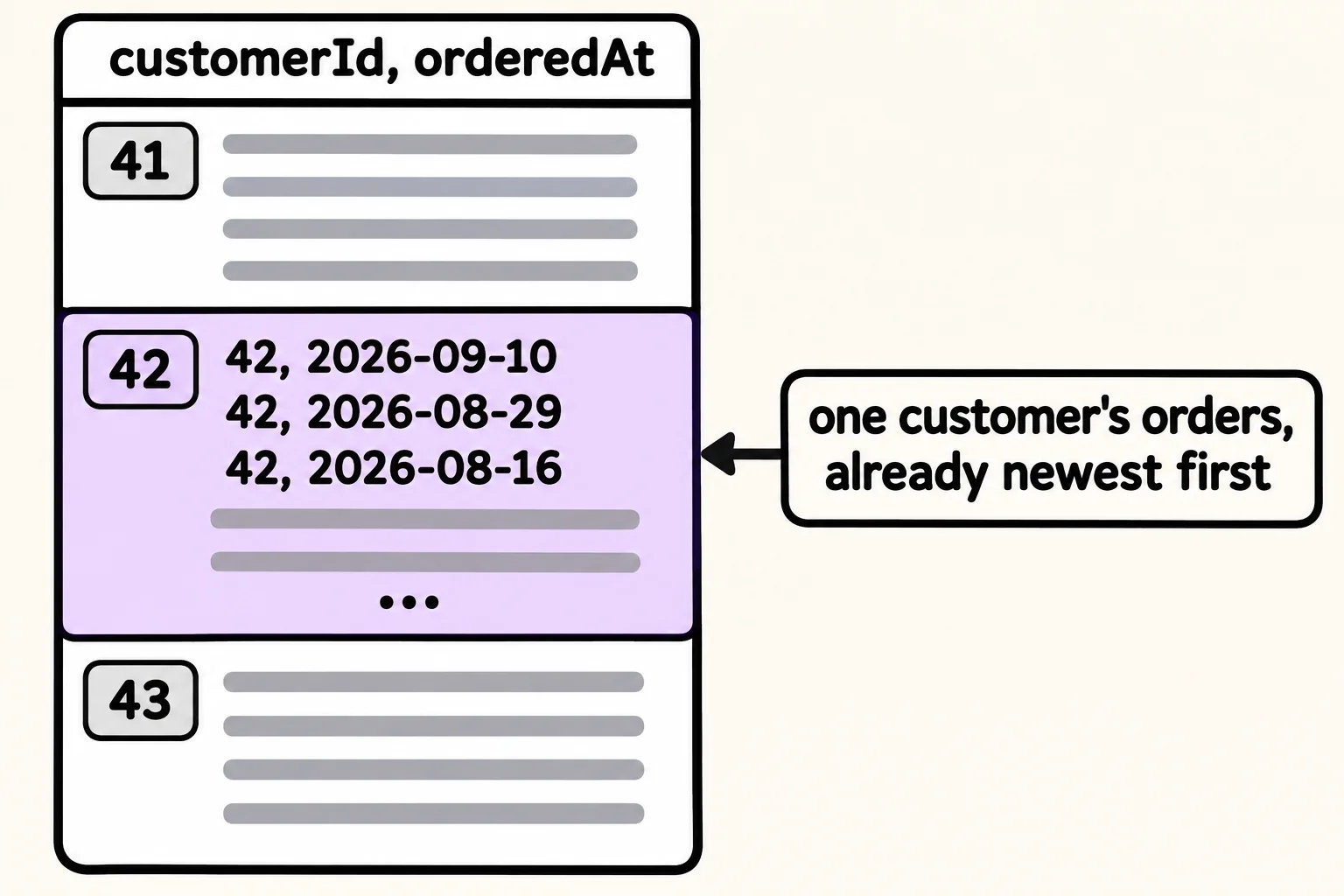
- A compound index on customerId and then orderedAt keeps each customer's orders together, in date order, so one index serves both the filter and the sort.
- A SORT stage in explain means MongoDB sorted the documents itself, in memory, because no index already held them in that order.
- An index also serves queries on its first field, or its first few, which are its prefix. It can't serve a query on a later field alone.
- Put the fields in the order equal, sort, range. Fields matched exactly first, then the field you sort by, then the fields with a range.
- Every index costs space and slows writes, so drop an index that another one's prefix already covers.
Real pages ask for more than one thing at a time. My orders wants one customer's orders, newest first. The returns desk wants the returned orders from last month, biggest first. One single-field index can't serve both parts of questions like these, and adding more single-field indexes doesn't fix it. Whenever a query filters on one field and sorts or ranges on another, the index you want is built on both, and the order you list the fields in decides whether it works.
The examples use Riverbend's 100,000 orders from Why Queries Get Slow, and What an Index Is. In mongosh, after use riverbend, load them again and add the customerId index back:
load("riverbend-big-store.js")
products: 12, customers: 2000, orders: 100000
true
db.orders.createIndex({ customerId: 1 })
customerId_1
One field isn't enough: a sort in memory
My orders shows the newest order first, and explain shows how MongoDB does it with the index it has. As in Reading explain(): COLLSCAN or IXSCAN, the report keeps only the fields that matter:
db.orders.find({ customerId: 42 }).sort({ orderedAt: -1 }).explain("executionStats")
{
  ...
  queryPlanner: {
    ...
    winningPlan: {
      queryPlan: {
        stage: 'SORT',
        ...
        sortPattern: { orderedAt: -1 },
        ...
        inputStage: {
          stage: 'FETCH',
          ...
          inputStage: {
            stage: 'IXSCAN',
            ...
            indexName: 'customerId_1',
            ...
          }
        }
      },
      ...
    },
    ...
  },
  ...
}
Read it from the inside out: IXSCAN found customer 42's entries, FETCH fetched the 50 orders, and then SORT put them in date order itself, in memory. The index knows the customer but not the date, so MongoDB had to sort. For 50 orders that's quick; for a list of thousands it's work on every visit, and it grows with the list.
An index on two fields
A phone book is sorted by last name, and within each last name by first name. Finding "Garcia, Maya" takes one look, and every Garcia sits together in first-name order. A compound index works the same way: its entries are in order by its first field, and within each value of that field, by the second:
db.orders.createIndex({ customerId: 1, orderedAt: -1 })
customerId_1_orderedAt_-1
Its name lists both fields with their directions. Customer 42's entries now sit together, newest first, so MongoDB reads them in the order the page wants:
db.orders.find({ customerId: 42 }).sort({ orderedAt: -1 }).explain("executionStats")
{
  ...
  queryPlanner: {
    ...
    winningPlan: {
      queryPlan: {
        stage: 'FETCH',
        ...
        inputStage: {
          stage: 'IXSCAN',
          ...
          keyPattern: { customerId: 1, orderedAt: -1 },
          indexName: 'customerId_1_orderedAt_-1',
          ...
        }
      },
      ...
    },
    rejectedPlans: [
      ...
    ]
  },
  ...
}
No SORT stage. The plan that used customerId_1 and sorted in memory lost, and it's listed in rejectedPlans.
The prefix: the fields at the start
A phone book also finds every Garcia, but it can't find every Maya: the first names are scattered through the book. An index works from its first field the same way. Its first field, or its first few, are its prefix, and the index serves a query on its prefix. So customerId_1 isn't needed anymore:
db.orders.dropIndex("customerId_1")
{ nIndexesWas: 3, ok: 1 }
db.orders.find({ customerId: 42 }).explain("executionStats").executionStats.totalDocsExamined
50
But a query on orderedAt alone, every order in March, can't use the index: it reads every document.
db.orders.find({ orderedAt: { $gte: ISODate("2026-03-01"), $lt: ISODate("2026-04-01") } }).explain("executionStats").executionStats.totalDocsExamined
100000
The order of fields: equal, sort, range
The returns desk asks for the returned orders in March 2026: an exact value for status and a range for orderedAt. There are 709:
db.orders.countDocuments({ status: "returned", orderedAt: { $gte: ISODate("2026-03-01"), $lt: ISODate("2026-04-01") } })
709
Try an index with the date first, and count the index entries MongoDB reads:
db.orders.createIndex({ orderedAt: 1, status: 1 })
db.orders.find({ status: "returned", orderedAt: { $gte: ISODate("2026-03-01"), $lt: ISODate("2026-04-01") } }).explain("executionStats").executionStats.totalKeysExamined
orderedAt_1_status_1
4960
March's entries sit together, but every status is mixed in among them, so MongoDB read all 4,960 of March's entries to keep 709. Now status first:
db.orders.createIndex({ status: 1, orderedAt: 1 })
db.orders.find({ status: "returned", orderedAt: { $gte: ISODate("2026-03-01"), $lt: ISODate("2026-04-01") } }).explain("executionStats").executionStats.totalKeysExamined
status_1_orderedAt_1
709
Every returned order sits together, in date order, so March's returns are one unbroken stretch: 709 read, 709 kept. A sort adds one more place. The five biggest returns in March, by total, need an index with the sort field between the two:
db.orders.createIndex({ status: 1, total: -1, orderedAt: 1 })
db.orders.find({ status: "returned", orderedAt: { $gte: ISODate("2026-03-01"), $lt: ISODate("2026-04-01") } }).sort({ total: -1 }).limit(5).explain("executionStats").executionStats.totalKeysExamined
status_1_total_-1_orderedAt_1
20
With status_1_orderedAt_1, this query read 709 entries and sorted them in memory. This index keeps the returned orders biggest first, so MongoDB read down from the top, skipped the ones not in March, and stopped at the fifth: 20 entries. That's the rule for ordering an index's fields, often called the ESR rule:
- Equality: the fields the query matches exactly, such as
status: "returned". - Sort: the field it sorts by, such as
total. - Range: the fields with
$gte,$ltand the like, such asorderedAt.
Too many indexes
The orders now have five indexes, and every new order writes an entry into each of them. orderedAt_1_status_1 loses to status_1_orderedAt_1 every time, so it only costs:
db.orders.dropIndex("orderedAt_1_status_1")
{ nIndexesWas: 5, ok: 1 }
Before adding an index, check getIndexes() for one that already starts with the fields you need.
Check yourself
2 questions to try on the lesson page.
So what
One well-ordered compound index can serve a page's filter, its sort and its range at once. Equal, sort, range is the order to write the fields in, and explain is how you check you got it right.