Connecting from Node: MongoClient and the Connection String
The official mongodb package connects a Node app to MongoDB through a MongoClient made from a connection string, which lives in a .env file that Node reads with --env-file, and the app connects that one client when it starts and closes it when it stops.
Journeyman · MongoDB · Node.js · Updated
After this lesson you can
- Connect a Node app to MongoDB with MongoClient and a connection string read from a .env file with --env-file
- Explain why an app makes one MongoClient when it starts, shares it with every request, and closes it when it stops
Key takeaways
- The mongodb package on npm is MongoDB's official Node.js driver, and MongoClient is the part of it that connects.
- A connection string is the database's address, such as mongodb://localhost:27017. An Atlas one also holds a user name and a password.
- The connection string goes in a .env file that .gitignore keeps out of Git, and node --env-file=.env hands it to the code as process.env.MONGODB_URI.
- An app makes one MongoClient, connects it once before the first request, and every request shares it.
- On Ctrl+C the app stops taking requests and closes the client, so MongoDB lets go of its connections cleanly.
Every app that keeps data starts the same way: before it answers anyone, it connects to its database. A shop's checkout, a clinic's booking page and the Maple Street Pet Adoption Center's API all do it once, in the first lines that run. You'll write this code whenever you put a database behind an app, and you'll read it first in any project you join.
The examples use the pet API you finished in Exercise: Pet API Warm-Up.
A restart forgets every pet
The warm-up API keeps its pets in an array in data/pets.js. Add Waffles with POST /pets, stop the server with Ctrl+C, start it again with npm start, and open http://localhost:3100/pets: Waffles is gone, and the six starting pets are back. An array lives in the program's memory, and that memory is wiped every time the program stops.
MongoDB keeps its documents on disk, so they outlive any restart. To reach it, the app needs two things: a package that speaks MongoDB's language, and the database's address.
The driver and the connection string
Node can't talk to MongoDB by itself. A driver is the package that can: your code calls its functions, and it turns each call into the messages MongoDB understands, the way a phone turns your voice into a signal on the line. MongoDB makes the official one for Node, the mongodb package. Install it in the API's folder:
npm install mongodb
The part of the driver that connects is MongoClient. You give it a connection string: the database's address, written as text.
| Where MongoDB runs | Its connection string |
|---|---|
| On your computer | mongodb://localhost:27017 |
| On Atlas | mongodb+srv://<username>:<password>@<cluster-address>.mongodb.net/ |
Read the first one aloud as "mongodb, colon, slash slash, localhost, port 27017": the same address mongosh connects to. Atlas shows you the second when you click Connect and then Drivers beside your cluster, as in Another Way: A Free Cluster on MongoDB Atlas, and it holds your database user's name and password. That password is the problem the next section solves.
Keep it out of your code: a .env file
Type the Atlas string into server.js, push the code to GitHub, and anyone can read your password. Even a local string doesn't belong in the code: the database on your computer and the one behind a live site have different addresses, and the same code should run against both.
So the address goes in a .env file (read "dot env"): a small text file of settings beside the code, one NAME=value per line. Make one in the API's folder:
MONGODB_URI=mongodb://localhost:27017
Add a line reading .env to the folder's .gitignore, so Git never sends the file anywhere. Projects usually commit a copy named .env.example instead, with no password in it, so a teammate knows which settings to fill in.
Node reads the file when you start it with --env-file=.env, and your code finds each setting in process.env, an object that holds the settings a program was started with.
Connect, and check it worked
To have something to find, put the center's 12 pets into a maple_street database first. Paste this into mongosh:
use maple_street
db.pets.insertMany([
  { _id: ObjectId("6740c0000000000000000001"), name: "Biscuit", species: "dog", age: 3, traits: ["good with kids", "house-trained"], status: "available" },
  { _id: ObjectId("6740c0000000000000000002"), name: "Mochi", species: "cat", age: 2, traits: ["calm", "indoor only"], status: "available" },
  { _id: ObjectId("6740c0000000000000000003"), name: "Pepper", species: "dog", age: 7, traits: ["calm", "good with cats"], status: "available" },
  { _id: ObjectId("6740c0000000000000000004"), name: "Clover", species: "rabbit", age: 1, traits: ["shy"], status: "available" },
  { _id: ObjectId("6740c0000000000000000005"), name: "Juniper", species: "cat", age: 5, traits: ["good with kids", "playful"], status: "adopted" },
  { _id: ObjectId("6740c0000000000000000006"), name: "Rocket", species: "dog", age: 1, traits: ["playful", "needs a yard"], status: "available" },
  { _id: ObjectId("6740c0000000000000000007"), name: "Olive", species: "cat", age: 9, traits: ["calm", "good with kids"], status: "available" },
  { _id: ObjectId("6740c0000000000000000008"), name: "Hazel", species: "rabbit", age: 3, traits: ["calm", "good with kids"], status: "available" },
  { _id: ObjectId("6740c0000000000000000009"), name: "Pickles", species: "cat", age: 1, traits: ["playful", "good with kids"], status: "adopted" },
  { _id: ObjectId("6740c0000000000000000010"), name: "Maple", species: "dog", age: 10, traits: ["calm", "good with kids", "house-trained"], status: "available" },
  { _id: ObjectId("6740c0000000000000000011"), name: "Ziggy", species: "cat", age: 4, traits: ["playful"], status: "available" },
  { _id: ObjectId("6740c0000000000000000012"), name: "Bean", species: "dog", age: 2, traits: ["good with kids", "needs a yard"], status: "available" }
])
switched to db maple_street
{
  acknowledged: true,
  insertedIds: {
    '0': ObjectId('6740c0000000000000000001'),
    '1': ObjectId('6740c0000000000000000002'),
    '2': ObjectId('6740c0000000000000000003'),
    '3': ObjectId('6740c0000000000000000004'),
    '4': ObjectId('6740c0000000000000000005'),
    '5': ObjectId('6740c0000000000000000006'),
    '6': ObjectId('6740c0000000000000000007'),
    '7': ObjectId('6740c0000000000000000008'),
    '8': ObjectId('6740c0000000000000000009'),
    '9': ObjectId('6740c0000000000000000010'),
    '10': ObjectId('6740c0000000000000000011'),
    '11': ObjectId('6740c0000000000000000012')
  }
}
Then make check-connection.js in the API's folder. It connects, asks the server for a ping, the smallest "are you there?" a database answers, counts the pets, and hangs up:
import { MongoClient } from "mongodb";

const client = new MongoClient(process.env.MONGODB_URI);
await client.connect();

const db = client.db("maple_street");
console.log(await db.command({ ping: 1 }));
console.log(await db.collection("pets").countDocuments());

await client.close();
node --env-file=.env check-connection.js
{ ok: 1 }
12
Forget --env-file=.env, and process.env.MONGODB_URI is undefined, so the driver has no address to read. The line that matters in what Node prints is:
TypeError: Cannot read properties of undefined (reading 'startsWith')
One client for the whole app
A restaurant unlocks its doors and fires up the kitchen once in the morning, not once per customer. An app treats its database the same way. A MongoClient keeps a small set of open connections, called a connection pool, and lends one to each request that needs it, so a request never waits for a fresh connection to be made. Make a new client for every request, and every request pays that wait, and a busy app can run the server out of connections.
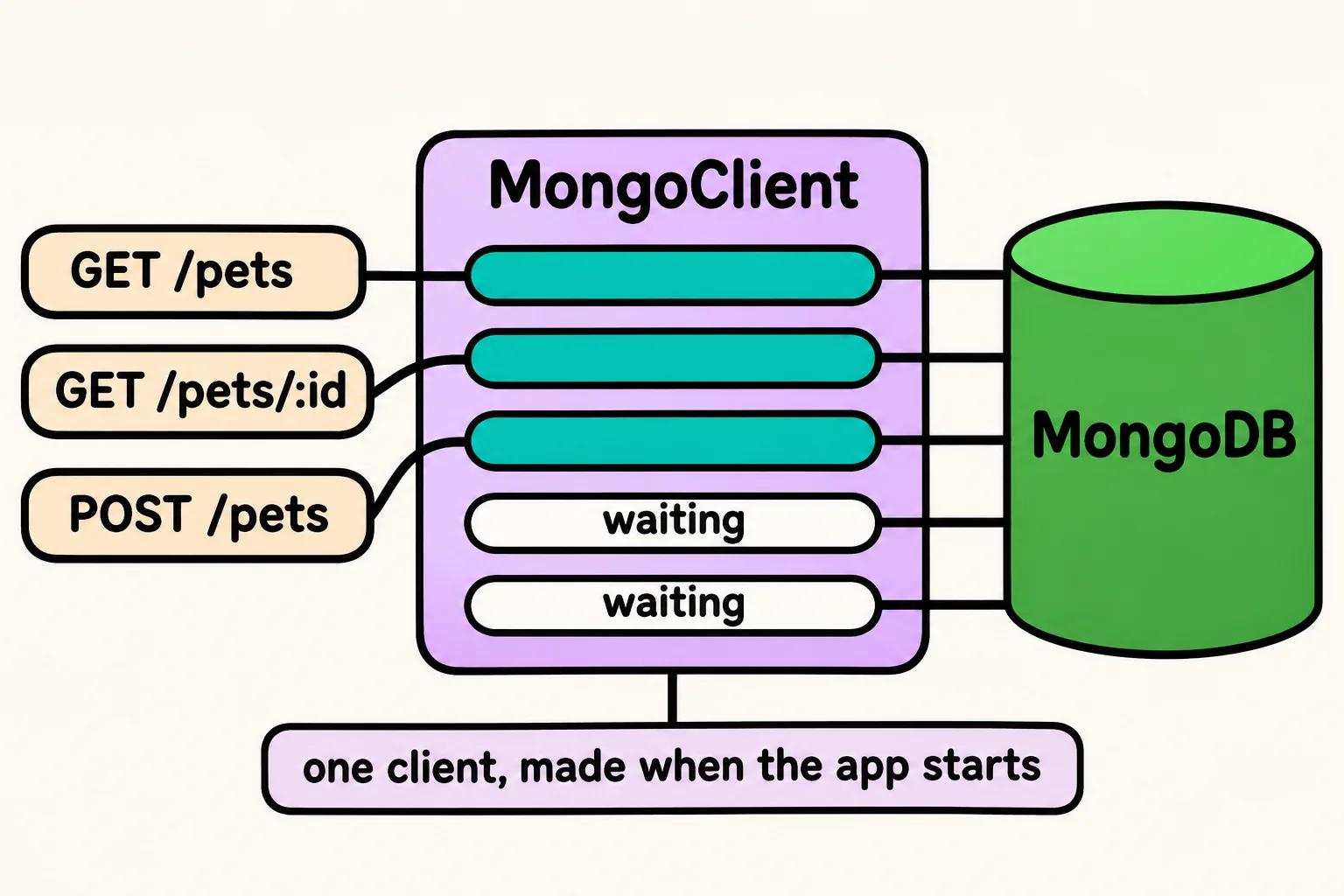
So server.js makes one client and connects it before the server takes its first request. createApp builds the Express app around the database it's given; A Data Layer: One File That Talks to the Database shows what it does with it:
import { MongoClient } from "mongodb";
import { createApp } from "./app.js";

const port = 3100;

const client = new MongoClient(process.env.MONGODB_URI);
await client.connect();
const app = createApp(client.db("maple_street"));

const server = app.listen(port, () => {
  console.log(`Maple Street's pet API is listening on http://localhost:${port}`);
});

process.on("SIGINT", async () => {
  server.close();
  await client.close();
  console.log("Stopped the server and closed the database connection.");
});
The last part runs when you press Ctrl+C, which sends the program a signal named SIGINT (read "signal interrupt"). It stops taking requests, then closes the client, so MongoDB can let go of the connections cleanly. In package.json, the start script becomes "start": "node --env-file=.env server.js". Run npm start, then press Ctrl+C:
Maple Street's pet API is listening on http://localhost:3100
Stopped the server and closed the database connection.
If MongoDB isn't running, client.connect() keeps trying for 30 seconds, then stops the program with MongoServerSelectionError: connect ECONNREFUSED, and the server never starts. That's on purpose: an API that can't reach its data should say so at once, not answer its first visitor with an error.
Check yourself
2 questions to try on the lesson page.
So what
A driver, an address kept out of the code, and one client opened when the app starts: that's the doorway every request in the pet API now walks through to reach MongoDB.