Your First Documents in mongosh
Start mongosh, see the databases with show dbs, choose one with use, add Sunday Kitchen's first three recipes with insertOne, list them with find, and leave with exit.
Novice · MongoDB · Updated
After this lesson you can
- Start mongosh, list the databases with show dbs, choose one with use, and leave with exit
- Add a document with insertOne and list a collection's documents with find, and read what each one gives back
Key takeaways
- show dbs lists the databases, and use chooses one. A database only appears in show dbs once it holds a document.
- db.recipes.insertOne({ ... }) adds one document to the recipes collection, and the collection is made by the first one.
- insertOne answers with acknowledged true and the insertedId, the _id MongoDB gave the new document.
- db.recipes.find() lists every document in the collection, each with its _id. Put a name in its braces to find one recipe.
- Capital letters count, in values and in command names. exit leaves the shell.
A bug report says a recipe vanished from the website. Is it really gone from the database, or is the page showing it wrong? A developer answers that by opening the shell and looking. You'll type commands at this prompt every time you need to see what's really in a database, and every query in this course starts here.
Sunday Kitchen's first three recipe cards go in today: Saturday Pancakes (a breakfast, 25 minutes), Weeknight Chili (a dinner, 45 minutes) and Lemon Bars (a dessert, 55 minutes, says the card). Open your mongodb-course folder in VS Code, open its terminal (Terminal > New Terminal), and type mongosh. When the prompt test> appears, the shell is waiting for you: it starts in a database named test.
Which databases are there?
Type each command at the prompt and press Enter. show dbs lists the databases on the server:
show dbs
admin   40.00 KiB
config  12.00 KiB
local   40.00 KiB
MongoDB keeps these three for itself, so leave them alone. The number beside each is its size on disk, and yours may differ. If you're on an Atlas cluster, you'll see different ones.
use: choose a database
Think of a shelf of recipe boxes. Before you file a card, you pick the box. use picks the database the next commands work in:
use sunday_kitchen
switched to db sunday_kitchen
The prompt changes to sunday_kitchen>, so you can always see where you are. But ask again, and it isn't on the list yet:
show dbs
admin   40.00 KiB
config  12.00 KiB
local   40.00 KiB
That isn't a mistake. A database appears when it gets its first document, the way an empty box doesn't go on the shelf until a card is in it.
insertOne: add a document
Here's the first card as a document. Type it exactly as it's written: the braces { }, the colons, the commas, and the double quotes around text but not around numbers. Documents and Why They Fit explains each of them properly.
db.recipes.insertOne({ name: "Saturday Pancakes", meal: "breakfast", minutes: 25 })
{
  acknowledged: true,
  insertedId: ObjectId('6afc9a5efa6b0c5171e7a789')
}
Read the command aloud from left to right: in this database (db), in the recipes collection, insert one document. The recipes collection didn't exist; the first document made it.
The answer says two things. acknowledged: true means the server received the document. insertedId is the _id (read "underscore I D") MongoDB gave it: every document has an _id that no other document in its collection shares, like a ticket number, and when you don't give one, MongoDB makes an ObjectId for it. Yours will be a different string of letters and numbers. BSON Types and the _id Field explains what's inside one.
Add the other two cards, one command at a time:
db.recipes.insertOne({ name: "Weeknight Chili", meal: "dinner", minutes: 45 })
db.recipes.insertOne({ name: "Lemon Bars", meal: "dessert", minutes: 55 })
{
  acknowledged: true,
  insertedId: ObjectId('6afc9a5efa6b0c5171e7a78a')
}
{
  acknowledged: true,
  insertedId: ObjectId('6afc9a5efa6b0c5171e7a78b')
}
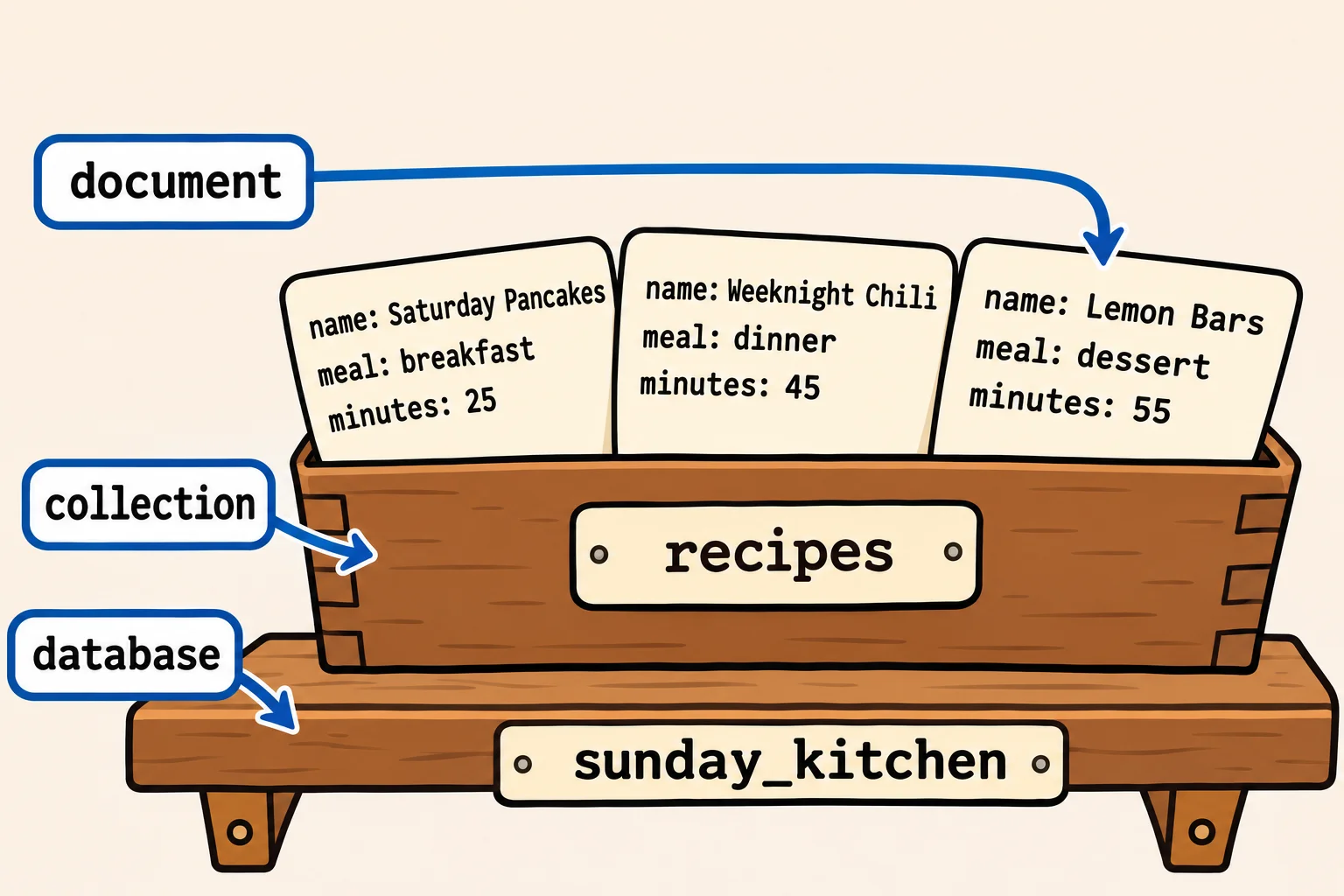
find: list the documents
find reads documents back. With nothing in its parentheses, it lists every document in the collection:
db.recipes.find()
[
  {
    _id: ObjectId('6afc9a5efa6b0c5171e7a789'),
    name: 'Saturday Pancakes',
    meal: 'breakfast',
    minutes: 25
  },
  {
    _id: ObjectId('6afc9a5efa6b0c5171e7a78a'),
    name: 'Weeknight Chili',
    meal: 'dinner',
    minutes: 45
  },
  {
    _id: ObjectId('6afc9a5efa6b0c5171e7a78b'),
    name: 'Lemon Bars',
    meal: 'dessert',
    minutes: 55
  }
]
The square brackets [ ] (read "square brackets") around the answer mean a list: three documents, each in its own braces, each with the _id you never typed. The shell shows text in single quotes; double quotes work the same when you type.
To find one recipe, put a field and the value it must have inside the parentheses, in braces:
db.recipes.find({ name: "Lemon Bars" })
[
  {
    _id: ObjectId('6afc9a5efa6b0c5171e7a78b'),
    name: 'Lemon Bars',
    meal: 'dessert',
    minutes: 55
  }
]
Capital letters count: db.recipes.find({ name: "lemon bars" }) prints nothing at all, because no recipe is named exactly that. Module 2 does much more with what goes inside find.
Look again, and leave
Now the database is on the list, and show collections lists the collections in it:
show dbs
show collections
admin           40.00 KiB
config          12.00 KiB
local           40.00 KiB
sunday_kitchen   8.00 KiB
recipes
Capital letters count in commands too. Type insertone instead of insertOne, and the shell stops you:
db.recipes.insertone({ name: "Pad Thai", meal: "dinner", minutes: 30 })
Uncaught TypeError: db.recipes.insertone is not a function
Nothing was added, so the collection still holds three recipes. Type exit and press Enter to leave the shell. Your recipes stay in the database, ready for next time.
Check yourself
2 questions to try on the lesson page.
So what
You've made a database, a collection and three documents, and read them back. Every app that uses MongoDB does exactly that, many times a second.