Missing Fields, null and $exists
Documents in one collection don't all have the same fields; a filter for null matches a missing field too, $exists asks whether the field is there at all, and $type finds values stored as the wrong kind.
Apprentice · MongoDB · Updated
After this lesson you can
- Find documents whose field is missing or null with a null filter and $exists, and explain the difference
- Find values stored as the wrong type with $type
- Choose the filter a recipe question needs from exact values, comparisons, $in, $or, $not, null and $exists
Key takeaways
- Documents in one collection can have different fields. A recipe nobody rated may have no rating field, or rating null.
- A filter for rating null matches both the documents where rating is null and the ones with no rating field.
- $exists false finds only the documents without the field; $exists true finds every document that has it, null included.
- $type matches a field by the kind of value it holds, such as "string" or "number", which finds a number typed in as text.
- Pick the filter for the question; for a field that can be missing, decide whether missing should count.
Sunday Kitchen wants to email its cooks a list of the recipes nobody has rated yet. It sounds like a one-line filter, and it is, once you know how MongoDB treats a field that isn't there. Real data is full of gaps: a customer who never gave a phone number, a product with no sale price, an old record from before a field existed. You'll meet them in every app, and a filter that ignores them gives answers that are quietly wrong.
The examples use Sunday Kitchen's 40 recipes from Adding Many Documents with insertMany.
Not every card has every field
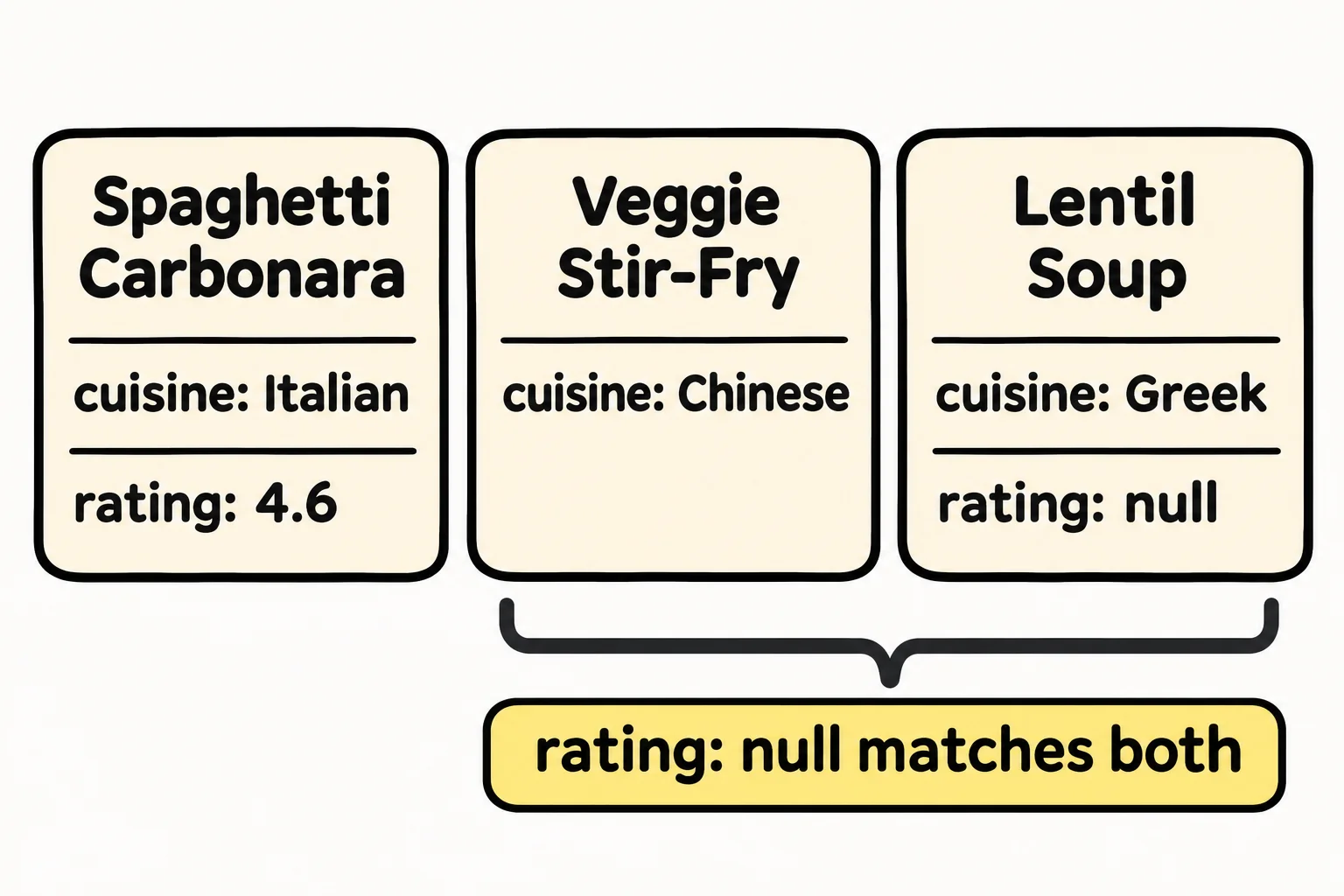
In a spreadsheet, every row has every column, even if a cell is empty. A document only has the fields someone put in it. Two cooks typed Sunday Kitchen's cards, and they handled "not rated yet" differently: one left the rating off the card, the other wrote rating: null. Here's one of each, beside a rated recipe:
db.recipes.find({ _id: { $in: [12, 13, 19] } }, { name: 1, rating: 1 })
[
  { _id: 12, name: 'Spaghetti Carbonara', rating: 4.6 },
  { _id: 13, name: 'Veggie Stir-Fry' },
  { _id: 19, name: 'Lentil Soup', rating: null }
]
Veggie Stir-Fry has no rating field at all. Lentil Soup has one, holding null: a value that means "no value". To a person both mean "not rated yet". To MongoDB they're different, and a filter can tell them apart, or treat them the same.
A null filter finds both
Ask for the recipes whose rating is null:
db.recipes.find({ rating: null }, { name: 1, rating: 1 })
[
  { _id: 13, name: 'Veggie Stir-Fry' },
  { _id: 19, name: 'Lentil Soup', rating: null },
  { _id: 21, name: 'Palak Paneer' },
  { _id: 25, name: 'Bibimbap' },
  { _id: 35, name: 'Hummus', rating: null },
  { _id: 36, name: 'Spanakopita' },
  { _id: 39, name: 'Churros' }
]
All seven unrated recipes: the two with rating: null and the five with no rating field. That surprises most people the first time, and here it's exactly what Sunday Kitchen wants. { field: null } matches a field that holds null and a field that isn't there.
$exists: is the field there at all?
When the difference matters, $exists (read "exists") asks only whether the field is present, whatever it holds. $exists: false finds the cards with no rating line:
db.recipes.find({ rating: { $exists: false } }, { name: 1, rating: 1 })
[
  { _id: 13, name: 'Veggie Stir-Fry' },
  { _id: 21, name: 'Palak Paneer' },
  { _id: 25, name: 'Bibimbap' },
  { _id: 36, name: 'Spanakopita' },
  { _id: 39, name: 'Churros' }
]
$exists: true counts every document that has the field, and a field holding null is still there:
db.recipes.countDocuments({ rating: { $exists: true } })
35
So "has a rating" isn't $exists: true. For the recipes with a real rating, rule out null, which rules out the missing fields too:
db.recipes.countDocuments({ rating: { $ne: null } })
33
That's also why $not in Combining Conditions: $and, $or and $not found 7 more recipes than $lt: it matches every document where its condition isn't true, and a recipe with no rating can't be rated 4.5 or higher.
$type: the right kind of value
A new card arrives for Sunday Roast, and whoever typed it put quotes around the minutes, so "90" is text, not a number:
db.recipes.insertOne({ _id: 41, name: "Sunday Roast", cuisine: "British", meal: "dinner", minutes: "90", servings: 6, vegetarian: false, tags: ["make-ahead"] })
{ acknowledged: true, insertedId: 41 }
Now ask for the recipes that take an hour or more:
db.recipes.find({ minutes: { $gte: 60 } }, { name: 1, minutes: 1 })
[
  { _id: 10, name: 'Chicken Tikka Masala', minutes: 60 },
  { _id: 11, name: 'Banana Bread', minutes: 70 },
  { _id: 14, name: 'Beef Pho', minutes: 180 },
  { _id: 26, name: 'Ratatouille', minutes: 75 },
  { _id: 36, name: 'Spanakopita', minutes: 70 },
  { _id: 37, name: 'Shoyu Ramen', minutes: 120 }
]
The 90-minute roast is missing: a comparison with a number only matches numbers. $type (read "type") matches a field by the kind of value it holds, one of the BSON types from BSON Types and the _id Field, so it can find the mistake:
db.recipes.find({ minutes: { $type: "string" } }, { name: 1, minutes: 1 })
[ { _id: 41, name: 'Sunday Roast', minutes: '90' } ]
"string" is text and "number" is any kind of number. $type: "null" finds a field that is there and holds null: Lentil Soup and Hummus. Changing Documents with updateOne and $set shows how to fix the roast's minutes; for now, loading sunday-kitchen-recipes.js again takes the roast back out.
Which filter for which question
This chapter has given you a filter for each kind of question. Before you write one, name the kind:
| The question | The filter |
|---|---|
| Recipes with one exact value: the Thai ones | { cuisine: "Thai" } |
| Above, below or between values: under 30 minutes | { minutes: { $lt: 30 } } |
| One of a list: Thai, Japanese or Korean | { cuisine: { $in: ["Thai", "Japanese", "Korean"] } } |
| Either condition: quick or loved | { $or: [ { minutes: { $lte: 10 } }, { rating: { $gte: 4.8 } } ] } |
| Not rated yet, missing or null | { rating: null } |
| Only the cards with no rating field | { rating: { $exists: false } } |
| A number typed in as text | { minutes: { $type: "string" } } |
Check yourself
2 questions to try on the lesson page.
So what
Gaps in data are normal, and now they don't fool your filters: a null filter finds a value that's missing or empty, $exists tells the two apart, and $type catches the number someone typed in as text.