Work That Runs After the Response
When a request starts slow work the caller doesn't need to wait for, the server answers 202 Accepted with a Location to check later, hands the work to a job queue that runs it after the response, and moves heavy calculations to worker_threads, while job services such as BullMQ keep jobs safe across restarts.
Freelancer · Node.js · Web Development · Updated
After this lesson you can
- Answer 202 Accepted for slow work, with a Location header and a route where the client checks on the job
- Write a small in-process job queue that runs jobs one at a time after the response and keeps going when one fails
- Choose where slow work runs, from an in-process queue to worker_threads for heavy CPU work or BullMQ when jobs must survive a restart
Key takeaways
- 202 Accepted, read "I've got it, and I'll finish it later", answers at once for work that isn't done yet, with a Location header saying where to check on it.
- A small in-process job queue keeps jobs in an array and runs them one at a time after the response, logging a job that fails and going on to the next.
- An in-process queue lives in memory, so a restart loses every job still waiting. BullMQ with Redis keeps jobs safe across restarts and adds retries.
- await frees the event loop only while Node waits. A long calculation still blocks every request, so worker_threads runs it on a thread of its own.
A welcome email after sign-up, a photo resized for a gallery, a monthly report, a video turned into three sizes: each takes seconds, and none of it has to happen before the user sees "Got it". Moving that work out of the request is how an app stays quick when the work behind it is slow.
Waiting for work nobody needs to see
Snapshot Saturday makes a thumbnail of every photo for its gallery page, and making one takes about two seconds. The first version of the upload route waited for it:
app.post("/entries", upload.single("photo"), async (req, res) => {
  const entry = saveEntry(req);
  entry.thumbnail = await makeThumbnail(entry.photo); // about two seconds
  res.status(201).json(entry);
});
Every entrant stares at a spinner for two seconds, for a picture they don't need yet. On a slow phone connection, near the deadline, some give up and send the photo again.
202 Accepted: a claim ticket
A dry cleaner doesn't make you wait while your coat is cleaned. You get a ticket that says "ready Thursday, number 4", and you come back. HTTP has the same answer: 202 Accepted, read "I've got it, and I'll finish it later". The Location header is the ticket number: the address where the client can check on the work.
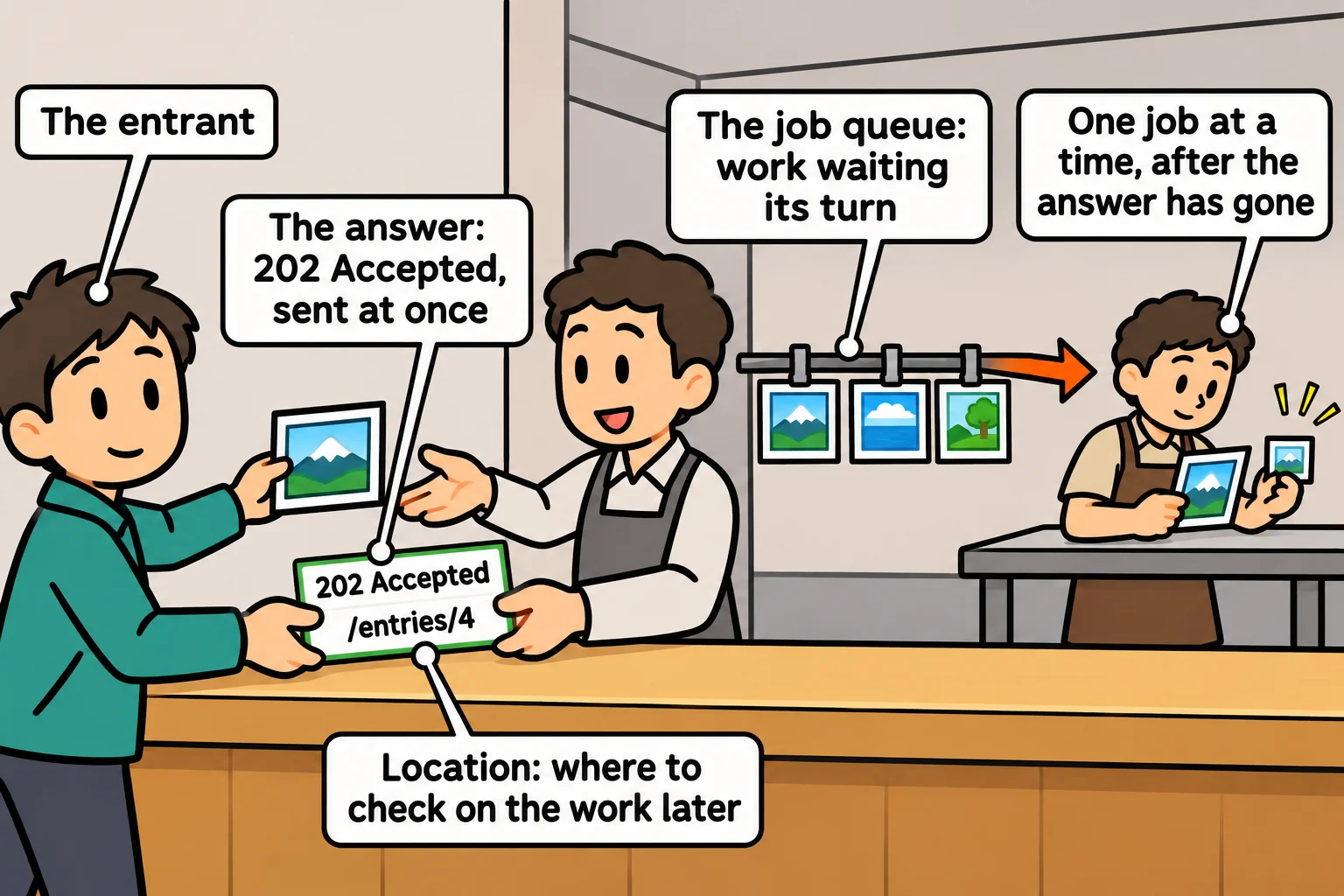
So the route saves the entry, hands the thumbnail to a queue, and answers at once:
addJob(async () => {
  entry.thumbnail = await makeThumbnail(entry.photo);
});
res.status(202).location(`/entries/${entry.id}`).json(entry);
Sending Noor's photo, then GET /entries/4 a moment later (each answer's status line, the header that matters, and its body):
HTTP/1.1 202 Accepted
Location: /entries/4
{"id":4,"name":"Noor","title":"Lighthouse in the rain","photo":"8e1b461a-6daa-408c-a58d-f5f7123a663c.jpg","thumbnail":null}

HTTP/1.1 200 OK
{"id":4,"name":"Noor","title":"Lighthouse in the rain","photo":"8e1b461a-6daa-408c-a58d-f5f7123a663c.jpg","thumbnail":"thumb-8e1b461a-6daa-408c-a58d-f5f7123a663c.jpg"}
thumbnail: null says "not yet"; the status route, GET /entries/:id, shows it once the job is done.
A small job queue
addJob is a job queue: a line of work waiting its turn, like tickets on a kitchen rail. This one fits in a few lines:
const jobs = [];
let running = false;

function addJob(work) {
  jobs.push(work);
  runNext();
}

async function runNext() {
  if (running || jobs.length === 0) return;
  running = true;
  const work = jobs.shift();
  try {
    await work();
  } catch (err) {
    console.error(`A background job failed: ${err.message}`);
  } finally {
    running = false;
    runNext();
  }
}

// A stand-in for the slow part: each thumbnail takes a moment to make.
const makeThumbnail = (photo) =>
  new Promise((resolve) => setTimeout(() => resolve(`thumb-${photo}`), 100));

for (const photo of ["harbor.jpg", "fog.png", "oak.jpg"]) {
  addJob(async () => {
    const thumbnail = await makeThumbnail(photo);
    console.log(`Made ${thumbnail}`);
  });
  console.log(`Answered 202 for ${photo}`);
}
Answered 202 for harbor.jpg
Answered 202 for fog.png
Answered 202 for oak.jpg
Made thumb-harbor.jpg
Made thumb-fog.png
Made thumb-oak.jpg
All three answers go out first. running keeps the jobs to one at a time, finally starts the next one when a job ends, and catch logs a failed job instead of stopping the queue.
What a queue in memory can't do
This is the small version of what job services do, and it's honest to say what it leaves out. Its jobs live in an array, so a restart, a crash or a deploy loses every job still waiting. That's fine for thumbnails, which can be made again, and not fine for a payment receipt. It doesn't retry a failed job, and a second copy of the server has a queue of its own.
Teams whose jobs must survive use a job service. BullMQ keeps jobs in Redis, a fast database that holds data in memory and saves it to disk, so they outlast a restart, retry with a wait between tries, and are shared by several worker processes. Cloud queues such as Amazon SQS and Azure Queue Storage do the same job.
Heavy calculations: worker_threads
A queue still runs on the event loop, the one waiter from The Event Loop, in Server Terms. await frees him only while Node waits for a file or the network. A calculation, such as checking every pixel of a photo, keeps him busy, and every request waits. Worker threads give the work to a helper with a thread of its own. The worker, score-photo.js:
import { parentPort, workerData } from "node:worker_threads";

// A stand-in for heavy work: a loop over 300 million "pixels", each 0 to 255.
let total = 0;
for (let pixel = 0; pixel < 300_000_000; pixel++) {
  total += pixel % 256;
}
const brightness = Math.round(total / 300_000_000);

parentPort.postMessage(`${workerData}: brightness ${brightness}`);
And main.js, in the same folder, which starts it. Run node main.js from that folder:
import { Worker } from "node:worker_threads";

const worker = new Worker("./score-photo.js", { workerData: "harbor.jpg" });

worker.on("message", (result) => console.log(result));
worker.on("error", (err) => console.error(`The worker failed: ${err.message}`));

console.log("The main thread is free to answer requests");
The main thread is free to answer requests
harbor.jpg: brightness 128
workerData goes in, postMessage sends the answer back, and the main thread carries on meanwhile. (The underscores in 300_000_000 only make the number easier to read.) Image libraries such as sharp already do their heavy work off the main thread, so reach for worker_threads for calculations of your own.
Check yourself
2 questions to try on the lesson page.
So what
When work is slow, ask whether the caller needs it before the answer: if not, answer 202 and queue it; if it's heavy, give it a worker thread; and if losing it on a restart would hurt, put it in a job service.