Middleware: Code That Runs on Every Request
Middleware is a function with (req, res, next) that Express runs on a request before the routes, in the order you add it, so a log line, a timer or a body reader is written once instead of in every route.
Journeyman · Node.js · REST API · Updated
After this lesson you can
- Write middleware with (req, res, next) that runs for every request, such as a request logger or timer
- Choose where middleware runs, for every request or for one route, and add it in the right order
Key takeaways
- Middleware is a function with three parameters, (req, res, next). It does its job, then calls next() to pass the request on, or answers it and stops the line.
- app.use(middleware) runs it on every request. A middleware listed in a route, such as app.post("/games", express.json(), handler), runs for that route only.
- Express runs middleware and routes in the order you add them. A middleware that forgets next() and doesn't answer leaves the request waiting forever.
- A middleware added after every route answers what no route did, such as a JSON 404 for an unknown address. Added first, it would answer every request.
- A header has to be set before the response is sent. A timing middleware can add X-Response-Time by wrapping res.writeHead, which Node calls just before the headers leave.
Some jobs belong to every request, not to one route: writing each request in a log, checking who's signed in, timing slow answers, reading the body. In a real API you'll add these once and never think about them again, and when a request behaves strangely, they're the first place to look. You'll write the sign-in check this way in Module 4.
The Rolling Dice café wants a line in the terminal for every request, and to know which requests are slow. A console.log in every route would work until someone adds a route and forgets it.
A line of stations
Picture a car wash. Every car rolls through the same stations: soap, rinse, dry. Each station does its one job and sends the car on to the next. A station could also stop a car, say one that's too tall, and send it away.
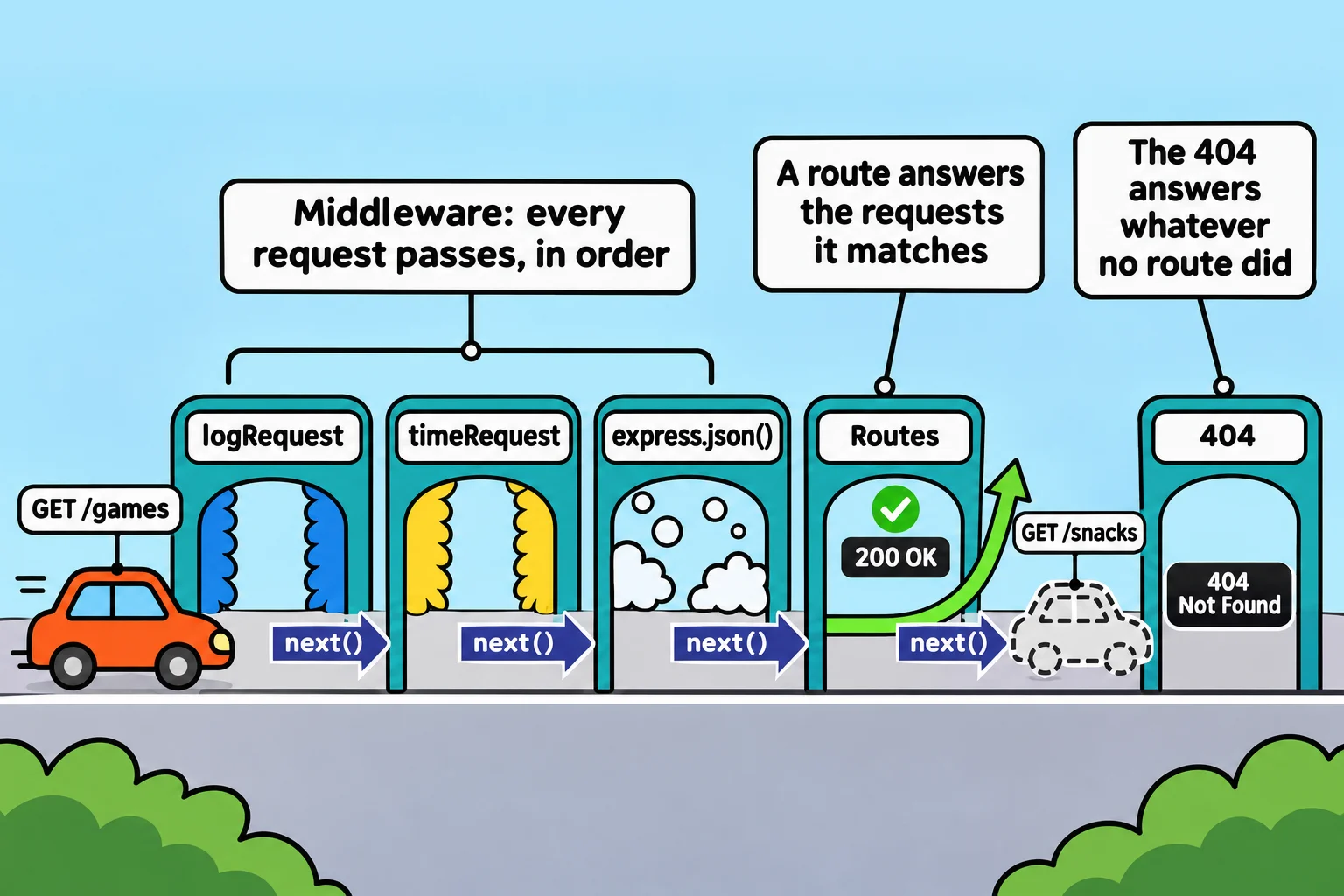
Express handles a request the same way. A middleware is one station: a function that gets the request, the response, and next, a function that sends the request on to the next station. app.use adds a station that every request passes:
function logRequest(req, res, next) {
  console.log(req.method, req.url);
  next();
}

app.use(logRequest);
Put app.use(logRequest) above the routes, send GET /games and GET /games?players=4, and the terminal shows:
GET /games
GET /games?players=4
A middleware ends in one of two ways: it calls next(), or it answers with res.json or similar. Leave out next() and the request reaches no route and gets no answer. REST Client keeps waiting, and nothing in the terminal says why.
Timing a request
To time a request, a middleware notes the time when the request arrives, then waits for the response to finish. res.on("finish", ...) runs a function once the answer has gone out:
function timeRequest(req, res, next) {
  const start = performance.now();
  res.on("finish", () => {
    const ms = performance.now() - start;
    console.log(`${req.method} ${req.url} answered ${res.statusCode} in ${ms.toFixed(1)} ms`);
  });
  next();
}
performance.now() is a clock in milliseconds, built into Node. With app.use(timeRequest) under the logger, GET /games and GET /snacks give:
GET /games
GET /games answered 200 in 3.1 ms
GET /snacks
GET /snacks answered 404 in 0.5 ms
The café's phone app wants the time too, in a header called X-Response-Time. A header can't wait for finish, though: headers go out before the body, so by then they're gone. Node calls res.writeHead at the moment the headers leave, whichever way the route answers, so a middleware can swap in its own writeHead that adds the header, then calls the original:
function responseTime(req, res, next) {
  const start = performance.now();
  const writeHead = res.writeHead;
  res.writeHead = (...args) => {
    const ms = performance.now() - start;
    res.setHeader("X-Response-Time", `${ms.toFixed(1)}ms`);
    return writeHead.apply(res, args);
  };
  next();
}
...args (read "rest args") collects whatever Node passes in, and writeHead.apply(res, args) hands it all on to the original, unchanged. With app.use(responseTime), every answer carries the header, the 404 too. The status line of GET /games and the headers that matter here:
HTTP/1.1 200 OK
X-Powered-By: Express
Content-Type: application/json; charset=utf-8
X-Response-Time: 1.1ms
Every request, or one route
app.use(middleware) runs a middleware on every request. To run one for a single route, list it in the route, before the handler. express.json() is middleware too, so the café could read bodies only where a body is expected:
app.post("/games", express.json(), (req, res) => {
  // the handler from Your First Express App, unchanged
});
Express runs express.json(), which fills in req.body and calls next(), then the handler. Module 4 uses the same shape for routes only signed-in users may call.
Express comes with one more middleware worth knowing: app.use(express.static("public")) answers requests for files in a public folder, so a café menu page at public/menu.html is served at /menu.html, with no route of your own.
Order matters
Express tries middleware and routes in the order you add them, top to bottom, until one answers. That makes a middleware added after every route the place for a café-style 404, since it only sees requests no route answered:
app.use((req, res) => {
  res.status(404).json({ message: `There's nothing at ${req.path}.` });
});
req.path is the path without the query string, so GET /snacks?size=large answers 404 with {"message":"There's nothing at /snacks."}, in JSON instead of Express's HTML page. Moved above the routes, the same middleware answers every request, GET /games included, with {"message":"There's nothing at /games."}. And a logger added below the routes logs only the requests that reach it: the unknown addresses.
Order the café's app like this: the logger, timing and body reader first, then the routes, then the 404.
Check yourself
2 questions to try on the lesson page.
So what
Every job that belongs to all requests is one function in the line, written once and added in the right place, which is how real APIs log, time, read bodies and, in Module 4, check who's signed in.