Documents and Collections
MongoDB keeps an app's data as documents, records that look like JavaScript objects, grouped into collections inside a database, and every document carries its own unique _id.
Apprentice · MongoDB · NoSQL · Updated
After this lesson you can
- Describe a MongoDB document, a collection and a database, and read the fields and values in a document
- Explain what _id and ObjectId are, and why every document in a collection has a different _id
- Choose whether a document database such as MongoDB or a table-based database fits an app's data
Key takeaways
- A document is one record, like one filled-in form. It holds fields and their values, and looks like a JavaScript object.
- A collection holds documents of one kind, such as plants, and a database holds an app's collections.
- Documents in one collection don't have to share the same fields, so your code must expect a field that isn't there.
- Every document has an _id that no other document in its collection has. When you don't give one, an ObjectId is made for it.
- MongoDB fits data that is read as one whole thing, such as a product and its details. A table-based database fits data that is shared and cross-checked everywhere.
Every API you've built so far forgets everything when it stops. Real apps keep their data: the account you made yesterday, the order you placed, the review you wrote. In Node projects that data very often lives in MongoDB, so this module teaches the part of it an API needs, starting with how MongoDB sees data.
This chapter's example is Fern & Fig, a small plant shop. Its catalog of plants (each one's name, price, light, water and whether it's safe for pets) lives in a file named plants.json, and the shop wants it in a database.
Where should the catalog live?
A JSON file works for a while. Then the shop's API grows, and the cracks show:
- A new plant added through the API lives only in memory, so it's gone the next time the server restarts.
- Writing the whole file on every change is slow, and when Lena and Marco save a change at the same moment, one of the two changes disappears.
- Finding the pet-safe plants means reading every plant, every time someone asks.
A database is a program built for exactly these jobs. It keeps data safely on disk, lets many people read and write at once, and finds what you ask for quickly. MongoDB is one such program, and it stores data in a shape you already know.
A document is a filled-in form
Picture the paper card the shop fills in for each plant: a box for the name, a box for the price, a box for the light it needs. Each box has a label and what's written in it.
In MongoDB, that filled-in card is a document. Each box is a field: a name, such as price, and its value, such as 24. A document looks like a JavaScript object, because it nearly is one:
const plant = {
  name: "Snake Plant",
  price: 24,
  petSafe: false,
  light: "low to bright, indirect",
  water: "every 2 to 3 weeks",
};

console.log(plant.name);
console.log(plant.petSafe);
console.log(Object.keys(plant));
Snake Plant
false
[ 'name', 'price', 'petSafe', 'light', 'water' ]
A value can be text, a number, true or false, a list (an array), or even another document. You read a document's fields the way you read any object's.
Collections and databases: drawers in a cabinet
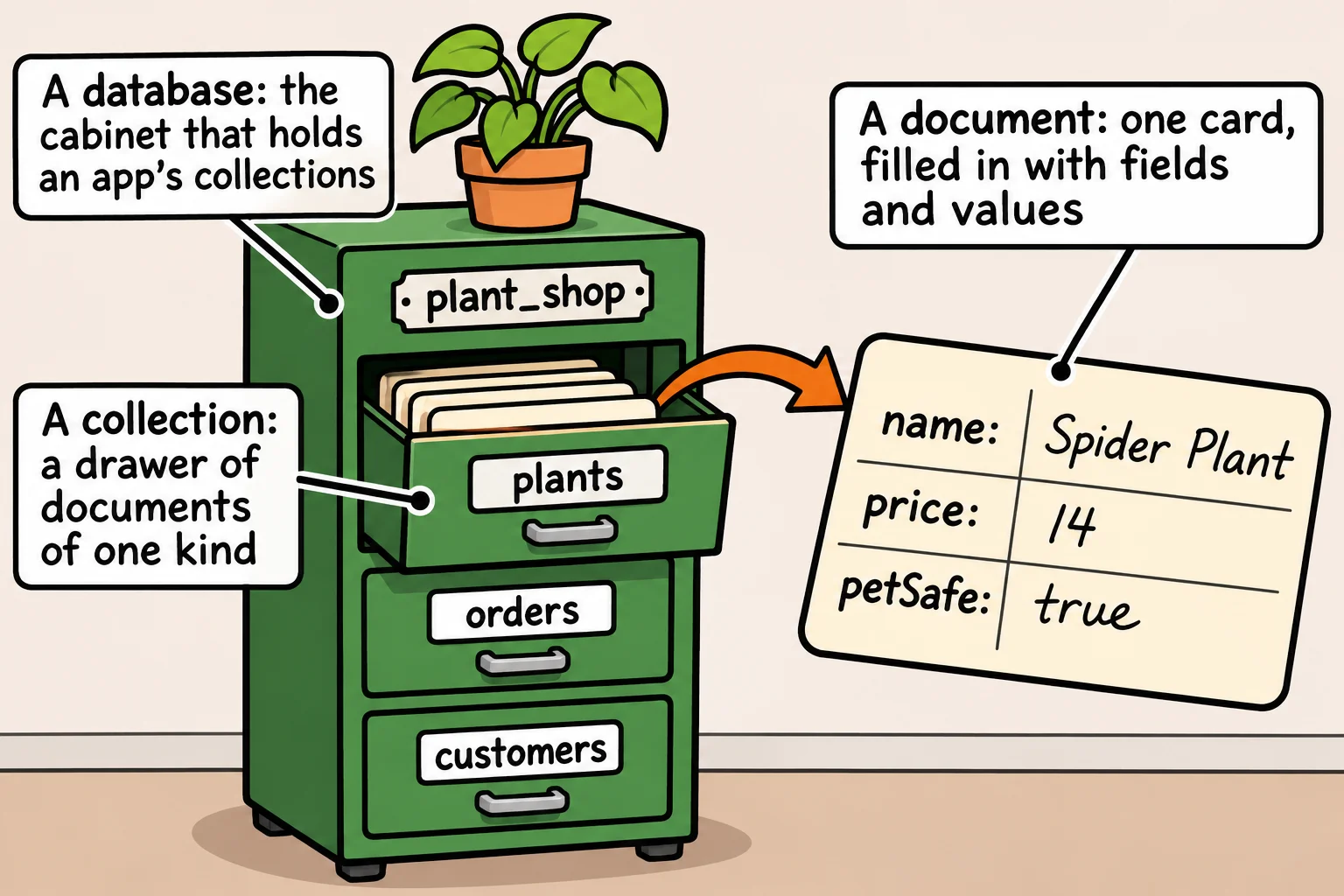
The shop keeps its plant cards in one drawer and its order slips in another. A collection is that drawer: a group of documents of one kind, such as plants or orders. A database is the cabinet that holds an app's drawers, such as plant_shop. One MongoDB server can hold many databases.
Unlike a paper form, a collection doesn't force every document to have the same fields. Here the fern has a pot size, and the snake plant doesn't:
const plants = [
  { name: "Snake Plant", price: 24, petSafe: false },
  { name: "Boston Fern", price: 22, petSafe: true, potSize: "8 inch" },
];

for (const plant of plants) {
  console.log(plant.name, plant.potSize);
}
Snake Plant undefined
Boston Fern 8 inch
That freedom is handy, and it comes with a job for you: a field that isn't there reads as undefined, so your code must expect it.
_id, ObjectId and BSON
A coat check hands out a numbered ticket for every coat, and no two tickets match. MongoDB does the same: every document has an _id field (read "underscore I-D"), and no two documents in a collection share one. When you save a document without an _id, the driver gives it one. Here is a plant as MongoDB keeps it, printed by Node:
{
  _id: new ObjectId('6afc92c2e5a5f45e301e56a0'),
  name: 'Spider Plant',
  price: 14,
  petSafe: true
}
That value is an ObjectId: 24 characters, each a digit or a letter from a to f. Its first eight record the second it was made, so ids made later sort later, and the rest is made so that two computers almost never invent the same one, without having to ask each other.
On disk, MongoDB stores documents as BSON (read "bee-son", binary JSON): JSON's shape, plus types JSON doesn't have, such as dates and ObjectIds. You never write BSON yourself. You hand the driver JavaScript objects, and it turns them into BSON and back.
Documents or tables: when MongoDB fits
You may have met databases that store data in tables, such as SQL Server or PostgreSQL. A table is a grid: every row has the same columns, and related data sits in other tables, matched up by ids when you ask for it.
MongoDB fits when the data is read as one whole thing (a plant with its care details, a recipe with its steps), when records vary in shape, and when the data goes out as JSON, as an API's does. A table-based database fits better when the same data is shared and cross-checked everywhere, such as a college's students, classes, enrollments and grades, with reports that cut across all of them. Many companies use both. MongoDB in Depth compares the two in detail; this course needs only what's here.
Check yourself
2 questions to try on the lesson page.
So what
Every piece of data your APIs keep from now on is a document in a collection, so the shapes you choose here are the shapes every route of yours will read and write.