Sorting and Paging Results
sort puts a query's results in order, skip and limit cut out one page of them, and countDocuments counts every match, so an API can answer with page 2 of 3 instead of every document at once.
Journeyman · MongoDB · NoSQL · Node.js · Updated
After this lesson you can
- Sort query results with sort, ascending (1) or descending (-1), by one field or more
- Return one page of results with skip and limit, working out skip from a page number and a page size
- Count the matching documents with countDocuments to report the total and the number of pages
Key takeaways
- find gives back documents in no promised order. sort with rating set to -1 puts the highest rating first, and 1 instead of -1 puts the lowest first.
- limit(n) keeps at most n documents, and skip(n) passes over the first n, so one page is skip((page - 1) * pageSize) and limit(pageSize).
- countDocuments(filter) counts every match, and Math.ceil(total / pageSize) is the number of pages.
- Always sort before you page, and end the sort with a field no two documents share, so every page is the same each time it's asked for.
Every list in an app you use comes sorted and a page at a time: products by price, posts newest first, search results 20 to a screen with Next at the bottom. When you build an API, you'll write the database side of that, and it takes three small methods and one line of arithmetic.
The Saturday Farmers Market's app wants two things: its best-rated vendors first, and the full list five stalls at a time, because a phone screen can't show 300 vendors at once. The examples use the market folder, seed-market.js and find.js from Finding Documents with Filters, and each replaces the middle of find.js. Run node --env-file=.env seed-market.js first if you've changed the data.
Putting results in order: sort
find gives back documents in the order MongoDB comes across them, which isn't promised: after some updates and deletes it can change. When order matters, ask for it with sort. It takes an object: each field you sort by, with 1 for ascending (smallest first, A to Z) or -1 for descending (largest first, Z to A). { rating: -1 } reads "rating, descending":
const best = await vendors.find().sort({ rating: -1 }).limit(3).toArray();
console.log(best.map((vendor) => `${vendor.rating} ${vendor.name}`));

const byTown = await vendors
  .find({ "farm.town": { $in: ["Willow Creek", "Cedar Ridge"] } })
  .sort({ "farm.town": 1, name: 1 })
  .toArray();
console.log(byTown.map((vendor) => `${vendor.farm.town}: ${vendor.name}`));
[ '4.9 Bee Happy Honey', '4.8 Berry Patch', '4.7 Sunny Acres' ]
[
  'Cedar Ridge: Berry Patch',
  'Cedar Ridge: Herb Corner',
  'Cedar Ridge: Orchard Lane',
  'Willow Creek: Green Valley Greens',
  'Willow Creek: Petal & Stem',
  'Willow Creek: Sunny Acres'
]
limit(3) keeps the first three, so the first search is the market's top three. The second sorts by two fields: by town first, then, among vendors from the same town, by name. A second field only decides between documents the first one calls a tie.
One page at a time: skip and limit
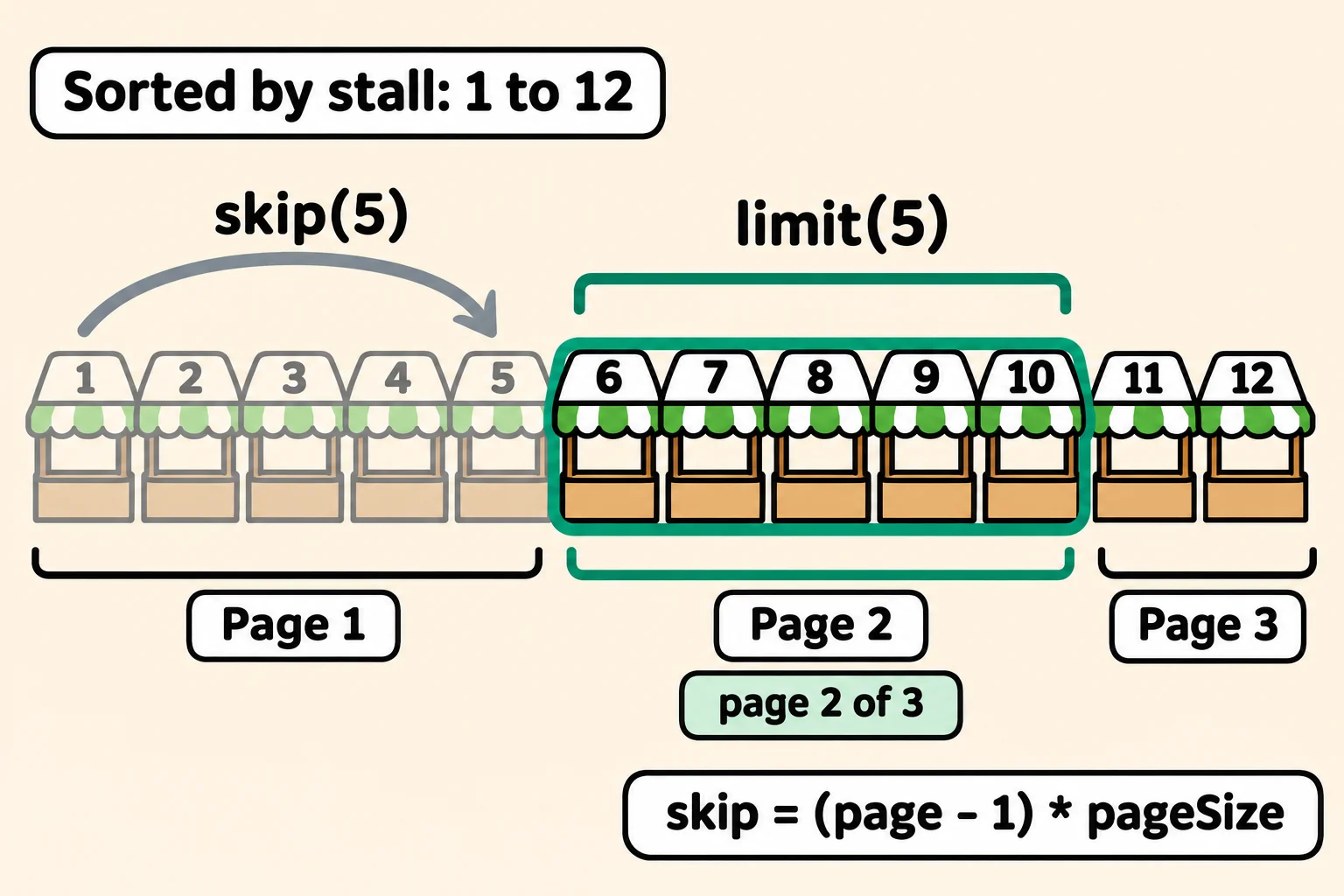
Think of a book with five vendors on each page. To show page 2, you pass over the five on page 1, then read the next five. skip(n) passes over the first n documents, and limit(n) keeps at most n after them:
| Page | Skip | Shows |
|---|---|---|
| 1 | 0 | stalls 1 to 5 |
| 2 | 5 | stalls 6 to 10 |
| 3 | 10 | stalls 11 and 12 |
The pattern is skip = (page - 1) * pageSize: page 1 skips nothing.
const page = 2;
const pageSize = 5;
const skip = (page - 1) * pageSize;

const onPage = await vendors
  .find()
  .sort({ stall: 1 })
  .skip(skip)
  .limit(pageSize)
  .toArray();
console.log(onPage.map((vendor) => `${vendor.stall} ${vendor.name}`));
[
  '6 Herb Corner',
  '7 Orchard Lane',
  '8 Maple Grove Syrup',
  '9 Bee Happy Honey',
  '10 Fungi Friends'
]
A page past the end, such as page 4, gives an empty array, []: there's nothing left to show.
"Page 2 of 3": countDocuments
A page on its own doesn't say whether there's a next one. countDocuments(filter) counts every document that matches the filter, without sending any of them. Use the same filter for the count and the page, so they describe the same list:
const filter = { organic: true };
const page = 2;
const pageSize = 3;

const total = await vendors.countDocuments(filter);
const pages = Math.ceil(total / pageSize);
const onPage = await vendors
  .find(filter)
  .sort({ stall: 1 })
  .skip((page - 1) * pageSize)
  .limit(pageSize)
  .toArray();

console.log(`Page ${page} of ${pages} (${total} organic vendors)`);
console.log(onPage.map((vendor) => vendor.name));
Page 2 of 3 (7 organic vendors)
[ 'Berry Patch', 'Herb Corner', 'Fungi Friends' ]
Seven vendors, three to a page, make 2 full pages and 1 vendor left over, so Math.ceil (read "ceiling", which rounds up) turns 7 ÷ 3, about 2.33, into 3 pages. An API sends these numbers back beside the page, so the app knows when to hide Next.
Paging that holds up
Paging goes wrong in quiet ways, so these habits are worth keeping:
- Sort before you page. Without
sort, page 2 isn't promised to start where page 1 ended, so a shopper could see a vendor twice or miss one. - End the sort with a field no two documents share, such as
stallhere, or_id. Sorting byratingalone would let tied vendors swap places between requests: add a second key,{ rating: -1, _id: 1 }. - The order you write them in doesn't matter. MongoDB always sorts, then skips, then limits, so
.limit(3).skip(3).sort({ stall: 1 })still gives stalls 4, 5 and 6. - Keep pages small and limited. An API that takes
pageSizefrom the address should cap it, at 50, say, so one request can't ask for every document. Very deep pages get slower, too, because MongoDB still steps past every document it skips.
Check yourself
2 questions to try on the lesson page.
So what
Sorted pages with a total are what every list screen asks your API for, and now that answer is a sort, a skip, a limit and a count, worked out the same way every time.