Testing Errors, with a Fresh Start for Every Test
An API's error answers, such as 400, 404 and 409 with their JSON bodies, are part of what it promises, so they get tests too, and beforeEach puts the in-memory data back before every test, so each one starts from the same seats.
Journeyman · Node.js · Unit Testing · Updated
After this lesson you can
- Test an API's error responses, such as 400, 404 and 409, checking the status code, the whole error body and that nothing changed
- Give every test a fresh start with beforeEach, so tests pass on their own, together and in any order
Key takeaways
- An API's error answers are part of its promise, so test each one's status code and its whole JSON body, as carefully as the answers that work.
- After a refused request, check that nothing changed, such as the seats left, as well as the status code.
- Tests that share in-memory data depend on their order, so a test can pass on its own and fail with the others.
- beforeEach runs a function before every test, so calling resetData there gives each test the same starting data.
- A loop can make one test for each bad value, such as 0, 9 and "two", each with its own name.
The answers that go wrong are the ones fans see at the worst moment: the show is nearly sold out, they ask for five tickets, and the app has to say clearly why it can't sell them. On a team, a bug report about a wrong error is as real as one about a wrong price. This lesson tests Starlight Stage's error answers, and fixes a problem that appears as soon as tests change data.
The answers nobody tries by hand
When you try an API by hand, you try the requests that work. The requests that fail get forgotten, and they're the ones a phone app depends on: it reads the status code to decide what to show, and shows the error's message to the fan. Starlight Stage's API answers every error with the one shape from Error Handling and Consistent Error Responses: a status, a title, a detail that says what went wrong and, for bad input, a list of problems.
Midnight Brass Band has 4 seats left. Asking for 5 should answer 409 Conflict (the request is fine, but it clashes with the seats there are), and sell nothing:
test("POST /shows/2/tickets with quantity 5 answers 409 and changes nothing", async () => {
  const response = await request(app).post("/shows/2/tickets").send({ quantity: 5 });

  assert.equal(response.status, 409);
  assert.deepEqual(response.body, {
    status: 409,
    title: "Conflict",
    detail: "Only 4 seats are left for Midnight Brass Band.",
  });

  const show = await request(app).get("/shows/2");
  assert.equal(show.body.seatsLeft, 4, "A refused order must leave the seats alone.");
});
Three checks, three promises: the status code, the whole body, and the data left alone. The third argument to assert.equal is a message a failure prints above the two values, so the report says in words what went wrong. A 404 gets the same care:
test("GET /shows/99 answers 404 with There's no show 99.", async () => {
  const response = await request(app).get("/shows/99");

  assert.equal(response.status, 404);
  assert.deepEqual(response.body, { status: 404, title: "Not Found", detail: "There's no show 99." });
});
One test for each bad value
A quantity must be a whole number from 1 to 8, so 0, 9 and "two" should all answer 400 Bad Request. A for...of loop makes one test for each, and the template literal (the backticks) puts the value in each test's name:
for (const quantity of [0, 9, "two"]) {
  test(`POST /shows/1/tickets with quantity ${quantity} answers 400`, async () => {
    const response = await request(app).post("/shows/1/tickets").send({ quantity });

    assert.equal(response.status, 400);
    assert.deepEqual(response.body.problems, [
      { field: "quantity", message: "quantity must be a whole number from 1 to 8." },
    ]);
  });
}
{ quantity } is short for { quantity: quantity }. When one value goes wrong, its own test fails and names it.
Tests that lean on each other
The API keeps its data in memory, and every test in a file talks to the same app. So a test that buys tickets leaves fewer seats for the tests after it. Here are two tests that look fine:
test("POST /shows/2/tickets with quantity 2 answers 201", async () => {
  const response = await request(app).post("/shows/2/tickets").send({ quantity: 2 });
  assert.equal(response.status, 201);
});

test("POST /shows/2/tickets with quantity 3 answers 201: 4 seats are left", async () => {
  const response = await request(app).post("/shows/2/tickets").send({ quantity: 3 });
  assert.equal(response.status, 201);
});
Run together, the second fails. The first already bought 2 of the 4 seats, so the API answers 409:
✖ POST /shows/2/tickets with quantity 3 answers 201: 4 seats are left (7.9921ms)
  AssertionError [ERR_ASSERTION]: Expected values to be strictly equal:

  409 !== 201
Run the second test on its own, with --test-name-pattern, which runs only the tests whose names contain the text you give it, and it passes:
node --test --test-name-pattern="quantity 3"
✔ POST /shows/2/tickets with quantity 3 answers 201: 4 seats are left (26.5801ms)
ℹ tests 1
ℹ suites 0
ℹ pass 1
ℹ fail 0
ℹ cancelled 0
ℹ skipped 0
ℹ todo 0
ℹ duration_ms 220.3926
A test whose result depends on which other tests ran first is a trap: it fails for reasons that have nothing to do with the code it checks, and a test that passes and fails without any change in the code is called a flaky test. Tests should each stand alone, which is called test isolation.
A fresh start with beforeEach
A stagehand resets the stage before every show, so each band starts from the same setup.
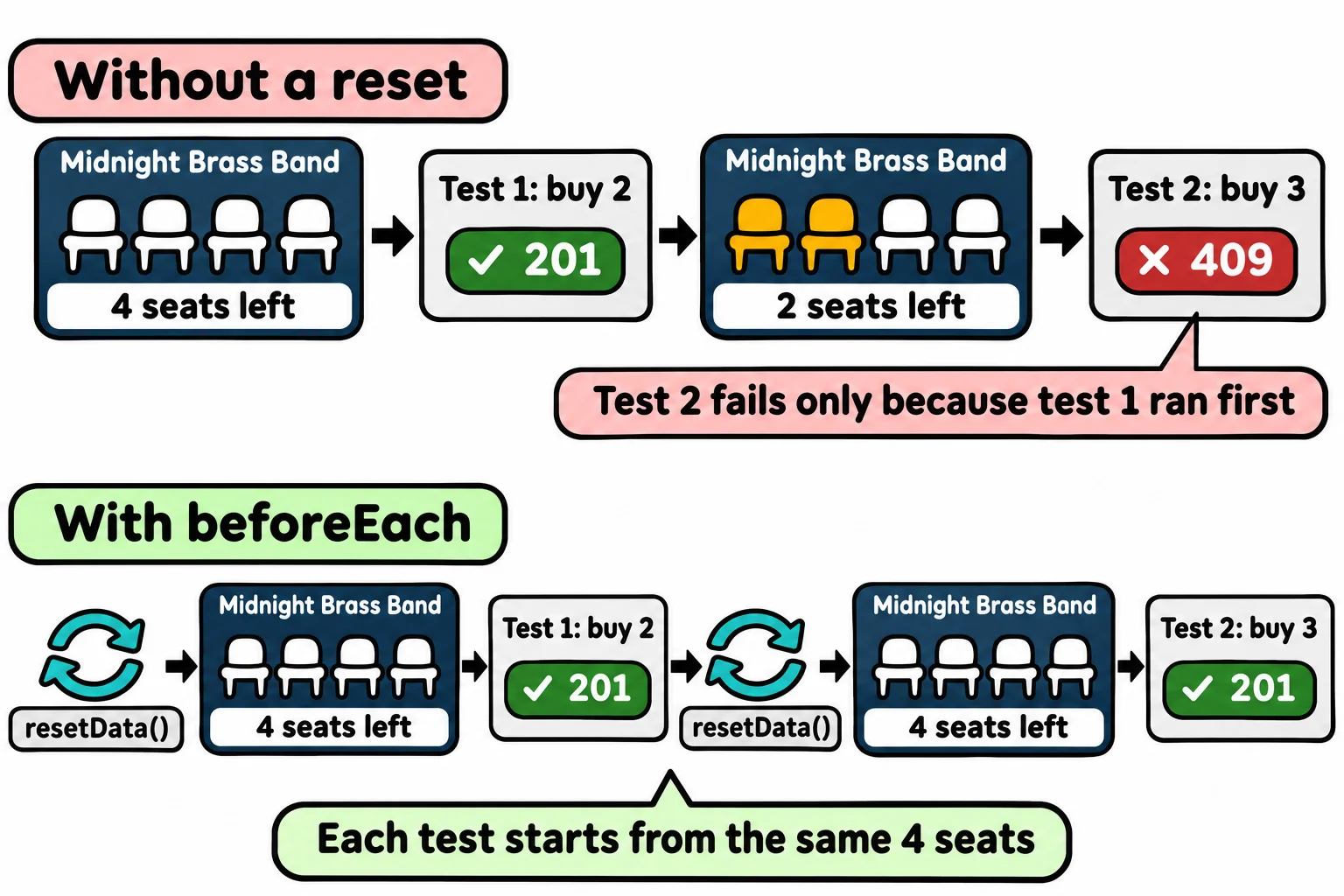
data.js has a function for that job: resetData() puts the three shows back the way they start, with no tickets sold:
export function resetData() {
  shows.length = 0;
  shows.push(...structuredClone(startingShows));
  tickets.length = 0;
  lastTicketId = 0;
}
structuredClone makes a deep copy, so a sale never changes startingShows itself. beforeEach, from node:test, runs a function before every test in the file, so each test starts from the same data. Code that runs before or after each test is called setup and teardown:
import { test, beforeEach } from "node:test";
import assert from "node:assert/strict";
import request from "supertest";
import { app } from "./app.js";
import { resetData } from "./data.js";

beforeEach(() => {
  resetData();
});
With it at the top of app.test.js, every test from this lesson passes, together, on its own, and in any order:
✔ POST /shows/2/tickets with quantity 2 answers 201 (30.9438ms)
✔ POST /shows/2/tickets with quantity 3 answers 201: 4 seats are left (7.3645ms)
✔ POST /shows/2/tickets with quantity 5 answers 409 and changes nothing (8.1624ms)
✔ GET /shows/99 answers 404 with There's no show 99. (3.549ms)
✔ POST /shows/1/tickets with quantity 0 answers 400 (3.5753ms)
✔ POST /shows/1/tickets with quantity 9 answers 400 (3.3448ms)
✔ POST /shows/1/tickets with quantity two answers 400 (3.7667ms)
ℹ tests 7
ℹ suites 0
ℹ pass 7
ℹ fail 0
ℹ cancelled 0
ℹ skipped 0
ℹ todo 0
ℹ duration_ms 300.9481
Check yourself
2 questions to try on the lesson page.
So what
An API's tests now cover what goes wrong as well as what goes right, and each one starts from the same seats, so a red test always means the code changed, never the order the tests ran in.