Finding and Removing Duplicates
duplicated marks every row that repeats one before it, on every column or only on the columns named in subset, drop_duplicates removes those rows and keep says which copy stays, and choosing the columns is how a double entry is told apart from two real visits.
Apprentice · Python · Updated
After this lesson you can
- Find duplicate rows with duplicated, on every column or on a subset of columns
- Remove double entries with drop_duplicates using subset and keep, and tell a double entry from two real visits
Key takeaways
- duplicated() answers True for every row that repeats an earlier one, and duplicated().sum() counts them.
- With no subset, a row counts as a copy only when every column matches, so a copy with one value typed differently is missed.
- subset= names the columns that make two rows the same event, such as the same animal on the same day. Too few columns, such as the animal alone, would also catch real return visits.
- drop_duplicates() removes the copies. keep="first" (the default) keeps the first of each, keep="last" the last, and keep=False marks or drops every copy.
A form submitted twice, an export run twice and pasted into one sheet, a volunteer who wasn't sure the first save worked: rows get entered twice all the time, and every copy counts again in a total. Before you report how many of anything there were, you check for duplicates, and you decide carefully what "the same row" means, because some repeats are real.
The example is Happy Tails Animal Shelter's intake log, intake.csv: one row for each time an animal arrived this year, typed in by volunteers, with an animal_id for each animal and the intake_date it arrived.
Two counts that don't agree
The director's report says how many animals the shelter took in. Two ways of counting give two answers:
import pandas as pd

intake = pd.read_csv("intake.csv", na_values=["unknown", "-"])
print("rows:", len(intake))
print("animals:", intake["animal_id"].nunique())
rows: 800
animals: 750
800 rows, but only 750 different animals. Some of those 50 extra rows are mistakes, and some may not be. Finding out which is this lesson's job.
duplicated: rows seen before
duplicated() goes down the table and answers True for every row that repeats one above it, with every column the same. Adding up the answers counts them:
print("exact copies:", intake.duplicated().sum())
exact copies: 19
Nineteen rows are exact copies. To look at one, put a condition inside square brackets, which keeps the rows where it's true (Filtering Rows with a Condition teaches it in full):
columns = ["animal_id", "name", "intake_date", "weight_lbs"]
intake[intake["animal_id"] == "HT-1065"][columns]
   animal_id     name intake_date weight_lbs
65   HT-1065  Pumpkin  2026-01-27       53.5
68   HT-1065  Pumpkin  2026-01-27       53.5
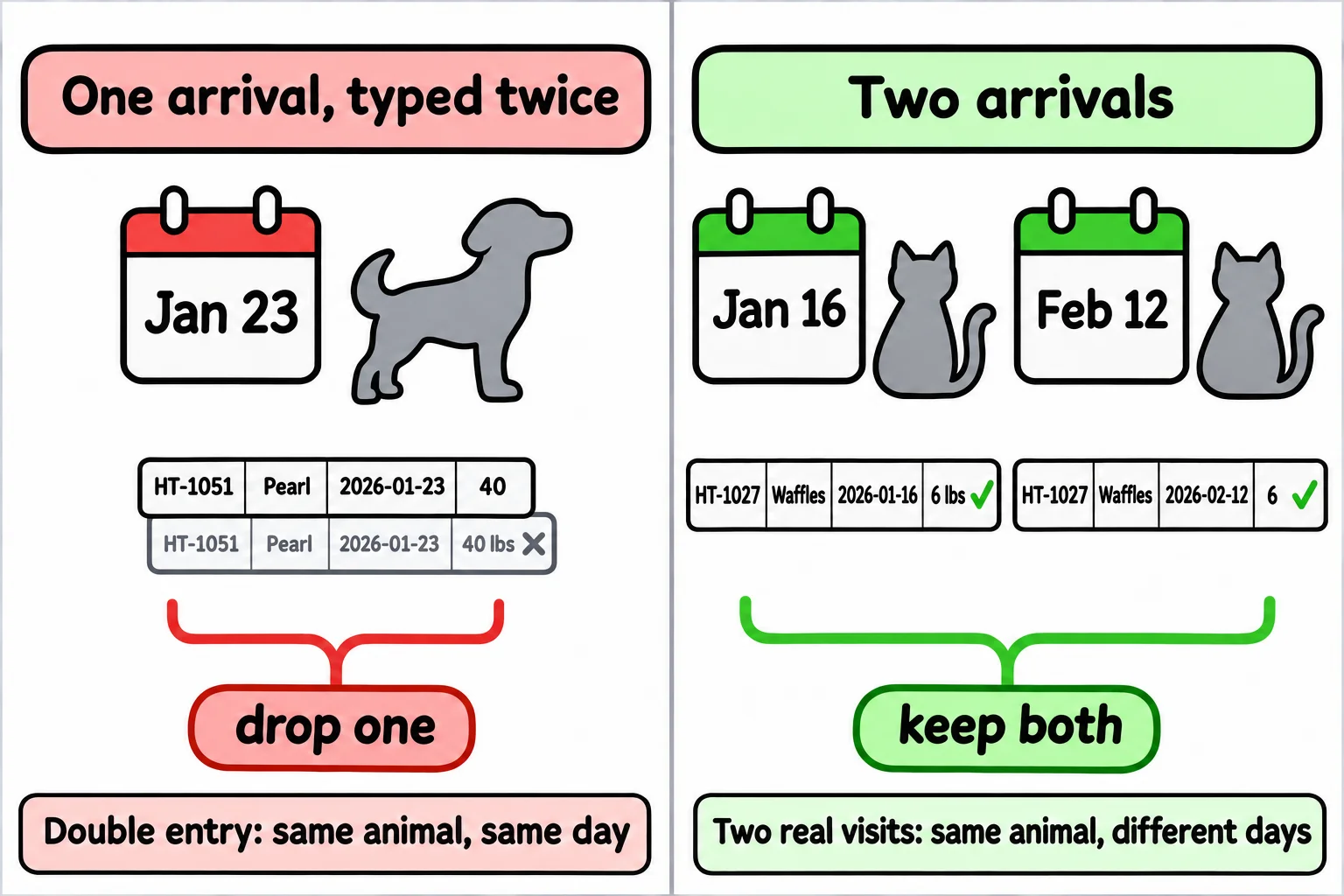
Pumpkin arrived once, on January 27, and was typed in twice. But 19 is less than 50. Here's a pair that duplicated() missed:
intake[intake["animal_id"] == "HT-1051"][columns]
   animal_id   name intake_date weight_lbs
50   HT-1051  Pearl  2026-01-23         40
51   HT-1051  Pearl  2026-01-23     40 lbs
The same dog on the same day, with the weight typed 40 once and 40 lbs the second time. Every column has to match for duplicated() to call it a copy, so one difference hides it.
Which columns make a row the same: subset
subset= tells duplicated() which columns decide. Here, the same animal arriving on the same day is one event, whatever else was typed:
same_day = intake.duplicated(subset=["animal_id", "intake_date"])
print("same animal, same day:", same_day.sum())
same animal, same day: 38
Thirty-eight double entries. Why not go further, and call any repeat of an animal_id a copy?
same_animal = intake.duplicated(subset=["animal_id"])
print("same animal:", same_animal.sum())
same animal: 50
That's 12 more, and they aren't mistakes:
intake[intake["animal_id"] == "HT-1027"][columns + ["intake_type"]]
    animal_id     name intake_date weight_lbs      intake_type
26    HT-1027  Waffles  2026-01-16      6 lbs  owner surrender
108   HT-1027  Waffles  2026-02-12          6  owner surrender
Waffles the cat came in on January 16, was adopted, and was brought back on February 12: two real visits, almost a month apart. Deleting the second would hide a return the shelter wants to know about. A double entry is the same event typed twice; two real visits are two events that happen to share an animal. Choosing the columns in subset is how you tell them apart, and it's a decision about the data, not about pandas.
drop_duplicates and keep
drop_duplicates() takes the same subset and removes the copies. keep= says which copy stays: "first" (the default) keeps the first of each group and drops the rest, "last" keeps the last, and False treats every copy as a duplicate. keep=False is handy for looking before you delete, because it marks both rows of each pair:
every_copy = intake.duplicated(subset=["animal_id", "intake_date"], keep=False)
print("rows in a double entry:", every_copy.sum())
rows in a double entry: 76
That's 38 pairs, 76 rows. Now drop the copies, keeping the first of each pair, and count before and after:
before = len(intake)
intake = intake.drop_duplicates(subset=["animal_id", "intake_date"])
print("rows before:", before)
print("rows after:", len(intake))
print("animals:", intake["animal_id"].nunique())
rows before: 800
rows after: 762
animals: 750
762 arrivals of 750 animals: 12 animals came twice. Both counts are now true, and the report can give either one, saying which it is.
Check yourself
2 questions to try on the lesson page.
So what
Duplicates inflate every count, but not every repeat is a mistake: deciding which columns make two rows the same event, and counting the rows before and after, is what keeps the real return visits in your data.