Picking Rows and Columns: loc and iloc
Square brackets pick columns by name, set_index makes a column such as sku the row labels, loc picks rows and columns by those labels (a label slice includes its end), and iloc picks them by position, counting from 0 (a position slice stops before its end).
Apprentice · Python · Updated
After this lesson you can
- Select rows and columns by label with loc, after set_index, using lists and label slices
- Select rows and columns by position with iloc, and choose between loc and iloc
Key takeaways
- df["price"] gives one column, and df[["product", "price"]] gives a smaller table of the columns you list.
- set_index("sku") makes a column the row labels, so loc can find a row by its SKU.
- loc picks by label, as df.loc[rows, columns]. A label slice such as "TO-1001" to "TO-1004" includes its end.
- iloc, read "i loc", picks by position, counting from 0. A position slice such as 0 to 3 stops before 3.
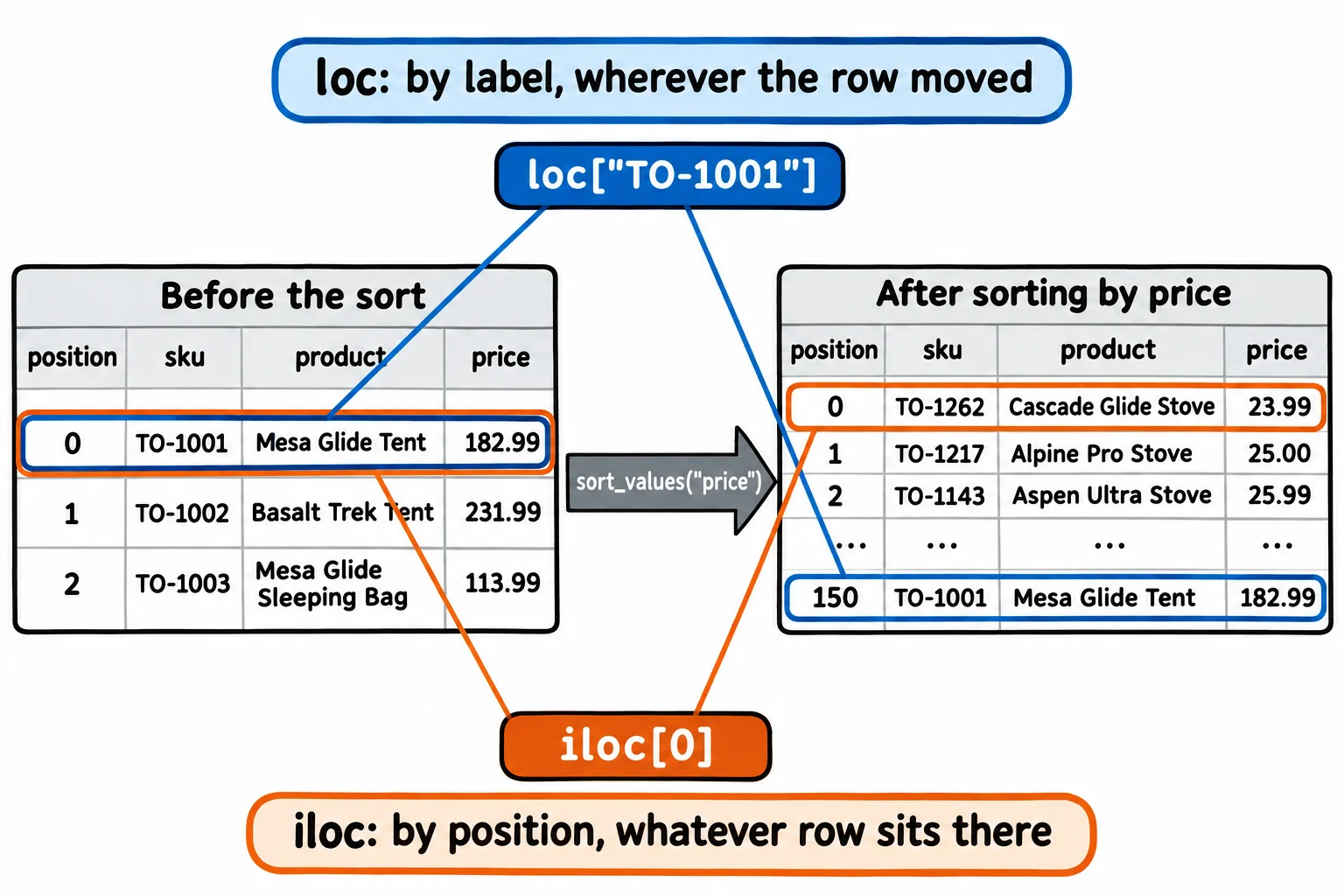
- After a sort, positions change and labels don't, so loc finds the same product wherever it moved.
A customer calls the store and asks about one backpack: what does it cost, and is it in stock? Your manager wants the names and prices of three products for a flyer. A lab report needs the first three rows of a results table. Each of these is a few rows and a few columns out of a big table, and picking them out exactly is the first move in answering almost any question with data.
The example is Trailhead Outfitters, an outdoor gear store, and its catalog, products.csv: 300 products, one row each. Its columns are sku (the store's product code, such as TO-1042), product, category (tents, backpacks, boots, jackets, stoves or sleeping bags), brand, price, stock, rating (1.0 to 5.0), reviews, on_sale and weight_oz. The catalog is our own made-up data.
Columns by name
Square brackets with a column's name give that column. Square brackets with a list of names give a smaller table with only those columns, in the order you list them:
import pandas as pd

products = pd.read_csv("products.csv")
products[["sku", "product", "price", "stock"]].head(3)
       sku                  product   price  stock
0  TO-1001          Mesa Glide Tent  182.99     18
1  TO-1002         Basalt Trek Tent  231.99     38
2  TO-1003  Mesa Glide Sleeping Bag  113.99     10
VS Code draws the table as a grid; this lesson shows it as pandas prints it as text. The numbers down the left side, 0, 1, 2, are the table's index: the label pandas gives each row. Right now they only say where each row sits.
Rows by label: set_index and loc
The customer read out a SKU, TO-1042, not a row number. Think of a coat check: you hand over a ticket, and the attendant finds your coat by its number, wherever it hangs. set_index("sku") makes the SKUs the row labels, and loc (read "lock", short for location) finds a row by its label:
products = products.set_index("sku")
products.loc["TO-1042"]
product      Cascade Trek Backpack
category                 backpacks
brand                    Pinecrest
price                        95.99
stock                           19
rating                         4.7
reviews                         77
on_sale                      False
weight_oz                     69.8
Name: TO-1042, dtype: object
set_index hands back a new table, so the line stores it in products again. A label after a comma picks the column too, so the customer's two answers are one line each:
print("price:", products.loc["TO-1042", "price"])
print("stock:", products.loc["TO-1042", "stock"])
price: 95.99
stock: 19
Rows and columns together
The pattern is df.loc[rows, columns]: what's before the comma picks rows, what's after it picks columns, and either can be a list. Here are the three products for the flyer:
products.loc[["TO-1042", "TO-1107", "TO-1213"], ["product", "price", "stock"]]
                           product   price  stock
sku
TO-1042      Cascade Trek Backpack   95.99     19
TO-1107        Cascade Lite Jacket  214.99     40
TO-1213  Willow Glide Sleeping Bag  176.99      6
A slice, two labels with a colon between them, picks everything from the first label to the second. With loc, the second label is included:
products.loc["TO-1001":"TO-1004", ["product", "price"]]
                         product   price
sku
TO-1001          Mesa Glide Tent  182.99
TO-1002         Basalt Trek Tent  231.99
TO-1003  Mesa Glide Sleeping Bag  113.99
TO-1004        Cascade Trek Tent  176.99
Ask loc for a label the table doesn't have, and it stops with the label it couldn't find: KeyError: 'TO-1400'.
Rows by position: iloc
Sometimes you want "the first three rows" whatever their labels are. iloc (read "i loc", for integer location) picks by position, counting from 0, the way Python lists do. Its slices stop before the end, also like lists, so 0:3 means positions 0, 1 and 2:
products.iloc[0:3, 0:2]
                         product       category
sku
TO-1001          Mesa Glide Tent          tents
TO-1002         Basalt Trek Tent          tents
TO-1003  Mesa Glide Sleeping Bag  sleeping bags
A negative position counts from the end, so products.iloc[-1, 0] is the last row's first column, Juniper Base Tent.
The difference matters most after a sort. Sorted by price, the first positions hold the cheapest products:
by_price = products.sort_values("price")
by_price.iloc[0:3, [0, 3]]
                     product  price
sku
TO-1262  Cascade Glide Stove  23.99
TO-1217     Alpine Pro Stove  25.00
TO-1143    Aspen Ultra Stove  25.99
Position 0 is now a stove, but by_price.loc["TO-1001"] is still the Mesa Glide Tent, which the sort moved to position 150. Use loc when you know which row you want (a SKU, a name, a date), and iloc when you want rows by where they sit (the first three, the last one). Sorting and Top Lists shows sort_values in full.
Check yourself
2 questions to try on the lesson page.
So what
loc answers "which one?" and iloc answers "where?": with labels from set_index and df.loc[rows, columns], you can pull out exactly the rows and columns a question needs, and still find them after the table is sorted.