Dictionaries: Looking Things Up by Name
A dictionary stores each value under a key you choose, so a program finds a value by its name instead of its position, and adds, changes and removes entries as the data changes.
Novice · Python · Updated
After this lesson you can
- Make a dictionary of keys and values, and read a value by its key, with get() when the key may be missing
- Add, change and remove a dictionary's entries, and check for a key with in
Key takeaways
- A dictionary holds key-value pairs in curly braces, each key joined to its value by a colon, and pantry["eggs"] reads the value stored under the key "eggs".
- Reading a key that isn't there stops the program with a KeyError. get() gives None or a default you choose instead, and in checks for the key first.
- Assigning to a key adds it when it's new and replaces its value when it's already there, and del removes a key with its value.
- Keys are unique, and in looks only at the keys, never at the values.
Programs look things up by name all day: the price of a latte on a café's menu, a student's grade in a class list, the setting called dark_mode in an app. When data comes from a file or a web API, it usually arrives in this same shape: names, each with a value. This lesson shows Python's tool for it, the dictionary, which you'll use in nearly every program you write from here on.
The example is Pantry Pal, a recipe app that keeps track of what's in your kitchen: 6 eggs, 4 cups of flour, 2 cups of milk and 1 stick of butter.
Two lists that have to stay in step
A first try keeps the pantry in two lists: the ingredients in one, and the amounts in the other, each amount at the same position as its ingredient. A list holds values in order, inside square brackets, and its .index() method gives the position of an item:
ingredients = ["eggs", "flour", "milk", "butter"]
amounts = [6, 4, 2, 1]

position = ingredients.index("flour")
print("Flour:", amounts[position])
Flour: 4
It works, in two steps: find the position of "flour", then read the same position in the other list. And the two lists have to stay in step forever. Add "sugar" to one and forget the other, and every amount after it belongs to the wrong ingredient, with no error to warn you. What you want is to ask for the flour by name and get its amount.
A dictionary: a label on every drawer
Think of a kitchen cabinet with a label on every drawer: eggs, flour, milk, butter. To find the flour, you read the labels; you don't count drawers from the left. A dictionary works the same way. Each value sits under a key, its label, and a key with its value is a key-value pair:
pantry = {"eggs": 6, "flour": 4, "milk": 2, "butter": 1}

print(pantry["flour"])
print(len(pantry))
print(pantry)
4
4
{'eggs': 6, 'flour': 4, 'milk': 2, 'butter': 1}
The curly braces, { }, make the dictionary. Inside them, each pair is written as the key, a colon, then the value, with commas between the pairs. pantry["flour"] is read "pantry at flour": the value stored under the key "flour". len() counts the pairs, and printing the dictionary shows them in the order they were added.
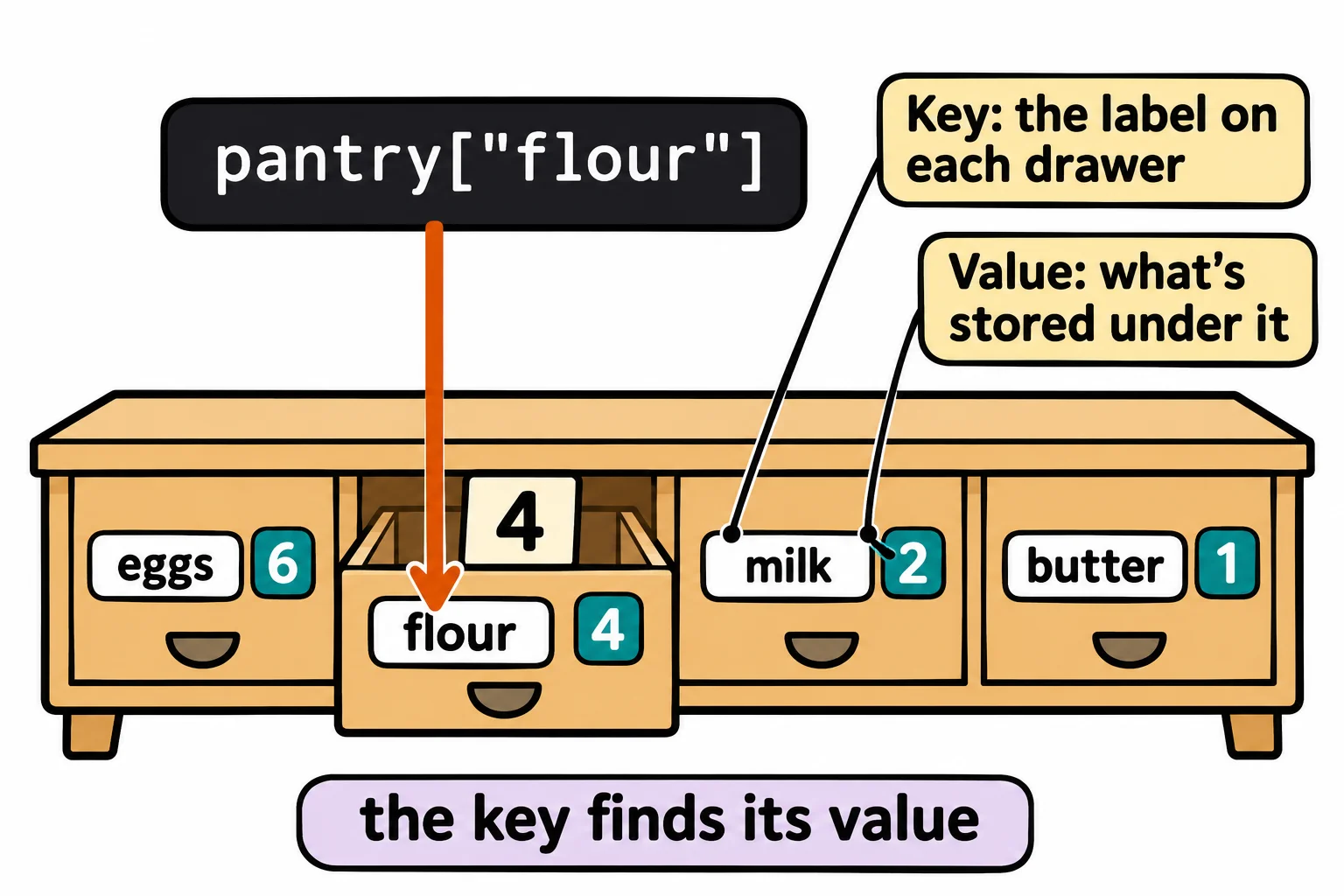
Keys are unique: there's one drawer labeled flour. Values can repeat: two ingredients can both have 4. Keys are usually strings, though numbers work too. In your textbook a dictionary may be called a map, an associative array or a hash table; Python calls its type dict.
A key that isn't there
Ask for a drawer that doesn't exist, and Python stops. Here's what the terminal shows on Windows, from a file named pantry.py in the course folder (your path will be your own):
pantry = {"eggs": 6, "flour": 4, "milk": 2, "butter": 1}

print(pantry["sugar"])
Traceback (most recent call last):
  File "C:\Users\Sam\python-course\pantry.py", line 3, in <module>
    print(pantry["sugar"])
          ~~~~~~^^^^^^^^^
KeyError: 'sugar'
A KeyError names the key it couldn't find. When a key might be missing, there are two safer ways to ask. in checks whether a key is there and gives True or False. The .get() method reads a key without stopping: it gives None (Python's value for "nothing here") when the key is missing, or the default you give it as a second argument:
pantry = {"eggs": 6, "flour": 4, "milk": 2, "butter": 1}

print("sugar" in pantry)
print(6 in pantry)
print(pantry.get("sugar"))
print(pantry.get("sugar", 0))
print(pantry.get("eggs", 0))
False
False
None
0
6
in looks only at the keys, so 6 in pantry is False even though there are 6 eggs. pantry.get("sugar", 0) reads "get sugar, or 0 if there isn't any", which is what a pantry means: no sugar is zero sugar.
Adding, changing and removing
A dictionary changes as the data does. Assigning to a key adds it when it's new, and replaces its value when it's already there. del (read "delete") removes a key and its value:
pantry = {"eggs": 6, "flour": 4, "milk": 2, "butter": 1}

pantry["sugar"] = 3
pantry["eggs"] = pantry["eggs"] - 2
del pantry["butter"]
print(pantry)
{'eggs': 4, 'flour': 4, 'milk': 2, 'sugar': 3}
Sugar went in at the end, the eggs kept their place with a new amount, and the butter is gone.
A function can change a dictionary it's given. It gets the same dictionary, not a copy, so the change is still there after the call:
def use_eggs(pantry, count):
    pantry["eggs"] = pantry["eggs"] - count


pantry = {"eggs": 6, "flour": 4}
use_eggs(pantry, 2)
print(pantry)
{'eggs': 4, 'flour': 4}
Do it: restock the pantry
After a trip to the store, Pantry Pal adds what you bought to the pantry. Some of it is already on the shelf, and some of it is new.
pantry: a dictionary of each ingredient's name to the amount you have.ingredient: the name of what you bought.amount: how much of it you bought.
Your job: write the function restock(pantry, ingredient, amount) so it adds what you bought to pantry.
- When the ingredient is already in the pantry, its amount goes up by
amount. - When the ingredient isn't in the pantry yet, it's added with
amount. - It changes
pantryitself. The tests look at the pantry after the call.
Worked through: with pantry = {"eggs": 6, "flour": 4}, the call restock(pantry, "eggs", 12) makes the eggs 6 + 12 = 18, so the pantry becomes {"eggs": 18, "flour": 4}. Then restock(pantry, "sugar", 3) adds the sugar, and the pantry becomes {"eggs": 18, "flour": 4, "sugar": 3}.
Practiced live on the lesson page: write the Python right there and check it.
Check yourself
2 questions to try on the lesson page.
So what
A dictionary lets a program ask for what it wants by name, which is how most real data is organized, from a café's menu to the answer a web API sends back.