Handling Errors with try and except
An exception is Python's report of an error while a program runs, and try and except let a program catch the one it expects, such as the ValueError from turning "two" into a number, with else for what runs when nothing went wrong and finally for what runs every time.
Apprentice · Python · Updated
After this lesson you can
- Catch the exception you expect with try and except, and use else and finally for what runs when it works and what runs every time
- Choose which exception to catch, and explain why a bare except hides real bugs
Key takeaways
- An exception is Python's way of reporting an error while a program runs. A syntax error is different, because Python can't read the file at all and nothing runs.
- Code that might fail goes in a try block, and the except block for that exception runs only if it happens. Then the program carries on after them.
- else runs only when the try block finished without an exception, and finally runs every time, which makes it the place for clean-up.
- Catch the exception you expect, such as except ValueError. A bare except catches your own bugs too, such as a misspelled name, and hides them.
A program that works with the values you tried can still stop the first time someone types two instead of 2, a file isn't where it should be, or a website doesn't answer. Every program that reads what people type, opens files or calls a web API needs a plan for when that happens, and in Python the plan is written with try and except.
The example is the pay kiosk at Riverside Parking Garage, where drivers type how many hours they parked and pay $4.00 an hour.
When Python stops: exceptions
The kiosk turns the typed answer into a number with float(). A real kiosk reads the answer with input(); here it's in a variable, so the example runs the same way every time:
typed = "two"
hours = float(typed)
print("Hours parked:", hours)
Here's what the terminal shows on Windows, from a file named kiosk.py in a python-course folder (your path will be your own):
Traceback (most recent call last):
  File "C:\Users\Sam\python-course\kiosk.py", line 2, in <module>
    hours = float(typed)
ValueError: could not convert string to float: 'two'
This report is a traceback, and it reads best from the last line up: the error's name, ValueError, its message, and the line where it happened, line 2. A ValueError means a value of the right type (here, text) that the code can't use. The third line never ran.
The error is an exception: Python's way of reporting a problem while a program runs. A syntax error is a different kind of mistake, such as a missing quote or colon. Python finds it while reading the file, before the first line runs, so nothing runs at all and the only fix is to change the code. An exception happens later, often because of data you don't control, so a program can plan for it.
try and except: a plan for when it fails
At the garage's exit, a declined card doesn't shut the gate for good: the kiosk asks for another card, and the line keeps moving. That backup plan is what try and except give a program:
typed = "two"
try:
    hours = float(typed)
    print("Hours parked:", hours)
except ValueError:
    print("Please type the hours as a number, such as 2 or 1.5.")
print("The kiosk is ready for the next driver.")
Please type the hours as a number, such as 2 or 1.5.
The kiosk is ready for the next driver.
Python runs the try block. When a line inside it raises a ValueError, the rest of the block is skipped and the except ValueError: block runs instead (read it as "if a ValueError happens"). Then the program carries on after both blocks. With typed = "2", nothing goes wrong, the except block is skipped, and the kiosk prints Hours parked: 2.0.
else and finally
Two more blocks finish the plan. else runs only when the try block finished without an exception, so the code that needs the number goes there and try holds only the line that can fail. finally runs every time, error or not:
HOURLY_RATE = 4.00

for typed in ["2.5", "two"]:
    try:
        hours = float(typed)
    except ValueError:
        print(f"'{typed}' isn't a number of hours.")
    else:
        print(f"{hours} hours: ${hours * HOURLY_RATE:.2f}")
    finally:
        print("Next driver, please.")
2.5 hours: $10.00
Next driver, please.
'two' isn't a number of hours.
Next driver, please.
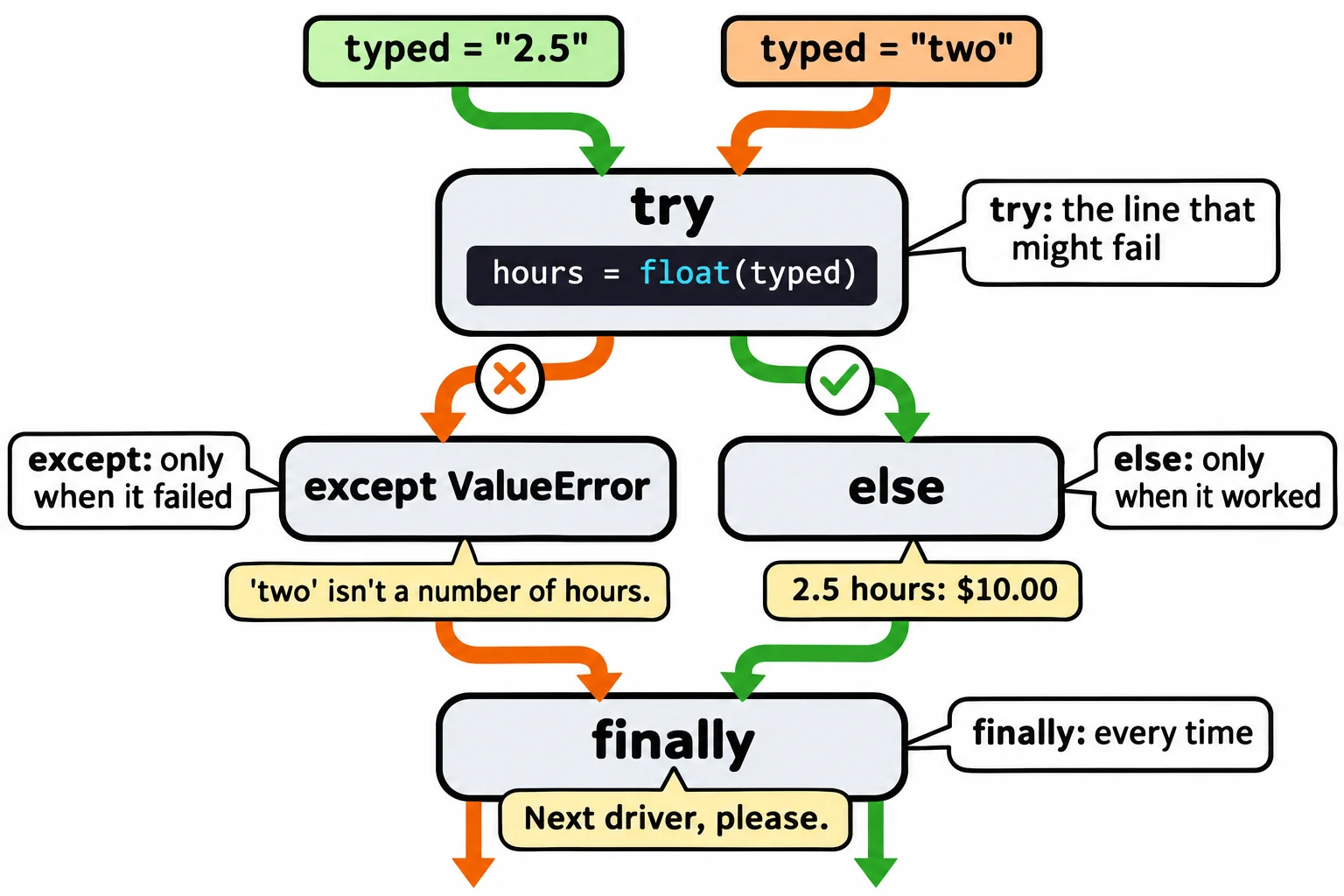
finally runs even when an exception isn't caught and the program is about to stop, which is why it's the place for clean-up: closing a file, a connection, or the kiosk's receipt drawer.
Catch the exception you expect
except can be written with no exception's name after it. That bare except: catches every exception there is, including your own bugs. Here the code has a typo, flot for float:
typed = "2"
try:
    hours = flot(typed)
except:
    print("Please type the hours as a number.")
Please type the hours as a number.
2 is a perfectly good answer, yet every driver is told to type a number, forever, and nothing points at the real problem. Write except ValueError: instead, and the typo can't hide: the program stops with NameError: name 'flot' is not defined. Did you mean: 'float'? and the line number of the typo. except Exception: is almost as wide as a bare except:, so it hides the same bugs.
Catch only the exception you expect and know what to do about. Give each kind its own except block when they need different messages, and add as error to get the exception itself, whose message prints with it:
typed = "two"
try:
    hours = float(typed)
except ValueError as error:
    print("That didn't work:", error)
That didn't work: could not convert string to float: 'two'
Every other exception still stops the program with its traceback, which tells you exactly where to look.
Do it: turn a typed answer into the kiosk's message
The kiosk's screen shows one message after each answer. Write the function that picks it, without letting a bad answer stop the kiosk.
typed: the text a driver typed for the hours they parked.
Your job: write the function fee_message(typed) so it returns the message for the screen.
- Turn
typedinto a number withfloat(). When that works, return"Please pay $X.XX.", where the amount is the hours timesHOURLY_RATE($4.00), with two decimal places. - When
float()raises aValueError, return"Please type the hours as a number." - Catch only
ValueError. Any other error still stops the code:fee_message(None)stops with aTypeError, becausefloat(None)raises one.
Worked through: with fee_message("2.5"), float("2.5") is 2.5, and 2.5 × 4.00 = 10.0, so it returns "Please pay $10.00.". With fee_message("two"), float() raises a ValueError, so it returns "Please type the hours as a number.".
Practiced live on the lesson page: write the Python right there and check it.
Check yourself
2 questions to try on the lesson page.
So what
Errors will happen in any program that meets real people and real files; catching the one you expect keeps the program running, and letting every other one stop with its traceback keeps your bugs where you can see them.