Reading and Writing Text Files
open() in a with block writes text to a file and reads it back, the mode says whether to write ("w"), add to the end ("a") or read ("r"), encoding="utf-8" keeps every letter intact, and a FileNotFoundError means the name or the folder is wrong.
Apprentice · Python · Updated
After this lesson you can
- Write text to a file and read it back with open() in a with block, choosing the mode and encoding="utf-8"
- Read a file line by line, and fix a FileNotFoundError caused by a wrong file name or folder
Key takeaways
- A file keeps text after the program ends. open() with the mode "w" writes a fresh file, "a" adds to the end of one, and "r" reads it.
- A with block closes the file for you when its indented lines are done, even when one of them fails.
- Write encoding="utf-8" every time you open a text file, so a letter such as the ë in Zoë reads back the same on any computer.
- A for loop over a file gives one line at a time, each ending in a new line that .strip() takes off.
- A file name with no folder is looked for in the folder the terminal is in, so the wrong folder gives a FileNotFoundError.
Every program so far has forgotten everything when it ended. Real programs remember: a to-do list that's still there tomorrow, a game's high scores, a log of the week. They save text to a file, and they read files other people made: a list of names, an export from a website. This lesson shows how to write a text file, read it back, and fix the error you'll meet when Python can't find one.
The example is the Riverbend Running Club, which keeps a log of the week's runs.
The program that forgets
The club's log, kept in a list:
runs = ["Mon Priya 3.1", "Tue Marcus 4.0"]
runs.append("Wed Zoë 5.2")
print(len(runs), "runs in the log")
3 runs in the log
Run it again tomorrow to add Thursday's run, and Wednesday's is gone: the list starts again from the program's first line. A variable lives in memory, which is cleared when the program ends. To keep something, a program writes it to a file on the disk.
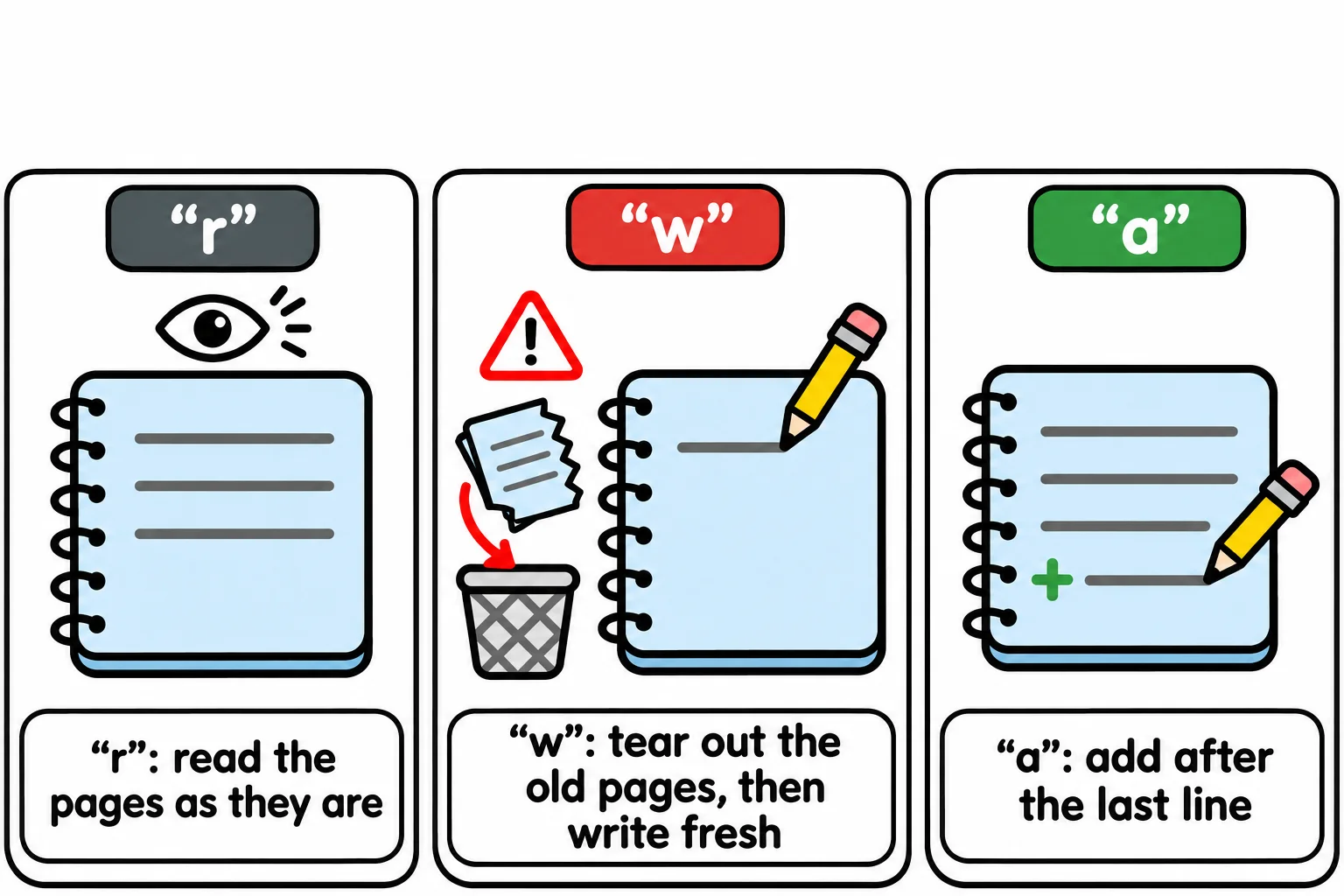
Think of a notebook on a shelf: you take it down, write in it or read it, close it and put it back, and it's there next week. Python's built-in open() takes the notebook down. You give it the file's name and a mode, a letter that says what you'll do: "r" to read, "w" to write a fresh file, "a" to add to the end of one (append).
Writing a file: "w" and with
with open("runs.txt", "w", encoding="utf-8") as log:
    log.write("Mon Priya 3.1\n")
    log.write("Tue Marcus 4.0\n")
    log.write("Wed Zoë 5.2\n")

print("Saved the log.")
Saved the log.
Read the first line as "with the file runs.txt, opened for writing, called log". open() hands back a file object, as log names it, and log.write() puts text in it. This is a with statement: when its indented lines are done, it closes the file for you, which finishes saving it, even if one of those lines fails.
Unlike print(), write() doesn't start a new line, so each line ends with \n, read "new line": the character that ends a line of text. Mode "w" makes the file if it isn't there and empties it first if it is, so it's the one mode that can wipe a file you meant to keep.
A file stores numbers, and an encoding is the table that says which number stands for which letter. UTF-8, the web's, has every letter of every language. Many Windows computers use an older table unless told otherwise, and the two disagree about letters such as the ë in Zoë:
with open("names.txt", "w", encoding="utf-8") as names:
    names.write("Zoë")

with open("names.txt", "r", encoding="cp1252") as names:
    print(names.read())
Zoë
Written in UTF-8 and read with cp1252, an older Windows table, one letter came back as two. Write encoding="utf-8" every time you open a text file, to read or to write.
Reading it back
with open("runs.txt", "r", encoding="utf-8") as log:
    text = log.read()

print(text)
Mon Priya 3.1
Tue Marcus 4.0
Wed Zoë 5.2
read() gives the whole file as one string. "r" is open()'s default mode, so from here on the examples leave it out.
To work with each run, loop over the file: a for loop gives one line at a time.
total = 0
with open("runs.txt", encoding="utf-8") as log:
    for line in log:
        day, runner, miles = line.strip().split()
        print(runner, "ran", miles, "miles on", day)
        total += float(miles)

print("Club total:", round(total, 1), "miles")
Priya ran 3.1 miles on Mon
Marcus ran 4.0 miles on Tue
Zoë ran 5.2 miles on Wed
Club total: 12.3 miles
Each line still ends with its \n, so .strip() takes it off. Then .split() cuts the line at its spaces into a list, ["Mon", "Priya", "3.1"], and unpacking names the three parts. Everything read from a text file is text, so float(miles) makes the miles a number before adding.
Adding to a file: "a"
with open("runs.txt", "a", encoding="utf-8") as log:
    log.write("Thu Luis 2.6\n")

with open("runs.txt", encoding="utf-8") as log:
    print(log.read())
Mon Priya 3.1
Tue Marcus 4.0
Wed Zoë 5.2
Thu Luis 2.6
"a" keeps what's there and writes after it, so each run of this program adds Luis's run again; with "w", the log would hold Luis's run and nothing else.
When Python can't find the file
with open("run.txt", encoding="utf-8") as log:
    print(log.read())
Traceback (most recent call last):
  File "C:\Users\Sam\python-course\club\read_log.py", line 1, in <module>
    with open("run.txt", encoding="utf-8") as log:
         ~~~~^^^^^^^^^^^^^^^^^^^^^^^^^^^^^
FileNotFoundError: [Errno 2] No such file or directory: 'run.txt'
Read it from the bottom: a FileNotFoundError, and the name Python looked for. Only reading needs the file to be there ("w" and "a" make it). There are two usual causes:
- The name is wrong:
run.txtinstead ofruns.txt. The whole name, extension and all, must match. - The terminal is in another folder. A name with no folder in it is looked for in the working directory: the folder the terminal is in, not the one the
.pyfile is in. Runpython club/read_log.pyfrom the folder aboveclub, and Python looks there. Go into the program's folder withcdfirst, as Finding Your Way in the Terminal shows.
Do it: add up one runner's miles
The club's log, runs.txt, has one run on each line: the day, the runner's name and the miles, with a space between each, such as Mon Priya 3.1. Each runner wants to know their own total for the week.
path: the log file's name.runner: the name of the runner to add up.
Your job: write the function miles_for(path, runner) so it reads the file at path line by line and returns the total miles of that runner's runs.
- Open the file with
encoding="utf-8". - Add up the miles only on lines whose name is
runner. - Round the total to 1 decimal place.
- A runner with no runs in the log gets
0.
Worked through: with this log,
Mon Priya 3.1
Tue Marcus 4.0
Wed Priya 2.5
miles_for("runs.txt", "Priya") adds Monday's 3.1 and Wednesday's 2.5, and returns 5.6.
Practiced live on the lesson page: write the Python right there and check it.
Check yourself
2 questions to try on the lesson page.
So what
A program that writes its data to a file and reads it back can pick up where it left off, and every file someone hands you, from a log to an export, is now something your code can read.