Parameters and Return Values
Parameters let a function work on whatever values each call hands it, and return hands a result back to the code that called it, which is different from printing it and gives None when a function returns nothing.
Novice · Python · Updated
After this lesson you can
- Give a function parameters and call it with arguments in the right order
- Return a value from a function and use it, and tell returning a value apart from printing it
Key takeaways
- A parameter is a name in a function's parentheses, and an argument is the value a call gives it, matched by position.
- return hands a value back to the line that called the function, where it can be stored, printed or used in a calculation.
- Printing only shows a value on the screen. A function that prints instead of returning hands back None, Python's value for "nothing".
- return ends the function at once, so lines after it in the same block don't run.
A function is a named job: you write it once with def (read "define") and run it by calling its name with parentheses, such as show_report(). On its own, though, a function does the same thing every time. Real jobs need something to work with: the price to add tax to, the student whose grade to look up, the file to read. This lesson shows how a function takes values in and hands a result back, which is how every function you'll use from a library works.
The example is Stride, a step-counter app that turns steps into miles: 2,000 steps make a mile.
A function stuck on one number
Here's a first try at Stride's miles function:
def show_miles():
    print(8400 / 2000)


show_miles()
4.2
It works for exactly one walk, the one with 8,400 steps. For tomorrow's walk you'd edit the function, or copy it with a new number. Neither is a function you can reuse.
Think of an order form at a coffee shop: Size: ____. The form is the same every time, and each customer fills in the blank. A parameter is that blank: a name inside the function's parentheses. An argument is what fills it in: the value a call puts in the parentheses.
def show_miles(steps):
    print(steps / 2000)


show_miles(8400)
show_miles(5000)
4.2
2.5
steps is the parameter. In the first call the argument is 8400, so inside the function steps is 8400; in the second it's 5000. One function, any walk.
More than one parameter
A function can have several parameters, separated by commas. The arguments fill them in order: the first argument goes to the first parameter, the second to the second. That's why they're called positional arguments:
def show_progress(steps, goal):
    print(steps, "of", goal, "steps")


show_progress(8400, 10000)
show_progress(10000, 8400)
8400 of 10000 steps
10000 of 8400 steps
The second call has its arguments swapped, so steps got the goal and goal got the steps. Python can't tell which you meant; it goes by position. Give the arguments in the order the def line lists the parameters.
Leave one out, as in show_progress(8400), and Python stops with TypeError: show_progress() missing 1 required positional argument: 'goal'. The message names the function and the parameter that got nothing.
Printing isn't handing back
Stride needs the miles for more than the screen: it adds up the week. So the program keeps each day's result in a variable:
def show_miles(steps):
    print(steps / 2000)


monday = show_miles(8400)
tuesday = show_miles(5000)
print("Week so far:", monday, tuesday)
4.2
2.5
Week so far: None None
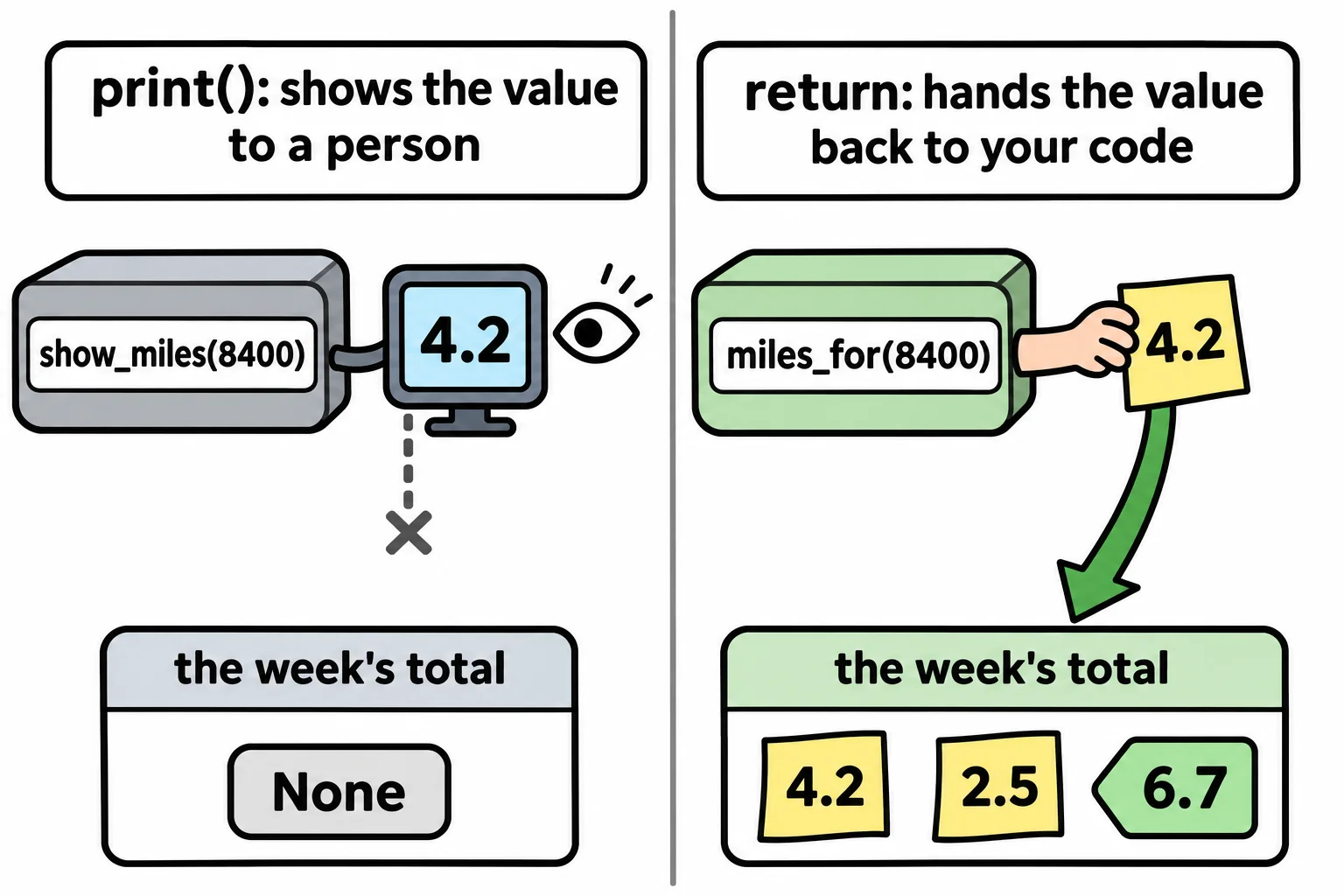
The miles appeared on the screen, but the variables hold None. None is Python's value for "nothing here". print() shows a value to a person reading the screen; it doesn't give the value to the rest of the program. A function that never hands anything back gives None to whoever called it, and monday + tuesday would stop with a TypeError, because you can't add nothing to nothing.
This is the most common mix-up with functions: a function that prints its answer looks right when you run it, and fails the moment another line needs the answer.
return: handing a value back
A calculator's screen shows you a number, and that's all. A coworker who works the number out and hands it to you on a sticky note gives you something you can use: add it, store it, pass it on. return is the sticky note. It hands a value back to the line that called the function, and that value is the function's return value:
def miles_for(steps):
    return steps / 2000


monday = miles_for(8400)
tuesday = miles_for(5000)
print("Week so far:", monday + tuesday, "miles")
Week so far: 6.7 miles
miles_for(8400) is replaced by what it returns, 4.2, the same way len("Stride") is replaced by 6. The caller decides what to do with it: store it, add it, print it. A function that returns stays useful everywhere, which is why most functions return and only a few print.
return also ends the function at once. Lines after it in the same block never run, so a function can return different values from different branches:
def pace_word(steps_per_minute):
    if steps_per_minute >= 100:
        return "brisk"
    return "steady"


print(pace_word(112))
print(pace_word(80))
brisk
steady
With 112, the if is true and the first return ends the function. With 80, the if is skipped and the second return runs.
Do it: work out the steps left to today's goal
Stride's home screen tells walkers how many more steps they need today. The number has to come back from a function, because the screen, the evening reminder and the weekly report all use it.
steps: how many steps the walker has taken today.goal: today's step goal.
Your job: write the function steps_left(steps, goal) so it returns how many more steps are needed to reach the goal.
- It returns
goalminussteps. - When the goal is met or passed, it returns
0, never a negative number. - It returns the number; it doesn't print it.
Worked through: with steps_left(6500, 10000), the walker needs 10000 − 6500 = 3500 more steps, so it returns 3500. With steps_left(12000, 10000) the goal is passed, so it returns 0.
Practiced live on the lesson page: write the Python right there and check it.
Check yourself
2 questions to try on the lesson page.
So what
A function that takes its values as parameters and hands its answer back with return can be used anywhere, by any line, which is what makes it worth writing.