Slicing Lists and Strings
A slice such as stops[1:4] takes part of a list or a string, from the start index up to but not including the stop index, with an optional step, and because a string can't be changed in place, you build a changed copy from slices instead.
Apprentice · Python · Updated
After this lesson you can
- Take part of a list or a string with a slice such as [1:4] or [::2], read as from start up to, but not including, stop
- Explain why a string can't be changed in place, and build a changed copy of it from slices
Key takeaways
- A slice, written [start:stop], gives a new list with the items from start up to, but not including, stop. The original list doesn't change.
- Leave out start and the slice begins at the front; leave out stop and it runs to the end. Negative indexes work in slices too.
- A third number, the step, sets how far to move each time, so [::2] takes every second item and [::-1] goes backward.
- Strings take the same indexes and slices as lists, but a string can't be changed in place. You build a new string and store it instead.
You'll often want part of a list rather than all of it: the first three search results, the last seven days of readings, every stop except the start. The same goes for text: the first three letters of a name, a file name without its ending. Slicing takes a piece with one short expression, and it works the same way on lists and on strings, so you learn it once and use it on both.
The example is a road trip from Chicago to the Grand Canyon, with five stops, and a trip planner that shows different parts of the trip on different screens.
Part of a list, the long way
The planner's "on the way" screen lists every stop except the start and the destination. Here's a first try, with a loop:
stops = ["Chicago", "Omaha", "Denver", "Moab", "Grand Canyon"]

middle = []
for index in range(1, 4):
    middle.append(stops[index])
print(middle)
['Omaha', 'Denver', 'Moab']
Four lines to copy three items, and the range(1, 4) has to be worked out by hand, which is exactly where off-by-one mistakes come from. Add a stop and the 4 is wrong.
A slice: from start up to, but not including, stop
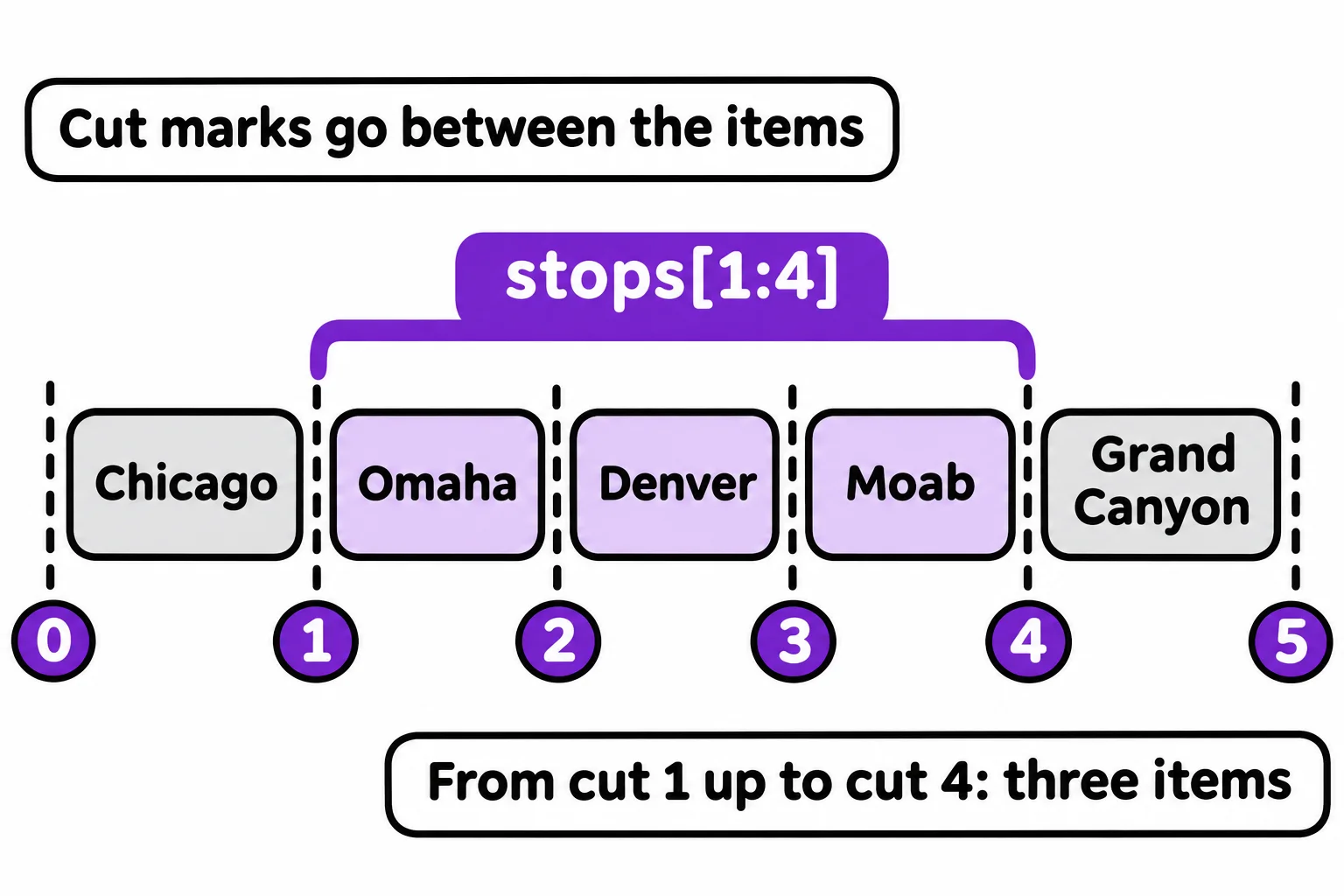
Think of cutting a loaf of bread: the knife goes in between the slices. Number those cuts in a list: cut 0 is before the first item, cut 1 after it, and so on. A slice takes everything between two cuts. stops[1:4] is read "stops from 1 up to, but not including, 4", and it gives a new list of the items at indexes 1, 2 and 3:
stops = ["Chicago", "Omaha", "Denver", "Moab", "Grand Canyon"]

print(stops[1:4])
print(stops[:2])
print(stops[3:])
print(stops[1:-1])
print(stops[3:100])
print(stops)
['Omaha', 'Denver', 'Moab']
['Chicago', 'Omaha']
['Moab', 'Grand Canyon']
['Omaha', 'Denver', 'Moab']
['Moab', 'Grand Canyon']
['Chicago', 'Omaha', 'Denver', 'Moab', 'Grand Canyon']
- Leave out the start and the slice begins at the front:
stops[:2]is the first two stops. - Leave out the stop and it runs to the end:
stops[3:]is everything from index 3 on. - Negative indexes work too:
stops[1:-1]is every stop but the first and the last, however long the trip gets. - A stop past the end is fine:
stops[3:100]gives the items that exist. Unlikestops[100], a slice never stops with anIndexError.
The stop index is never included, so stops[1:4] holds 4 − 1 = 3 items. And the slice is a new list: the last line shows stops itself is unchanged.
A step: every second item, or backward
A slice can take a third number, the step: how far to move each time. The whole shape is [start:stop:step], and any part can be left out. stops[::2] (read "stops, every second item") takes indexes 0, 2 and 4, and a step of -1 walks backward, so stops[::-1] is the trip home:
stops = ["Chicago", "Omaha", "Denver", "Moab", "Grand Canyon"]

print(stops[::2])
print(stops[::-1])
['Chicago', 'Denver', 'Grand Canyon']
['Grand Canyon', 'Moab', 'Denver', 'Omaha', 'Chicago']
The same slices on strings
A string is a sequence too: its characters, in order. Indexes and slices work on it exactly as they do on a list, and each gives you characters instead of items:
city = "Grand Canyon"

print(city[0])
print(city[-1])
print(city[:5])
print(city[6:])
print(city[:3].upper())
G
n
Grand
Canyon
GRA
city[6:] starts at index 6, the C, because the space at index 5 counts as a character too.
A string can't change in place
A list can change: stops[1] = "Lincoln" replaces an item. A string can't. Here's a city name typed without its capital letter, and a try at fixing it in place:
city = "denver"
city[0] = "D"
print(city)
Python stops on the second line with TypeError: 'str' object does not support item assignment. A string is immutable: once it's made, it can't be changed. A list is mutable: it can. Every string method and every slice hands you a new string instead, so the fix is to build the new string from pieces and store it under the old name:
city = "denver"
city = "D" + city[1:]
print(city)
Denver
city[1:] is everything after the first letter, "enver", and "D" + "enver" makes a new string, which city now holds. The old "denver" was never changed; the name city now points to a different string. That's also why a method such as .upper() hands back a new string and leaves the old one alone.
Do it: make a label for the trip
The trip planner names each trip's photo album with a short label: the first three letters of the start, a dash, and the first three letters of the destination, all in capitals.
stops: the trip's stops in order, from the start to the destination.
Your job: write the function trip_label(stops) so it returns the label as a string.
- It's the first three letters of the first stop, then
-, then the first three letters of the last stop, all in capitals. - A trip with one stop uses that stop for both halves.
Worked through: in ["Chicago", "Omaha", "Denver", "Moab", "Grand Canyon"], the first stop is Chicago, whose first three letters are Chi, and the last is Grand Canyon, whose first three are Gra. In capitals, with a dash between them, trip_label returns "CHI-GRA".
Practiced live on the lesson page: write the Python right there and check it.
Check yourself
2 questions to try on the lesson page.
So what
One slice replaces a loop, a counter and a chance to be off by one, and because strings take the same slices, the same short expression trims a list of stops and a city's name alike.