Testing a Route
FastAPI's TestClient sends requests straight to your app with no server running, so pytest tests can check each route's status code and the JSON it answers with, including the 404 for an item that isn't there, every time the code changes.
Apprentice · Python · FastAPI · Updated
After this lesson you can
- Test a FastAPI route with TestClient, checking the response's status_code and the data that .json() gives back
- Write a test that proves a route answers 404 with its detail message for an item that isn't there
Key takeaways
- TestClient(app) is a stand-in browser for tests. It hands each request straight to your app in memory, so no server or port is needed.
- client.get("/books") returns a response. Its .status_code is the status number, and .json() turns the JSON it answers with back into Python lists and dictionaries.
- A test for the 404 matters as much as the tests for the happy path, because "not there" is an answer your API promises too.
- When a test fails, pytest names the test and the line, and shows the value that came back, such as assert 404 == 200.
Every change to an API can break a route that used to work, and nothing on the screen tells you: the server starts, the page loads, and a member's app quietly gets the wrong answer. Developers who write APIs for a living don't check every route by hand after every change. They write tests that send requests to the app, and one command checks them all, before each commit and before each hand-in. This lesson shows how, with the pytest you already know.
The example is Chapter & Verse's book club app from Your First FastAPI Route: main.py, with GET /books for every book and GET /books/{book_id} for one book, or a 404.
Checking by hand doesn't keep up
Say you tidy up main.py and, along the way, delete the : int from def get_book(book_id: int):. The server still starts. /books still answers. But now book_id arrives as the text "2", which never equals the number 2, so every book answers 404 Book not found.
You'd catch it only if you happened to open /books/2 after that change, and with ten routes and three cases each, nobody clicks through thirty requests every time they save. A test does it every time, in a few seconds.
TestClient: requests without a server
FastAPI comes with a TestClient: a stand-in browser for tests. It hands each request straight to your app in memory, so no server needs to be running and no port is opened.
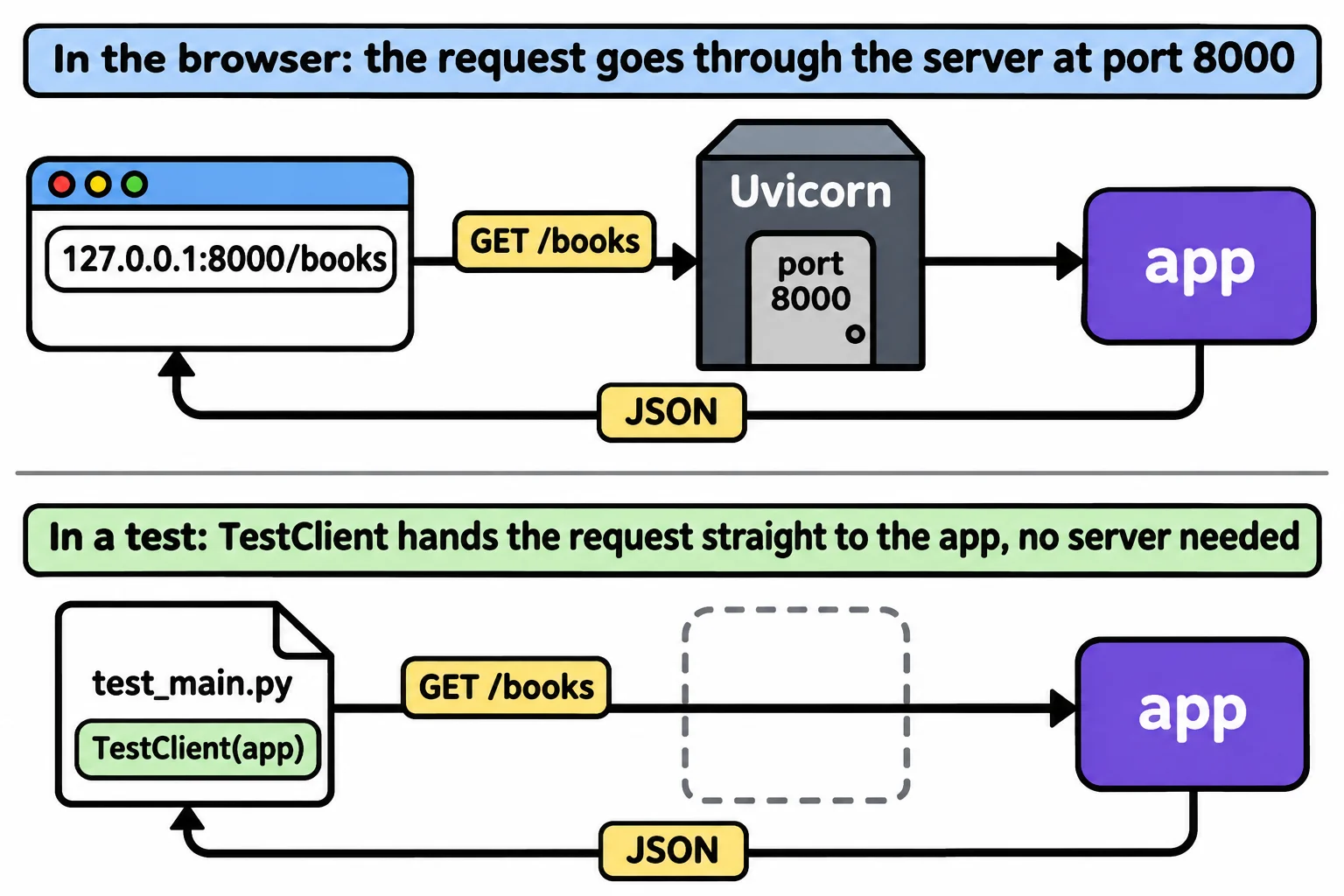
Install pytest in the same virtual environment (pip install pytest==9.2.0; TestClient itself came with fastapi[standard]), then save this beside main.py as test_main.py:
from fastapi.testclient import TestClient

from main import app

client = TestClient(app)


def test_list_books_answers_200_with_3_books():
    response = client.get("/books")
    assert response.status_code == 200
    assert len(response.json()) == 3


def test_book_2_is_twelve_bridges_north():
    response = client.get("/books/2")
    assert response.status_code == 200
    assert response.json()["title"] == "Twelve Bridges North"


def test_book_42_answers_404_book_not_found():
    response = client.get("/books/42")
    assert response.status_code == 404
    assert response.json() == {"detail": "Book not found"}
client.get("/books") sends a GET request for /books and returns the response: the app's whole answer. Two parts of it do most of the checking:
.status_codeis the status code as a number:200for OK,404for Not Found..json()turns the JSON in the answer back into Python: here, a list of three dictionaries, solen()counts them and["title"]reads one book's title.
Each test checks the status first, then the data. A route that answers 200 with the wrong book is as broken as one that answers 404 for a book that is there.
Run the tests
In the terminal, in the book-club folder, with the virtual environment on:
pytest
============================= test session starts ==============================
platform win32 -- Python 3.14.4, pytest-9.2.0, pluggy-1.7.0
rootdir: C:\Users\Sam\python-course\book-club
plugins: anyio-4.16.0
collected 3 items

test_main.py ...                                                         [100%]

============================== 3 passed in 2.86s ===============================
Three dots, three passing tests. (anyio is a package FastAPI uses; pytest lists it as a plugin.) The third test matters as much as the first two: "that book isn't here" is an answer your API promises too, and the members' app shows a friendly message only if the 404 and its detail stay the way they are.
When a route breaks
Now delete the : int from get_book, as in the tidy-up above, save, and run pytest again:
============================= test session starts ==============================
platform win32 -- Python 3.14.4, pytest-9.2.0, pluggy-1.7.0
rootdir: C:\Users\Sam\python-course\book-club
plugins: anyio-4.16.0
collected 3 items

test_main.py .F.                                                         [100%]

=================================== FAILURES ===================================
_____________________ test_book_2_is_twelve_bridges_north ______________________

    def test_book_2_is_twelve_bridges_north():
        response = client.get("/books/2")
>       assert response.status_code == 200
E       assert 404 == 200
E        +  where 404 = <Response [404 Not Found]>.status_code

test_main.py:16: AssertionError
=========================== short test summary info ============================
FAILED test_main.py::test_book_2_is_twelve_bridges_north - assert 404 == 200
========================= 1 failed, 2 passed in 5.11s ==========================
Read it from the bottom: the test for book 2 failed on line 16, because the status code was 404 where the test expected 200. The F in .F. shows which of the three it was. The test named the broken route before any member noticed. Put the : int back, run pytest, and all three pass again.
Where Python Web APIs goes next
You've built a small API and proved it works, the way professional back-end developers do. Python Web APIs, the course that goes further, starts here and builds the whole thing: routes that take JSON in and create, change and delete items; Pydantic models that refuse bad input with clear errors; a SQLite database, so the data survives a restart; members who sign in, and rules for who may do what; a test for every rule; and your API online at a link you can share. Everything you learned in this course comes along, so you'll start on familiar ground.
Check yourself
2 questions to try on the lesson page.
So what
A test that sends a real request to your app checks a route in a second, every time, so a change that breaks it is caught by you and not by the people using it.