Variables: Giving a Value a Name
A variable gives a value a name with =, read "gets", so a program can remember it, use it in many places and change it later, and Python stops with a NameError when a line uses a name that hasn't been given a value yet.
Novice · Python · Updated
After this lesson you can
- Create and reassign variables with =, read "gets", and use their values in later lines
- Name variables in snake_case within Python's naming rules, and fix the NameError a misspelled or unassigned name causes
Key takeaways
- A variable is a name for a value. popcorn_price = 6.50 is read "popcorn price gets 6.50".
- The = sign is an instruction, not the equals of math class. Python works out the right side first, then gives the name on the left that value.
- Names use letters, digits and underscores, can't start with a digit, and are case-sensitive. Python programmers write them in snake_case.
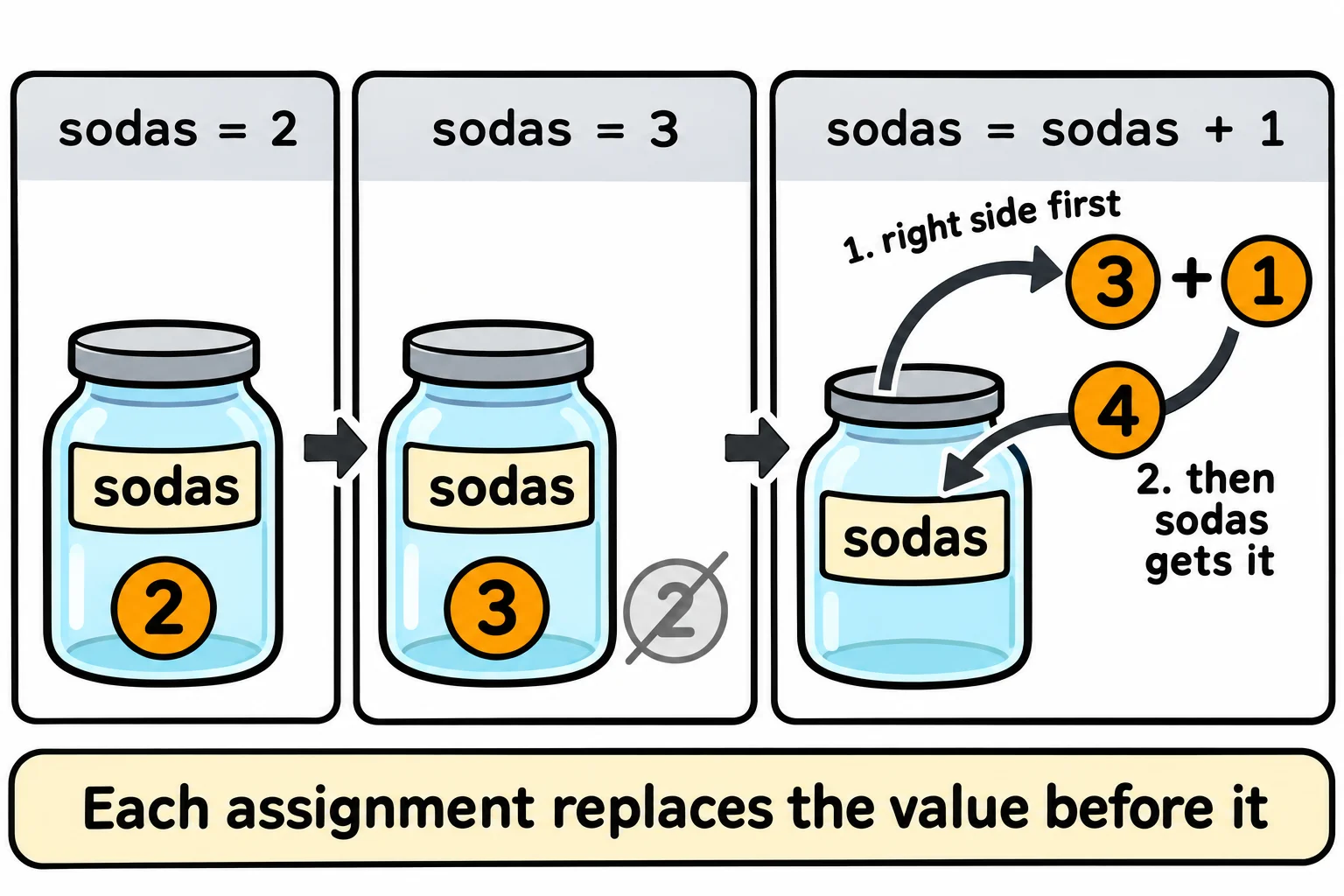
- Assigning to a name again replaces its value, so sodas = sodas + 1 adds one to sodas.
- Using a name before any line has given it a value, or misspelling it, stops the program with a NameError.
Every program has to remember things while it runs: a customer's name, the price of popcorn, how many sodas are in an order, the total so far. A variable is how a program remembers a value, and nearly every line you write from here on uses one.
This lesson's example is the snack bar at Starlight Cinema, where popcorn is $6.50 and a soda is $3.75.
Numbers with no names
Here's a first try at pricing two orders: three popcorns and two sodas, then one of each:
print(6.50 * 3 + 3.75 * 2)
print(6.50 * 1 + 3.75 * 1)
27.0
10.25
The answers are right, but the code has two problems. Someone reading it has to guess what 6.50 and 3.75 are. And when the snack bar raises the price of popcorn, you have to find every 6.50 in the program and change it, and if 6.50 also means something else somewhere (a ticket discount, say), you can change the wrong one.
A name for a value
In a kitchen, you write "sugar" on a jar once, and nobody has to taste what's inside again. A variable is a label like that: a name for a value.
popcorn_price = 6.50
soda_price = 3.75
print(popcorn_price * 3 + soda_price * 2)
27.0
The first line is read "popcorn price gets 6.50". The = sign is read "gets", and the line is an assignment: it gives the name on the left the value on the right. It isn't the equals of math class, which says two things are the same. It's an instruction: work out the right side, then give that value to the name on the left. That's why the name always goes on the left.
When a later line uses the name, Python puts its value in its place. The third line becomes 6.50 * 3 + 3.75 * 2, and the price lives in one place: change the first line, and every line that uses popcorn_price gets the new price.
Naming rules, and snake_case
Python checks a few rules for names:
- A name uses letters, digits and underscores (
_). No spaces, and no dashes:popcorn-pricereads as "popcorn minus price". - A name can't start with a digit.
sodas_2is a name;2_sodasisn't. - Capital letters matter.
Popcorn_priceandpopcorn_priceare two different names. - A few words belong to Python itself, such as
if,forandclass(later lessons teach them), and can't be names.
On top of those rules, Python programmers agree on a style: snake_case (read "snake case"), lowercase words joined by underscores, such as popcorn_price and customer_name. And a name should say what it holds. popcorn_price tells the next reader what the value is; p or x makes them guess.
Changing what a name holds
Assign to a name again, and it holds the new value. The old one is gone:
sodas = 2
print(sodas)
sodas = 3
print(sodas)
sodas = sodas + 1
print(sodas)
2
3
4
The last assignment, sodas = sodas + 1, is read "sodas gets sodas plus one". As math it makes no sense; as an instruction it's how a program counts. Python works out the right side first, with the value sodas has now (3 + 1 is 4), then gives sodas the answer. Python runs a file from the top, so each line sees the value from the latest assignment above it.
A name Python hasn't met: NameError
A misspelled name is a name Python has never been given:
popcorn_price = 6.50
print(popcorn_prise)
Here's what the terminal shows on Windows, from a file named snacks.py in the course folder (your path will be your own):
Traceback (most recent call last):
  File "C:\Users\Sam\python-course\snacks.py", line 2, in <module>
    print(popcorn_prise)
          ^^^^^^^^^^^^^
NameError: name 'popcorn_prise' is not defined. Did you mean: 'popcorn_price'?
Read it from the last line up: the name popcorn_prise isn't defined, on line 2, and Python even suggests the name you probably meant. A NameError has two usual causes: a typo, as here, or a line that uses a name before the line that assigns it. Fix the spelling, or move the assignment above the line that uses it.
Do it: set tonight's snack prices
The snack bar's price board starts the evening with popcorn at $6.50. Tonight is a special screening, and the manager has three changes for the program.
popcorn_price: the price of a popcorn, set to6.50on the starter's first line.
Your job: below the starter's first line, write the lines that:
- make a variable named
soda_pricethat holds3.75; - raise the popcorn price by 25 cents, by giving
popcorn_priceits own value plus0.25; - make a variable named
combo_pricethat holds the price of one popcorn and one soda, worked out by adding the two variables; - print
combo_price.
Worked through: popcorn goes from 6.50 to 6.50 + 0.25, which is 6.75. One popcorn and one soda make 6.75 + 3.75, which is 10.5, so the program prints 10.5.
Practiced live on the lesson page: write the Python right there and check it.
Check yourself
2 questions to try on the lesson page.
So what
A variable gives a value a name, so you write it once, read it everywhere, and change it in one place.