Virtual Environments and pip
A virtual environment gives each Python project its own private set of packages, pip installs packages into it from PyPI, and a requirements.txt with exact versions lets any computer install the same set with one command.
Apprentice · Python · Software Development · Updated
After this lesson you can
- Make a virtual environment with python -m venv and turn it on in PowerShell or zsh
- Install packages with pip and pin their exact versions in requirements.txt, so a project installs the same way on any computer
Key takeaways
- A virtual environment is a folder, usually .venv, that holds a project's own packages, so two projects can need different versions and neither one changes the computer's Python.
- python -m venv .venv makes one. Activating it turns it on for one terminal, and the prompt starts with (.venv) while it's on.
- pip install pytest==9.2.0 installs that exact version from PyPI, with the packages it needs, and pip list shows what's installed.
- requirements.txt lists a project's packages with exact versions, and pip install -r requirements.txt installs them all on any computer.
- Git keeps requirements.txt and leaves .venv out, because .venv is big and belongs to one computer, and one command makes it again.
The moment a program needs a package that doesn't come with Python, such as pytest for tests, requests for web APIs or pandas for data, you'll install it, and how you install it decides whether the project still works next month, on a lab computer or on a teammate's laptop. This lesson sets up the way Python developers do it: one private set of packages per project, written down so any computer can make it again.
The example is a Game Night project: a small program that keeps score for a group of friends' board games, and needs pytest to test it.
One Python, many projects
Game Night's tests need pytest, which doesn't come with Python. The first try is to install it straight into the computer's Python with pip, the tool that installs Python packages. pip downloads them from PyPI, the Python Package Index at pypi.org, where anyone can publish a package; packages that other people write are called third-party libraries. Installing into the computer's Python causes trouble:
- Every project on the computer shares those packages. Game Night wants pytest 9.2.0; an older project of yours was written for pytest 7. One Python holds one version.
- Nothing records what the project needed, so it breaks on the next computer.
- On a Mac, Homebrew's Python refuses outright, with
error: externally-managed-environment, so that packages installed by hand can't clash with the ones Homebrew looks after.
Think of a workshop where every project has its own toolbox: the right tools, at the right sizes, for that job, and nobody borrows from it. A virtual environment is that toolbox: a folder inside the project, usually named .venv, with its own python and pip and its own installed packages.
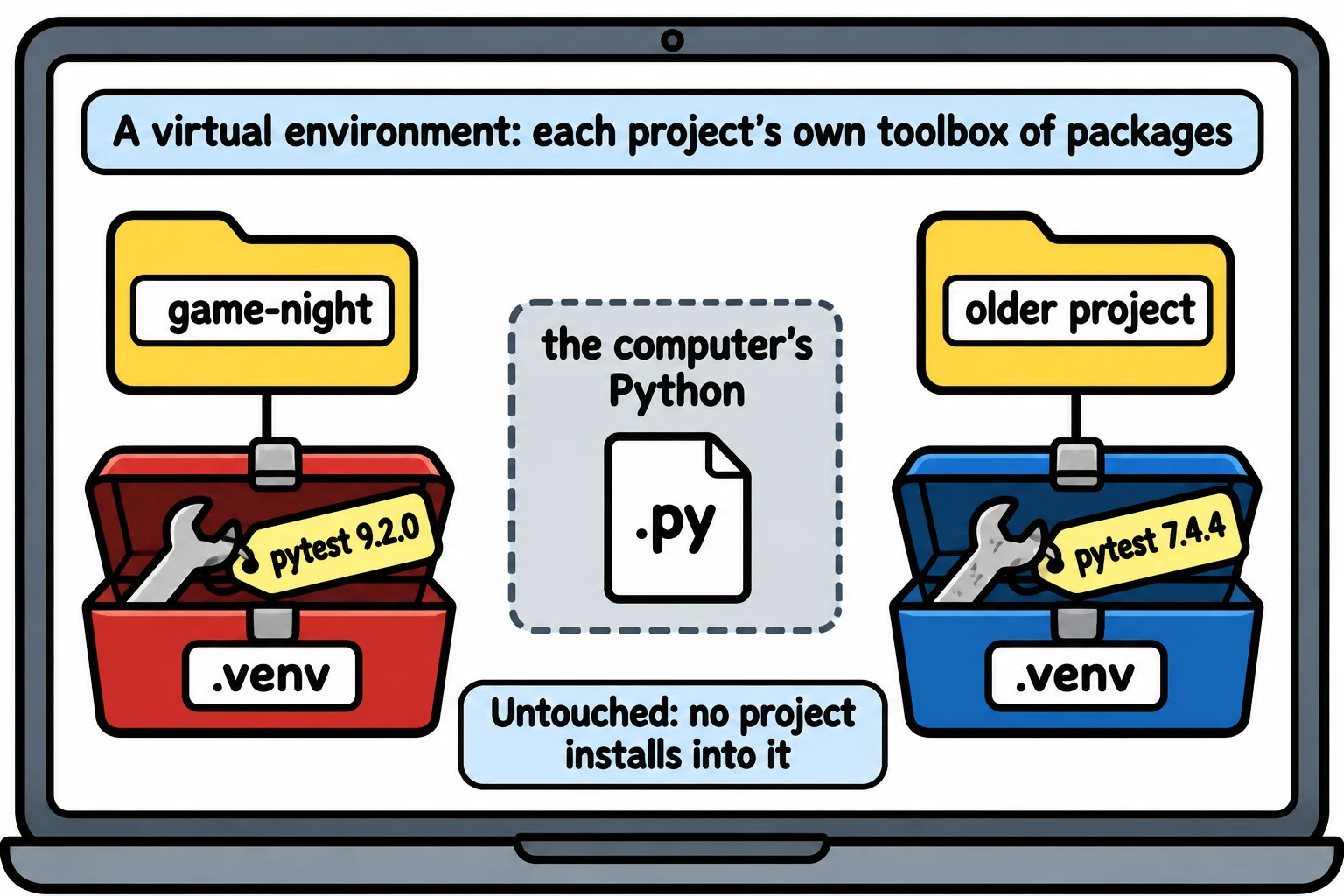
Make one, and turn it on
In VS Code's terminal, in the project folder, make the environment, then activate it, which turns it on for this terminal. On Windows (PowerShell):
python -m venv .venv
.venv\Scripts\Activate.ps1
On a Mac (zsh):
python3 -m venv .venv
source .venv/bin/activate
python -m venv .venv reads "run Python's venv module, and make an environment in a folder named .venv". While it's on, the prompt starts with (.venv), and python and pip are the environment's own, on a Mac too. deactivate turns it off, and every new terminal starts with it off.
If PowerShell answers that running scripts is disabled on this system, run this once, then activate again:
Set-ExecutionPolicy -Scope CurrentUser -ExecutionPolicy RemoteSigned
VS Code usually notices a new environment and offers to use it. If it doesn't, press Ctrl+Shift+P (Cmd+Shift+P on a Mac), choose Python: Select Interpreter, and pick the one with .venv in its path, so the editor and its Run button use the same packages as your terminal.
Install packages with pip
With the environment on, install pytest at an exact version. == reads "exactly version":
pip install pytest==9.2.0
pip prints each file it downloads, and finishes with:
Successfully installed iniconfig-2.3.1 packaging-26.3 pluggy-1.7.0 pygments-2.21.0 pytest-9.2.0
pytest needs four packages of its own, and pip fetched them too. pip list shows everything in the environment (your pip's own version may differ):
Package   Version
--------- -------
iniconfig 2.3.1
packaging 26.3
pip       25.1.1
pluggy    1.7.0
Pygments  2.21.0
pytest    9.2.0
requirements.txt: the project's shopping list
A shopping list that says "milk" gets you whatever is on the shelf; one that says "2% milk, one gallon" gets you the same thing every week. requirements.txt is the project's list of packages, one per line, with exact versions: writing the version is called pinning it. Game Night's file, made in VS Code, has one line:
pytest==9.2.0
pip freeze prints every installed package in that same format, so it's how you look up the exact version to write. Without ==9.2.0, each computer gets whatever version is newest that day, and a project that worked can stop working.
On another computer, after cloning the project, it takes three commands: make the environment, activate it, then install everything on the list. -r reads "from the file":
pip install -r requirements.txt
Successfully installed iniconfig-2.3.1 packaging-26.3 pluggy-1.7.0 pygments-2.21.0 pytest-9.2.0
Commit requirements.txt to Git, and leave .venv out: it's thousands of files, it only works on the computer that made it, and those three commands make it again anywhere. A line in the project's .gitignore file tells Git to skip it:
.venv/
uv, a newer tool from the company Astral, does the same jobs much faster: uv venv makes the environment and uv pip install -r requirements.txt installs the list. It's a separate program you install, not part of Python. This course uses venv and pip because they come with every Python, so they work on any computer you sit down at.
Check yourself
2 questions to try on the lesson page.
So what
A virtual environment per project and a pinned requirements.txt mean "it works on my computer" becomes "it works on every computer", with three commands.