Records: Small Data Types with Value Equality and with
Write a small data type in one line with a positional record, which compares and prints by its values and makes changed copies with a with expression.
Apprentice · C# · Updated
After this lesson you can
- Declare a positional record, and compare and print records by their values
- Make a changed copy of a record with a with expression, giving the copy its own array when it needs one
Key takeaways
public record MenuItem(string Name, decimal Price);writes the constructor and the read-only propertiesNameandPricefor you.- Two records are equal with
==when they're the same type and every property has the same value. Two objects of a class are equal only when they're the same object. - Printing a record shows its values, such as
MenuItem { Name = Latte, Price = 4.25 }. latte with { Price = 4.50m }makes a copy with onlyPricechanged, and leaveslatteas it was.withcopies an array property as the same array, so the copy and the original share it. Give the copy its own with[.. mine.Toppings].
A coffee shop's menu item, the seat on a movie ticket, the answer a method gives back with three numbers in it: a lot of the data a program passes around is a few values that belong together, with nothing to do but hold them. Later in this course, the data a web API sends and receives is often this kind of type. Writing each one as a class takes a lot of typing, and the class still gets two everyday questions wrong: are these two the same? and what's in here?
A small data class, the long way
A coffee shop's menu has items with a name and a price. Here's a class for one, written the way the Properties lessons did, with two read-only properties set in the constructor. Two customers look at the same latte, so the program makes two MenuItems with the same values, compares them, and prints one:
MenuItem first = new MenuItem("Latte", 4.25m);
MenuItem second = new MenuItem("Latte", 4.25m);

Console.WriteLine(first == second);
Console.WriteLine(first);

public class MenuItem
{
    public string Name { get; }
    public decimal Price { get; }

    public MenuItem(string name, decimal price)
    {
        Name = name;
        Price = price;
    }
}
False
MenuItem
That's twelve lines for two values, and both answers are disappointing:
==saysFalse, though both are a latte at $4.25.- Printing the item shows only the name of its type,
MenuItem, not what's in it.
Why the class says False: references
Picture a coat check. You hand over your coat and get a ticket with a number on it. The ticket isn't the coat; it tells the attendant where your coat hangs. Two people with identical black coats get two different tickets, because there are two coats.
A variable of a class type works like that ticket. new MenuItem(...) makes an object in the computer's memory, and the variable holds a reference to it: where to find it. A type whose variables hold references is called a reference type. Every class is one, and so is every array.
For a class, == compares the tickets, not the coats: do these two variables lead to the very same object? first and second came from two news, so they're two objects, and the answer is False. Copy the ticket, and the answer changes:
MenuItem first = new MenuItem("Latte", 4.25m);
MenuItem second = new MenuItem("Latte", 4.25m);
MenuItem sameOne = first;

Console.WriteLine(first == second);
Console.WriteLine(first == sameOne);

public class MenuItem
{
    public string Name { get; }
    public decimal Price { get; }

    public MenuItem(string name, decimal price)
    {
        Name = name;
        Price = price;
    }
}
False
True
MenuItem sameOne = first; doesn't make a new menu item. It copies the reference, so sameOne and first lead to the same object. Comparing this way is called reference equality, and for an object with a life of its own, such as a bank account, it's the right question: two accounts with the same balance are still two accounts.
A record: the same type in one line
For a menu item, the right question is same name and same price? That's what a record is for. A record is a type made for holding data, and its shortest form, the positional record, lists the values in parentheses after its name:
MenuItem first = new MenuItem("Latte", 4.25m);
MenuItem second = new MenuItem("Latte", 4.25m);

Console.WriteLine(first == second);
Console.WriteLine(first);
Console.WriteLine(first.Name);

public record MenuItem(string Name, decimal Price);
True
MenuItem { Name = Latte, Price = 4.25 }
Latte
From that one line, C# writes:
- a constructor that takes the values in that order:
new MenuItem("Latte", 4.25m); - a property for each value, named exactly as written, which is why they're in PascalCase:
NameandPrice; - an
==that compares the values, and a printed form that shows them.
The properties are read-only once the record is made, so first.Price = 4.50m; doesn't compile. (You'll see how to get a latte at a new price below.) Like a class, a record goes after the program's top-level code. You'll also see records written without public; in a one-file program like these, it works the same.
A value in the parentheses can have a default, as a method's parameter can, and then the code that makes the record can leave it out. A hotel booking with an optional request:
Booking ana = new Booking("Ana", 2);
Booking raj = new Booking("Raj", 3, "Late check-in");

Console.WriteLine(ana);
Console.WriteLine(raj);

public record Booking(string Guest, int Nights, string? Request = null);
Booking { Guest = Ana, Nights = 2, Request =  }
Booking { Guest = Raj, Nights = 3, Request = Late check-in }
string? is a string that may be null, as in the Nullable Types in C# lessons. A null prints as nothing.
Value equality: == compares the values
Two records are equal when they're the same type and every property is equal. That's value equality: two MenuItems that say Latte, $4.25 are the same menu item, however many times you make them.
MenuItem latte = new MenuItem("Latte", 4.25m);
MenuItem mocha = new MenuItem("Mocha", 4.25m);
MenuItem bigLatte = new MenuItem("Latte", 4.75m);
Console.WriteLine(latte == new MenuItem("Latte", 4.25m));
Console.WriteLine(latte == mocha);
Console.WriteLine(latte == bigLatte);
Console.WriteLine(latte != bigLatte);
Console.WriteLine(True
False
False
True
Today's special: MenuItem { Name = Latte, Price = 4.25 }
- Change any one value, the name or the price, and the two aren't equal anymore.
!=, read "not equal", is the opposite of==.- The printed form is what the record's
ToString()gives back, so it shows up inConsole.WriteLineand in string interpolation. It's a big help when you're checking what your code made.
Value equality is also why a test can check a whole record in one go: Assert.Equal(new MenuItem("Latte", 4.25m), result) passes when result holds those two values, whichever code made it.
A changed copy: with
The price of a latte goes up to $4.50. The record's properties can't be changed, and that's on purpose: no code anywhere can change a latte that other code is holding. Instead, you make a new record from the old one with a with expression: the record, the word with, and the properties to change in curly braces.
MenuItem latte = new MenuItem("Latte", 4.25m);
MenuItem raised = latte with { Price = 4.50m };
MenuItem iced = latte with { Name = "Iced Latte", Price = 4.75m };

Console.WriteLine(latte);
Console.WriteLine(raised);
Console.WriteLine(iced);

public record MenuItem(string Name, decimal Price);
MenuItem { Name = Latte, Price = 4.25 }
MenuItem { Name = Latte, Price = 4.50 }
MenuItem { Name = Iced Latte, Price = 4.75 }
- Read
latte with { Price = 4.50m }as the latte, with the price 4.50. - Every property you don't name is copied as it is, so
raisedis still aLatte. latteitself doesn't change. The copy is a new record.- Name several properties, separated by commas, to change several at once.
In your textbook, a change like this is called nondestructive mutation: you get the changed version, and the original stays in one piece.
The catch: with copies an array as the same array
with copies each property's value. For a string or a decimal, that's the value itself. For an array, it's the reference: the ticket, not the coat. So the copy and the original share one array.
A pizza place lets a customer order the same pizza again in another size:
Pizza mine = new Pizza("Large", ["Cheese", "Basil"]);
Pizza yours = mine with { Size = "Small" };

yours.Toppings[0] = "Mushroom";

Console.WriteLine(yours.Toppings[0]);
Console.WriteLine(mine.Toppings[0]);

public record Pizza(string Size, string[] Toppings);
Mushroom
Mushroom
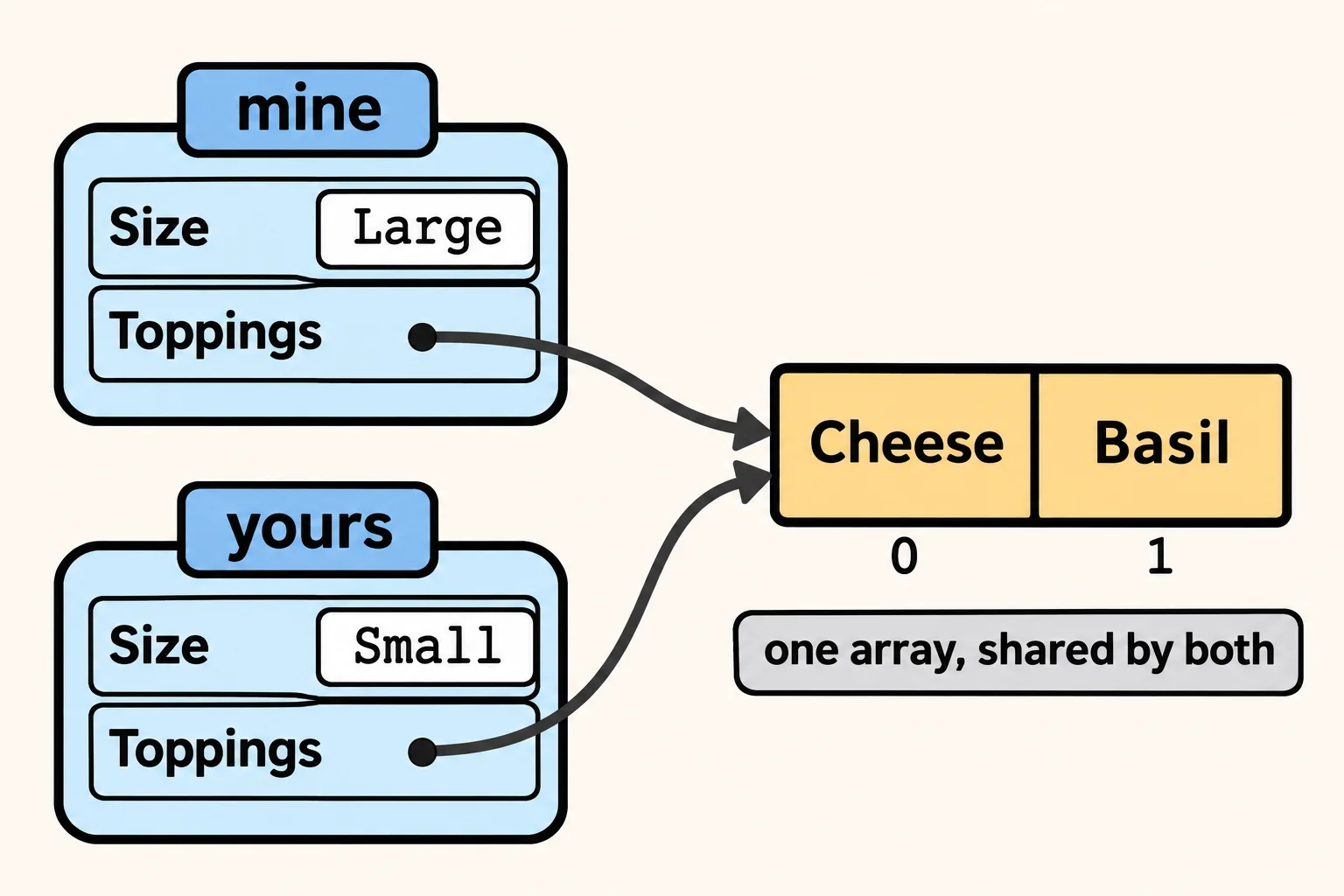
Changing yours.Toppings[0] changed mine too. yours.Toppings and mine.Toppings are two references to one array, so there's only one list of toppings to change. (The Toppings property itself is still read-only: nothing pointed it at another array. The code changed one of the array's elements, and an array's elements can always be changed.) A copy like this, new on the outside but sharing what's inside, is called a shallow copy.
When the copy needs an array of its own, give it one in the with. [.. mine.Toppings] is a collection expression, like [12.75m, 10.25m, 8.44m] in Array Basics, and .., read "spread", pours every element of mine.Toppings into the new array:
Pizza mine = new Pizza("Large", ["Cheese", "Basil"]);
Pizza yours = mine with { Size = "Small", Toppings = [.. mine.Toppings] };

yours.Toppings[0] = "Mushroom";

Console.WriteLine(yours.Toppings[0]);
Console.WriteLine(mine.Toppings[0]);

public record Pizza(string Size, string[] Toppings);
Mushroom
Cheese
The same thing affects ==. A record compares an array property by its reference, so two pizzas with separate arrays of the same toppings aren't equal, and the array prints as its type's name:
Pizza first = new Pizza("Large", ["Cheese", "Basil"]);
Pizza second = new Pizza("Large", ["Cheese", "Basil"]);

Console.WriteLine(first == second);
Console.WriteLine(first);

public record Pizza(string Size, string[] Toppings);
False
Pizza { Size = Large, Toppings = System.String[] }
Records work best when their properties are simple values: numbers, strings, bools and other records. When one holds an array, remember that the array is shared. The same goes for any reference type a record holds, such as the lists you'll meet in the Collections chapter.
Record or class?
| Use a | When | For example |
|---|---|---|
| record | The values are the thing: two with the same values are the same | A menu item, a movie ticket, a method's answer with several numbers in it |
| class | The object has a life of its own, and its state changes through its methods | A bank account, a printer, a player whose points add up game by game |
Do it: move a movie ticket to a new seat
The movie theater's app sells tickets. Once a ticket is printed, its movie, seat and price never change, but a customer can ask to move: the app then makes a new ticket for the new seat, at the same price. Two tickets with the same movie, seat and price are the same ticket, and when the app prints a ticket, it shows the ticket's values.
The starter has Ticket written as a class, the long way. A ticket holds three values:
Movie: the movie's name, astring("The Snow Fox").Seat: the row letter and seat number, astring("F7").Price: what the ticket cost, adecimal(12.50m).
The method ChangeSeat gets two values:
ticket: the customer's ticket, aTicket.newSeat: the seat they're moving to, astring("B3").
For example:
Ticket ticket = new Ticket("The Snow Fox", "F7", 12.50m);
Ticket moved = ChangeSeat(ticket, "B3");
Movie |
Seat |
Price |
|
|---|---|---|---|
ticket |
The Snow Fox | F7 | 12.50 |
moved |
The Snow Fox | B3 | 12.50 |
So moved == new Ticket("The Snow Fox", "B3", 12.50m) is true, ticket.Seat is still "F7", and Console.WriteLine(ticket) prints Ticket { Movie = The Snow Fox, Seat = F7, Price = 12.50 }.
Your job:
- Turn the class
Ticketinto a positional record with the same three properties, in the same order:Movie,Seat,Price. - Then two tickets with the same three values are equal with
==, and two that differ in any value aren't. - Then printing a ticket shows its values, as in the example.
- Finish
Ticket ChangeSeat(Ticket ticket, string newSeat): it returns a copy ofticketwithSeatset tonewSeat, and the same movie and price. ChangeSeatleavesticketas it was.
Practiced live on the lesson page: write the C# right there and check it.
Check yourself
2 questions to try on the lesson page.
So what
A record says what a small piece of data is in one line and gets same values, same thing right for free; reach for with to change one, and give a copied array a home of its own.
Key terms
- Record Type
- Value Equality
- Reference Type
- Shallow Copy
- with Expression