Simple SELECT Query
Use SELECT * FROM to return every column and every row of a table or view.
Novice · SQL · MySQL · Updated
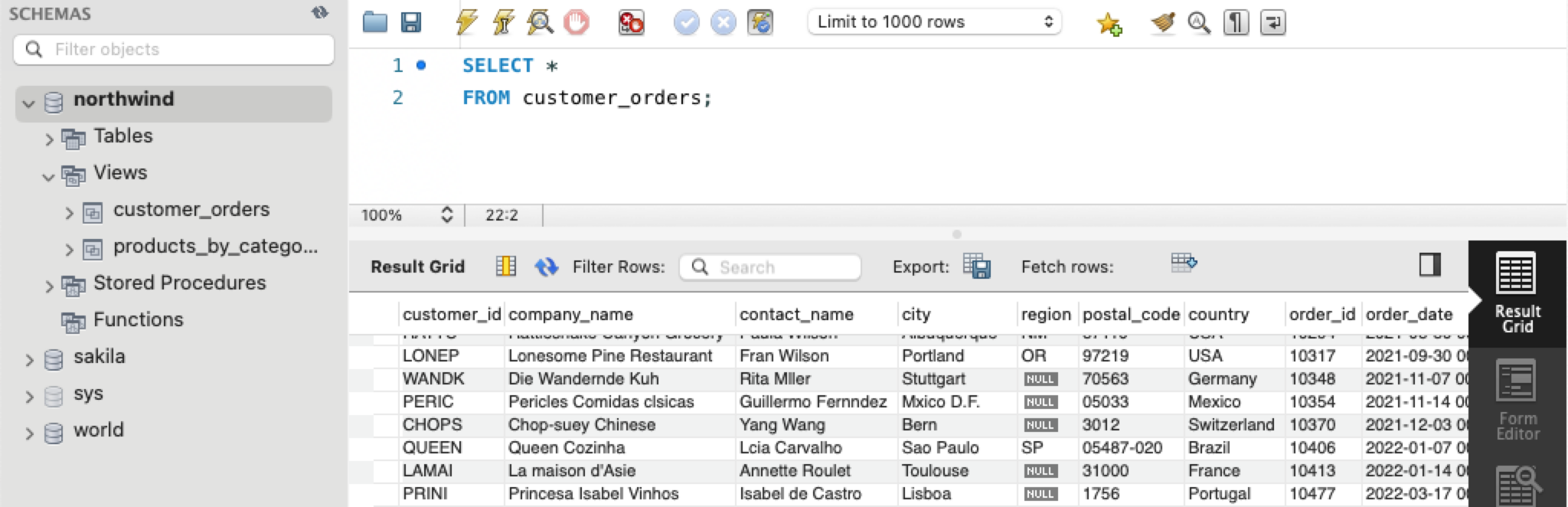
The most basic SELECT query is to select all columns and rows from a table. This SELECT statement uses the Northwind database. It selects all data from the customer_orders view.
Note: a view is a virtual table – the customer_orders view combines data from multiple tables to return customer sales data.
SELECT *
FROM customer_orders;
The * means you are requesting all columns in the table.
Do it: see everything in the categories table
The designer of a new product catalog is planning its sections, one per category. Before planning, she wants to see everything the categories table holds: every column and every row.
The box has two tables, products and categories (the Tables tab shows the SQL that makes them). categories has these rows:
| category_id | category_name | description |
|---|---|---|
| 1 | Beverages | Soft drinks, coffees, teas, beers, and ales |
| 2 | Condiments | Sweet and savory sauces, relishes, spreads, and seasonings |
| 3 | Confections | Desserts, candies, and sweet breads |
| 4 | Dairy Products | Cheeses |
| 5 | Grains/Cereals | Breads, crackers, pasta, and cereal |
Your query should give exactly that: the three columns category_id, category_name and description, in that order, and all 5 rows, in any order.
Your job: write one query that returns every column and every row of categories.
- Don't type the column names: use the symbol that means all columns.
- Read from
categories, notproducts.
Practiced live on the lesson page: write the SQL right there and check it.