What is Version Control?
Version control keeps the history of every change to your source code, and Git, the version control system this course uses, gives every developer a full copy of that history.
Novice · Software Development · Git · Updated
After this lesson you can
- Explain what a version control system lets you do with your source code
- Tell centralized and distributed version control apart by where the full history is kept
- Explain what Git does and what GitHub does, and which one runs on your own computer
Key takeaways
- A version control system records who changed what in your code, when and why, and lets you go back to an earlier version.
- In centralized version control, the full history lives only on one central server.
- In distributed version control, every developer's computer has a full copy of the repository and its history.
- Git is distributed version control. It runs on your computer and works without the internet.
- GitHub is a website that hosts Git repositories online. GitLab and Bitbucket do the same job.
Online documents such as Google Docs keep a version history: you can see who changed a paragraph, and when, and put back last Tuesday's version with one click. Developers want the same thing for their code, and much more. This lesson explains the tools that give it to them.
Source code and version control
Source code is the code developers write: all the files they create for a project, such as .java files in a Java project, .cs files in a C# project, and .html, .css, .js and .sql files.
A version control system (VCS) is software that keeps track of the changes to those files. It lets you:
- Keep a history. Every saved change records who made it, when, and a message saying why.
- Go back. If a change breaks something, you can return a file, or the whole project, to an earlier version.
- Work on branches. A branch is a separate line of work. You can try a new feature on a branch without disturbing the version that works.
- Compare and merge. You can see exactly which lines changed between two versions, and combine work from different branches, or from different people.
Try it. If you have a Google account, open any document in Google Docs and choose File > Version history > See version history. Click an older version to see what changed, and who changed it. Version control keeps that kind of history for code.
There are two main kinds of version control: centralized and distributed. The difference is where the full history is kept.
Centralized version control
In a centralized VCS, the full history lives in one central repository, on a server. Each developer's computer has only the files they are working on. To see the history, or to save a change, a developer connects to the server.
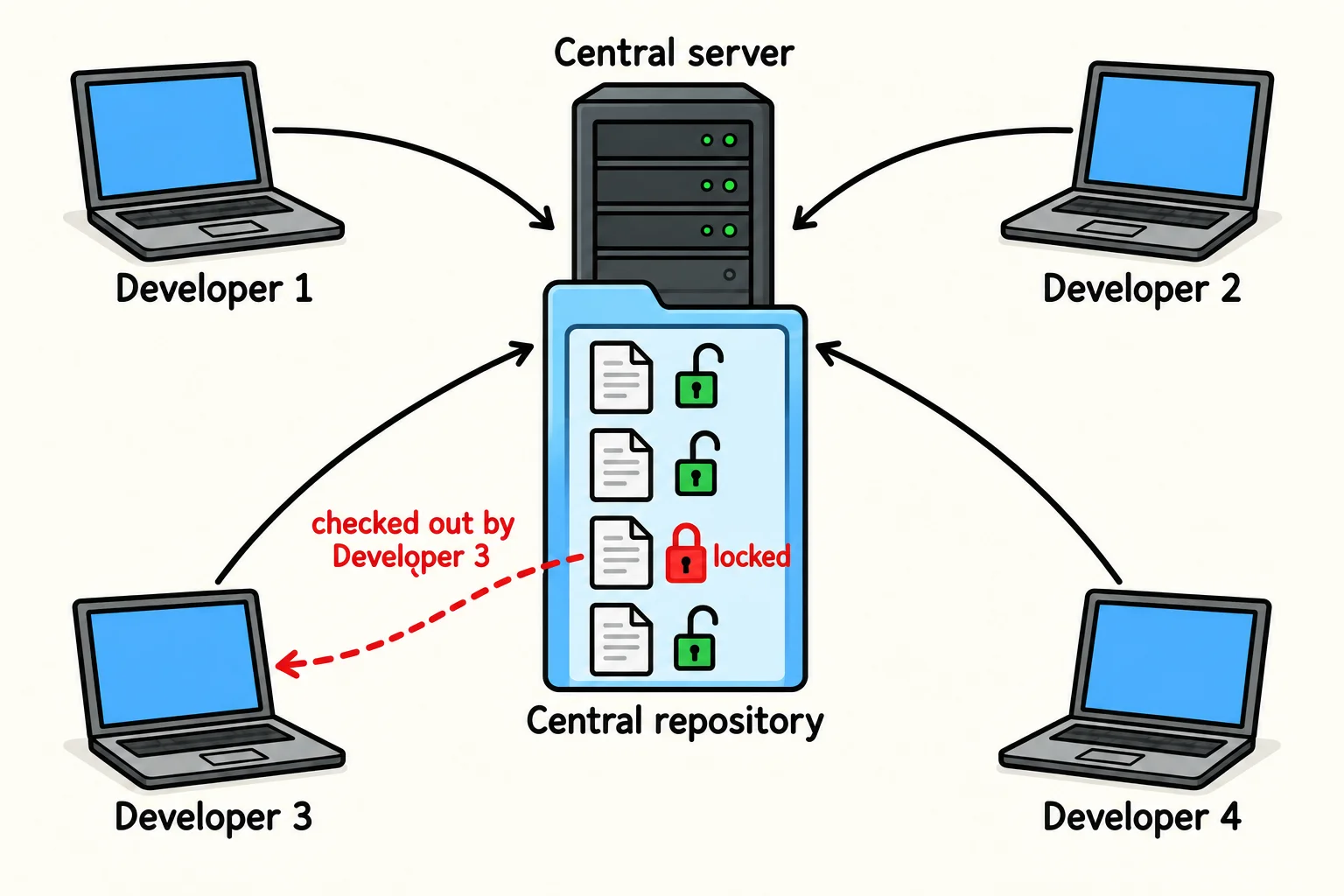
Many centralized systems let a developer lock a file while they change it, so nobody else can change that file until they check it in again. Subversion (SVN) and Team Foundation Version Control are centralized systems you may meet at work.
What's good about it
- It is easy to understand: there is one place, and one copy of the truth.
- A team can control who sees and changes what, all in one place.
What's hard about it
- You need a connection to the server to save a change or see the history, so working offline is awkward.
- If the server goes down, nobody can save their work, and if it is lost, the history goes with it.
- When files are locked, two developers can't change the same file at the same time.
Distributed version control
In a distributed VCS, every developer has a full copy of the repository, history and all, on their own computer. That copy is called the local repository. A shared copy on a server, called the remote repository, is where the team swaps their work.
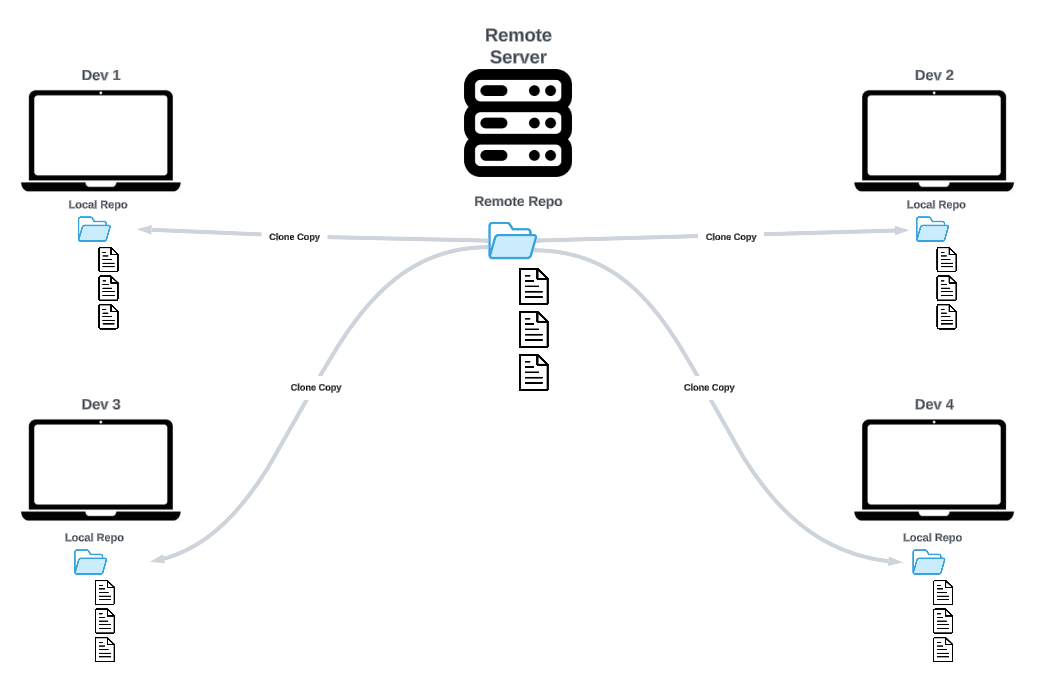
Nobody locks files. You commit your changes to your local repository, then push them to the remote repository, and pull other people's changes down from it.
What's good about it
- Saving a change and reading the history happen on your computer, so they are fast and work offline.
- Every copy holds the whole history. If the server is lost, any developer's copy can replace it.
- Teams can choose how they work together, with branches and with as many remote copies as they need.
What's hard about it
- There are more ideas to learn at first: local and remote, commit and push, pull.
- Two people can change the same lines of the same file. When their work is combined, Git can't tell which change is right, so it stops and asks you to decide. That is called a merge conflict.
Git: distributed version control
Git is a distributed version control system. Linus Torvalds created it in 2005 to manage the code of Linux, a very large project with thousands of developers. It is fast, it is free, and today it is the version control system most developers use.
Git runs on Windows, macOS and Linux, and you use it the same way on each. On Windows, you type Git commands in Git Bash, the terminal that comes with Git for Windows. On a Mac, you type them in Terminal.
Git and GitHub
The names sound alike, but they are two different things:
- Git is a program on your computer. It keeps your repository's history in a hidden
.gitfolder inside your project folder, and it works without an internet connection. - GitHub is a website that hosts remote repositories. It keeps a copy of your repository online, so your work is backed up, others can get it, and you can show it to employers.
Think of email and Gmail. Email is the way messages are sent; Gmail is one company that keeps your mailbox online, and you could use another one instead. In the same way, Git is the way history is kept, and GitHub is one company that keeps repositories online. GitLab, Bitbucket and Azure DevOps do the same job. This course uses GitHub, the most popular of them.
Check yourself
2 questions to try on the lesson page.
So what
With version control, no change is ever lost and no mistake is final: you can always see what changed, and go back. Every software team you join will use it, and almost every one will use Git.