Where to use Sub-Queries
Where a sub-query can go, as a lookup value or list in WHERE, an EXISTS check, a column value, or a table to join.
Journeyman · SQL · MySQL · Updated
Sub-queries can be used anywhere a dataset or a value is needed. We will explore a few scenarios of how a sub-query could be used.
Lookup Single Value in a WHERE clause
Sub-queries are often used in WHERE clauses to provide a lookup value. The benefit is that the outer query can be simplified because it does not need to deal with JOINed rows or columns.
In this scenario the sub query can only return a single value, the customer id of a specific company name:
SELECT *
FROM orders
WHERE customer_id = (
    SELECT customer_id
    FROM customers
    WHERE company_name = 'Alfreds Futterkiste'
);
Lookup Multiple Values in a WHERE clause
In this scenario, we should find orders for all customers in Canada. The sub-query can be used to provide a column of customer_id values to the IN operator.
SELECT *
FROM orders
WHERE customer_id IN (
    SELECT customer_id
    FROM customers
    WHERE country = 'Canada'
);
Check for matches in a WHERE clause
The IN operator can be slow if the sub-query returns a very large list. EXISTS can be faster because it doesn't compare every value: it stops looking as soon as it finds one match.
SELECT *
FROM orders AS o
WHERE EXISTS (
    SELECT *
    FROM customers AS c
    WHERE country = 'Canada'
        AND o.customer_id = c.customer_id
);
Column Value
A sub-query can perform a lookup to find the value for a column in a SELECT statement. This type of sub-query must be a scalar query (it can only return a single value).
SELECT product_name
    , unit_price
    , (SELECT AVG(unit_price) FROM products) AS average_price
FROM products;
JOIN Statement
A JOIN statement usually points to another table to join, but a query can join any other dataset, including a query. Some queries can get so long that it is easier to manage them by breaking them down into sub-queries instead.
The following example breaks one long query into three smaller ones.
SELECT *
FROM (
    SELECT customer_id
        , company_name
    FROM customers
) AS c
INNER JOIN (
    SELECT o.order_id
        , o.customer_id
        , o.order_date
        , od.product_id
        , od.unit_price AS sales_price
        , od.quantity
        , od.discount
    FROM orders AS o
    INNER JOIN order_details AS od
        ON o.order_id = od.order_id
) AS o
    ON c.customer_id = o.customer_id
INNER JOIN (
    SELECT p.product_id
        , p.product_name
        , c.category_name
    FROM products AS p
    INNER JOIN categories AS c
        ON p.category_id = c.category_id
) AS p
    ON o.product_id = p.product_id;
INNER JOIN vs Sub-Query
As noted above, many of the queries we have seen can be written either with an INNER JOIN or with a sub-query.
If I want to query a list of all product names and prices whose prices are higher than the average price in each category, I must first determine what the average product price is in each category.
SELECT category_id
    , AVG(unit_price) AS average_price
FROM products
GROUP BY category_id;
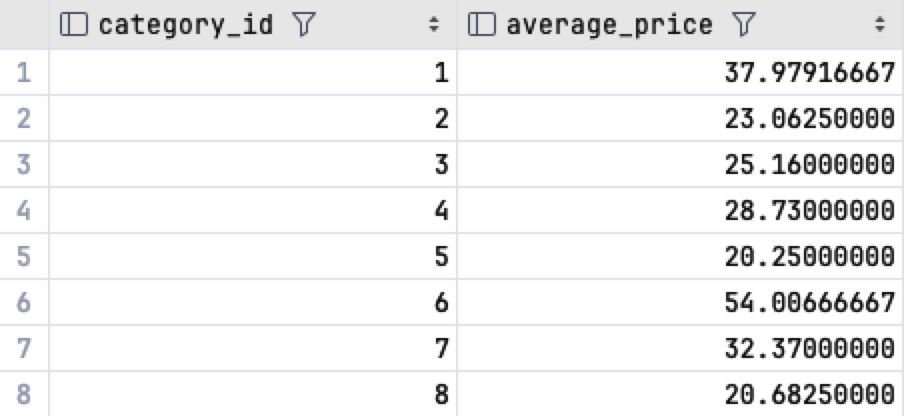
With this information, you can now find all products with prices higher than the average.
SELECT p.category_id
    , p.product_name
    , p.unit_price
    , ap.average_price
FROM products AS p
INNER JOIN (
    SELECT category_id
        , AVG(unit_price) AS average_price
    FROM products
    GROUP BY category_id
) AS ap
    ON p.category_id = ap.category_id
WHERE p.unit_price > ap.average_price
ORDER BY p.category_id
    , unit_price DESC;
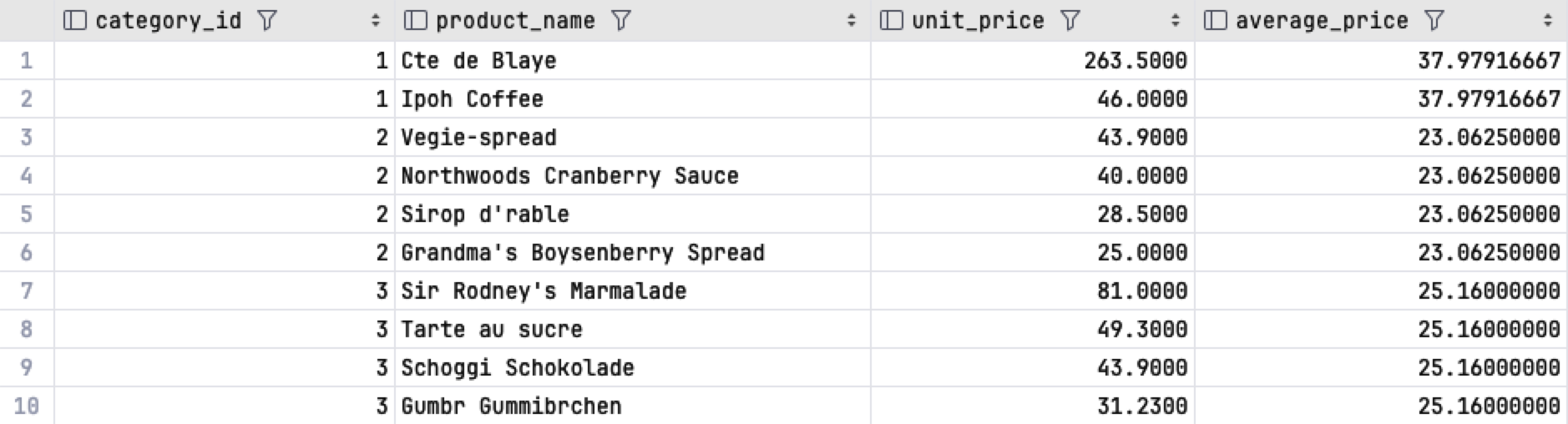
The average has to be calculated for each category before any product can be compared with it, and a sub-query is the clearest way to do that.
Do it: list the orders from customers in Mexico
The sales team in Mexico wants a list of the orders its customers have placed. orders doesn't hold a country, only each order's customer_id, and the country is in customers.
Two tables hold what the list needs:
customers: each customer'scustomer_id,company_nameandcountry.orders: each order'sorder_id, thecustomer_idof the customer who placed it, and itsorder_date.
They hold these rows (the Tables tab shows the SQL that makes them):
| customer_id | company_name | country |
|---|---|---|
| ALFKI | Alfreds Futterkiste | Germany |
| ANATR | Ana Trujillo Emparedados y helados | Mexico |
| ANTON | Antonio Moreno Taquería | Mexico |
| AROUT | Around the Horn | UK |
| BERGS | Berglunds snabbköp | Sweden |
| order_id | customer_id | order_date |
|---|---|---|
| 10278 | BERGS | 2016-08-12 |
| 10308 | ANATR | 2016-09-18 |
| 10355 | AROUT | 2016-11-15 |
| 10365 | ANTON | 2016-11-27 |
| 10507 | ANTON | 2017-04-15 |
| 10625 | ANATR | 2017-08-08 |
| 10643 | ALFKI | 2017-08-25 |
It takes two steps:
| Step | Query | Gives |
|---|---|---|
| 1 | The ids of the customers in Mexico, from customers |
ANATR, ANTON |
| 2 | The orders whose customer_id is one of those, from orders |
10308, 10365, 10507, 10625 |
Mexico has two customers, so step 1 gives a list of values, not one value.
Your query should give exactly these rows, in this order:
| order_id | customer_id |
|---|---|
| 10308 | ANATR |
| 10365 | ANTON |
| 10507 | ANTON |
| 10625 | ANATR |
Your job: write one SELECT query on orders, with step 1 as a sub-query inside it.
- Show two columns,
order_idandcustomer_id, in that order. - Keep only the orders whose
customer_idis in the list of customers whosecountryis'Mexico'. - Sort the rows by
order_id, smallest first.
Practiced live on the lesson page: write the SQL right there and check it.