Why Queries Get Slow, and What an Index Is
A query with no index reads every document in the collection, which is fine for 50 orders and slow for 100,000, while an index keeps one field's values in order so MongoDB can go straight to the matches, at a cost in disk space and in every write.
Apprentice · MongoDB · Database · Updated
After this lesson you can
- Explain why a query with no index reads every document, and how an index lets MongoDB go straight to the matches
- Create an index with createIndex, list a collection's indexes with getIndexes, and say what each index costs
Key takeaways
- Without an index, MongoDB answers a query with a collection scan, reading every document to check it against the filter.
- An index keeps one field's values in sorted order, each pointing to its document, like the index at the back of a book.
- createIndex with customerId set to 1 builds an index on customerId, smallest first, and getIndexes lists a collection's indexes.
- Every collection already has an index on _id, which is why finding a document by its _id is fast in any collection.
- An index takes disk space and adds work to every insert, update and delete, so index the fields your app searches by.
Riverbend Bike Shop's My orders page answered at once when the shop had 50 orders. Two years and 100,000 orders later, the same page takes a moment, and so does every other page that looks something up. Nothing in the query changed; the amount of data did. Every app that grows runs into this, and the fix is usually one line, once you know why the query got slow.
The examples use Riverbend's store after two busy years: 12 products, 2,000 customers and 100,000 orders. Open your mongodb-course folder in VS Code, open its terminal (Terminal > New Terminal), type mongosh, then use riverbend.
The same query, 2,000 times the orders
Make a new file in your mongodb-course folder named riverbend-big-store.js, and copy this into it. The two loops near the end write the customers and orders in a fixed pattern, so your 100,000 orders are the same as the ones on this page. You don't need to follow how the loops work.
// Riverbend Bike Shop after two busy years: 12 products, 2,000 customers and 100,000 orders.
// The loops below write the customers and orders in a fixed pattern, so your numbers match the lessons'.
// Load it in mongosh with: load("riverbend-big-store.js")   (it takes a few seconds)
// drop() empties each collection first, indexes included, so running this file again starts you fresh.
db.products.drop();
db.customers.drop();
db.orders.drop();

db.products.insertMany([
  { _id: 1, name: "Summit Helmet", category: "helmets", price: 89, description: "Road helmet with 14 vents and a magnetic buckle." },
  { _id: 2, name: "Harbor Helmet", category: "helmets", price: 59, description: "Commuter helmet with a built-in rear light." },
  { _id: 3, name: "Trailhead Helmet", category: "helmets", price: 59, description: "Mountain bike helmet with a visor and extra cover at the back." },
  { _id: 4, name: "Beacon Front Light", category: "lights", price: 35, description: "Bright white front light that charges over USB." },
  { _id: 5, name: "Beacon Rear Light", category: "lights", price: 25, description: "Red rear light with flashing and steady modes." },
  { _id: 6, name: "Beam 400 Light", category: "lights", price: 34, description: "Front light for dark trails, 400 lumens, with a helmet mount." },
  { _id: 7, name: "Canal City Bike", category: "bikes", price: 649, description: "Upright city bike with a front basket, fenders and lights." },
  { _id: 8, name: "Riverbend Road 2", category: "bikes", price: 1199, description: "Lightweight road bike with 22 gears." },
  { _id: 9, name: "Gravel Runner", category: "bikes", price: 1199, description: "Gravel bike with wide tires for dirt roads." },
  { _id: 10, name: "Steel Chain Lock", category: "locks", price: 45, description: "Heavy chain lock in a fabric sleeve that protects your paint." },
  { _id: 11, name: "Smooth Chain Oil", category: "care", price: 12, description: "Chain oil for dry roads, in a 4-ounce bottle." },
  { _id: 12, name: "Trail Pump", category: "care", price: 29, description: "Mini pump that fits in a jersey pocket." }
]);

const names = ["Maya", "Leo", "Priya", "Sam", "Ana", "Jordan", "Kai", "Rosa", "Eli", "Noor"];
const customers = [];
for (let id = 1; id <= 2000; id++) {
  const name = names[id % 10];
  customers.push({ _id: id, name: name, email: name.toLowerCase() + id + "@example.com" });
}
db.customers.insertMany(customers);

const statuses = ["delivered", "shipped", "delivered", "placed", "delivered", "returned", "delivered"];
const firstDay = Date.UTC(2025, 0, 1);
for (let start = 1; start <= 100000; start += 10000) {
  const orders = [];
  for (let id = start; id < start + 10000; id++) {
    orders.push({
      _id: id,
      customerId: (id * 7) % 2000 + 1,
      status: statuses[id % 7],
      orderedAt: new Date(firstDay + id * 9 * 60 * 1000),
      total: 25 + (id * 37) % 1201
    });
  }
  db.orders.insertMany(orders);
}
print("products: " + db.products.countDocuments() + ", customers: " + db.customers.countDocuments() + ", orders: " + db.orders.countDocuments());
It replaces the products, customers and orders collections in riverbend; an earlier lesson's own file puts its data back if you go back to it. Load it:
load("riverbend-big-store.js")
products: 12, customers: 2000, orders: 100000
true
Every order has a customer, a status, a date and a total:
db.orders.findOne()
{
  _id: 1,
  customerId: 8,
  status: 'shipped',
  orderedAt: ISODate('2025-01-01T00:09:00.000Z'),
  total: 62
}
The My orders page for customer 42 asks for that customer's orders, and there are 50:
db.orders.countDocuments({ customerId: 42 })
50
How much work did MongoDB do to find them? explain() is the database's own report on how it ran a query, and the next lesson, Reading explain(): COLLSCAN or IXSCAN, reads the whole report. For now, ask it for one number: how many documents MongoDB read.
db.orders.find({ customerId: 42 }).explain("executionStats").executionStats.totalDocsExamined
100000
To find 50 orders, MongoDB read all 100,000. With 50 orders in the shop, reading them all took no time. With 100,000 it's 2,000 times the work, and every visit to the page pays it again.
A book with no index
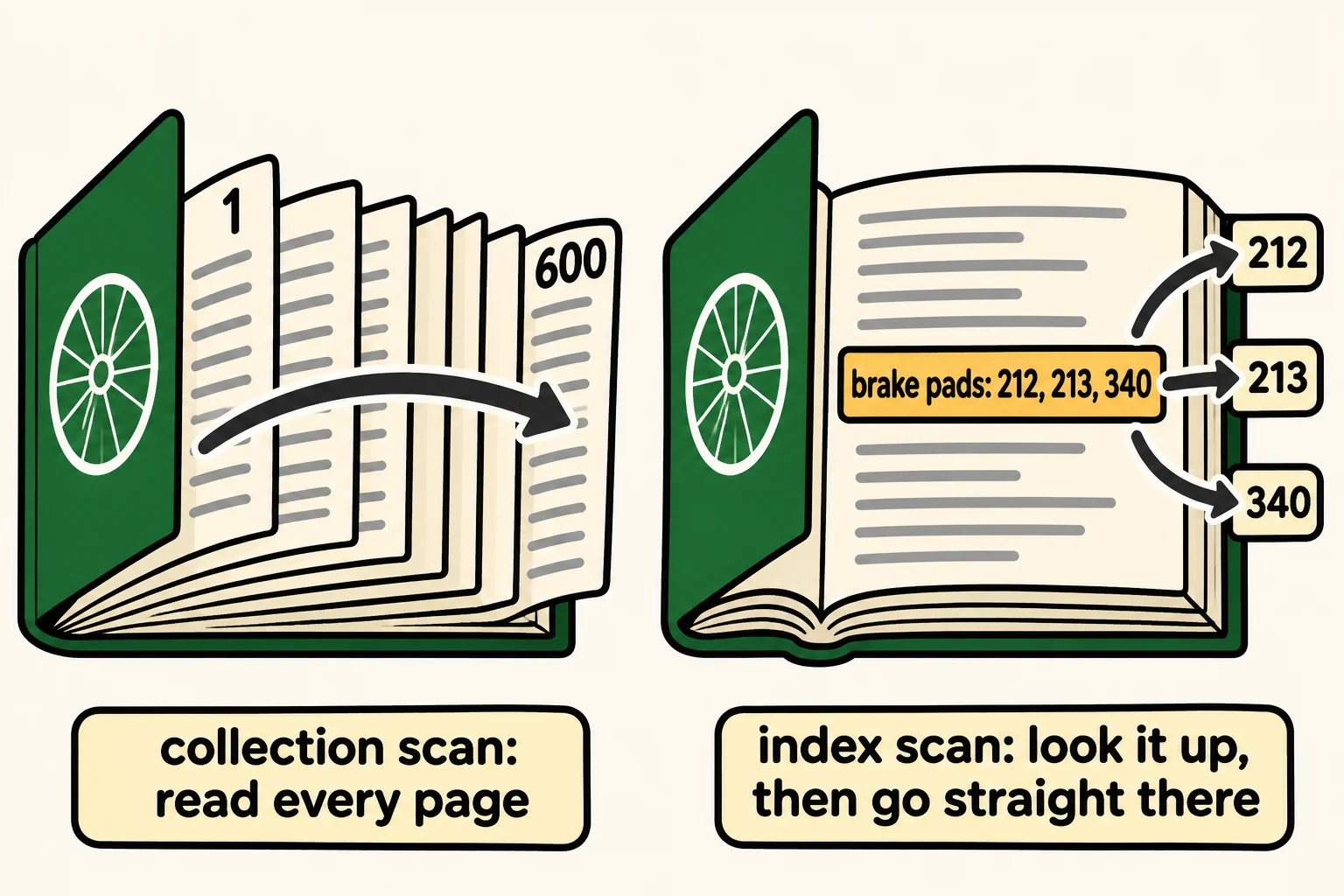
Picture a 600-page bike repair manual with no index at the back. To find every page about brake pads, you'd turn every page from the first to the last and check each one. That's what MongoDB did: a collection scan, reading every document in the collection to check it against the filter.
A book's index fixes that. It lists words in alphabetical order, each with the pages it's on, so you find "brake pads" in seconds and turn straight to pages 212, 213 and 340.
An index in MongoDB is the same idea. It keeps one field's values in sorted order, each with a pointer to the document that holds it. To find customerId: 42, MongoDB finds 42 in the sorted list and follows its 50 pointers. Reading an index this way is an index scan.
createIndex and getIndexes
getIndexes (read "get indexes") lists the indexes a collection already has:
db.orders.getIndexes()
[ { v: 2, key: { _id: 1 }, name: '_id_' } ]
Every collection gets an index on _id when it's made, so you've had one all along. It's why finding a document by its _id is fast in a collection of any size. The index's name, _id_, is the field's name with an underscore after it.
createIndex (read "create index") builds a new one. Give it the field and 1, read "up", for smallest first:
db.orders.createIndex({ customerId: 1 })
customerId_1
It answers with the new index's name: the field, an underscore, and the direction. The list now has two:
db.orders.getIndexes()
[
  { v: 2, key: { _id: 1 }, name: '_id_' },
  { v: 2, key: { customerId: 1 }, name: 'customerId_1' }
]
Ask the same question again:
db.orders.find({ customerId: 42 }).explain("executionStats").executionStats.totalDocsExamined
50
MongoDB read the 50 orders it gave back and no others. A -1, read "down", would keep the index largest first; for an index on one field either works, since MongoDB can read an index from either end.
What an index costs
An index isn't free, and it's worth knowing what you pay:
- Disk space. An index is stored beside the collection. On Riverbend's 100,000 orders, the
customerIdindex takes about half a megabyte. - Every write. When an order goes in, MongoDB also puts its
customerIdinto the index, in its sorted place. An update that changescustomerIdmoves the entry, and a delete removes it. One index adds a little work to each write; ten indexes add ten times that.
So index the fields your app's queries search by, such as the customer on My orders, rather than every field in case a query needs it someday. An index nobody uses only costs, and db.orders.dropIndex("customerId_1") removes one by its name.
Check yourself
2 questions to try on the lesson page.
So what
A query with no index gets slower with every order the shop takes. An index on the field you search by turns it into a lookup, and now you know what that lookup costs in return.