Adding Many Documents with insertMany
insertMany adds a whole list of documents in one call and tells you each one's _id; a duplicate _id stops it unless you set ordered to false, and load() runs a whole file of them.
Apprentice · MongoDB · Updated
After this lesson you can
- Add many documents at once with insertMany or from a file with load(), and read the insertedIds insertMany gives back
- Predict which documents insertMany adds when one has a duplicate _id, in order and with ordered set to false
Key takeaways
- insertMany takes a list of documents in square brackets and adds them all in one call.
- Its answer, insertedIds, pairs each document's position in the list (counting from 0) with that document's _id.
- No two documents in a collection can share an _id. A duplicate stops insertMany there, and the documents before it stay in.
- Set ordered to false, and insertMany skips the duplicate and still adds every other document.
- load() runs a file of mongosh commands, which is how a whole collection of sample data goes in at once.
Moving a box of recipe cards into a database, importing a spreadsheet someone exported, filling a test database with sample data: each of these starts with many documents at once. You'll reach for insertMany whenever data arrives in a batch, and the mistake it guards against, a document that's already there, is one every import runs into sooner or later.
Sunday Kitchen's whole box holds 40 recipe cards. This lesson adds them to the recipes collection of the sunday_kitchen database from Your First Documents in mongosh, and the rest of the chapter searches them. To follow along, open your mongodb-course folder in VS Code, open its terminal (Terminal > New Terminal), type mongosh, then use sunday_kitchen.
Forty cards, one at a time?
You could type insertOne forty times. It works, but it's slow, and if card 23 has a typo, you're left wondering which cards made it in. insertMany takes the whole stack in one call: a list of documents inside square brackets [ ], each document in its own braces, with commas between them.
db.recipes.insertMany([
  { _id: 1, name: "Saturday Pancakes", minutes: 25 },
  { _id: 2, name: "Weeknight Chili", minutes: 45 },
  { _id: 3, name: "Lemon Bars", minutes: 50 }
])
{ acknowledged: true, insertedIds: { '0': 1, '1': 2, '2': 3 } }
acknowledged: true means the server received the write. insertedIds pairs each document's position in your list with its _id: position '0', the first document (positions count from 0), got _id 1. These recipes bring their own _id, the number written on each card, so your results will match this page exactly. Leave _id out, and MongoDB makes an ObjectId for each document, as BSON Types and the _id Field showed.
A duplicate _id stops the line
Think of the seats in a theater: two tickets can't be sold for the same seat. The _id field works the same way: no two documents in a collection can share one. Here Weeknight Chili, _id 2, sneaks into a second batch:
db.recipes.insertMany([
  { _id: 4, name: "Chickpea Curry", minutes: 35 },
  { _id: 2, name: "Weeknight Chili", minutes: 45 },
  { _id: 5, name: "Pad Thai", minutes: 30 }
])
Uncaught:
MongoBulkWriteError: E11000 duplicate key error collection: sunday_kitchen.recipes index: _id_ dup key: { _id: 2 }
Result: BulkWriteResult {
  insertedCount: 1,
  matchedCount: 0,
  modifiedCount: 0,
  deletedCount: 0,
  upsertedCount: 0,
  upsertedIds: {},
  insertedIds: { '0': 4 }
}
Write Errors: [
  WriteError {
    err: {
      index: 1,
      code: 11000,
      errmsg: 'E11000 duplicate key error collection: sunday_kitchen.recipes index: _id_ dup key: { _id: 2 }',
      errInfo: undefined,
      op: { _id: 2, name: 'Weeknight Chili', minutes: 45 }
    }
  }
]
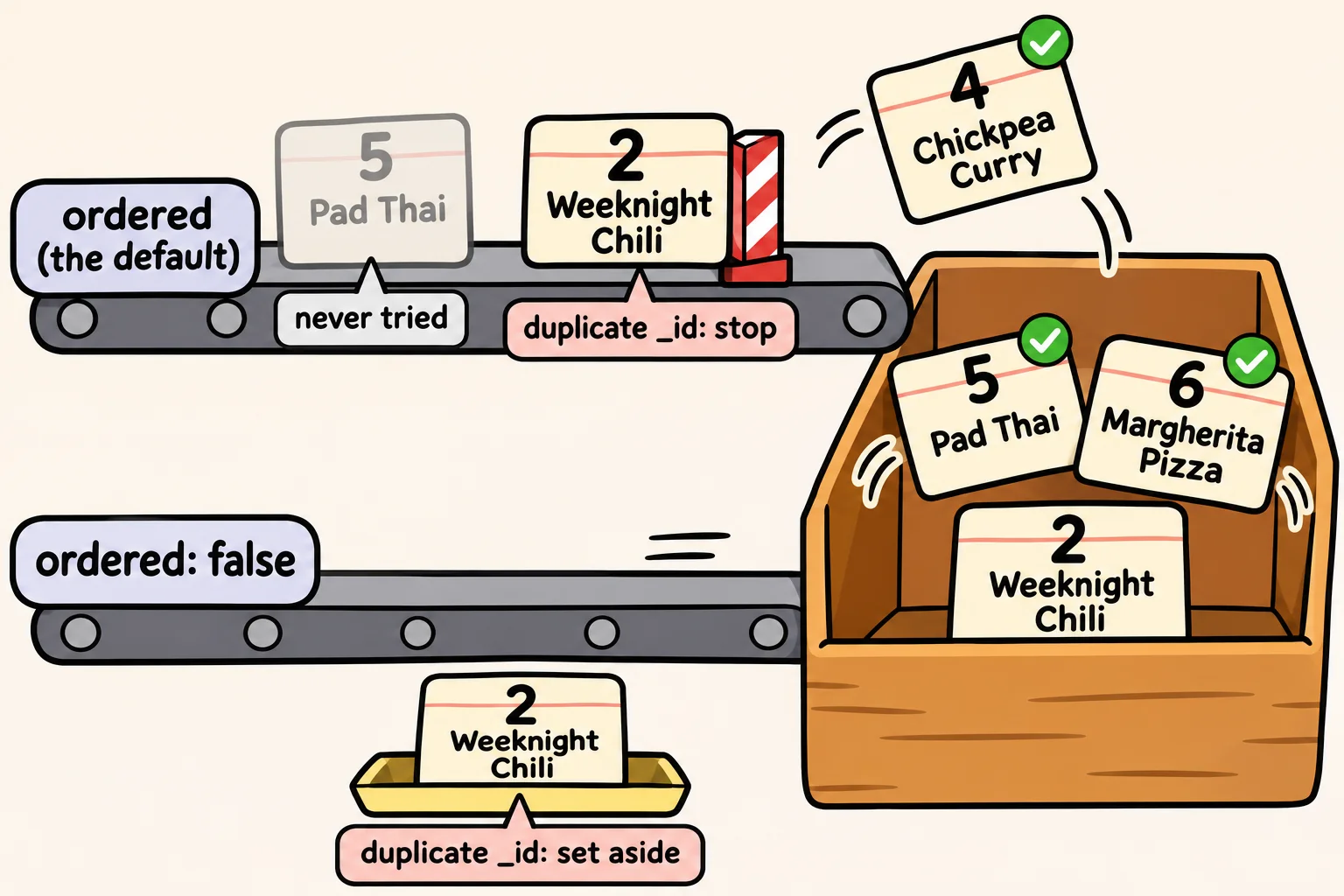
It's long, so read it from the top. E11000 duplicate key error is the duplicate key error, and dup key: { _id: 2 } names the _id that was already taken. Result then says what happened anyway: insertedCount: 1 and insertedIds: { '0': 4 }. Chickpea Curry went in. Weeknight Chili was refused at index: 1, its position in the list. Pad Thai, after it, was never tried.
That's what ordered means, and it's how insertMany works unless you say otherwise: it adds the documents in list order and stops at the first one that fails. The documents before the failure stay in.
ordered: false keeps going
Stopping is sometimes right: if a batch is wrong, you want to look before anything more goes in. But when you're loading cards and a few might already be there, you'd rather add every new one and hear about the duplicates. Pass { ordered: false } as a second argument, after the list:
db.recipes.insertMany([
  { _id: 5, name: "Pad Thai", minutes: 30 },
  { _id: 2, name: "Weeknight Chili", minutes: 45 },
  { _id: 6, name: "Margherita Pizza", minutes: 40 }
], { ordered: false })
Uncaught:
MongoBulkWriteError: E11000 duplicate key error collection: sunday_kitchen.recipes index: _id_ dup key: { _id: 2 }
Result: BulkWriteResult {
  insertedCount: 2,
  matchedCount: 0,
  modifiedCount: 0,
  deletedCount: 0,
  upsertedCount: 0,
  upsertedIds: {},
  insertedIds: { '0': 5, '2': 6 }
}
Write Errors: [
  WriteError {
    err: {
      index: 1,
      code: 11000,
      errmsg: 'E11000 duplicate key error collection: sunday_kitchen.recipes index: _id_ dup key: { _id: 2 }',
      errInfo: undefined,
      op: { _id: 2, name: 'Weeknight Chili', minutes: 45 }
    }
  }
]
The same error, but a different result: insertedCount: 2 and insertedIds: { '0': 5, '2': 6 }. Pad Thai (position 0) and Margherita Pizza (position 2) went in, and only Weeknight Chili (position 1) was refused. Either way, the Weeknight Chili already in the collection doesn't change: a duplicate is turned away, never merged in.
Loading a whole file with load()
Forty recipes is a lot to paste at the prompt. mongosh can run a file of commands with load(). In VS Code, make a new file in your mongodb-course folder named sunday-kitchen-recipes.js, and copy this into it:
// Sunday Kitchen's 40 recipes. Load them in mongosh with: load("sunday-kitchen-recipes.js")
// drop() removes the recipes collection first, so running this file twice is safe.
db.recipes.drop();
db.recipes.insertMany([
  { _id: 1, name: "Saturday Pancakes", cuisine: "American", meal: "breakfast", minutes: 25, servings: 4, vegetarian: true, rating: 4.6, tags: ["sweet", "kid-friendly"] },
  { _id: 2, name: "Weeknight Chili", cuisine: "American", meal: "dinner", minutes: 45, servings: 6, vegetarian: false, rating: 4.4, tags: ["spicy", "make-ahead"] },
  { _id: 3, name: "Lemon Bars", cuisine: "American", meal: "dessert", minutes: 50, servings: 16, vegetarian: true, rating: 4.8, tags: ["sweet", "bake-sale"] },
  { _id: 4, name: "Chickpea Curry", cuisine: "Indian", meal: "dinner", minutes: 35, servings: 4, vegetarian: true, rating: 4.7, tags: ["vegan", "spicy"] },
  { _id: 5, name: "Pad Thai", cuisine: "Thai", meal: "dinner", minutes: 30, servings: 2, vegetarian: false, rating: 4.5, tags: ["noodles"] },
  { _id: 6, name: "Margherita Pizza", cuisine: "Italian", meal: "dinner", minutes: 40, servings: 4, vegetarian: true, rating: 4.3, tags: ["kid-friendly"] },
  { _id: 7, name: "Black Bean Tacos", cuisine: "Mexican", meal: "dinner", minutes: 20, servings: 4, vegetarian: true, rating: 4.2, tags: ["vegan", "kid-friendly"] },
  { _id: 8, name: "Miso Soup", cuisine: "Japanese", meal: "lunch", minutes: 15, servings: 2, vegetarian: true, rating: 3.9, tags: ["soup"] },
  { _id: 9, name: "Greek Salad", cuisine: "Greek", meal: "lunch", minutes: 15, servings: 4, vegetarian: true, rating: 4.1, tags: ["no-cook"] },
  { _id: 10, name: "Chicken Tikka Masala", cuisine: "Indian", meal: "dinner", minutes: 60, servings: 4, vegetarian: false, rating: 4.9, tags: ["spicy"] },
  { _id: 11, name: "Banana Bread", cuisine: "American", meal: "snack", minutes: 70, servings: 10, vegetarian: true, rating: 4.5, tags: ["sweet", "bake-sale"] },
  { _id: 12, name: "Spaghetti Carbonara", cuisine: "Italian", meal: "dinner", minutes: 25, servings: 4, vegetarian: false, rating: 4.6, tags: ["pasta"] },
  { _id: 13, name: "Veggie Stir-Fry", cuisine: "Chinese", meal: "dinner", minutes: 20, servings: 3, vegetarian: true, tags: ["vegan"] },
  { _id: 14, name: "Beef Pho", cuisine: "Vietnamese", meal: "dinner", minutes: 180, servings: 6, vegetarian: false, rating: 4.8, tags: ["soup", "noodles"] },
  { _id: 15, name: "Shakshuka", cuisine: "Middle Eastern", meal: "breakfast", minutes: 30, servings: 4, vegetarian: true, rating: 4.4, tags: ["spicy"] },
  { _id: 16, name: "French Toast", cuisine: "French", meal: "breakfast", minutes: 15, servings: 2, vegetarian: true, rating: 4.0, tags: ["sweet"] },
  { _id: 17, name: "Tiramisu", cuisine: "Italian", meal: "dessert", minutes: 30, servings: 8, vegetarian: true, rating: 4.7, tags: ["sweet", "make-ahead"] },
  { _id: 18, name: "Chicken Fried Rice", cuisine: "Chinese", meal: "dinner", minutes: 25, servings: 4, vegetarian: false, rating: 4.0, tags: ["leftovers"] },
  { _id: 19, name: "Lentil Soup", cuisine: "Greek", meal: "lunch", minutes: 45, servings: 6, vegetarian: true, rating: null, tags: ["vegan", "soup"] },
  { _id: 20, name: "Guacamole", cuisine: "Mexican", meal: "snack", minutes: 10, servings: 4, vegetarian: true, rating: 4.3, tags: ["vegan", "no-cook"] },
  { _id: 21, name: "Palak Paneer", cuisine: "Indian", meal: "dinner", minutes: 40, servings: 4, vegetarian: true, tags: ["gluten-free"] },
  { _id: 22, name: "Caesar Salad", cuisine: "American", meal: "lunch", minutes: 20, servings: 2, vegetarian: false, rating: 3.8, tags: ["no-cook"] },
  { _id: 23, name: "Chocolate Chip Cookies", cuisine: "American", meal: "dessert", minutes: 30, servings: 24, vegetarian: true, rating: 4.9, tags: ["sweet", "bake-sale", "kid-friendly"] },
  { _id: 24, name: "Teriyaki Salmon", cuisine: "Japanese", meal: "dinner", minutes: 25, servings: 2, vegetarian: false, rating: 4.4, tags: ["high-protein"] },
  { _id: 25, name: "Bibimbap", cuisine: "Korean", meal: "dinner", minutes: 50, servings: 4, vegetarian: false, tags: ["spicy"] },
  { _id: 26, name: "Ratatouille", cuisine: "French", meal: "dinner", minutes: 75, servings: 6, vegetarian: true, rating: 4.2, tags: ["vegan", "make-ahead"] },
  { _id: 27, name: "Huevos Rancheros", cuisine: "Mexican", meal: "breakfast", minutes: 25, servings: 2, vegetarian: true, rating: 4.5, tags: ["spicy"] },
  { _id: 28, name: "Mango Sticky Rice", cuisine: "Thai", meal: "dessert", minutes: 40, servings: 4, vegetarian: true, rating: 4.6, tags: ["sweet", "vegan"] },
  { _id: 29, name: "Minestrone", cuisine: "Italian", meal: "lunch", minutes: 55, servings: 8, vegetarian: true, rating: 3.7, tags: ["soup", "make-ahead"] },
  { _id: 30, name: "Green Curry", cuisine: "Thai", meal: "dinner", minutes: 35, servings: 4, vegetarian: false, rating: 4.3, tags: ["spicy"] },
  { _id: 31, name: "Apple Crumble", cuisine: "British", meal: "dessert", minutes: 55, servings: 6, vegetarian: true, rating: 4.4, tags: ["sweet"] },
  { _id: 32, name: "Overnight Oats", cuisine: "American", meal: "breakfast", minutes: 5, servings: 1, vegetarian: true, rating: 3.6, tags: ["make-ahead", "no-cook"] },
  { _id: 33, name: "Falafel Wraps", cuisine: "Middle Eastern", meal: "lunch", minutes: 40, servings: 4, vegetarian: true, rating: 4.5, tags: ["vegan"] },
  { _id: 34, name: "Beef Tacos", cuisine: "Mexican", meal: "dinner", minutes: 30, servings: 4, vegetarian: false, rating: 4.1, tags: ["kid-friendly"] },
  { _id: 35, name: "Hummus", cuisine: "Middle Eastern", meal: "snack", minutes: 10, servings: 6, vegetarian: true, rating: null, tags: ["vegan", "no-cook"] },
  { _id: 36, name: "Spanakopita", cuisine: "Greek", meal: "dinner", minutes: 70, servings: 8, vegetarian: true, tags: ["make-ahead"] },
  { _id: 37, name: "Shoyu Ramen", cuisine: "Japanese", meal: "dinner", minutes: 120, servings: 4, vegetarian: false, rating: 4.7, tags: ["soup", "noodles"] },
  { _id: 38, name: "Kimchi Fried Rice", cuisine: "Korean", meal: "lunch", minutes: 20, servings: 2, vegetarian: false, rating: 4.2, tags: ["spicy", "leftovers"] },
  { _id: 39, name: "Churros", cuisine: "Mexican", meal: "dessert", minutes: 45, servings: 6, vegetarian: true, tags: ["sweet"] },
  { _id: 40, name: "Tomato Soup", cuisine: "American", meal: "lunch", minutes: 30, servings: 4, vegetarian: true, rating: 3.9, tags: ["soup", "kid-friendly"] }
]);
The file's first command, db.recipes.drop(), removes the whole recipes collection, the six recipes above included, so the file starts fresh and is safe to run twice. Deleting Documents Safely covers drop() properly. Some cards have no rating yet, and two have rating: null; Missing Fields, null and $exists explains why that matters.
Save the file, and load it at the mongosh prompt:
load("sunday-kitchen-recipes.js")
true
true means the file ran to its end. load() looks for the file in the folder mongosh was started in, so if it says the file can't be found, type exit, check that the terminal is in your mongodb-course folder, and start mongosh there again, then use sunday_kitchen. Every lesson in this chapter uses these 40 recipes, and if you change them along the way, loading the file again puts them back.
Check yourself
2 questions to try on the lesson page.
So what
Real data arrives in batches. You can now add a whole batch in one call, read which documents made it in, and decide whether a duplicate should stop the load or be skipped.